
1. Вовед
This manual provides detailed instructions for the installation, configuration, and operation of the MD430 Stepper Motor Controller Board Driver, featuring the TB6560 chip. This single-axis driver is designed for controlling stepper motors with a maximum current of 3.5A and supports up to 16 microsteps, making it suitable for various automation and motion control applications.
2. Информации за безбедност
Please read and understand all safety precautions before installing or operating this device. Failure to comply with these instructions may result in electrical shock, fire, or damage to the product or connected equipment.
- Ensure power is disconnected before making any wiring connections.
- Verify correct polarity for all power connections.
- Не надминувајте го наведениот волtagд и тековните оценки.
- Install the board in a well-ventilated area to prevent overheating.
- Avoid touching components while the board is powered.
3. Карактеристики на производот
- Integrated TB6560AHQ chip for reliable stepper motor control.
- Single-axis control for one stepper motor.
- Maximum output current: 3.5A.
- Microstepping capabilities: 1, 2, 8, 16 microsteps.
- Adjustable current settings.
- Overheat and overcurrent protection.
- Compact design with integrated heatsink for efficient heat dissipation.
4. Идентификација на компоненти
Familiarize yourself with the various components on the MD430 driver board:

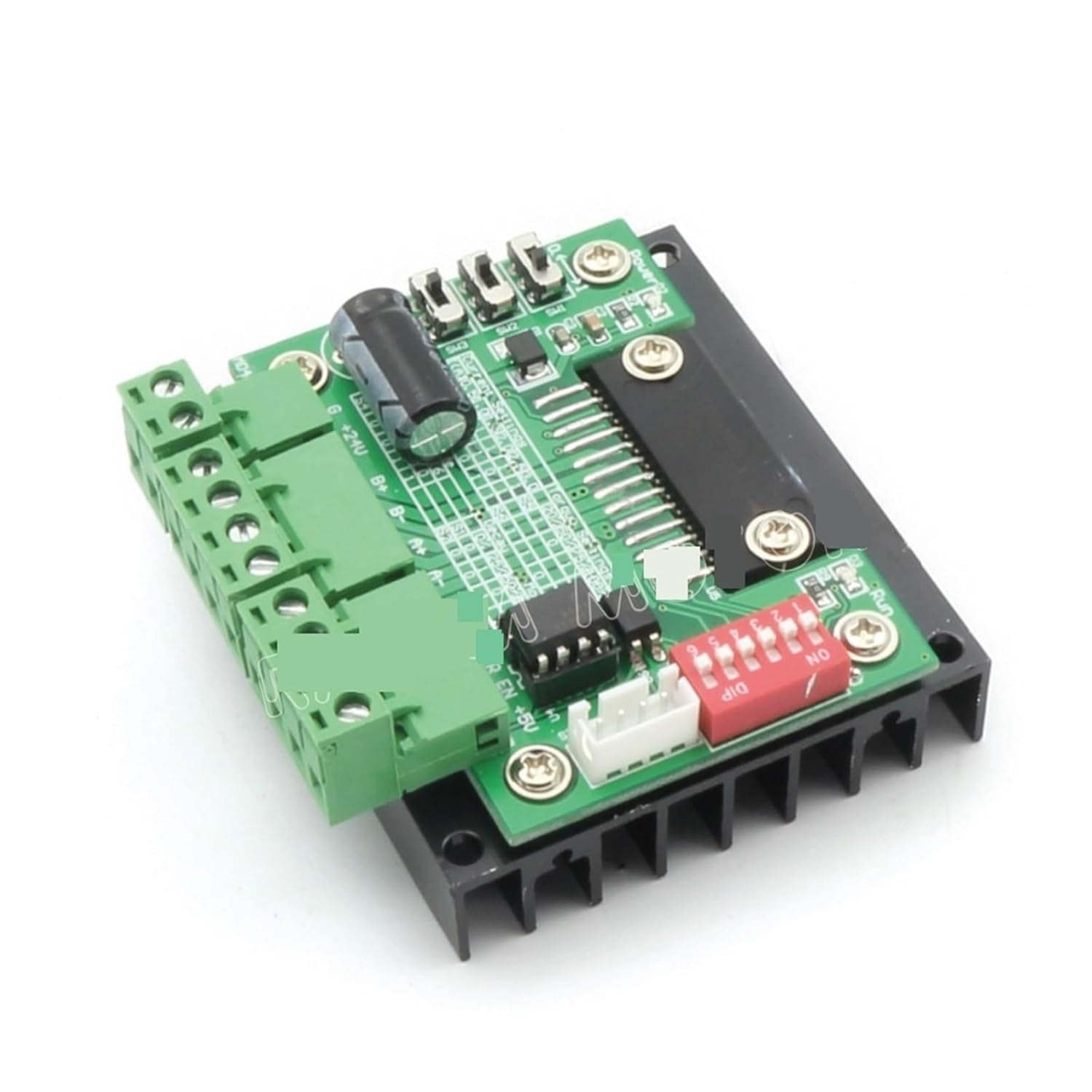

Клучните компоненти вклучуваат:
- Power Input Terminals: За приклучување на еднонасочно напојување.
- Motor Output Terminals: For connecting the stepper motor windings (A+, A-, B+, B-).
- Влез за контролен сигнал: Terminals for Step, Direction, and Enable signals.
- DIP прекинувачи: Used to configure microstepping resolution and output current.
- Ладилник: Large black aluminum heatsink for thermal dissipation.
5. Поставување и поврзување
Follow these steps to correctly set up and wire your MD430 stepper motor driver:
- Приклучок за напојување:
Connect a DC power supply (typically 12V-36V) to the power input terminals. Ensure correct polarity: +V to positive, ГНД to negative. The power supply should be capable of providing sufficient current for your motor (e.g., 24V, 5A).
- Stepper Motor Connection:
Connect your 4-wire or 6-wire stepper motor to the motor output terminals (A+, A-, B+, B-). For 6-wire motors, connect the center taps to the power supply positive or leave them disconnected, depending on your motor type and desired configuration (unipolar/bipolar). Refer to your motor's datasheet for specific wiring.
- Контролна сигнална врска:
Connect your control signals (STEP, DIR, EN) from your microcontroller or CNC controller to the corresponding input terminals on the MD430 board. Ensure common ground connection between the controller and the driver.
- STEP (CLK): Pulse input for each step.
- DIR (CW/CCW): Direction control input (High/Low).
- EN (ENA): Enable input (Low to enable, High to disable motor current).
- Конфигурација на прекинувачот DIP:
Configure the DIP switches for desired microstepping resolution and output current. Refer to the tables below for settings. Always adjust DIP switches when power is off.
Microstepping Settings:
Микростеп S1 S2 S3 1 (Full Step) ON ON ON 2 (Half Step) ИСКЛУЧЕНО ON ON 8 (1/8 Step) ON ИСКЛУЧЕНО ON 16 (1/16 Step) ИСКЛУЧЕНО ИСКЛУЧЕНО ON Note: ON typically means the switch is pushed down or towards the "ON" label. OFF means up or away from "ON".
Тековни поставки:
Врвна струја S4 S5 S6 0.5 А ON ON ON 1.0 А ИСКЛУЧЕНО ON ON 1.5 А ON ИСКЛУЧЕНО ON 2.0 А ИСКЛУЧЕНО ИСКЛУЧЕНО ON 2.5 А ON ON ИСКЛУЧЕНО 3.0 А ИСКЛУЧЕНО ON ИСКЛУЧЕНО 3.5 А ON ИСКЛУЧЕНО ИСКЛУЧЕНО 4.0А (максимум) ИСКЛУЧЕНО ИСКЛУЧЕНО ИСКЛУЧЕНО Note: The maximum current for the TB6560 is typically 3.5A. Setting it to 4.0A might exceed the chip's safe operating limits and is not recommended for continuous use. Match the current setting to your motor's rated current.
6. Упатства за работа
Once the MD430 driver board is correctly wired and configured:
- Вклучување: Apply power to the driver board. The motor should be energized (if EN is low).
- Send Step Pulses: Send pulse signals to the STEP input from your controller. Each pulse will cause the motor to move one step (or microstep, depending on configuration).
- Control Direction: Change the logic level (High/Low) on the DIR input to reverse the motor's rotation direction.
- Enable/Disable Motor: Set the EN input to low to enable the motor and high to disable it. When disabled, the motor will be free-spinning and consume less power.
Monitor the motor and driver for excessive heat during operation. If the heatsink becomes too hot to touch, reduce the current setting or improve ventilation.
7. Одржување
The MD430 stepper motor driver board requires minimal maintenance. Follow these guidelines:
- Одржувајте ја плочката чиста и без прашина и остатоци.
- Ensure adequate airflow around the heatsink to prevent overheating.
- Периодично проверувајте ги сите жичени врски за затегнатост и интегритет.
- Avoid exposing the board to moisture or corrosive environments.
8 Смена на проблеми
| Проблем | Можна причина | Решение |
|---|---|---|
| Моторот не се движи. | No power, incorrect wiring, EN pin high, no step pulses, motor current too low. | Check power supply, verify motor and control wiring, ensure EN is low, check step pulse generation, increase current setting. |
| Моторот се движи неправилно или вибрира. | Incorrect microstep setting, motor wiring issues, insufficient power, mechanical binding. | Verify microstep DIP switch settings, recheck motor phase wiring, ensure power supply is stable, check for mechanical obstructions. |
| Driver board overheats. | Motor current too high, insufficient ventilation, short circuit in motor wiring. | Reduce motor current setting, ensure adequate airflow around heatsink, check motor wiring for shorts. |
| Motor rotates in the wrong direction. | DIR signal polarity incorrect, motor phase wiring reversed. | Reverse the DIR signal logic (High/Low) or swap one pair of motor phase wires (e.g., A+ with A-). |
9. Спецификации
- Модел: 430 МД
- Чип на драјвер: TB6560AHQ
- Влез волуменtage: 12V - 36V DC (Recommended)
- Излезна струја: 0.5A - 3.5A (Adjustable, Peak 4.0A)
- Микростепинг: 1, 2, 8, 16 (selectable via DIP switches)
- Заштита: Overheat, Overcurrent
- Димензии: Approximately 1.18 x 0.79 x 0.39 inches (Board only, excluding heatsink/terminals)
- Тежина: Приближно 1.76 унци
10. Гаранција и поддршка
Information regarding warranty and customer support for this product was not provided in the available data. Please refer to the seller or manufacturer's website for specific details regarding warranty terms and technical assistance.
For further assistance, you may contact the seller chengbaihuoshangmao via their Amazon seller page: Продавач Проfile.