
Вовед
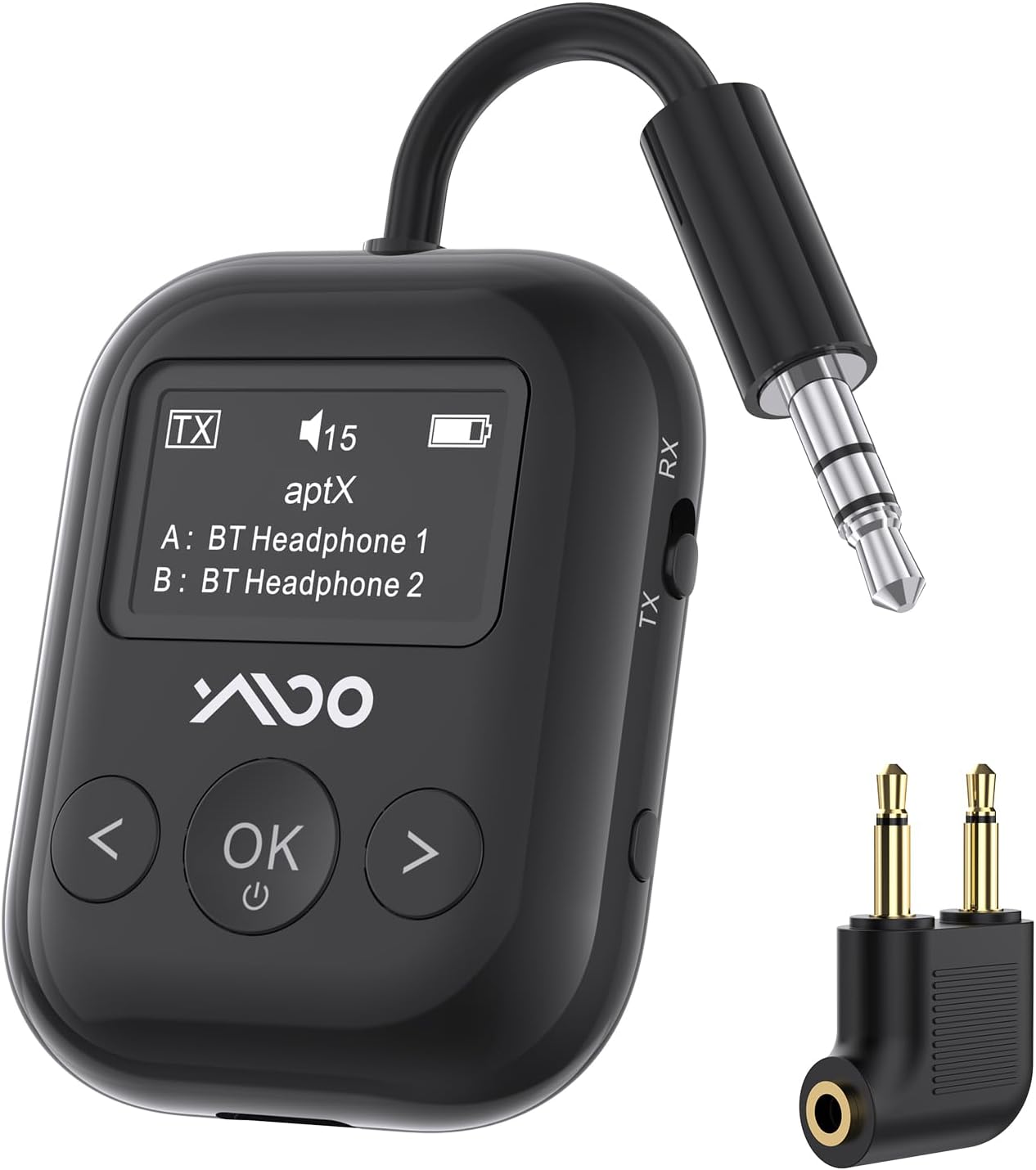
The YMOO SafeFly Min+ is a versatile 2-in-1 Bluetooth 5.4 audio adapter designed to enhance your audio experience across various devices and environments. It functions as both a transmitter (TX mode) and a receiver (RX mode), allowing you to wirelessly connect your audio sources to Bluetooth headphones or speakers, or to enable Bluetooth functionality for wired audio systems. Featuring an intuitive OLED screen and a long-lasting battery, this device is ideal for travel, home entertainment, and fitness activities.
Што има во кутијата
- YMOO SafeFly Min+ Bluetooth Adapter
- USB-C кабел за полнење
- Key Chain Attachment
- Аудио адаптер од 3.5 мм до 3.5 мм
- Airplane Audio Adapter (dual-prong)
- Упатство за употреба

Производот завршиview
The SafeFly Min+ is a compact and feature-rich device designed for seamless audio connectivity.
- OLED екран: The device features an OLED screen that clearly displays pairing status, volume level, current mode (TX or RX), battery capacity, and supported audio codecs (aptX-HD/LL/AD/SBC). This allows for easy monitoring and control.
- Функционалност 2-во-1: Operates as both a Bluetooth transmitter (TX Mode) and a Bluetooth receiver (RX Mode).
- Bluetooth 5.4: Equipped with the latest Bluetooth 5.4 technology for quick pairing, stable connection, and a wireless range of up to 70 feet (line-of-sight).
- Поддршка за два уреди: Supports simultaneous connection to two Bluetooth devices (e.g., two headphones or two speakers) in TX mode.
- Долг век на батеријата: Provides up to 25 hours of playtime on a single charge, making it suitable for extended use during travel. Charges via a USB-C port.
- aptX Ниска латенција: Supports aptX Low Latency mode for audio synchronization with minimal delay (less than 40ms), ideal for video and gaming. Note: Both the adapter and your headphones must support aptX-LL for this feature to work. It cannot be used when pairing two Bluetooth headsets simultaneously.

Поставување
- Полнење на уредот:
Before first use, fully charge the SafeFly Min+ using the provided USB-C cable. Connect the USB-C end to the device and the USB-A end to a compatible power source (e.g., computer USB port, wall adapter). The OLED screen will indicate charging status.

Image: The YMOO SafeFly Min+ device connected to a USB-C charging cable, illustrating its charging capability. - Selecting Operating Mode (TX/RX):
Locate the TX/RX switch on the side of the device. Slide the switch to the desired mode:
- Режим на TX (предавател): For sending audio from a non-Bluetooth device (e.g., TV, airplane entertainment) to Bluetooth headphones/speakers.
- Режим на RX (приемник): For receiving audio from a Bluetooth device (e.g., smartphone) to wired headphones/speakers or a car stereo.

Слика: Крупен план view of the physical TX/RX switch on the side of the YMOO SafeFly Min+ for mode selection. - Initial Pairing (TX Mode Exampле):
Следете ги овие чекори за брзо спарување:
- Slide the TX/RX button to TX mode to turn on the adapter. The screen will display "Searching...".
- Ensure your Bluetooth headphones/earbuds are in pairing mode.
- The SafeFly Min+ will automatically search for and display available Bluetooth devices on its OLED screen.
- Use the left/right arrow buttons to navigate and the "OK" button to select your desired device. Connection should occur within 2 seconds.
- Once connected, the screen will display the connected device's name.
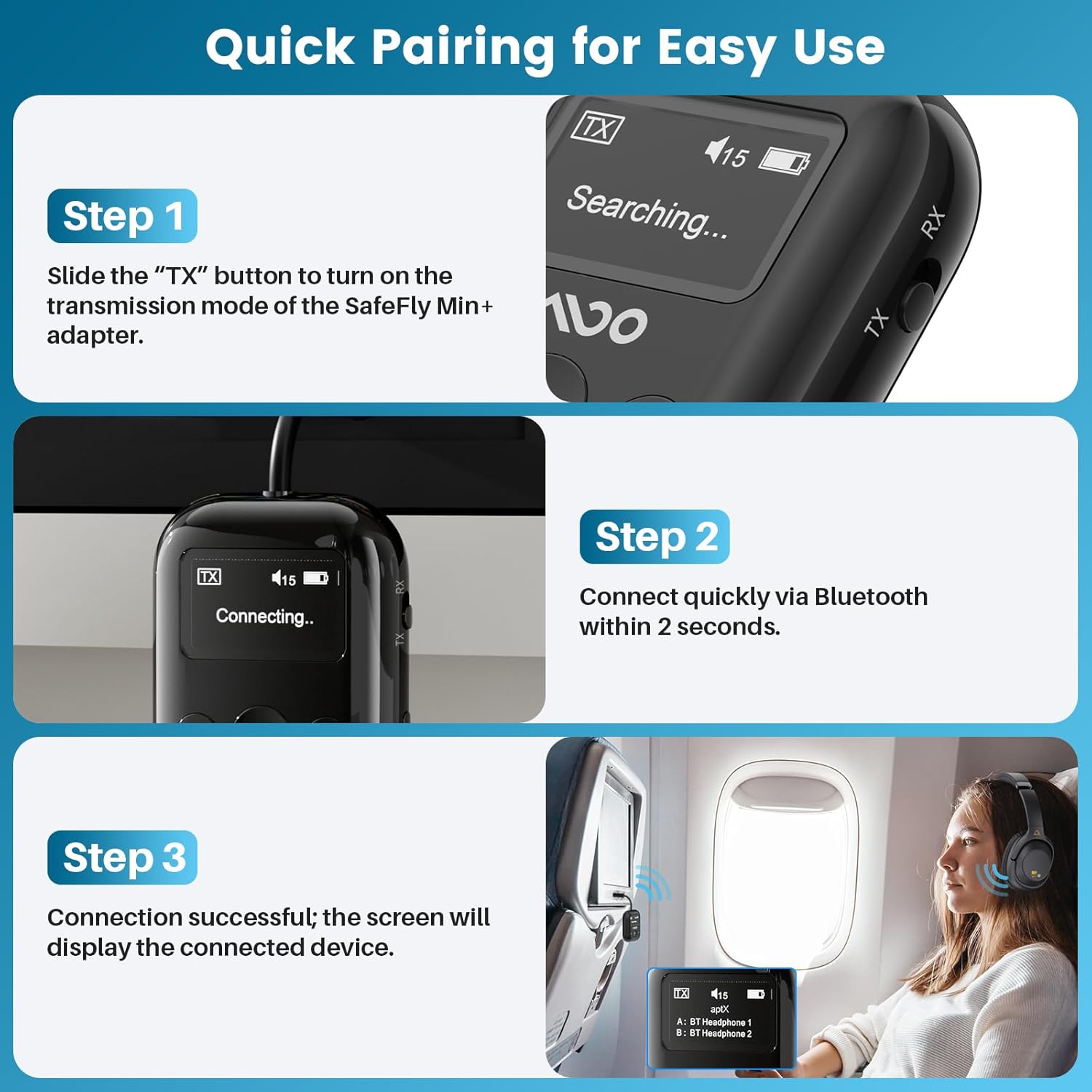
Image: A visual guide demonstrating the three steps for quick pairing the YMOO SafeFly Min+ adapter with Bluetooth headphones, including turning on, connecting, and successful pairing display.
Упатства за работа
TX (Transmitter) Mode
In TX mode, the SafeFly Min+ transmits audio from a non-Bluetooth source to your Bluetooth headphones or speakers.
- Поврзете се со извор на аудио: Plug the integrated 3.5mm audio jack of the SafeFly Min+ into the audio output port of your device (e.g., TV, PC, airplane entertainment system, gym equipment). Use the provided airplane adapter if necessary for dual-prong jacks.
- Pair Bluetooth Headphones/Speakers: Ensure the SafeFly Min+ is in TX mode and your Bluetooth headphones/speakers are in pairing mode. Select your device on the SafeFly Min+ screen to connect.
- Уживајте во безжичното аудио: Once connected, audio from your source device will be streamed wirelessly to your paired Bluetooth headphones or speakers.


RX (Receiver) Mode
In RX mode, the SafeFly Min+ receives audio from a Bluetooth source (e.g., smartphone) and outputs it to a wired audio system.
- Connect to Wired Audio System: Plug the integrated 3.5mm audio jack of the SafeFly Min+ into the audio input port of your wired headphones, car stereo, home stereo, or AV receiver.
- Спари Bluetooth уред: Ensure the SafeFly Min+ is in RX mode. On your smartphone or other Bluetooth audio source, search for "SafeFly Min+" in the Bluetooth settings and connect.
- Stream Audio: Откако ќе се поврзете, аудио од вашиот Bluetooth уред ќе се репродуцира преку вашиот жичен аудио систем.

Dual Headphone Connection (TX Mode)
The SafeFly Min+ can transmit audio to two Bluetooth headphones simultaneously.
- Connect the first pair of Bluetooth headphones as described in the TX Mode instructions.
- Once the first pair is connected, put the second pair of Bluetooth headphones into pairing mode.
- On the SafeFly Min+ screen, select the second device to connect. The screen will show both connected devices (A and B).

Контрола на јачината на звукот
Use the left (<) and right (>) arrow buttons on the device to adjust the volume level. The current volume will be displayed on the OLED screen.
Audio Codec Information
The OLED screen will display the active audio codec (e.g., aptX, SBC, AAC). For aptX Low Latency (aptX-LL) to function, both the SafeFly Min+ and your connected headphones must support aptX-LL. This mode is not available when two Bluetooth headsets are paired simultaneously.

Video: An official product video from YMOO-US demonstrating the YMOO Bluetooth Transmitter Receiver for Airplane, showcasing неговите карактеристики и леснотијата на користење.
Одржување
- Чистење: Use a soft, dry cloth to clean the device. Avoid using liquid cleaners or solvents.
- Складирање: Store the device in a cool, dry place when not in use. Use the provided key chain attachment to protect the 3.5mm jack.
- Нега на батеријата: To prolong battery life, avoid fully discharging the device frequently. Recharge it regularly, especially if stored for long periods.
Решавање проблеми
- Уредот не се вклучува: Проверете дали уредот е наполнет. Поврзете го со извор на енергија користејќи го USB-C кабелот.
- Не може да се спари:
- Check that the SafeFly Min+ is in the correct TX or RX mode.
- Ensure your target Bluetooth device (headphones/speaker/phone) is in pairing mode.
- Поместете ги уредите поблиску еден до друг за да се осигурате дека се во опсег.
- Restart both the SafeFly Min+ and the target Bluetooth device.
- Нема звук или квалитетот на звукот е слаб:
- Verify that the 3.5mm audio jack is fully inserted into the source/destination device.
- Check the volume levels on both the SafeFly Min+ and the connected audio device.
- Ensure there are no obstructions or strong interference sources between the SafeFly Min+ and the paired Bluetooth device.
- If using aptX-LL, confirm both devices support it and only one headset is connected.
- OLED screen not displaying correctly: If the screen is unresponsive or shows garbled text, try restarting the device.
Спецификации
| Карактеристика | Спецификација |
|---|---|
| Бренд | YMOO |
| Модел | SafeFly Min+ |
| Bluetooth верзија | 5.4 |
| Технологија за поврзување | AUX |
| Извор на енергија | Се напојува со батерија (USB-C се полни) |
| Посебни карактеристики | AptX LL/HD/Adaptive, Built-in Battery, High fidelity sound quality, Low latency transmission, OLED Screen |
| Траење на батеријата | До 25 часа |
| Тежина на ставката | 2.39 унци |
| Материјал | Пластика |
| Димензии на пакетот | 4.53 x 3.58 x 0.75 инчи |
Информации за безбедност
This product contains a lithium battery. Ensure proper handling and disposal. Avoid using near other wireless devices to minimize interference. Use with caution during travel, adhering to temperature and humidity limitations.
Гаранција и поддршка
For warranty information and technical support, please refer to the official YMOO website or contact their customer service directly. Details can typically be found on the product packaging or the manufacturer's online resources.