
Bofypoo DC311-AF
Bofypoo FHD 1080P 36MP Kids Vlogging Camera User Manual
Model: DC311-AF
1. Вовед
This user manual provides detailed instructions for the Bofypoo FHD 1080P 36MP Kids Vlogging Camera, Model DC311-AF. This compact and portable digital camera is designed for teens and beginners, offering high-resolution photos and videos with various creative features.
Содржина на пакетот
Ве молиме проверете дали сите артикли се присутни во вашиот пакет:
- Bofypoo FHD 1080P 36MP Digital Camera (Pink)
- 2 x батерии за полнење
- 32 GB мемориска картичка
- USB кабел
- Ремен за зглоб
- Кабел за вратот
- Упатство за употреба
- Camera Bag/Pouch
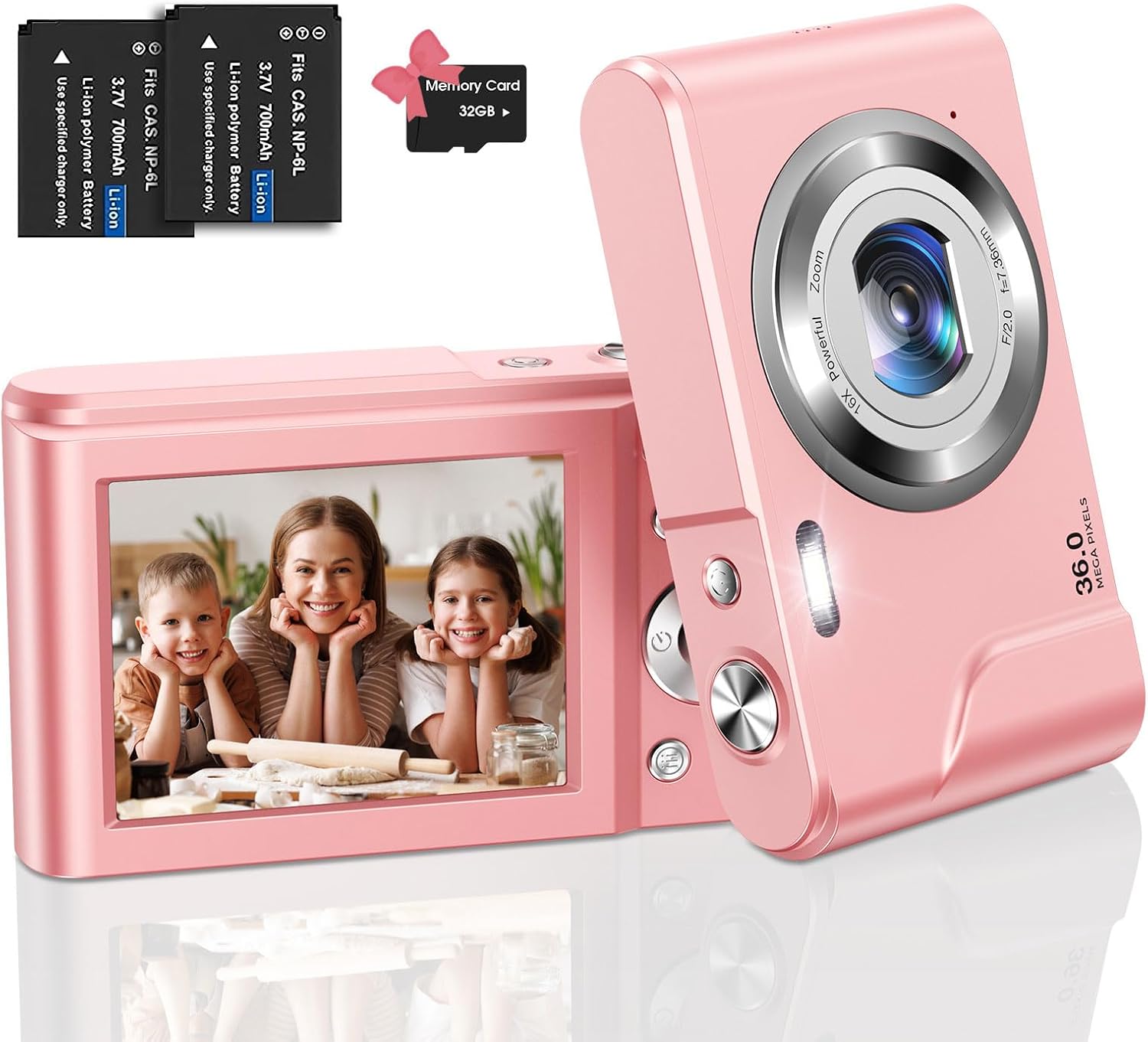
Image: The Bofypoo digital camera in pink, shown with two batteries and a 32GB memory card.

Слика: Надview of Bofypoo digital cameras, highlighting their suitability for children and various color options.
2. Информации за безбедност
- Не изложувајте ја камерата на вода или влага. Овој производ не е водоотпорен.
- Избегнувајте испуштање на камерата или нејзино изложување на силни удари.
- Keep the camera away from extreme temperatures (hot or cold).
- Не обидувајте се сами да ја расклопите или поправите камерата. Контактирајте ја службата за корисничка поддршка за помош.
- Use only the specified batteries and charging accessories.
- Keep out of reach of very young children to prevent choking hazards from small parts.
3. Поставување
3.1 Инсталација на батерија
- Пронајдете го капакот на преградата за батерии на дното од камерата.
- Лизнете ја резето на капакот за да го отворите преградата.
- Insert the rechargeable battery into the compartment, ensuring the correct polarity (match the + and - symbols).
- Затворете го капакот на преградата за батерии додека не кликне безбедно на своето место.
3.2 Инсталација на мемориска картичка
The camera supports SD memory cards up to 32GB. A 32GB memory card is included.
- Locate the memory card slot, usually next to the battery compartment or on the side.
- Insert the 32GB memory card into the slot with the gold contacts facing down, until it clicks into place.
- Важно: When using the memory card for the first time, it is recommended to format it using the camera's menu settings. This ensures optimal compatibility and performance.
3.3 Почетно полнење
Пред првата употреба, целосно наполнете ја батеријата.
- Поврзете го фотоапаратот со извор на енергија користејќи го дадениот USB-кабел.
- Индикаторското светло за полнење ќе светне. Ќе се исклучи или ќе ја промени бојата штом полнењето ќе заврши.

Image: Visual guide for battery installation (top row) and activating webcam mode (bottom row).

Image: The camera connected for charging and a visual representation of inserting the memory card.
4. Упатства за работа
4.1 Вклучување/исклучување
Press and hold the power button (usually marked with Ⓞ) for a few seconds to turn the camera on or off.
4.2 Фотографирање
- Вклучете ја камерата.
- Кадрирај ја твојата снимка користејќи го LCD екранот.
- Press the Shutter button (usually on top) to capture the photo.
4.3 Снимање видеа
- Вклучете ја камерата.
- Switch to video mode (refer to your camera's specific mode button or menu).
- Press the Record button (often marked with a red dot) to start recording. Press again to stop.
- The camera supports 1080P high-resolution video recording.

Image: A visual representation of the camera's 36MP image and 1080P video resolution capabilities.
4.4 Функција за зумирање
The camera features 16X digital zoom. Use the W/T (Wide/Telephoto) button to zoom in or out on your subject.

Image: Illustration of the 16X digital zoom feature and continuous shooting mode.
4.5 Посебни карактеристики
- Пополнете светлина: The built-in fill light assists in taking high-quality photos in low-light conditions. Activate it via the camera settings.
- Anti-shake Function: Helps to reduce blur caused by camera movement, resulting in clearer images.
- Само-тајмер: Set a delay (2s/5s/10s) before the photo is taken, allowing you to join the shot.
- Continuous Shoot: Снимајте повеќе фотографии брзо едно по друго.
- Face Detection & Smile Capture: The camera can detect faces and automatically capture a photo when a smile is detected.
- Filter Effects & Painting Styles: Experiment with 20 filter effects and 8 painting styles to add artistic touches to your photos.
- Функција за пауза: Pause video recording and resume without creating a new file, simplifying editing.

Image: Demonstrates the effect of the fill light in dark environments and the anti-shake function for clearer images.

Image: Highlights various photo styles and the camera's compact, portable design.

Image: Illustrates the self-timer function, smile detection, and beauty mode for enhanced photos.

Image: Shows examples of various image filter effects that can be applied to photos.
4.6 Webрежим на камера
Камерата може да се користи како webкамера за видео повици или пренос во живо.
- Поврзете ја камерата со вашиот компјутер користејќи го USB кабелот.
- Вклучете ја камерата.
- On the camera screen, select "PC Camera" or "Webcam" mode when prompted. If not prompted, navigate through the camera's menu to find this option.
- Вашиот компјутер треба да ја препознае камерата како webcam. You can then select it in your video conferencing or streaming software.
5. Одржување
- Чистење: Use a soft, dry cloth to clean the camera body. For the lens, use a specialized lens cleaning cloth and solution. Do not use abrasive cleaners.
- Складирање: Store the camera in a cool, dry place away from direct sunlight and excessive dust. Remove the battery if storing for extended periods.
- Нега на батеријата: Fully charge batteries before long-term storage. Avoid completely draining batteries regularly to prolong their lifespan.
6 Смена на проблеми
| Проблем | Можна причина | Решение |
|---|---|---|
| Камерата не се вклучува. | Батеријата е слаба или не е правилно инсталирана. | Наполнете ја батеријата. Осигурајте се дека батеријата е вметната со правилен поларитет. |
| Не може да се фотографира/снима видео. | Memory card is full, not inserted, or not formatted. | Избриши некои files, insert memory card, or format the memory card (backup data first). |
| Сликите се матни. | Тресење на фотоапаратот, валкан објектив или објектот е премногу блиску/далеку. | Use anti-shake function, clean the lens, ensure proper distance to subject. |
| Камерата се замрзнува. | Привремен софтверски дефект. | Извадете ја и повторно ставете ја батеријата за да го ресетирате фотоапаратот. |
| Webcam mode not working. | Incorrect mode selected or driver issue. | Ensure "PC Camera" mode is selected on the camera. Try a different USB port or restart your computer. |
7. Спецификации
| Карактеристика | Детал |
|---|---|
| Бренд | Бофипу |
| Име на моделот | DC311-AF |
| Максимум WebРезолуција на слика на камерата | 36 MP |
| Видео резолуција | 1080 стр |
| Дигитален зум | 16x |
| Стабилизација на слика | Дигитален |
| Големина на екранот | 2.4 инчи |
| Тип на дисплеј | LCD екран |
| Капацитет за складирање на меморија | 32 GB (SD картичка) |
| Технологија на фотосензор | CMOS |
| Тип на батерија | Литиум Јон |
| Технологија за поврзување | USB |
| Посебни карактеристики | Fill Light, Anti-shake, Self-timer, Continuous Shoot, Face Detection, Smile Capture, Filter Effects, Pause Feature |
| Форма фактор | Компактен |
| Боја | Розова |
8. Гаранција и поддршка
This product typically comes with a manufacturer's warranty. Please refer to the warranty information included in your product packaging for specific terms and conditions. For technical support, troubleshooting assistance, or warranty claims, please contact Bofypoo customer service through the retailer where the product was purchased or refer to the contact information provided in your product documentation.
Производител: Бофипу
Број на модел: DC311-AF
UPC: 755560203285