
1. Важни безбедносни инструкции
Ве молиме прочитајте ги и разберете ги сите безбедносни упатства пред да го користите овој производ. Непочитувањето на овие упатства може да резултира со електричен удар, пожар или сериозни повреди.
- Не го изложувајте уредот на екстремни температури, директна сончева светлина или висока влажност.
- Keep the device away from water and other liquids. If it gets wet, turn it off immediately and allow it to dry completely before reuse.
- Не обидувајте се да го расклопите, поправите или модифицирате уредот. За сите сервисирања обратете се на квалификуван персонал.
- Use only specified charging methods (USB-C, solar, hand crank).
- Да се чува подалеку од дофат на деца.
- Фрлете ги батериите според локалните прописи.
2. Производот завршиview
The FosPower Emergency Weather Radio Model A6 is a versatile device designed for emergency preparedness and outdoor activities. It features multiple power sources, radio reception, lighting, and a power bank function.
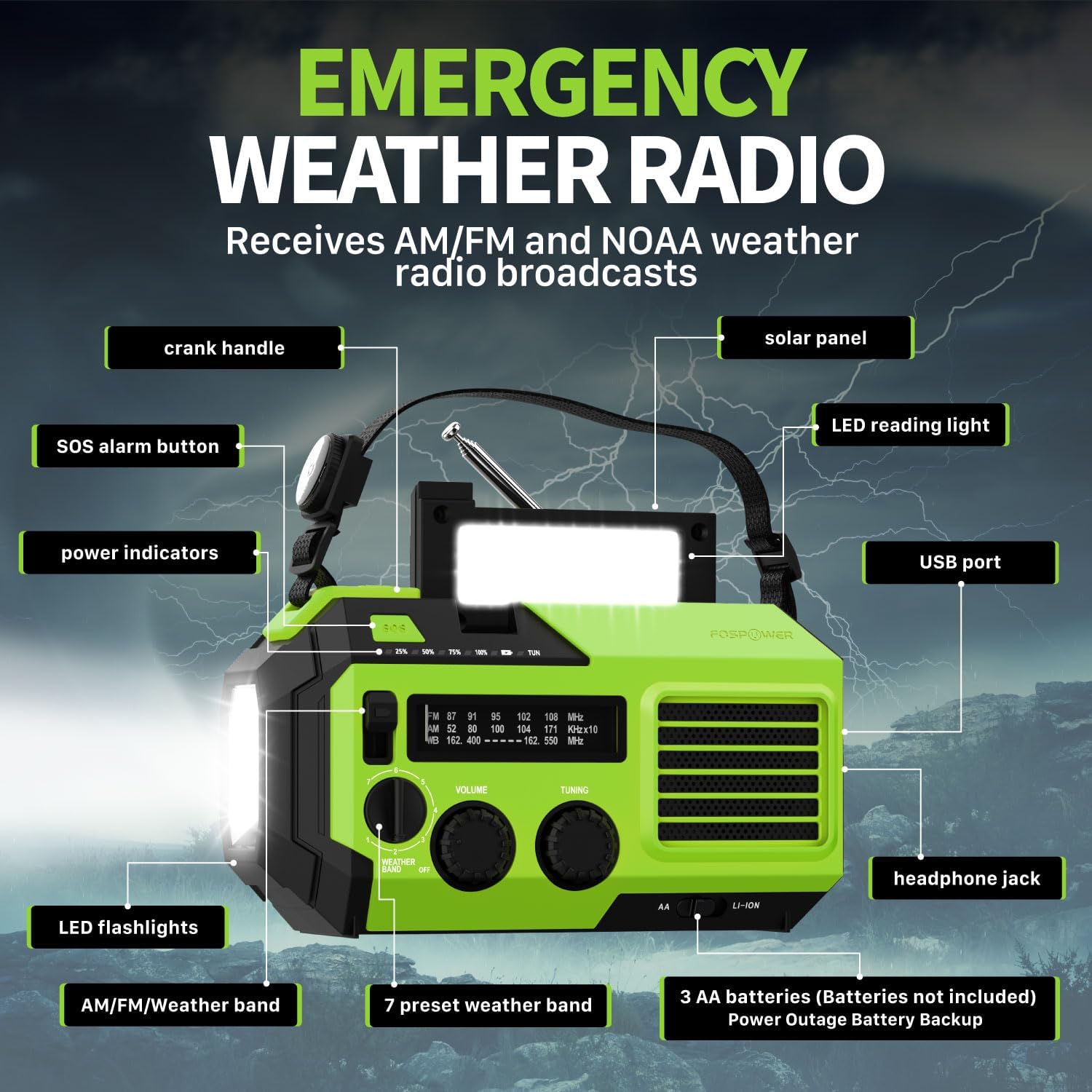
Слика 2.1: напред view of the FosPower Emergency Weather Radio with key components labeled, including the crank handle, solar panel, SOS alarm button, power indicators, LED reading light, USB port, LED flashlights, AM/FM/Weather band selector, volume and tuning knobs, and headphone jack.
Клучни карактеристики:
- NOAA/AM/FM Radio: Access local weather information and emergency hazard alerts, as well as standard AM/FM broadcasts.
- 19240mWh (5200mAh) Power Bank: Charge USB devices during power outages or in outdoor settings.
- Повеќе извори на енергија: Recharge via USB-C cable, solar panel, or hand crank. Can also be powered by AA batteries (not included).
- СОС аларм: Activates a loud siren and flashing light for emergency signaling.
- Интегрирано осветлување: Features a powerful flashlight and a reading light.
- IPX3 Отпорност на вода: Обезбедува заштита од прскање вода.
3. Поставување
3.1 Почетно полнење
Before first use, fully charge the internal battery using the provided USB-C cable. Connect the USB-C cable to the radio's USB-C port and the other end to a USB power adapter (not included) or a computer USB port. The power indicators will illuminate to show charging progress.
3.2 AA Battery Installation (Optional)
The radio can also operate on 3 AA batteries (not included) as a backup power source. Open the battery compartment cover on the back of the radio and insert 3 AA batteries, ensuring correct polarity. Close the cover securely.

Слика 3.1: Задна страна view of the radio highlighting the solar panel, hand-crank, AA battery compartment, and USB charging port, illustrating the multiple power sources.
4. Упатства за работа
4.1 Работа со радио
- Вклучување/исклучување: Rotate the 'VOLUME' knob clockwise to turn the radio on and adjust the volume. Rotate counter-clockwise until it clicks to turn off.
- Избор на бенд: Use the 'WEATHER BAND' switch to select between AM, FM, or WB (Weather Band).
- подесување: Rotate the 'TUNING' knob to scan for radio stations. Extend the telescopic antenna for improved reception, especially for FM and WB.
- NOAA метеоролошка група: When WB is selected, the radio will receive NOAA weather alerts. The radio supports 7 preset weather bands.
- Jackек за слушалки: For private listening, connect 3.5mm headphones to the headphone jack.
4.2 Flashlight and Reading Light

Image 4.1: The radio demonstrating its high-power flashlight and cool-tone reading lamp карактеристики.
- Фенерче: Press the flashlight button located on the front of the radio to turn the flashlight on or off.
- Светло за читање: Lift the solar panel to reveal the LED reading light. Press the reading light button to turn it on or off.
4.3 СОС аларм
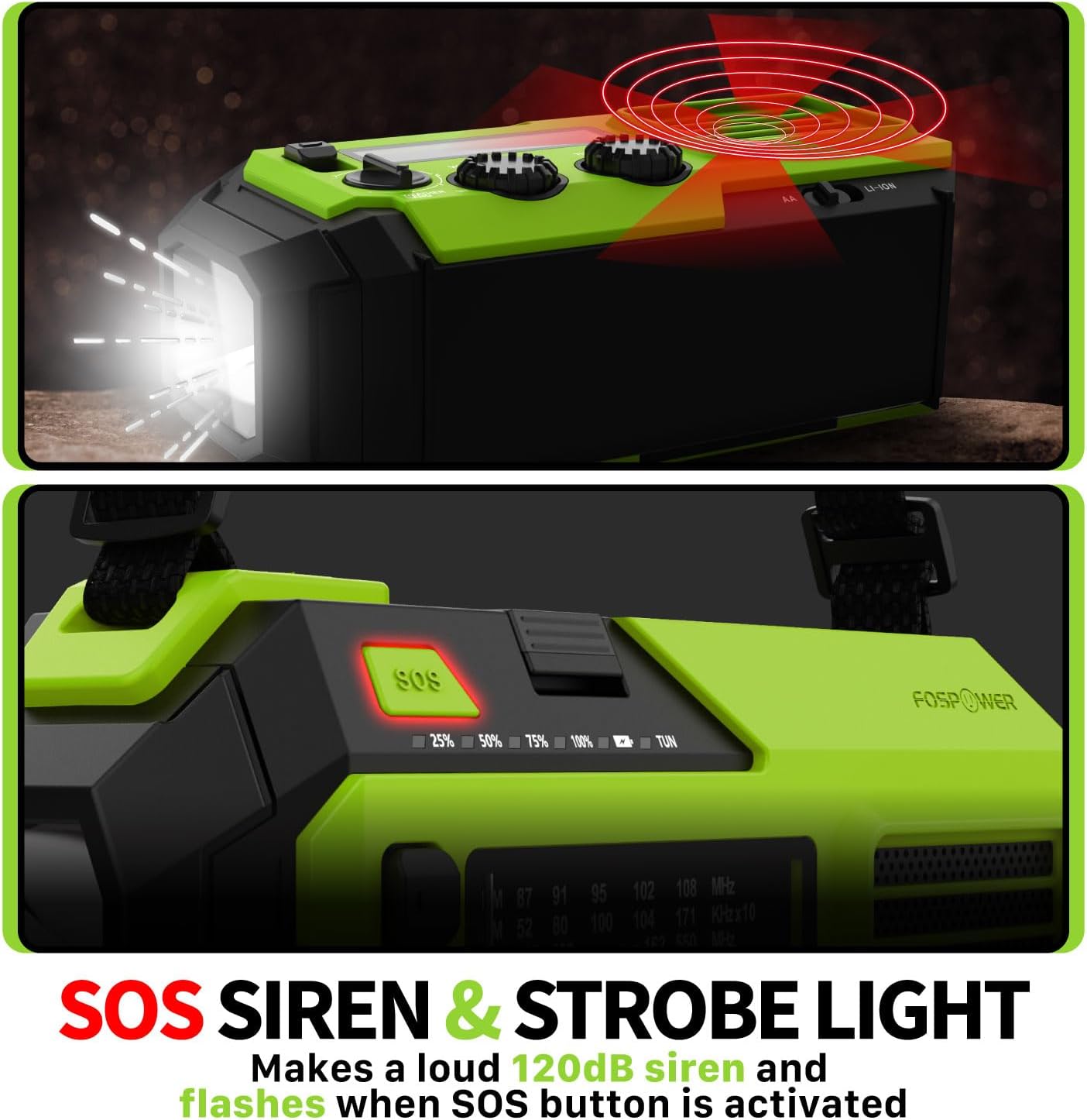
Image 4.2: Close-up of the radio's SOS button and an illustration of the siren and strobe light being activated.
In an emergency, press and hold the 'SOS' button to activate a loud 120dB siren and a flashing strobe light. Press the 'SOS' button again to deactivate.
4.4 Полнење надворешни уреди (Power Bank)

Image 4.3: The radio connected via USB to a smartphone, demonstrating its power bank capability for charging small electronics.
Connect your USB-powered device (e.g., smartphone, tablet) to the radio's USB-A output port using your device's charging cable. The radio's internal battery will begin charging your device.
4.5 Полнење на радиото
- Полнење USB-C: Connect the provided USB-C cable to the radio's USB-C input port and a USB power source. This is the most efficient charging method.
- Соларно полнење: Place the radio with the solar panel facing direct sunlight. The solar panel charges the internal battery, primarily for maintaining charge or slow charging in emergencies.
- Полнење на рачна рачка: Вртете ја рачката во насока на стрелките на часовникот или спротивно од стрелките на часовникот со рамномерно темпо (приближно 130-150 вртежи во минута) 3-5 минути за да генерирате енергија за краткотрајна употреба или за да започнете со полнење.
5. Одржување
- Чистење: Избришете го радиото со мека, сува крпа. Не користете абразивни средства за чистење или растворувачи.
- Складирање: Store the radio in a cool, dry place away from direct sunlight when not in use for extended periods. For optimal battery health, fully charge the internal battery every 3-6 months.
- Нега на батеријата: If using AA batteries, remove them if the radio will not be used for a long time to prevent leakage.
6 Смена на проблеми
| Проблем | Можна причина | Решение |
|---|---|---|
| Радиото не се вклучува. | Internal battery is depleted; AA batteries are depleted or incorrectly installed. | Charge the internal battery via USB-C or hand crank. Check and replace AA batteries if used. |
| Лош радио прием. | Антената не е продолжена; слаба сигнална област; пречки. | Fully extend the telescopic antenna. Adjust radio position. Try tuning to a stronger station. |
| Надворешниот уред не се полни. | Radio's internal battery is low; incorrect cable; device not compatible. | Ensure the radio's internal battery is sufficiently charged. Use a functional USB charging cable. Verify device compatibility. |
| Hand crank is stiff or not generating power. | Mechanism obstruction; improper cranking speed. | Ensure no obstructions. Crank at a steady, moderate pace (130-150 RPM). |
7. Спецификации
| Карактеристика | Детал |
|---|---|
| Број на модел | FOSPWB-2419 |
| Димензии на производот | 6.76 x 3.52 x 2.59 инчи |
| Тежина на ставката | 1.08 фунти |
| Внатрешна батерија | 19240mWh (5200mAh) |
| Поддршка за надворешна батерија | 3 x AA батерии (не се вклучени) |
| Радио бендови | AM, FM, NOAA метеоролошки опсег (WB) |
| Методи за полнење | USB-C, Solar, Hand Crank |
| Посебни карактеристики | Built-In Flashlight, Reading Light, SOS Alarm, Power Bank |
| Отпорност на вода | IPX3 |
8. Гаранција и поддршка
FosPower provides a limited lifetime warranty for this product. For warranty claims, technical assistance, or customer service inquiries, please contact FosPower's USA-based customer support team. Refer to the official FosPower webстраницата или вашата документација за купување за контакт информации.