Вовед
This manual provides essential instructions for the safe operation, maintenance, and troubleshooting of your Hisense RVCG144AB Robot Vacuum Mop. Please read this manual thoroughly before using the product and retain it for future reference.
Инструкции за безбедност
За да го намалите ризикот од повреда или оштетување, почитувајте ги следниве безбедносни мерки на претпазливост:
- Уверете се дека роботот е целосно наполнет пред првата употреба.
- Не ракувајте со роботот во близина на отворен пламен или запаливи материјали.
- Чувајте ги косата, широката облека, прстите и сите делови од телото подалеку од отворите и подвижните делови.
- Не дозволувајте деца да го ракуваат роботот. Надгледувајте ги децата и домашните миленици кога роботот е во функција.
- Use only the original charging adapter and dock provided by Hisense.
- Remove power cords, small objects, and fragile items from the floor before cleaning to prevent entanglement or damage.
- Не го користете роботот за собирање големи остатоци, течности или запаливи предмети.
- Редовно чистете ги четките и филтрите за да одржите оптимални перформанси.
Производот завршиview
The Hisense RVCG144AB is a versatile robot vacuum mop designed for efficient floor cleaning. It features gyroscopic mapping for systematic navigation, adjustable power and water levels, and convenient control via a mobile application.
Содржина на пакетот
По распакувањето, проверете дали сите компоненти се присутни:
- Hisense RVCG144AB Robot Vacuum Mop
- Станица за полнење
- Кабел за полнење
- Далечински управувач
- HEPA Filter (1 piece)
- Cleaning Pad (Mop Cloth)
- Странични четки (2 парчиња)
- Упатство за употреба (овој прирачник)
Компоненти на роботи
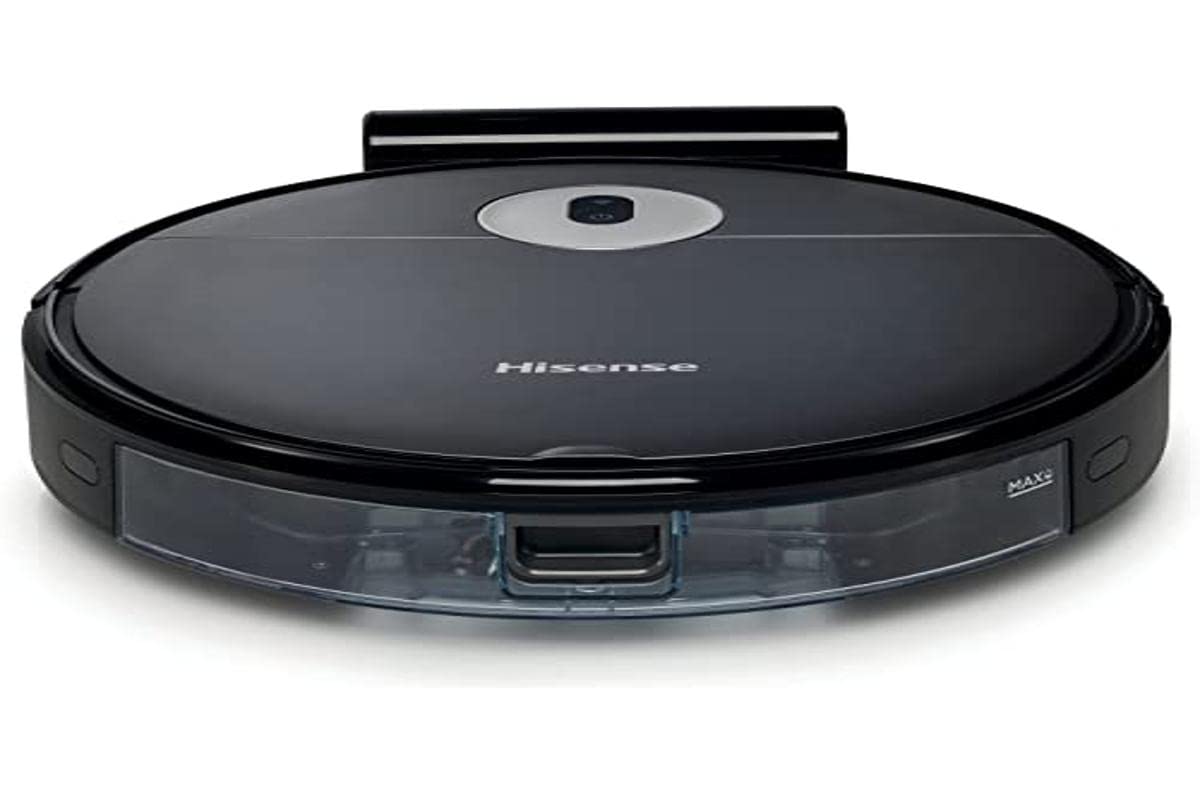
Image: The Hisense RVCG144AB Robot Vacuum Mop, showcasinнеговиот елегантен црн дизајн и компактна форма.
The robot includes a floating roller brush for adapting to different floor conditions and dual-sided brushes for edge cleaning and preventing hair entanglement.
Поставување
1. Поставување на станица за полнење
Place the charging station against a wall in an open area, ensuring there are no obstacles within 1 meter (3 feet) to the sides and 2 meters (6 feet) in front of the station. Connect the charging cable to the station and plug it into a power outlet.

Image: Illustration of the charging station, showing its power connection and recommended clear space around it.
2. Почетно полнење
Place the robot onto the charging station. Ensure the charging contacts on the robot align with those on the station. The robot will begin charging automatically. For first use, allow the robot to charge completely, which typically takes several hours.
3. Инсталирајте странични четки
Притиснете ги страничните четки на столбовите на дното од роботот додека не кликнат на своето место.
4. Врска со апликација (Wi-Fi)
- Преземете ја апликацијата Hisense ConnectLife од продавницата за апликации на вашиот паметен телефон.
- Регистрирајте сметка и најавете се.
- Follow the in-app instructions to add your RVCG144AB robot vacuum. This typically involves connecting the robot to your home Wi-Fi network.
- Ensure your Wi-Fi network is 2.4GHz for optimal connectivity.
Упатства за работа
1. Започнување и прекинување на чистењето
- Рачен почеток: Притиснете го копчето за вклучување на роботот еднаш за да започнете со чистење. Притиснете повторно за да паузирате.
- Контрола на апликацијата: Use the Hisense ConnectLife app to start, pause, or stop cleaning from anywhere.
- Далечински управувач: Use the provided remote control to initiate or stop cleaning.
2. Режими на чистење
The robot offers various cleaning modes to suit different needs:
- Автоматско чистење: Роботот интелигентно се движи и чисти низ целата достапна област.
- Selective Room/Zone Cleaning: Use the app to define specific rooms or areas for cleaning.
- Длабоко чистење: For thorough cleaning of a specific area.
- Цик-цак чистење: A systematic cleaning pattern to cover large areas efficiently.
- Чистење на рабовите: Роботот чисти по ѕидовите и рабовите на мебелот.
3. Adjusting Suction Power and Water Flow
The robot features 3 levels of suction power and water flow. These can be adjusted via the mobile app to match your cleaning requirements and floor type.
4. Закажување на чистење
Set up cleaning schedules through the Hisense ConnectLife app. This allows the robot to automatically clean at preferred times and days.
Одржување
Редовното одржување обезбедува оптимални перформанси и го продолжува животниот век на вашиот роботски правосмукалка.
1. Празнење на корпата за отпадоци
Open the top cover of the robot and remove the dustbin. Empty its contents into a trash bin. It is recommended to empty the dustbin after each cleaning cycle.

Слика: Крупен план view of the robot's dustbin being removed for emptying, highlighting its capacity.
2. Чистење на HEPA филтерот
Remove the HEPA filter from the dustbin. Tap it gently to remove dust. Do not wash the HEPA filter with water; replace it every 3-6 months depending on usage.
3. Чистење на главната четка
Remove the main brush cover and then the main brush. Use the cleaning tool to remove hair and debris tangled around the brush. Reinstall the brush and cover.
4. Чистење странични четки
Periodically check the side brushes for tangled hair or debris. Remove them by pulling gently and clean as needed. Replace if damaged.
5. Чистење на резервоарот за вода и подлогата за бришење
Detach the water tank and empty any remaining water. Clean the mop pad by hand or machine wash. Allow all components to dry completely before reassembly.

Image: The water tank and mop pad assembly, illustrating how to detach and clean them.
6. Чистење на сензорите и контактите за полнење
Избришете ги сензорите за стрмнини, сензорите за ѕид и контактите за полнење и на роботот и на станицата за полнење со чиста, сува крпа за да се осигурате дека функционираат правилно.
Решавање проблеми
Погледнете го овој дел за вообичаени проблеми и нивни решенија.
| Проблем | Можна причина | Решение |
|---|---|---|
| Роботот не се вклучува и не се полни. | Battery depleted; charging contacts dirty; charging station not powered. | Ensure robot is on charging station; clean charging contacts; check power to charging station. |
| Роботот често се заглавува. | Obstacles on floor; robot caught on wires or rugs. | Clear floor of obstacles, wires, and thick rugs before cleaning. |
| Лоши перформанси на чистење. | Корпата за ѓубре е полна; четките се заплеткани; филтерот е затнат. | Empty dustbin; clean main and side brushes; clean or replace HEPA filter. |
| App cannot connect to robot. | Incorrect Wi-Fi password; robot out of Wi-Fi range; 5GHz Wi-Fi network. | Verify Wi-Fi password; move robot closer to router; ensure 2.4GHz Wi-Fi is used. |
Спецификации
Technical specifications for the Hisense RVCG144AB Robot Vacuum Mop:
| Карактеристика | Детал |
|---|---|
| Бренд | Хисенс |
| Број на модел | RVCG144AB |
| Боја | Црното |
| Моќ | 55 вати |
| Моќ на вшмукување | 4000 Па |
| Number of Speeds/Levels | 3 (Power and Wash) |
| Тип на батерија | Литиум-јон |
| Капацитет на батеријата | 2600 mAh |
| Време на траење | До 90 минути |
| Капацитет на корпата за ѓубре | 500 мл |
| Капацитет на резервоар за вода | 250 мл |
| Тип на филтер | ХЕПА |
| Навигација | Gyroscopic Mapping |
| Тип на контрола | App Control (Wi-Fi), Remote Control |
| Димензии на производот | 35L x 35W x 4H cm |
| Тежина на ставката | 5.4 килограми |
| Препорачана површина | Marble, laminate, linoleum, carpet, wood |
Гаранција и поддршка
For warranty information, please refer to the warranty card included with your product packaging or visit the official Hisense webстраница. За техничка поддршка или прашања за услуги, контактирајте ја службата за корисници на Hisense преку нивните официјални канали.
Можете да најдете повеќе информации и ресурси за поддршка на Hisense official webсајт.


