
1. Вовед
The TP-Link AX3000 WiFi 6 Range Extender (RE700X) is designed to expand your existing Wi-Fi network's coverage, eliminating dead zones and providing a stronger, more reliable connection throughout your home or office. This dual-band extender supports the latest Wi-Fi 6 technology, offering speeds up to 3 Gbps for smoother streaming, gaming, and downloading. It also features an Access Point Mode and OneMesh compatibility for a seamless whole-home Wi-Fi experience.

Слика 1: Предна страна view на проширувачот на опсег TP-Link AX3000 WiFi 6 (RE700X).
2. Што има во кутијата
Проверете дали сите артикли се присутни во вашиот пакет:
- Проширен опсег на Wi-Fi RE700X
- Водич за брза инсталација
3. Клучни карактеристики
- WiFi 6 Speeds: Dual-band Wi-Fi speeds up to 3 Gbps (2402 Mbps on 5 GHz and 574 Mbps on 2.4 GHz) for smoother streaming and gaming.
- Проширена покриеност: Features 4 high-performance amplifiers to reach hard-to-cover areas and eliminate Wi-Fi dead zones.
- Гигабитна етернет порта: Provides wired speed and reliability for devices like smart TVs, PCs, or game consoles.
- Компатибилен со OneMesh: Create a seamless Wi-Fi network with a single Wi-Fi name when paired with a compatible OneMesh router, ensuring uninterrupted streaming as you move around your home.
- Built-In Access Point Mode: Easily transform your wired internet connection into a 2x2 MU-MIMO dual-band wireless access point by plugging in an Ethernet cable.
- Универзална компатибилност: Works with all Wi-Fi-enabled devices, routers, gateways, or cable modems with Wi-Fi.
- Лесно поставување: Simple setup and management using the TP-Link Tether app (Android, iOS) with an intelligent signal indicator to find the optimal location.

Слика 2: Готовоview of key features including 160MHz Bandwidth, 1000M Ethernet Port, AX3000 High-Speed WiFi, Dual Band, MU-MIMO, and OneMesh compatibility.
4. Водич за поставување
Follow these steps to set up your TP-Link AX3000 WiFi 6 Range Extender:
4.1. Unboxing and Physical Overview
Before you begin, familiarize yourself with the extender's components and ports.

Figure 3: Labeled components of the RE700X, including Power Indicator, 2.4GHz Indicator, 5GHz Indicator, Reset Button, WPS Button, and Gigabit Port.
4.2. Using the TP-Link Tether App (Recommended)
- Преземете ја апликацијата Tether: Пребарај за "TP-Link Tether" on the App Store (iOS) or Google Play (Android) and install it on your smartphone or tablet.
- Вклучување: Plug the RE700X into an electrical outlet near your main router. Wait for the Power LED to turn solid blue.
- Поврзете се со екстендер: Open the Tether app. It should automatically detect your extender. Follow the on-screen instructions to connect to the extender's temporary Wi-Fi network (e.g., "TP-Link_Extender").
- Create Admin Password: The app will prompt you to create a new admin password for the extender.
- Select Host Network: Choose your existing 2.4GHz and 5GHz Wi-Fi networks from the list that you wish to extend. Enter the passwords for these networks when prompted.
- Потврдете ги поставките: Review the settings and confirm. The extender will then apply the settings and connect to your main router.
- Преместете го продолжетокот: Once connected, unplug the extender and move it to a location halfway between your router and the Wi-Fi dead zone. Ensure the Signal LED on the extender is solid blue, indicating a strong connection to your router. An open and unobstructed location is ideal for optimal signal.

Figure 4: Visual guide for setting up the RE700X using the TP-Link Tether app.
Видео 1: Производот завршиview and Setup Guide for the TP-Link AX3000 WiFi 6 Range Extender.
4.3. Using the WPS Button (Alternative)
- Вклучување: Plug the RE700X into an electrical outlet near your main router.
- Притиснете WPS на рутерот: Притиснете го копчето WPS на вашиот главен рутер.
- Притиснете WPS на екстендерот: Within two minutes, press the WPS button on your RE700X. The Signal LED should turn solid blue, indicating a successful connection.
- Преместете го продолжетокот: Unplug the extender and move it to an optimal location (halfway between router and dead zone) where the Signal LED remains solid blue.
5. Работни режими
5.1. Режим на продолжување на опсегот
In this mode, the RE700X extends the coverage of your existing Wi-Fi network. Devices connect to the extender, which then relays the signal to and from your main router. This is ideal for expanding Wi-Fi to areas with weak or no signal.
5.2. Access Point Mode
The RE700X can function as a wireless access point. Connect an Ethernet cable from your router (or any wired internet source) to the Gigabit Ethernet port on the extender. The extender will then broadcast a new Wi-Fi network, converting your wired connection into a wireless one. This is useful for adding Wi-Fi capability to a wired-only network or creating a new Wi-Fi hotspot.

Figure 5: The RE700X operating in Built-In Access Point Mode, converting a wired connection to Wi-Fi.
5.3. OneMesh Functionality
When paired with a compatible TP-Link OneMesh router, the RE700X creates a unified Mesh network. This means your devices will automatically switch to the strongest Wi-Fi signal as you move around your home, without needing to manually switch networks. This provides seamless roaming and a single Wi-Fi name for your entire home.
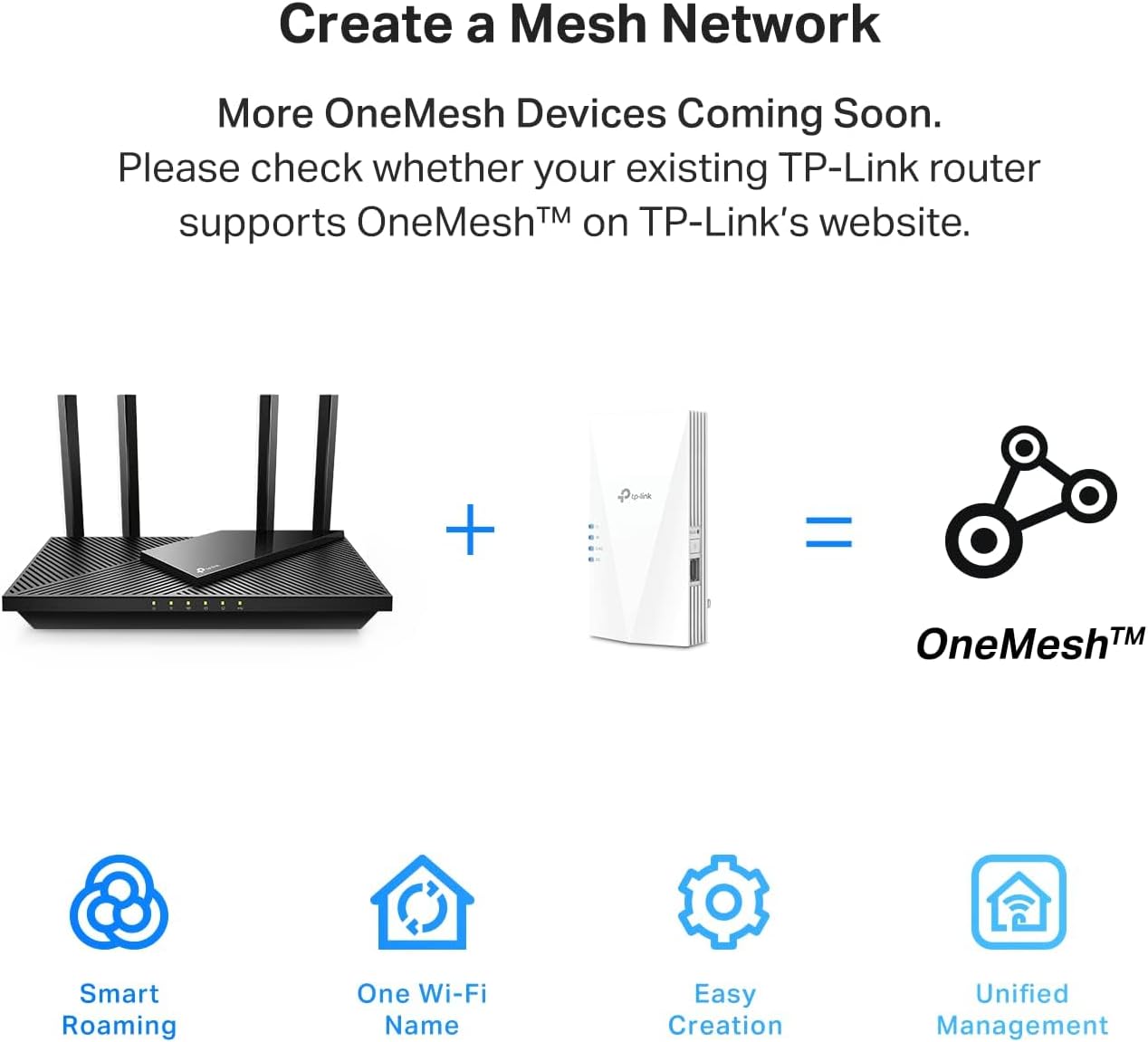
Figure 6: Illustration of how a OneMesh network is created by combining a OneMesh router and a OneMesh range extender.
6. Одржување
- Чистење: Use a soft, dry cloth to clean the device. Do not use liquid or chemical cleaners.
- Вентилација: Ensure the extender is placed in a well-ventilated area to prevent overheating. Do not block the ventilation holes.
- Животна средина: Избегнувајте поставување на уредот на директна сончева светлина, во близина на извори на топлина или во претерано влажна или прашлива средина.
- Ажурирања на фирмверот: Редовно проверувајте и инсталирајте ажурирања на фирмверот преку апликацијата Tether или официјалната веб-страница на TP-Link. webстраницата за да обезбеди оптимални перформанси и безбедност.
7 Смена на проблеми
Заеднички прашања и решенија:
- Нема пристап до интернет по поставувањето:
- Проверете дали вашиот главен рутер има пристап до интернет.
- Check the Signal LED on the extender. If it's not solid blue, relocate the extender closer to your router until it is.
- Ensure you entered the correct Wi-Fi password for your main network during setup.
- Рестартирајте ги и рутерот и проширувачот.
- Слаб сигнал или чести прекини:
- Relocate the extender to an optimal spot, ensuring the Signal LED is solid blue. Avoid physical obstructions like thick walls or large metal objects.
- Проверете дали има пречки од други електронски уреди (на пр., микробранови печки, безжични телефони).
- Ажурирајте го фирмверот на продолжувачот на најновата верзија.
- Cannot Access Extender's Web Страна за управување:
- Проверете дали вашиот уред е поврзан со Wi-Fi мрежата на продолжетокот.
- Verify that the extender is powered on.
- Обидете се да го исчистите кешот на прелистувачот или да користите друг прелистувач.
8. Спецификации
| Карактеристика | Детал |
|---|---|
| Димензии на производот | 5.87 x 3.07 x 1.42 инчи |
| Тежина на ставката | 9.1 унци |
| Број на модел на ставка | RE700X |
| Стандард за безжична комуникација | 802.11n, 802.11ax, 802.11b, 802.11g, 802.11ac |
| Стапка на пренос на податоци | 3 гигабити во секунда |
| Класа на фреквентен опсег | Двобенд |
| Тип на конектор | RJ45 |
| Производител | TP-Link |
| Земја на потекло | Виетнам |
9. Гаранција и поддршка
За информации за гаранцијата, техничка поддршка и дополнителни ресурси, посетете ја официјалната страница на TP-Link. webстраницата или погледнете ја документацијата вклучена со вашиот производ.
- Упатство за користење (PDF): Преземете го упатството за употреба
- Упатство за инсталација (PDF): Преземи го упатството за инсталација
- Планови за заштита: Optional protection plans are available for purchase. Please refer to your retailer for details.