1. Вовед
Thank you for choosing the WOOX Smart WiFi Video Doorbell R4957. This wireless Full HD 1080p video doorbell system, complete with a door chime, allows you to monitor your front door, communicate with visitors, and receive alerts directly on your smartphone. It integrates seamlessly with your home Wi-Fi network and is compatible with smart home platforms like Amazon Alexa and Google Assistant. This manual provides detailed instructions for installation, operation, and maintenance to ensure optimal performance and security.

Image 1.1: The WOOX Smart WiFi Video Doorbell R4957, showing the doorbell unit, the indoor chime, and the product packaging.
2. Содржина на пакетот
Ве молиме проверете дали сите артикли се присутни во вашиот пакет:
- WOOX Smart WiFi Video Doorbell Unit (R4957)
- Внатрешна ѕвонченица
- Држач за монтирање и завртки
- USB кабел за полнење
- Упатство за употреба (овој документ)
3. Производот завршиview
3.1. Doorbell Unit

Слика 3.1: Детално view of the WOOX Smart WiFi Video Doorbell unit, highlighting the camera lens and doorbell button.
The doorbell unit features a 1080p Full HD camera with a wide-angle lens for clear video capture. It includes a motion sensor for detecting activity, a microphone and speaker for two-way audio communication, and an illuminated doorbell button. Infrared LEDs provide night vision capabilities for clear viewработи во услови на слаба осветленост.
3.2. Chime Unit
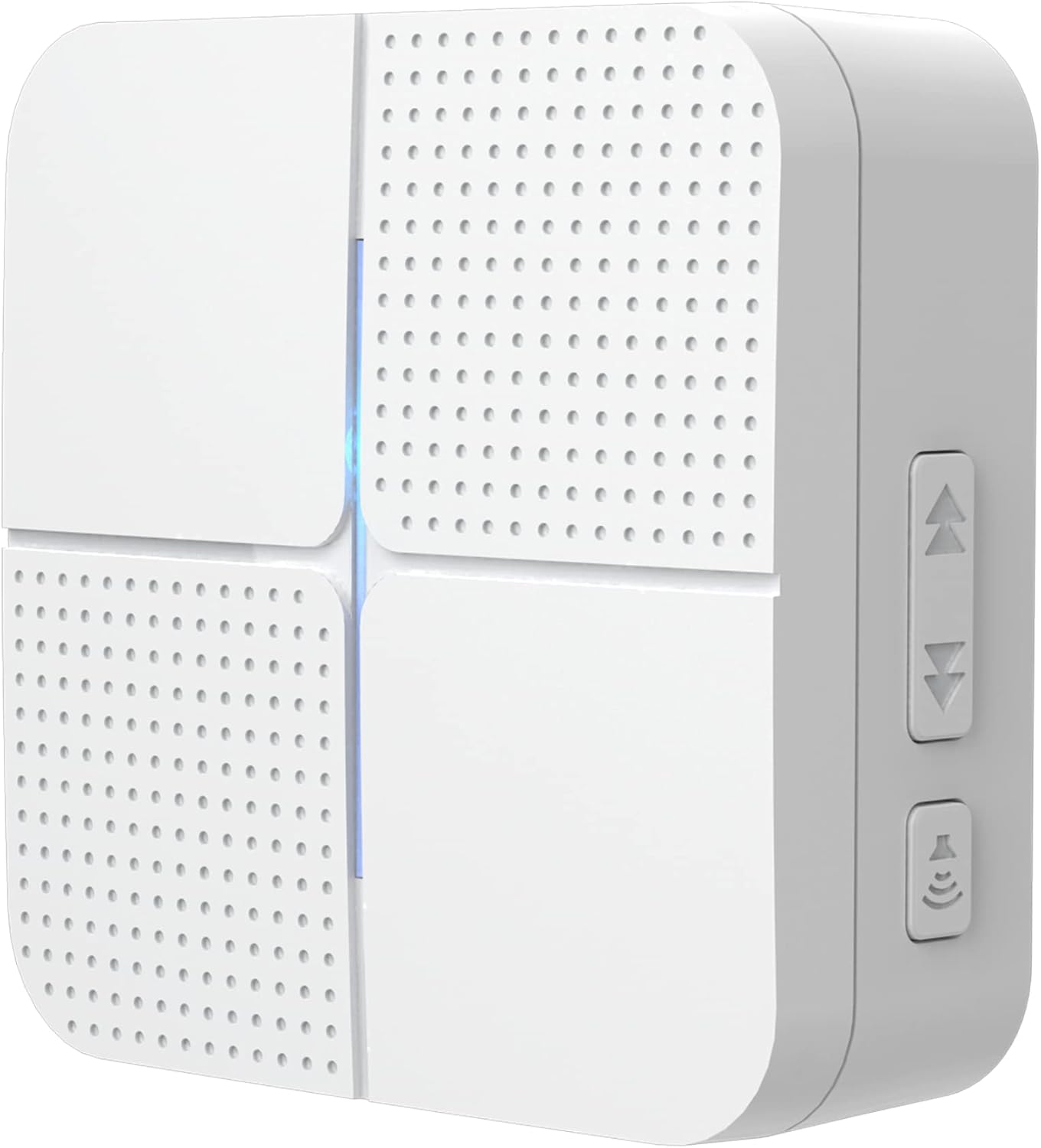
Слика 3.2: Детално view of the WOOX indoor chime unit, showing its speaker grille and side controls.
The indoor chime unit connects wirelessly to the doorbell and provides an audible alert when the doorbell button is pressed. It typically features adjustable volume levels and multiple chime melodies.

Image 3.3: The doorbell and chime units working together, with a smartphone displaying the live video feed from the doorbell.
4. Поставување
4.1. Полнење на ѕвончето
Before first use, fully charge the doorbell unit. Connect the provided USB charging cable to the doorbell's charging port and plug the other end into a standard USB power adapter (not included). The charging indicator light will show the charging status. A full charge typically takes several hours.
4.2. Installing the Doorbell
- Изберете локација: Изберете соодветна локација во близина на влезната врата, обезбедувајќи чист view and good Wi-Fi signal strength. The doorbell is designed for outdoor use and is weather-resistant.
- Држач за монтирање: Detach the mounting bracket from the back of the doorbell unit.
- Означи и дупчи: Hold the mounting bracket against the wall at your desired height. Mark the screw holes with a pencil. Drill pilot holes if necessary, using an appropriate drill bit for your wall material.
- Безбедна заграда: Прикачете го држачот за монтирање на ѕидот користејќи ги приложените завртки. Уверете се дека е цврсто прицврстен.
- Прикачете ѕвонче на врата: Slide the doorbell unit onto the mounted bracket until it clicks into place.

Слика 4.1: Задниот дел view of the doorbell unit and its separate mounting plate, highlighting the soft rubber base for secure installation.

Image 4.2: The WOOX doorbell mounted on an exterior wall, demonstrating its weather-resistant design with water droplets visible on its surface.
4.3. Pairing the Chime
Plug the indoor chime unit into a standard power outlet within range of the doorbell. Follow the instructions in the WOOX Home app to pair the chime with your doorbell. This typically involves pressing a pairing button on the chime and then activating the doorbell.
4.4. Инсталација и конфигурација на апликацијата
- Преземи апликација: Download the WOOX Home app from the Apple App Store or Google Play Store. Alternatively, the doorbell is compatible with the Tuya Smart app.
- Регистрација/Најава: Отворете ја апликацијата и регистрирајте се за нова сметка или најавете се ако веќе имате.
- Додај уред: Tap the "+" icon to add a new device. Select "Video Doorbell" or search for the R4957 model.
- Поврзете се на Wi-Fi: Follow the on-screen instructions to connect the doorbell to your 2.4GHz Wi-Fi network. This usually involves scanning a QR code generated by the app with the doorbell's camera.
- Целосно поставување: Once connected, name your doorbell and complete the setup process. You can then access live view, adjust settings, and configure notifications.

Image 4.3: A smartphone displaying the WOOX app logo, indicating compatibility with the WOOX Home and Tuya Smart platforms.
The WOOX Smart WiFi Video Doorbell R4957 is designed to work with popular smart home ecosystems. You can integrate it with Amazon Alexa and Google Assistant for voice control and smart home routines. Refer to the app's integration section for specific instructions on linking your doorbell to these platforms.

Image 4.4: The WOOX doorbell system is compatible with Amazon Alexa and Google Assistant, allowing for integrated smart home control.
5. Упатства за работа
5.1. Во живо View и Двонасочно аудио
Open the WOOX Home app and select your doorbell from the device list. This will initiate a live video feed from the doorbell's camera. To speak with a visitor, tap the microphone icon in the app. To hear the visitor, ensure your phone's volume is up.
5.2. Детекција на движење и известувања
The doorbell is equipped with a motion sensor. When motion is detected, you will receive a push notification on your smartphone. You can adjust the motion detection sensitivity and set detection zones within the app to minimize false alerts.
5.3. Ноќно гледање
The doorbell automatically switches to night vision mode in low-light conditions, utilizing infrared LEDs to provide clear black-and-white video footage.
5.4. Снимање и репродукција
The doorbell supports local storage via a microSD card (not included, up to 128GB) for continuous recording or event-triggered recordings. You can also subscribe to cloud storage services offered through the app. To view снимен footage, access the playback section in the WOOX Home app and select the desired date and time.
6. Одржување
6.1. Управување со батерии
The doorbell is powered by two rechargeable lithium-ion batteries. Battery life varies depending on usage and environmental factors. When the battery level is low, you will receive a notification via the app. Recharge the doorbell promptly using the provided USB cable. For optimal battery longevity, avoid extreme temperatures.
6.2. Чистење
To clean the doorbell and chime units, use a soft, damp cloth. Do not use harsh chemicals or abrasive cleaners, as these can damage the finish or electronic components. Ensure the charging port is dry before charging.
6.3. Ажурирања на фирмверот
Periodically check for firmware updates through the WOOX Home app. Updates often include performance improvements, new features, and security enhancements. Follow the in-app instructions to download and install any available updates.
7 Смена на проблеми
If you encounter issues with your WOOX Smart WiFi Video Doorbell, please refer to the table below for common problems and their solutions.
| Проблем | Можно решение |
|---|---|
| Ѕвончето не се поврзува со Wi-Fi | Ensure your Wi-Fi network is 2.4GHz. Check Wi-Fi signal strength at the doorbell's location. Restart your router and the doorbell. Re-attempt pairing in the app. |
| Лош квалитет на видео или доцнење | Check your Wi-Fi signal strength. Reduce video resolution settings in the app if available. Ensure sufficient internet bandwidth. |
| Ѕвончето не ѕвони | Ensure the chime is plugged in and powered on. Re-pair the chime with the doorbell via the app. Check chime volume settings. |
| Краток век на батеријата | Чести настани за детекција на движење или во живо view access can drain the battery faster. Adjust motion sensitivity. Ensure the doorbell is fully charged. |
| Нема предупредувања за откривање движење | Check motion detection settings and sensitivity in the app. Ensure notifications are enabled for the app on your smartphone. |
If the problem persists after trying these solutions, please contact WOOX customer support for further assistance.
8. Спецификации
| Карактеристика | Вредност |
|---|---|
| Име на моделот | WOOX Video Doorbell 1 with Chime Melody Box Wifi R4957 |
| Број на модел | WOX804957 |
| Видео резолуција | 1080p full HD |
| Безжична технологија | Wi-Fi (2.4 GHz) |
| Извор на енергија | Battery Powered (2 Lithium-ion batteries included) |
| Voltage | 5 волти |
| Посебни карактеристики | Night Vision, Two-Way Audio, Motion Detection |
| Компатибилни уреди | Smartphone (via WOOX Home / Tuya Smart App) |
| Тип на контролер | Амазон Алекса, асистент на Google |
| Тип на монтирање | Монтирање на ѕид |
| Product Dimensions (Doorbell) | 13.5 x 6.5 x 3.8 cm |
| Тежина на производот | 570 гр |
| Препорачана употреба | Мониторинг |
9. Гаранција и поддршка
WOOX products are designed and manufactured to the highest quality standards. This product is covered by a limited warranty from the date of purchase. Please refer to the warranty information provided with your product packaging or visit the official WOOX webстраница за детални услови за гаранција.
For technical support, troubleshooting assistance, or warranty claims, please contact WOOX customer service through their official website or the contact information provided in your product documentation. When contacting support, please have your product model number (R4957 or WOX804957) and proof of purchase ready.


