
1. Вовед
This manual provides essential information for the safe and efficient use of your HP Envy x360 13.3-inch 2-in-1 laptop. Please read this manual thoroughly before operating your device to ensure optimal performance and longevity. This device combines the functionality of a traditional laptop with the versatility of a tablet, featuring a responsive touchscreen and a 360-degree hinge.
2. Карактеристики на производот
- 13.3-inch Full HD IPS Touch-Screen Display: Experience vibrant visuals and intuitive interaction with the responsive touch display.
- Процесор Intel Core i5-1135G7 од 11-та генерација: Delivers efficient performance for multitasking, productivity, and entertainment.
- 8GB DDR4 RAM меморија: Provides substantial memory for smooth operation of multiple applications.
- 256GB PCIe NVMe SSD: Offers fast boot-up times and quick data access with solid-state storage.
- Тастатура со позадинско осветлување: Enables comfortable typing in various lighting conditions.
- Читач на отпечатоци: Enhances security and provides quick, convenient login.
- Windows 10 Home Operating System: Pre-installed for a familiar and productive user experience.
- Шарка од 360 степени: Allows the device to transform between laptop, tent, stand, and tablet modes.
- Графика Intel Iris Xe: Integrated graphics for clear visuals and light creative tasks.
- Bang & Olufsen Audio with Three Speakers: Овозможува богат и импресивен звук.
- HP Wide Vision HD Camera with Camera Shutter: For video calls and privacy.
3. Физичко преоптоварувањеview
Familiarize yourself with the various components and ports of your HP Envy x360 laptop.

Слика 3.1: Аголна view of the HP Envy x360 laptop in traditional laptop mode, displaying the keyboard and screen.
Пристаништа и конектори:
- USB 3.0 порти од тип A (x2): For connecting external devices such as USB drives, mice, or keyboards.
- HDMI порт (x1): За поврзување со надворешни дисплеи или проектори.
- Micro SD Card Reader (x1): For reading and writing data to Micro SD cards.
- Headphone/Microphone Combo Jack (x1): For connecting headphones or an external microphone.
- USB-C порт (x1): For data transfer, charging, and display output (Thunderbolt compatible).
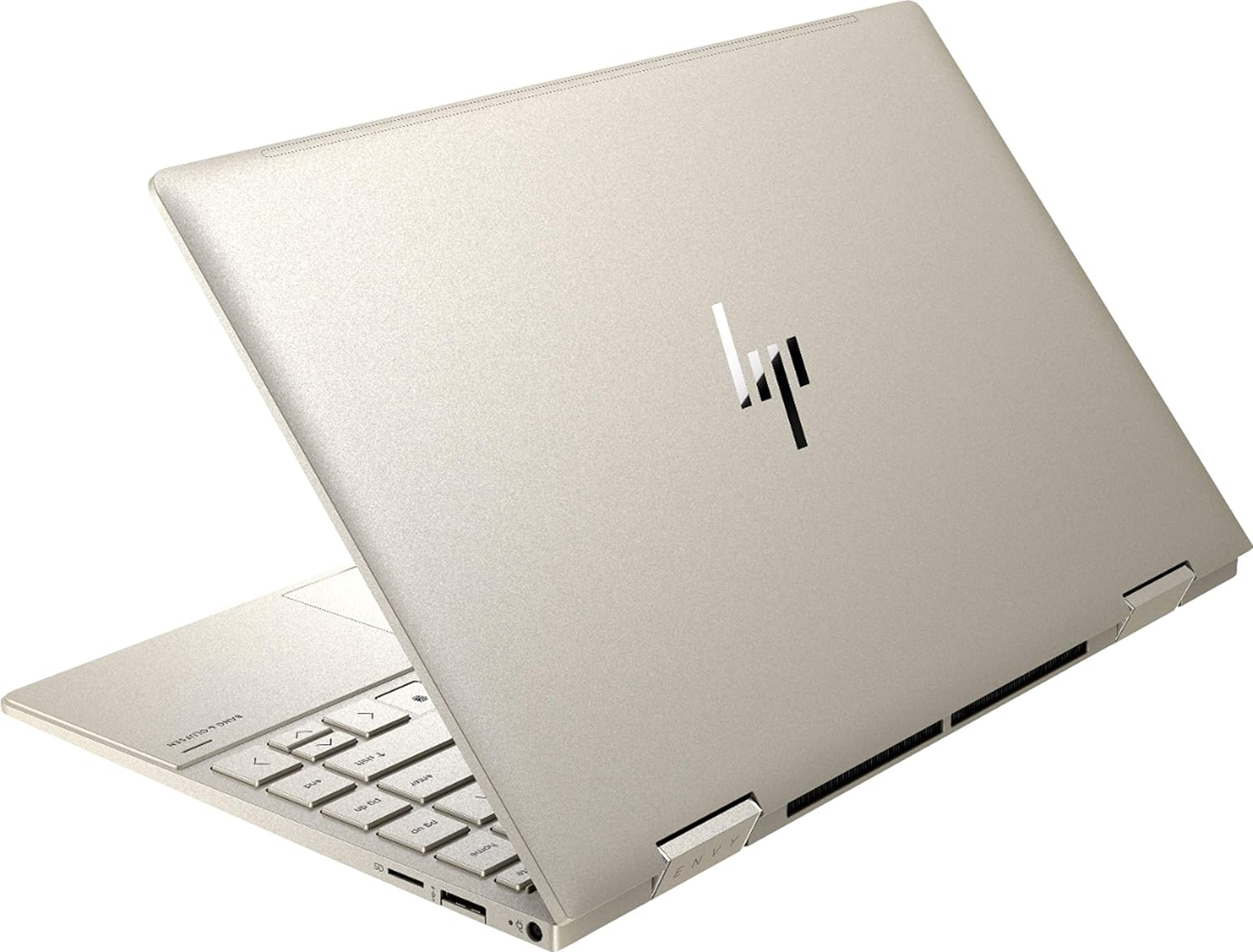
Слика 3.2: Заден дел view of the HP Envy x360 laptop, highlighting the sleek design and port placement on the sides.
4. Поставување
4.1 Почетно вклучување
- Unpack your HP Envy x360 laptop and included accessories.
- Поврзете го адаптерот за напојување со приклучокот за полнење на лаптопот, а потоа со штекер.
- Press the power button, typically located on the side or keyboard deck, to turn on the laptop.
- Следете ги упатствата на екранот за да го завршите поставувањето на Windows 10 Home, вклучувајќи го изборот на јазик, мрежната врска и креирањето на корисничка сметка.
4.2 Поврзување на периферни уреди
Connect your mouse, external display, or other USB devices to the available ports as described in Section 3. For wireless devices, enable Bluetooth in Windows settings and pair your devices.
5. Упатства за работа
5.1 Using the 2-in-1 Modes
Your HP Envy x360 features a versatile 360-degree hinge, allowing for multiple usage modes:
- Режим на лаптоп: Traditional laptop orientation for typing and productivity.
- Режим на шатор: Fold the screen back to form an inverted 'V' shape, ideal for watching videos or presentations in confined spaces.
- Режим на стојка: Fold the screen back further, resting the keyboard face down, to use the display for media consumption or touch-based applications.
- Режим на таблет: Fold the screen completely back against the base, transforming the device into a tablet for touch interaction.

Figure 5.1: The HP Envy x360 laptop configured in tent mode, suitable for media viewинг.

Figure 5.2: The HP Envy x360 laptop fully folded into tablet mode, ready for touch input.
5.2 Користење на екран на допир и тастатура
- Екран на допир: Use gestures similar to a smartphone or tablet for navigation, zooming, and interaction with applications.
- Тастатура со позадинско осветлување: Press the function key (Fn) and the appropriate F-key (usually F5 or F4, check keyboard icons) to toggle the keyboard backlight on/off or adjust brightness.
- Читач на отпечатоци: Enroll your fingerprint through Windows Hello settings for secure and fast login.
6. Одржување
Regular maintenance helps prolong the life of your laptop.
- Чистење: Use a soft, lint-free cloth to clean the screen and chassis. For stubborn smudges, dampИзбришете ја крпата со вода или средство за чистење безбедно за екрани. Избегнувајте груби хемикалии.
- Ажурирања на софтверот: Regularly update Windows and HP drivers to ensure optimal performance and security.
- Нега на батеријата: Избегнувајте често целосно празнење на батеријата. За долгорочно складирање, наполнете ја батеријата до околу 50-70%.
- Вентилација: Ensure the laptop's vents are not obstructed to prevent overheating. Use on a hard, flat surface when possible.
7 Смена на проблеми
Овој дел се однесува на вообичаени проблеми со кои може да се соочите.
7.1 Проблеми со напојувањето
- Лаптопот не се вклучува: Ensure the power adapter is securely connected and the outlet is functional. Try a different outlet or power adapter if available.
- Батеријата не се полни: Проверете го поврзувањето на адаптерот за напојување. Проверете дали има оштетување на кабелот или портата.
7.2 Проблеми со приказот
- Екранот е празен: Поврзете надворешен монитор за да проверите дали проблемот е со екранот на лаптопот. Обидете се да го рестартирате лаптопот.
- Екранот на допир не реагира: Restart the laptop. Ensure all drivers are up to date via Windows Update or HP Support Assistant.
7.3 Проблеми со перформансите
- Бавни перформанси: Затворете ги непотребните апликации. Проверете го „Task Manager“ за процеси што трошат многу ресурси. Обезбедете доволно слободен простор на SSD-то.
- Прегревање: Clean vents. Ensure proper airflow. Reduce workload if consistently hot.
8. Спецификации
| Карактеристика | Детал |
|---|---|
| Бренд | HP |
| Име на моделот | HP Envy x360 |
| Големина на екранот | 13.3 инчи |
| Резолуција на екранот | 1920 x 1080 (Full HD) |
| Тип на дисплеј | LED IPS Touch Screen |
| Процесор | 11th Generation Intel Core i5-1135G7 (2.4 GHz, up to 4.2 GHz with Turbo Boost) |
| RAM меморија | 8 GB DDR4 |
| Складирање | 256 GB SSD |
| Оперативен систем | Windows 10 Home |
| Графика | Интел Iris Xe графика (интегрирана) |
| Посебни карактеристики | Тастатура со позадинско осветлување, читач на отпечатоци од прсти |
| Аудио | Bang & Olufsen Audio with Three speakers |
| Поврзување | Wireless-AX, Bluetooth, USB, HDMI |
| Пристаништа | 2x USB 3.0 Type-A, 1x HDMI, 1x Micro SD Card Reader, 1x Headphone/Microphone Combo, 1x USB-C |
| Димензии (Д x Ш x В) | 12.07" x 7.66" x 0.65" |
| Тежина | 2.92 фунти |
| Боја | Бледо злато |
9. Што има во кутијата
The following items are included with your HP Envy x360 laptop:
- HP Envy x360 13.3-inch 2-in-1 Laptop
- Адаптер за напојување
- Подлога за глувчето

Figure 9.1: The HP Envy x360 laptop shown alongside the included mouse pad.
10. Гаранција и поддршка
Your HP Envy x360 laptop comes with a standard manufacturer's warranty. For detailed warranty information, please refer to the warranty card included in your product packaging or visit the official HP support website. For technical assistance, driver downloads, or service requests, please contact HP Customer Support.
Поддршка на HP Webсајт: support.hp.com