
1. Вовед
This manual provides essential instructions for the safe and efficient operation of your Multilaser MINI TORRE 900W SP380 audio system. Please read this manual thoroughly before using the product and retain it for future reference. Proper use will ensure optimal performance and extend the lifespan of your device.
2. Инструкции за безбедност
- Извор на енергија: Осигурете се дека напојувањето одговара на јачината на звукотtage барањата наведени на етикетата на производот.
- Вентилација: Не ги блокирајте отворите за вентилација. Одржувајте доволен простор околу уредот за правилен проток на воздух.
- Вода и влага: Држете го уредот подалеку од вода, дожд и прекумерна влажност. Не ракувајте со него со влажни раце.
- Извори на топлина: Избегнувајте поставување на уредот во близина на извори на топлина како што се радијатори, шпорети или други апарати што произведуваат топлина.
- Чистење: Disconnect the power before cleaning. Use a dry, soft cloth. Do not use liquid cleaners or aerosol sprays.
- Сервисирање: Не обидувајте се сами да го поправите уредот. Сите сервиси обратете се кај квалификуван сервисер.
- Деца: Чувајте го уредот и неговите додатоци подалеку од дофат на деца.
- Поставување: Поставете го уредот на стабилна, рамна површина за да спречите паѓање.
3. Производот завршиview
The Multilaser MINI TORRE 900W SP380 is a powerful audio system designed for versatile sound reproduction. It features dual speakers, LED lighting, and multiple connectivity options.
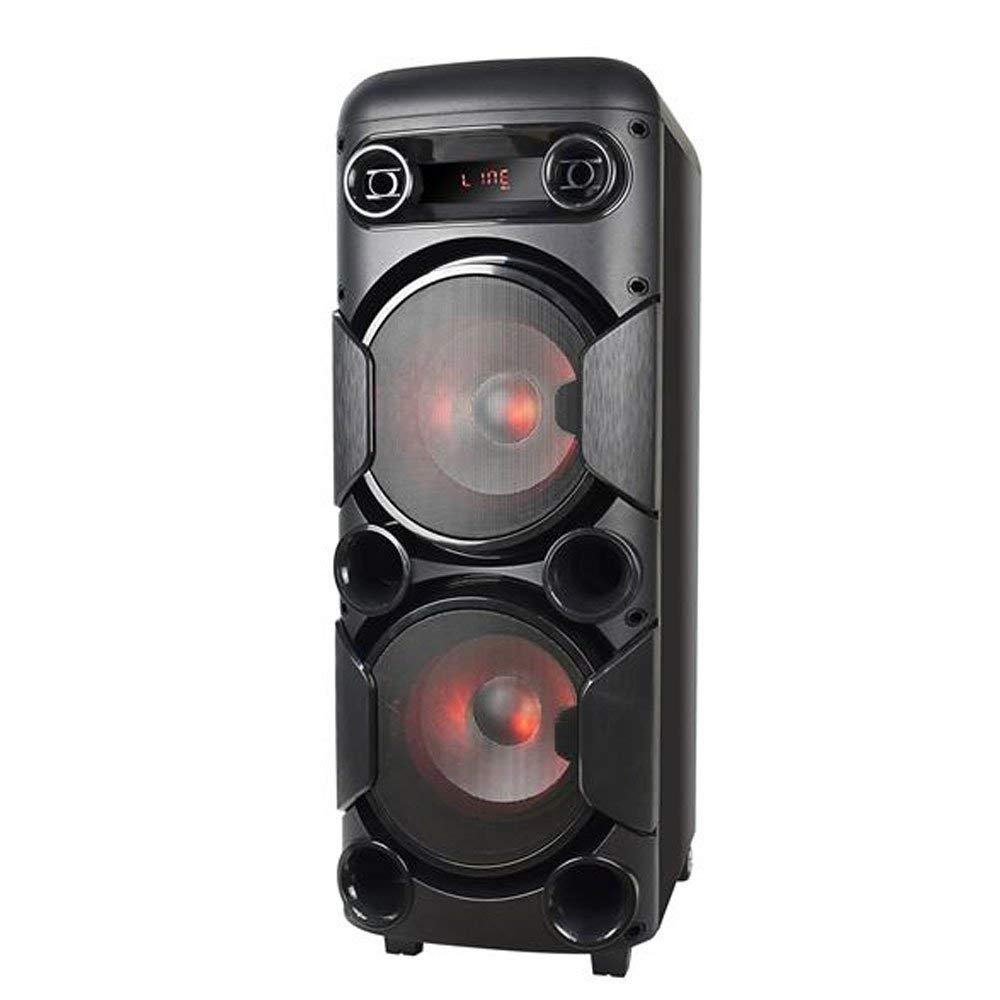
Слика 3.1: Предна страна view of the Multilaser MINI TORRE 900W SP380, showcasing its dual speaker design and illuminated LED woofers.
The control panel, located on the top of the unit, provides access to all functions and inputs.

Слика 3.2: Детално view of the control panel, including volume knob, equalizer sliders, input ports (USB, TF/Memory Card, Line, Mic 1, Mic 2), and control buttons for mode, light, and playback.
4. Поставување
- Отпакување: Carefully remove the MINI TORRE from its packaging. Retain the packaging for future transport or storage.
- Поставување: Position the speaker on a flat, stable surface. Ensure there is adequate space around the unit for ventilation. The integrated wheels facilitate easy transport.
- Поврзување за напојување: Connect the power cable to the AC input on the unit and then to a suitable power outlet. The device supports bivolt automatic voltage.
- Почетно вклучување: Flip the power switch (usually located on the control panel) to the "ON" position. The display will illuminate.
5. Упатства за работа
5.1. Вклучување/исклучување
To power on the device, locate the power switch on the control panel and set it to the "ON" position. To power off, set the switch to "OFF".
5.2. Контрола на јачината на звукот
Adjust the main volume using the large central ВОЛУМЕН knob on the control panel. Turn clockwise to increase volume and counter-clockwise to decrease.
5.3. Избор на режим
Притиснете го РЕЖИМ button repeatedly to cycle through available input modes: Bluetooth (BT), FM Radio, USB, Memory Card (TF), and Auxiliary (LINE).
5.4. LED осветлување
Притиснете го СВЕТЛИНА button to toggle the LED lighting effects on the speakers. Multiple light modes may be available.
5.5. Влез за микрофон
Connect a microphone to either the МИК 1 or МИК 2 влез. Прилагодете ја јачината на звукот на микрофонот користејќи го MIC.VOL slider and add echo effect with the ЕХО лизгач.
5.6. Sound Equalization
Користете го ТРЕБРЕН и BASS sliders to adjust the high and low frequencies of the audio output, respectively, to suit your preference.
6. Поврзување
6.1. Bluetooth спарување
- Turn on the MINI TORRE and select Bluetooth (BT) mode using the РЕЖИМ button. The display will show "BT" and a pairing indicator.
- Овозможете Bluetooth на вашиот паметен телефон, таблет или друг компатибилен уред.
- Пребарај за available devices and select "MULTILASER SP380" (or similar name) from the list.
- Once paired, the device will confirm the connection, and you can begin playing audio wirelessly.
6.2. USB / Memory Card Playback
Вметнете USB флеш драјв во USB port or a TF (MicroSD) card into the TF/USB slot. The unit will automatically switch to USB or TF mode and begin playing compatible audio files. Use the playback control buttons (PLAY/PAUSE, ПРЕТХОДЕН, СЛЕДНО) за управување со вашата музика.
6.3. Auxiliary Input (LINE IN)
Поврзете надворешен аудио уред (на пр., MP3 плеер, лаптоп) на ЛИНИЈА input using a 3.5mm audio cable. Select ЛИНИЈА режим со РЕЖИМ button. Audio will play from the connected device.
6.4. FM радио
Префрли се на FM mode using the РЕЖИМ копче. Притиснете и држете го PLAY/PAUSE button to initiate an automatic scan for FM stations. The unit will save detected stations. Use the ПРЕТХОДЕН и СЛЕДНО копчиња за движење низ зачуваните станици.
7. Одржување
- Чистење: Before cleaning, ensure the device is powered off and unplugged. Use a soft, dry, lint-free cloth to wipe the exterior surfaces. Do not use abrasive cleaners, waxes, or solvents.
- Складирање: Доколку го складирате уредот подолг временски период, исклучете го од штекерот и складирајте го на ладно и суво место, подалеку од директна сончева светлина и екстремни температури.
- Избегнувајте опструкции: Regularly check that the speaker grilles and ventilation openings are free from dust and debris.
8 Смена на проблеми
| Проблем | Можна причина | Решение |
|---|---|---|
| Нема моќ | Кабелот за напојување не е поврзан; Приклучокот за напојување не работи; Прекинувачот е исклучен. | Ensure power cable is securely connected. Test the outlet with another device. Turn the power switch to "ON". |
| Нема звук | Volume too low; Incorrect input mode selected; External device not playing. | Зголемете ја јачината на звукот. Притиснете РЕЖИМ to select the correct input. Ensure the external device is playing and its volume is up. |
| Bluetooth не се спарува | Device too far; Bluetooth not enabled on external device; Incorrect mode. | Move devices closer. Ensure Bluetooth is enabled on your external device. Select BT mode on the speaker. |
| USB/TF картичката не се репродуцира | Картичката/дискот не е правилно вметната; Некомпатибилен file format; Incorrect mode. | Reinsert the USB drive or TF card. Ensure audio files are in a compatible format (e.g., MP3). Select USB or TF режим. |
| FM радио статичко | Weak signal; No antenna connected (if applicable). | Reposition the unit or extend the antenna (if present). Perform an auto-scan for stations again. |
9. Спецификации
Below are the technical specifications for the Multilaser MINI TORRE 900W SP380:

Слика 9.1: Packaging of the Multilaser MINI TORRE 900W SP380, highlighting its main features and technical specifications.
| Карактеристика | Детал |
|---|---|
| Бренд | Мултиласер |
| Модел | SP380 |
| Максимална излезна моќност на звучникот | 900 вати РМС |
| Технологија за поврзување | Помошен, Bluetooth 5.0 |
| Тип на звучник | Tower (2x 8" drivers) |
| Посебни карактеристики | USB Port, LED Lighting, Microphone Input, Memory Card Slot, FM Radio, Bass Boost, Transport Wheels |
| Димензии на ставката (Д x Ш x В) | 33 cm x 37 cm x 82 cm |
| Тежина на ставката | 11.95 килограми |
| Компатибилни уреди | Notebook, Smartphone, Tablet |
| Извор на енергија | Bivolt automatic (AC) |
| Фреквентен одговор | 60Hz-20KHz |
| Чувствителност | 89 dB |
| Импеданса | 4 оми |
| Вклучени компоненти | 1x Mini Torre 900W SP380, 1x Cable Set, 1x User Manual |
10. Гаранција и поддршка
The Multilaser MINI TORRE 900W SP380 comes with a 1 година гаранција од датумот на купување. Оваа гаранција ги покрива производствените дефекти под нормални услови на употреба.
For warranty claims, technical support, or service inquiries, please contact Multilaser customer support through their official channels. Please have your proof of purchase and product model number (SP380) ready when contacting support.
Забелешка: The warranty does not cover damage caused by misuse, accidents, unauthorized modifications, or failure to follow the instructions in this manual.