
1. Вовед
Thank you for choosing the X.Cell M100 Wireless Mouse. This manual provides essential information for setting up, operating, and maintaining your new wireless mouse. Please read these instructions carefully before use to ensure optimal performance and longevity of your device.
2. Содржина на пакетот
Проверете дали сите артикли се присутни во вашиот пакет:
- X.Cell M100 Wireless Mouse
- USB Нано приемник
- AA батерија (може да биде претходно инсталирана или вклучена одделно)
- Упатство за употреба (овој документ)
3. Поставување
- Вметнете ја батеријата: Locate the battery compartment on the underside of the mouse. Open the cover and insert the provided AA battery, ensuring correct polarity (+/-). Close the battery compartment cover.
- Поврзете го USB-приемникот: Remove the USB Nano Receiver from its storage slot, usually located inside the battery compartment or near it. Plug the receiver into an available USB port on your computer (PC or Mac).
- Вклучување: Turn on the mouse using the power switch, typically located on the underside. The mouse is designed for plug-and-play functionality, meaning it should automatically connect to your computer within a few seconds.
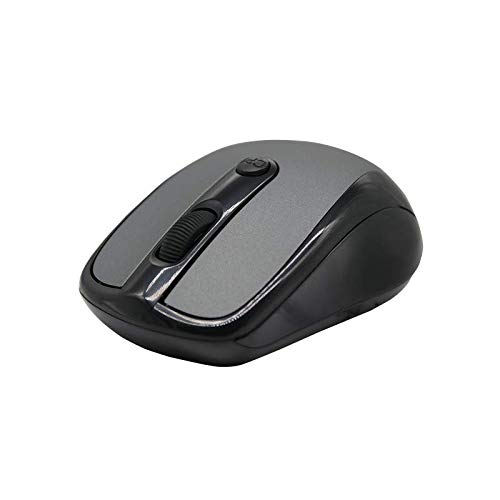
This image shows the X.Cell M100 Wireless Mouse from a top-down perspective, highlighting its ergonomic design and button layout.
4. Упатства за работа
The X.Cell M100 Wireless Mouse utilizes 2.4 GHz wireless technology, providing a stable connection with an operating range of up to 10 meters. It is compatible with both PC and Mac systems.
- Лево копче: Примарна функција за кликнување за избирање ставки, отворање fileс, итн.
- Десно копче: Secondary click function for context menus and additional options.
- Тркало за лизгање: Свртете нагоре или надолу за да се движите низ документите и web страници. Тркалото за скролување функционира и како средно копче за кликнување.
- DPI Button (if present): Some models may include a DPI button to adjust cursor sensitivity. Refer to the mouse's physical design for this feature.

A hand demonstrates the comfortable grip and usage of the X.Cell M100 Wireless Mouse during operation.
5. Одржување
- Чистење: Користете мека, сува крпа за чистење на глувчето. За тврдокорна нечистотија, малку дampИзмијте ја крпата со вода. Избегнувајте употреба на груби хемикалии или абразивни материјали.
- Замена на батерија: When the mouse performance degrades or it stops responding, replace the AA battery. Follow the steps in the 'Setup' section for battery insertion. The mouse is designed for approximately 12 months of battery life under typical usage.
- Складирање: When not in use for extended periods, turn off the mouse to conserve battery life. Store the USB Nano Receiver in its designated slot to prevent loss.
6 Смена на проблеми
| Проблем | Решение |
|---|---|
| Глувчето не реагира |
|
| Движењето на курсорот е неправилно или бавно |
|
| Проблеми со поврзувањето |
|
7. Спецификации
- Модел: XL-M-100-BLK
- Поврзување: Безжичен 2.4 GHz
- Оперативен опсег: До 10 метри
- Компатибилност: Компјутер и Мек
- Извор на енергија: 1 x AA батерија
- Проценет век на траење на батеријата: 12 месеци
- Димензии (Д x Ш x В): 2.4 x 6.4 x 4.6 cm
- Тежина: 80 грама
- Боја: Црното
8. Гаранција и поддршка
Specific warranty details and direct support contact information are not provided in the product description. Please refer to the product packaging or the official X.Cell website for the most current warranty policy and customer support options. Keep your purchase receipt as proof of purchase for any warranty claims.