
1. Вовед
Thank you for choosing the Multilaser TC190 2.4 GHz Wireless Keyboard with Integrated Touchpad. This device is designed to provide a convenient and efficient input solution for your PC or Smart TV, combining a full keyboard with a multi-touch touchpad. This manual will guide you through the setup, operation, and maintenance of your new keyboard to ensure optimal performance and longevity.
2. Информации за безбедност
- Чувајте го уредот подалеку од вода, влага и екстремни температури.
- Не обидувајте се сами да го расклопите или поправите уредот. За сите сервиси обратете се на квалификуван персонал.
- Use only specified batteries (if applicable) and dispose of them properly.
- Избегнувајте паѓање или изложување на уредот на силни удари.
- Чистете го уредот со мека, сува крпа. Не користете течни средства за чистење или аеросоли.
3. Содржина на пакетот
Внимателно проверете ја содржината на пакувањето. Доколку недостасуваат или се оштетени некои предмети, контактирајте го вашиот продавач.
- Multilaser TC190 Wireless Keyboard with Integrated Touchpad
- USB 2.4 GHz Receiver
- Упатство за употреба
- (Batteries may or may not be included depending on the region/retailer)
4. Производот завршиview
Familiarize yourself with the components of your Multilaser TC190 keyboard.
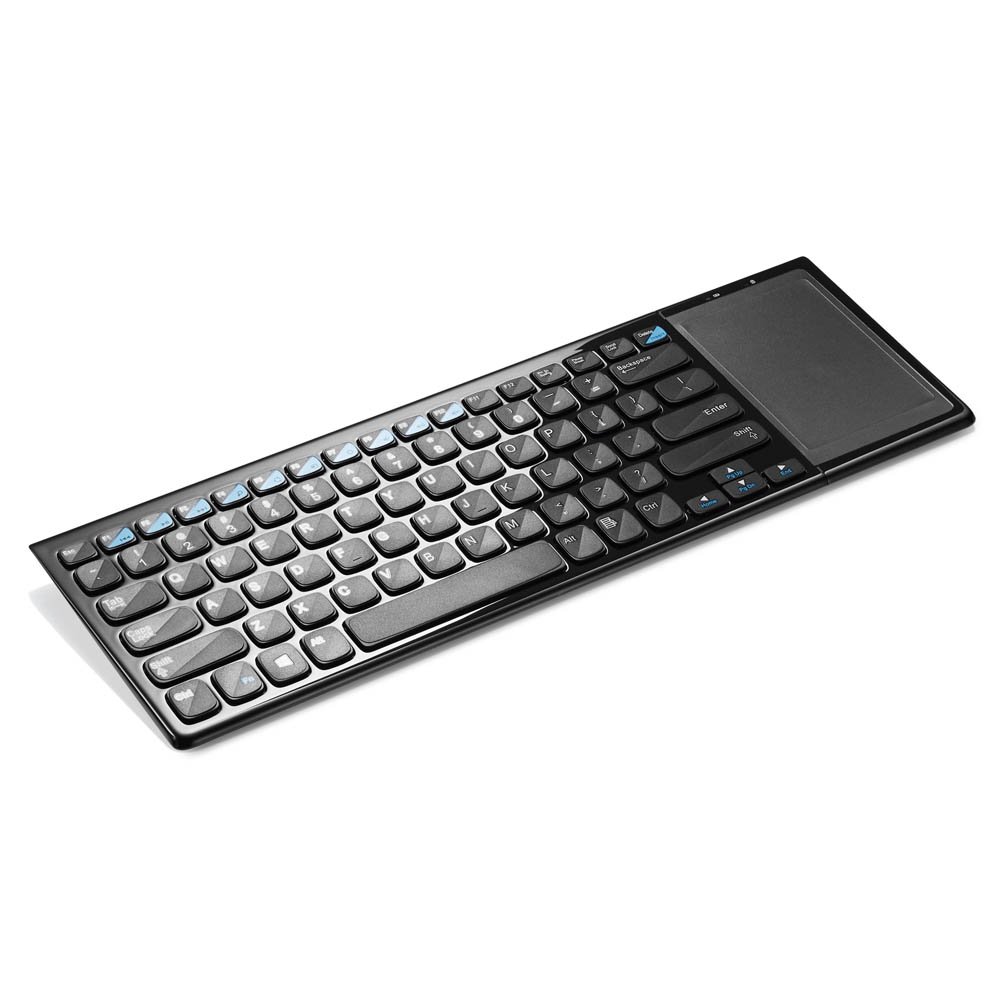
Слика 1: Multilaser TC190 Wireless Keyboard with Integrated Touchpad. This image shows the full keyboard layout with the touchpad located on the right side, indicating its compact design and integrated functionality.
- Распоред на тастатура: Standard QWERTY layout with multimedia function keys.
- Интегриран тачпед: Located on the right side, supporting multi-touch gestures.
- Преграда за USB приемник: Usually located in the battery compartment for storage.
- Прекинувач: On/Off switch to conserve battery life.
- Оддел за батерии: For inserting required batteries.
5. Поставување
- Инсталирајте батерии: Open the battery compartment cover on the back of the keyboard. Insert the required batteries (typically AAA, refer to the compartment for exact type and polarity). Close the cover securely.
- Поврзете го USB-приемникот: Locate the USB 2.4 GHz receiver, usually stored inside the battery compartment. Plug the USB receiver into an available USB port on your PC or Smart TV.
- Вклучување: Лизнете го прекинувачот за вклучување на тастатурата во положба „ВКЛУЧЕНО“.
- Автоматско поврзување: The keyboard should automatically connect to your device within a few seconds. No additional drivers are typically required for most operating systems.
6. Упатства за работа
6.1. Функции на тастатурата
The Multilaser TC190 features a standard keyboard layout. Use the keys as you would with any conventional keyboard for typing text, navigating menus, and executing commands.
- Функциски копчиња (Fn): Some keys may have secondary functions (e.g., volume control, media playback) accessible by pressing the Fn копчето истовремено со саканото функционално копче.
- Мултимедијални клучеви: Dedicated multimedia keys (if present) allow quick access to media controls.
6.2. Touchpad Functions
The integrated multi-touch touchpad replaces a traditional mouse. Below are common gestures:
- Допир со еден прст: Лев клик.
- Допирање со два прста: Десен-клик.
- Влечење со еден прст: Поместете го курсорот.
- Лизгање со два прста: Scroll up or down in documents and web страници.
- Штипнете за зумирање: Use two fingers to zoom in or out (application dependent).
7. Одржување
- Чистење: Use a soft, lint-free cloth to wipe the keyboard and touchpad. For stubborn dirt, slightly dampen the cloth with water or a mild, non-abrasive cleaner. Ensure no liquid enters the device.
- Замена на батерија: When the keyboard's performance degrades or it stops responding, replace the batteries. Always use fresh batteries of the correct type.
- Складирање: If storing the keyboard for an extended period, remove the batteries to prevent leakage. Store in a cool, dry place.
8 Смена на проблеми
| Проблем | Можно решение |
|---|---|
| Тастатурата не реагира. |
|
| Touchpad is not working correctly. |
|
| Проблеми со поврзувањето / Доцнење. |
|
9. Спецификации
| Карактеристика | Детал |
|---|---|
| Бренд | Мултиласер |
| Модел | TC190 |
| Поврзување | Безжична врска од 2.4 GHz (USB приемник) |
| Компатибилни уреди | компјутер, паметен телевизор |
| Опис на тастатурата | Мултимедија |
| Посебни карактеристики | Wireless, Integrated Multi-touch Touchpad |
| Извор на енергија | Напојува со батерија |
| Тежина на ставката | 800 грама |
10. Гаранција и поддршка
Multilaser products are manufactured to high-quality standards. For information regarding warranty terms and conditions, please refer to the warranty card included with your product or visit the official Multilaser website. For technical support or customer service, please contact Multilaser customer support through their official channels.
Службен Webсајт: www.multilaser.com.br (Ве молиме проверете за вашиот регионален webсајт)