
1. Вовед
Thank you for choosing the Baseus Encok S16 Neck Hung Bluetooth Wireless In-Ear Earphone. This manual provides detailed instructions for setup, operation, and maintenance to ensure optimal performance and longevity of your device. Please read this manual thoroughly before use.
2. Содржина на пакетот
Проверете дали сите артикли се присутни во пакувањето:
- 1 x Baseus Encok S16 Wireless Earphone
- 1 x Кабел за полнење
- 1 x Упатство за употреба
- 1 x Гарантна картичка

Image: Contents of the Baseus Encok S16 earphone package, showing the earphones, charging cable, user manual, and warranty card.
3. Производот завршиview
The Baseus Encok S16 earphones feature a neck-hung design for comfortable and secure wear. Key features include:
- Магнетна фиксација: Earbuds can be magnetically joined when not in use, preventing tangling and loss.
- Adjustable Coils: The earphone line length can be adjusted by sliding for a customized fit.
- Висококвалитетен звук: Equipped with a dynamic speaker unit, composite diaphragm, and independent tune trope structure for clear audio.
- Ефикасна моќност: Utilizes a British CSR chip and 120mAh battery for low power consumption and extended battery life.
- Универзална компатибилност: Smartly matches with smartphones and tablet PCs, compatible with all Bluetooth 4.0 enabled devices.

Image: Close-up of the Baseus Encok S16 earbuds demonstrating their magnetic connection capability.
4. Поставување
4.1 Полнење на слушалките
- Connect the provided charging cable to the charging port on the earphone's control unit.
- Поврзете го другиот крај од кабелот за полнење со USB извор на напојување (на пр., USB порт на компјутер, USB адаптер за ѕид).
- The indicator light will illuminate during charging and turn off or change color when fully charged.
- Целосното полнење обично трае приближно 1.5 до 2 часа.
4.2 Спарување преку Bluetooth
- Осигурајте се дека слушалките се целосно наполнети.
- Press and hold the Power button on the control unit until the indicator light flashes red and blue alternately, indicating pairing mode.
- На вашиот паметен телефон или уред со Bluetooth, одете во поставките за Bluetooth.
- Пребарај за available devices and select "Baseus Encok S16" from the list.
- Once connected, the indicator light will flash blue slowly or turn solid blue.
- Ако се побара лозинка, внесете „0000“.
5. Упатства за работа
5.1 Основни контроли
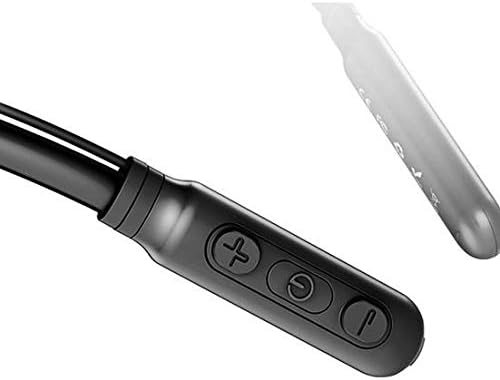
Image: Close-up of the Baseus Encok S16 earphone's inline control unit, showing the power/multi-function button, volume up, and volume down buttons.
| Копче | Функција |
|---|---|
| Копче за вклучување (центар) |
|
| Јачина на звук (+) |
|
| Намалување на јачината на звукот (-) |
|
5.2 Носење на слушалките
Place the neckband around your neck, ensuring the control unit is easily accessible. Insert the earbuds comfortably into your ears. Adjust the earphone line length using the sliding coils for a secure and comfortable fit.
6. Одржување
- Clean the earbuds and control unit regularly with a soft, dry cloth.
- Avoid exposing the earphones to extreme temperatures, humidity, or corrosive liquids.
- Store the earphones in a cool, dry place when not in use. The magnetic earbuds can help prevent tangling during storage.
- Не обидувајте се сами да ги расклопите или поправите слушалките, бидејќи тоа ќе ја поништи гаранцијата.
7 Смена на проблеми
| Проблем | Решение |
|---|---|
| Не може да се вклучи | Ensure the earphones are fully charged. Press and hold the Power button for 3 seconds. |
| Не може да се спари со уредот |
|
| Нема звук или низок волумен |
|
| Наизменична врска |
|
8. Спецификации
| Карактеристика | Детал |
|---|---|
| Бренд | Басеус |
| Број на модел | FWP-E-S16 |
| Технологија за поврзување | Bluetooth |
| Bluetooth верзија | 4.0 (compatible with devices enabling Bluetooth 4.0) |
| Форма фактор | In Ear, Neck Hung |
| Тип на контрола | Voice Control, Touch (via buttons) |
| Капацитет на батеријата | 120 mAh |
| Тежина | 30 грама |
| Вклучени компоненти | Wireless Earphone, Charging Cable, User Manual, Warranty Card |
9. Гаранција и поддршка
This product comes with a Limited Warranty. Please refer to the included Warranty Card for detailed terms and conditions regarding coverage and duration.
For technical support or warranty claims, please contact your retailer or visit the official Baseus webстраница за информации за корисничка поддршка.
Глобален трговски идентификациски број (GTIN): 06953156264489