
1. Вовед и повеќеview
The BLUEAIR Pro XL Air Purifier is designed to provide clean air in large office spaces, lobbies, and other extensive environments. Utilizing advanced HEPASilent Technology, it effectively removes airborne pollutants to improve air quality and promote a healthier environment.
Клучни карактеристики:
- True HEPA Performance: HEPASilent Technology with particle filtration and electrostatic charge captures 99.97% of airborne pollutants, including allergens, mold, dust, pet dander, smoke particles, and pollen.
- German Engineered Fans: Provides quiet yet powerful operation for peak performance and maximum airflow.
- Sleek Swedish Design: Professional and elegant design suitable for any office, workspace, business, or home environment.
- Revolutionary Filtration: Advanced filter media and an encapsulated particle-charging chamber deliver more clean air in less time.
- Голема област на покриеност: Effectively purifies air in environments between 1000 and 1200 square feet, AHAM rated at 1184 square feet.
- Air Intelligence Module: Features an automatic mode that adjusts fan speed based on detected particle and gas levels.


Официјално видео за производот:
Видео 1: Оверview of the Blueair Pro Series Purifiers, showcasinнивниот дизајн и функционалност.
Understanding Air Purifiers:
Video 2: Informative video explaining key factors to consider when choosing an air purifier, including filter types and technologies.
2. Поставување
Setting up your Blueair Pro XL Air Purifier is straightforward. Follow these steps to ensure proper installation and operation:
- Отпакување: Carefully remove the air purifier and all included components from the packaging.
- Подготовка на филтер: Before connecting the unit to power, open the filter compartment and remove any plastic packaging from the filters. Ensure filters are correctly seated.
- Поставување: Position the air purifier in a suitable location. Ensure there is at least 6 inches of clear space around all sides (especially the back and sides where air is drawn in) to allow for optimal airflow. Avoid placing it directly next to windows or balconies that are frequently open, as this can reduce efficiency.
- Поврзување за напојување: Приклучете го кабелот за напојување во заземјен електричен штекер.
- Почетна калибрација: Upon first power-up, the unit may take up to 24 hours to fully calibrate its air quality sensors and display accurate readings. During this period, the PM2.5 display might show dashes or inconsistent numbers. Allow the unit to operate continuously for 24 hours for optimal calibration.
3. Упатства за работа
The Blueair Pro XL features an intuitive control panel and can also be managed via a mobile application.
Функции на контролниот панел:

- Копче за вклучување: Притиснете за да го вклучите или исклучите уредот.
- Ноќен режим: Activates a quieter operation mode, ideal for undisturbed environments.
- Auto Mode (A): The purifier automatically detects air quality and adjusts fan speed accordingly to maintain optimal air purification.
- Контрола на брзината на вентилаторот: Manually adjust the fan speed to your preference.
- PM Display: Toggles between different particulate matter (PM) readings (e.g., PM2.5, PM10). A higher number indicates poorer air quality.
- Air Quality Indicator Light: A light bar on the front changes color based on real-time air quality:
- Green: Excellent air quality.
- Blue: Good air quality.
- Yellow: Moderate air quality.
- Црвено: Лош квалитет на воздухот.
Контрола на мобилни апликации:
The Blueair Pro XL can be controlled remotely via a dedicated mobile application. This allows you to monitor air quality, adjust settings, and receive notifications even when you are not near the unit. The app provides convenience and enhanced control over your air purification system.
4. Одржување
Regular maintenance ensures your Blueair Pro XL operates efficiently and effectively.
Замена на филтер:
- The Blueair Pro XL filters are designed for long-lasting performance. Typically, filters need to be replaced approximately еднаш годишно (every 8 to 12 months), depending on usage and air quality.
- The unit will indicate when filter replacement is due. Refer to the manual for specific instructions on how to replace the filters.
Чистење:
- Надворешноста на уредот може да се избрише со мека, дamp крпа.
- The mesh pre-filters (if applicable) can be cleaned more frequently (e.g., monthly) by vacuuming or gently wiping them to remove larger dust and pet dander particles.
5 Смена на проблеми
If you encounter any issues with your Blueair Pro XL, refer to the following common troubleshooting tips:
- No PM Reading on Display: If the PM2.5 display shows dashes or an inaccurate reading after initial setup, allow up to 24 hours for the sensors to calibrate.
- Уредот не се вклучува: Ensure the power cord is securely plugged into both the unit and a working electrical outlet. Check the power button on the control panel.
- Индикаторот за квалитет на воздух секогаш црвен/жолт: This indicates consistently poor air quality. Ensure the unit is placed optimally for airflow and that filters are not excessively dirty or due for replacement. If using in a very large or open space, consider closing doors/windows to improve efficiency.
- Невообичаени звуци: Check for any obstructions in the fan or filter compartments. Ensure filters are correctly installed. If the issue persists, contact customer support.
6. Спецификации
| Карактеристика | Спецификација |
|---|---|
| Бренд | БЛУЕР |
| Број на модел | Pro XL |
| Боја | Бело |
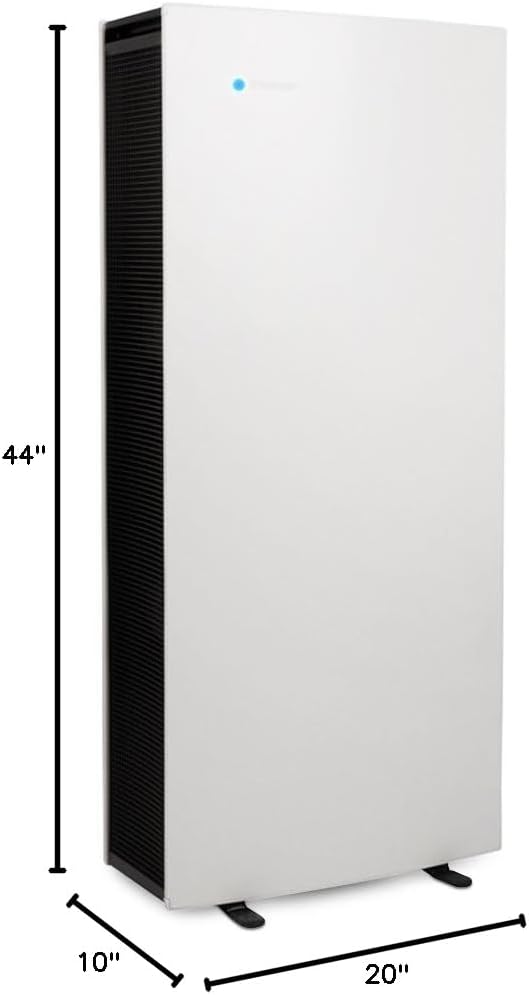
| Димензии на производот | 10" Д x 20" Ш x 44" В |
| Тежина на ставката | 77 фунти |
| Покриеност на подна површина | 1000 - 1200 Square Feet (AHAM rated at 1184 sq ft) |
| Ниво на бучава | 31 децибели |
| Тип на контролер | Контрола на копче |
| Ватtage | 256 вати |
| Класа на филтри | SmokeStop |
| Специјална карактеристика | Air Intelligence Module with Auto Mode |
| Вклучени компоненти | Blueair Pro XL air purifier, 3 particle filters, product documentation |
| Извор на енергија | AC/DC |
| UPC | 689122002200, 759005341952 |
7. Гаранција и поддршка
For warranty information, product registration, or technical support, please refer to the official Blueair webлокација или контактирајте го нивниот оддел за корисничка поддршка. Чувајте ја сметката за купување како доказ за купување за какви било гаранциски побарувања.