
1. Вовед
This manual provides detailed instructions for the installation, operation, and maintenance of the Lutron MA-ALFQ35 Maestro Companion Fan and Light Control. This device is designed to work in conjunction with a compatible Lutron Maestro Multi-Location Fan and Light Control (MA-LFQ3 or MA-LFQM) to provide multi-location control of your ceiling fan speed and light levels.
2. Важни безбедносни информации
ПРЕДУПРЕДУВАЊЕ: Ризик од електричен удар.
- Секогаш исклучувајте го напојувањето на прекинувачот или кутијата со осигурувачи пред да го инсталирате или сервисирате овој уред.
- Do not use this device with any fan or light control other than specified Lutron Maestro models.
- Installation must be performed by a qualified electrician or in accordance with all local and national electrical codes.
- Не ја надминувајте максималната ватиtage ratings for connected loads.
- Овој производ е само за внатрешна употреба.
3. Производот завршиview
The Lutron MA-ALFQ35 is a companion control unit that extends the functionality of a primary Maestro Multi-Location Fan and Light Control. It allows you to adjust both the fan speed and light intensity from additional locations within a room or area. This unit does not function independently and must be paired with a compatible Maestro master control.
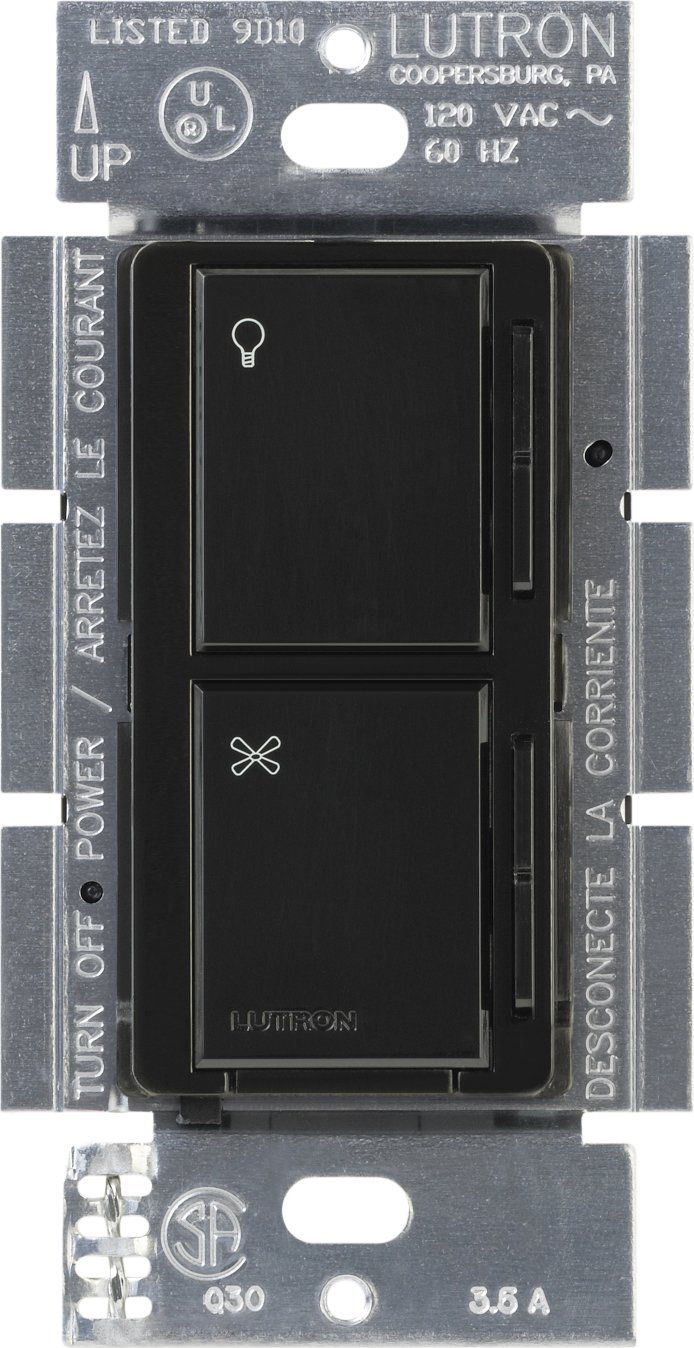
Слика 1: напред view of the Lutron MA-ALFQ35 Maestro Companion Fan and Light Control. This black wall-mounted unit features separate touch controls for light (top) and fan (bottom), with a small Lutron logo at the base.
Главните карактеристики вклучуваат:
- Multi-location control for fan speed and light level.
- Adjusts fan speed and light level from up to three locations (when used with additional companion controls).
- Sets and recalls 7 distinct light levels and fan speeds.
- Touch control method for intuitive adjustments.
4. Компатибилност
This companion control unit is designed to operate exclusively with specific Lutron Maestro Multi-Location Fan and Light Controls. It is not a standalone device and will not function without a compatible master unit.
Compatible Master Control Models:
- Lutron MA-LFQ3
- Lutron MA-LFQM
Ensure you have one of these master units installed before attempting to install the MA-ALFQ35 companion control.
5. Инсталација (Поставување)
Installation of the MA-ALFQ35 companion control requires basic electrical wiring knowledge. If you are unsure about any steps, consult a qualified electrician.
5.1 Пред да започнете
- Исклучете го напојувањето: Locate the circuit breaker or fuse box that controls the power to the fan and light fixture. Turn off the power completely to prevent electric shock. Verify power is off using a voltagд тестер.
- Идентификувајте ги жиците: Carefully remove the existing wall plate and switch. Identify the wiring in the wall box. This companion control typically requires a neutral wire, a hot wire, and a traveler wire connected to the master control. Refer to the wiring diagram provided with your господар Maestro Multi-Location Fan and Light Control for specific connections.
- Подгответе жици: Strip insulation from wires if necessary, ensuring approximately 1/2 inch (12 mm) of bare wire is exposed.
5.2 Wiring the Companion Control
The MA-ALFQ35 companion control connects to the master control unit via traveler wires. The exact wiring configuration will depend on your specific setup (e.g., 3-way or 4-way control). Always follow the wiring instructions provided with the господар Lutron Maestro Multi-Location Fan and Light Control (MA-LFQ3 or MA-LFQM).
- Connect the appropriate wires from the wall box to the terminals on the MA-ALFQ35.
- Проверете дали сите жичени врски се безбедни.
5.3 Mounting and Finishing
- Mount the Control: Carefully push the wired MA-ALFQ35 into the wall box. Secure it with the provided mounting screws.
- Инсталирајте ја тапетата: Attach a coordinating Claro wallplate (sold separately) over the companion control.
- Вратете ја моќноста: Вклучете го напојувањето повторно на прекинувачот или кутијата со осигурувачи.
- Тест функционалност: Test both the fan and light controls from all locations to ensure proper operation.
6. Операција
The Lutron MA-ALFQ35 companion control provides intuitive touch-based operation for your ceiling fan and lights.
6.1 Контрола на светлината
- Вклучи/исклучи: Tap the top section of the control (light icon) to turn the lights on or off.
- Прилагодете ја осветленоста: Press and hold the top section to dim or brighten the lights. Release when the desired brightness is reached. The control supports 7 distinct light levels.
- Потсети се претходно поставено: A quick tap will often recall the last set brightness level.
6.2 Контрола на брзината на вентилаторот
- Вклучи/исклучи: Tap the bottom section of the control (fan icon) to turn the fan on or off.
- Прилагодете ја брзината: Press and hold the bottom section to increase or decrease the fan speed. Release when the desired speed is reached. The control supports 7 distinct fan speeds.
- Потсети се претходно поставено: A quick tap will often recall the last set fan speed.
7. Одржување
The Lutron MA-ALFQ35 requires minimal maintenance.
- Чистење: To clean the surface of the control, wipe with a soft, damp крпа. Не користете абразивни средства за чистење, растворувачи или хемиски спрејови, бидејќи тие можат да ја оштетат завршната обработка или внатрешните компоненти.
- Нема делови што се сервисираат од страна на корисникот: There are no user-serviceable parts inside this unit. Do not attempt to open or repair the control.
8 Смена на проблеми
If your Lutron MA-ALFQ35 companion control is not functioning as expected, consider the following:
- Без моќност: Ensure the circuit breaker or fuse supplying power to the fan and light circuit is in the ON position.
- Не одговара: Verify that the master Maestro Multi-Location Fan and Light Control (MA-LFQ3 or MA-LFQM) is properly installed and functioning. The companion unit relies on the master unit for operation.
- Неправилно поврзување: Double-check all wiring connections, especially the traveler wires between the companion and master units. Refer to the master unit's installation guide for correct wiring diagrams. Ensure all connections are secure.
- Incompatible Master Unit: Confirm that the master control unit is one of the specified compatible Lutron Maestro models (MA-LFQ3 or MA-LFQM). This companion control will not work with other types of fan or light controls.
- Лабави врски: Turn off power at the breaker and re-check all wire connections in the wall box for tightness.
If problems persist after checking these points, contact Lutron customer support or a qualified electrician.
9. Спецификации
| Модел | MA-ALFQ35-BL |
| Бренд | Лутрон |
| Режим на работа | ВКЛУЧЕНО ИСКЛУЧЕНО |
| Контролен метод | Допрете |
| Број на позиции | 7 (for both fan speed and light level) |
| Ватtage | 300 Watts (when used with compatible master) |
| Компатибилни уреди | MA-LFQ3, MA-LFQM |
| Тип на монтирање | Приклучете го Монт |
| Тежина на ставката | 0.3 фунти |
| Боја | Црното |
10. Гаранција и поддршка
10.1 Информации за гаранцијата
The Lutron MA-ALFQ35 Maestro Companion Fan and Light Control comes with a 1-годишна ограничена гаранција on materials and manufacture. Please retain your proof of purchase for warranty claims. This warranty covers defects in materials and workmanship under normal use.
10.2 Поддршка за корисници
For technical assistance, troubleshooting beyond this manual, or warranty inquiries, please contact Lutron customer support. Visit the official Lutron webстраница за контакт информации и дополнителни ресурси.


