Sava lalana
Misaotra anao nividyasing the Amazon Basics Portable Wireless, 2.1 Bluetooth Speaker. This manual provides important information regarding the setup, operation, maintenance, and troubleshooting of your new speaker. Please read it thoroughly before use and retain it for future reference.
Vita ny vokatraview
The Amazon Basics Portable Wireless, 2.1 Bluetooth Speaker offers high-quality sound with a portable design. It features Bluetooth connectivity for wireless audio streaming, a 3.5mm aux-in jack for wired connections, and a built-in microphone for hands-free calling.
Fonosana fonosana
- Amazon Basics Portable Wireless, 2.1 Bluetooth Speaker
- USB Charging Cable
- Boky torolalana
Mpandahateny
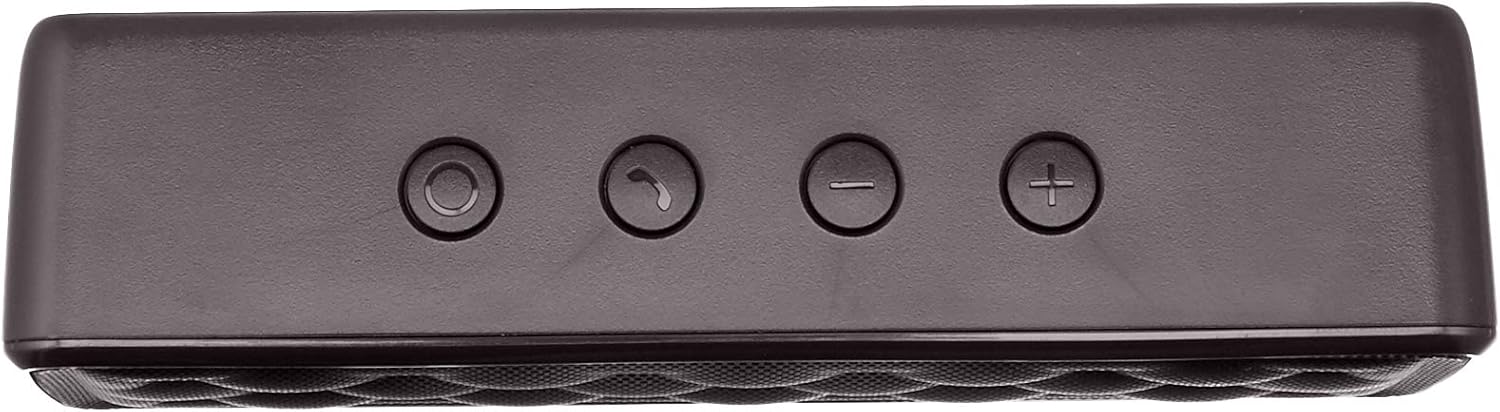


Hametraka
1. Fiampangana ny mpiteny
Before first use, fully charge the speaker. Connect the supplied USB charging cable to the Micro USB port on the speaker and the other end to a USB power source (e.g., computer USB port, USB wall adapter). The charging indicator light will illuminate during charging and turn off when fully charged. A full charge takes approximately 3 hours.
2. Mamelona/Mamono
To power on the speaker, slide the ON/OFF switch located on the rear panel to the "ON" position. To power off, slide the switch to the "OFF" position.
Torolàlana miasa
Pairing Bluetooth
- Ensure the speaker is powered on and within 33 feet (10 meters) of your Bluetooth-enabled device.
- The speaker will automatically enter pairing mode, indicated by a flashing blue LED light.
- Ao amin'ny fitaovanao, mandehana any amin'ny kiran'ny Bluetooth ary tadiavo ireo fitaovana misy.
- Select "Amazon Basics Speaker" from the list.
- Once paired, the blue LED light will stop flashing and remain solid. You can now stream audio wirelessly.
Note: If pairing fails, turn off the speaker and your device's Bluetooth, then repeat the steps. The speaker will attempt to reconnect to the last paired device automatically when powered on.
Famerenana feo
- Fanaraha-maso ny feo: Use the '+' and '-' buttons on the top panel of the speaker to adjust the volume. You can also control the volume from your connected device.
- Play/Pause: Use the controls on your connected device to play or pause audio.
Fiantsoana tsy misy tànana
When connected via Bluetooth, the speaker's built-in microphone allows for hands-free calling.
- Valio/Atsaharo ny antso: Press the Call/Bluetooth button once to answer an incoming call or end an ongoing call.
- Mandà ny antso: Press and hold the Call/Bluetooth button for 2 seconds to reject an incoming call.
- antso indray: Double-press the Call/Bluetooth button to redial the last number.
AUX Mode fampidirana
To connect non-Bluetooth audio devices, use the 3.5mm AUX input jack on the rear panel. Connect one end of a 3.5mm audio cable (not included) to the speaker's AUX port and the other end to your audio device's headphone jack. The speaker will automatically switch to AUX mode when a cable is inserted.

fikarakarana
- Diovy amin'ny lamba malefaka sy maina ny mpandahateny. Aza mampiasa mpanadio abrasive na solvents.
- Fadio ny mampibaribary ny mpandahateny amin'ny hafanana tafahoatra, ny hamandoana, na ny tara-masoandro mivantana.
- Aza atsoboka ao anaty rano ny fanamafisam-peo. Tsy tantera-drano izy io.
- Tehirizo ao amin'ny toerana mangatsiatsiaka sy maina ny mpandahateny rehefa tsy ampiasaina mandritra ny fotoana maharitra.
Fanamboarana
| OLANA | Antony mety hitranga | vahaolana |
|---|---|---|
| Tsy mandeha ny fanamafisam-peo. | Lany ny bateria. | Ampidiro ny fanamafisam-peo amin'ny alalan'ny tariby USB nomena. |
| Tsy afaka mampiaraka amin'ny alalan'ny Bluetooth. | Bluetooth is off on your device; speaker is out of range; speaker is already paired to another device. | Ensure Bluetooth is enabled on your device. Move the speaker closer to your device (within 33 feet). Disconnect from other devices or restart the speaker to enter pairing mode. |
| Tsy misy feo na feo ambany. | Volume is too low on speaker or device; incorrect input mode. | Increase volume on both the speaker and your connected device. Ensure the correct input mode (Bluetooth or AUX) is active. |
| Diso feo. | Volume is too high; speaker is too far from the device. | Reduce the volume on the speaker and/or your device. Move the speaker closer to your device. |
fepetra arahana
| Anarana modely | BSK30BK |
| Teknolojia fifandraisana | Bluetooth, Auxiliary |
| Wireless Range | Hatramin'ny 33 feet (10 metatra) |
| Power Output Speaker | 2 x 2.5 Watts (5 Watts total) |
| Fiainana bateria | Hatramin'ny 8 ora (amin'ny fiampangana feno) |
| Time Charging | Tokony ho 3 ora |
| refy (L x W x H) | 6.3" x 1.5" x 2.6" (16cm x 3.8cm x 6.6cm) |
| lanja | 8.1 ounces (0.23 kg) |
| Microphone anatiny | ENY |
| Tsy tantera-drano | tsy misy |
Warranty Information
This product is covered by a Limited Warranty. For detailed information regarding warranty terms and conditions, please refer to the documentation included with your purchase or visit the Amazon Basics official website.
Fanohanana ny mpanjifa
For further assistance, troubleshooting, or product information, please visit the Amazon Basics support page or contact customer service through your Amazon account.
Fampahalalana manan-danja momba ny fiarovana
- Aza disassemble, manamboatra, na manova ny vokatra.
- Arovy amin'ny rano sy ny hamandoana be ny vokatra.
- Avoid prolonged exposure to direct sunlight or extreme heat.
- Aza mandatsaka na mametraka ny vokatra amin'ny fiantraikany mahery vaika.
- Ario am-pahamendrehana ny vokatra sy ny bateria ao aminy araka ny lalàna eo an-toerana.
Vidéo vokatra
No official instructional videos from the seller are available for this product at this time.


