1. សេចក្តីផ្តើម
This manual provides comprehensive instructions for the safe and efficient use of the Creality Space PI Filament Dryer Plus and the Creality PLA Plus Filament. Please read this manual thoroughly before operating the device or using the filament to ensure optimal performance and longevity of your products.

Image 1.1: Creality Space PI Filament Dryer Plus and Creality PLA Plus Filament. This image displays the filament dryer unit alongside a spool of rainbow-colored PLA Plus filament and a 3D printed dragon model.
2. ព័ត៌មានសុវត្ថិភាព
អនុវត្តតាមការប្រុងប្រយ័ត្នសុវត្ថិភាពខាងក្រោមជានិច្ច ដើម្បីការពារការរងរបួស ឬការខូចខាតដល់ផលិតផល៖
- កុំដាក់ឧបករណ៍ឱ្យទឹក ឬសំណើម។
- ធានាឱ្យមានខ្យល់ចេញចូលបានត្រឹមត្រូវក្នុងអំឡុងពេលប្រតិបត្តិការ។
- រក្សាឱ្យឆ្ងាយពីដៃកុមារ និងសត្វចិញ្ចឹម។
- ប្រើតែអាដាប់ទ័រថាមពលដែលបានផ្តល់។
- Do not open or attempt to repair the device yourself. Contact authorized service personnel.
- The heating element can become hot. Avoid direct contact during operation.
3. មាតិកាកញ្ចប់
ផ្ទៀងផ្ទាត់ថាធាតុទាំងអស់មាននៅក្នុងកញ្ចប់៖
- Creality Space PI Filament Dryer Plus Unit
- អាដាប់ទ័រថាមពល
- PTFE Tubes (2x)
- Creality PLA Plus Filament (1KG Rainbow)
- សៀវភៅណែនាំអ្នកប្រើ (ឯកសារនេះ)
4. ផលិតផលលើសview
4.1. Dryer Components
Familiarize yourself with the main components of the Creality Space PI Filament Dryer Plus:
- អេក្រង់ LCD ប៉ះ៖ Displays temperature, time, and filament type settings. Used for interaction and control.
- ប៊ូតុងបញ្ជា៖ For navigating menus and adjusting settings.
- Filament Outlets: Two openings on the top for feeding filament to a 3D printer.
- Heating Chamber: Internal compartment where filament spools are placed for drying.
- PTC Heater: Efficient heating element for uniform drying.
- កង្ហារខាងក្នុង៖ Circulates hot air 360° for consistent drying.
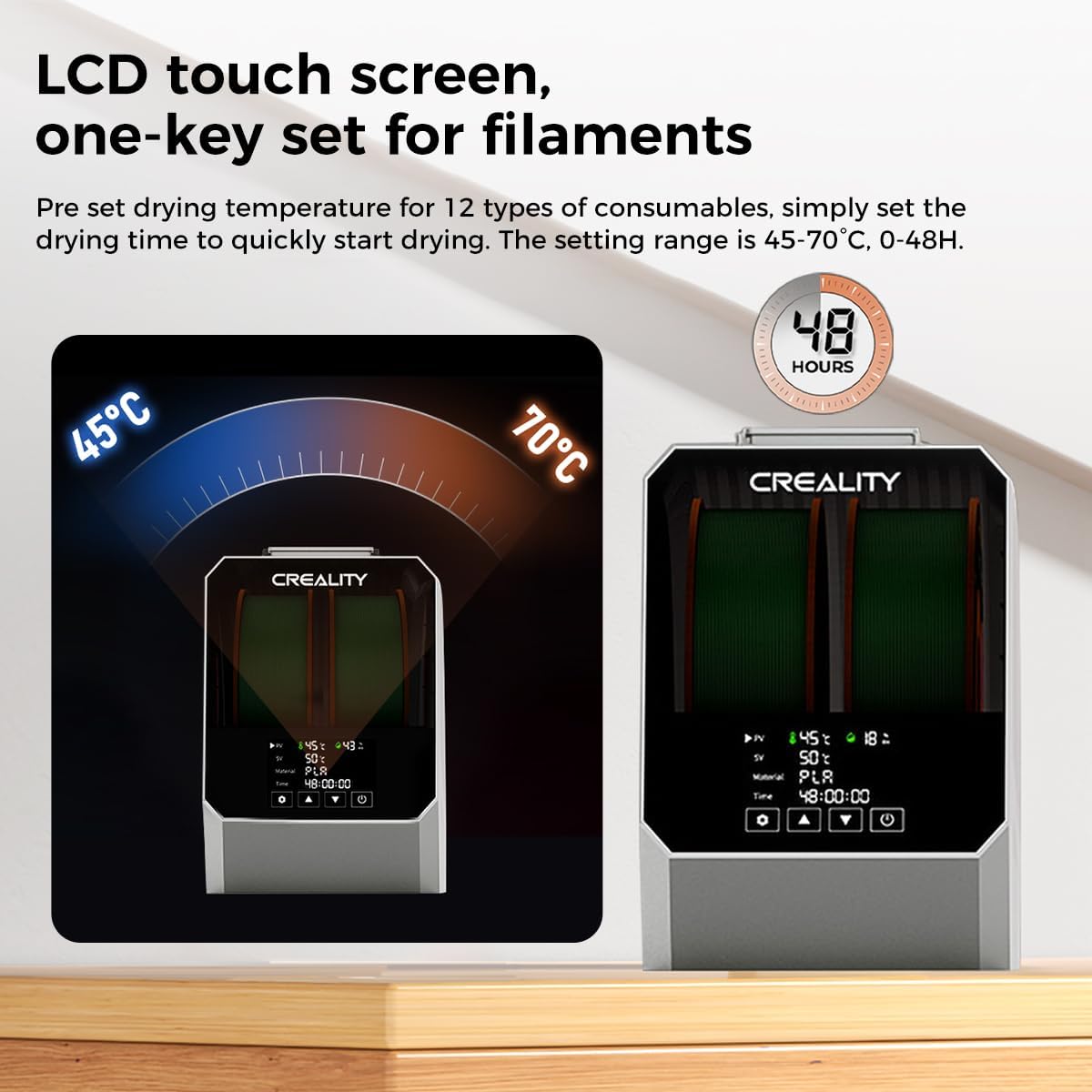
Image 4.1: LCD Touch Screen and Controls. This image highlights the dryer's LCD touch screen interface, showing temperature and time settings, and indicating one-key set functionality for various filaments.
5. រៀបចំ
5.1. ការវេចខ្ចប់
យកសមាសធាតុទាំងអស់ចេញពីកញ្ចប់ដោយប្រុងប្រយ័ត្ន។ រក្សាទុកកញ្ចប់សម្រាប់ការផ្ទុក ឬដឹកជញ្ជូននាពេលអនាគត។
5.2. ការតភ្ជាប់ថាមពល
Connect the provided power adapter to the dryer unit and then plug it into a suitable power outlet.
5.3. ការផ្ទុក filament
The Space PI Filament Dryer Plus supports up to two 1KG filament spools simultaneously.
- Open the lid of the dryer unit.
- Place one or two filament spools onto the internal rollers. Ensure the filament unwinds smoothly.
- Thread the filament through the designated holes on the top of the dryer.
- Insert the PTFE tubes into the filament outlets to guide the filament to your 3D printer(s).
- បិទគម្របដោយសុវត្ថិភាព។
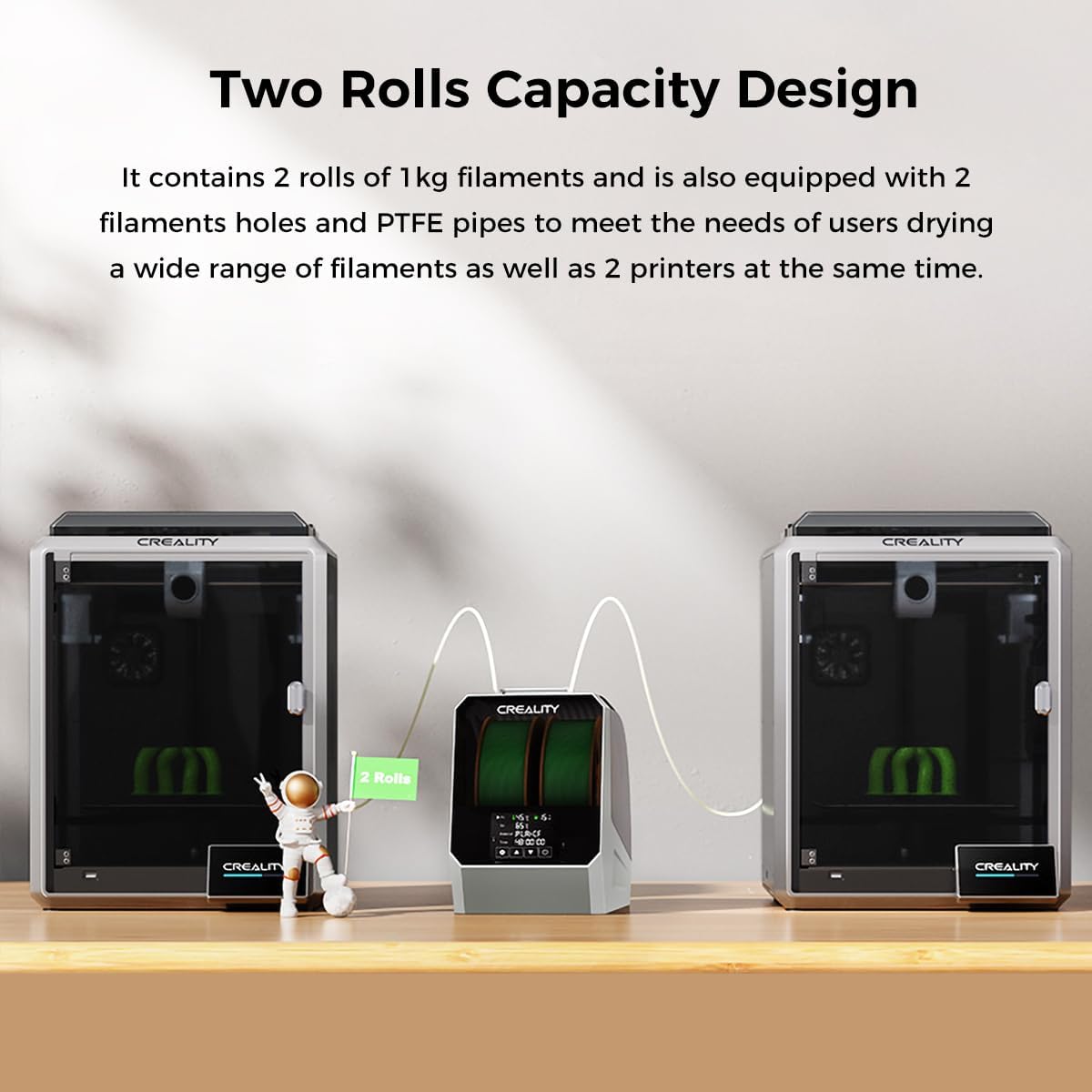
Image 5.1: Two Rolls Capacity Design. This image illustrates the dryer's capability to hold two 1KG filament spools, with filament being fed out through PTFE tubes to two separate 3D printers.
6. ប្រតិបត្តិការ
បើក / បិទថាមពល
Press the power button to turn the dryer on or off. The LCD screen will illuminate upon powering on.
6.2. Basic Drying Process
The dryer features one-key temperature settings for various filament types and allows for custom adjustments.
- Select Filament Type: On the LCD touch screen, choose the appropriate filament type from the pre-set options. The dryer supports up to 12 types, including PLA, ABS, TPU, PETG, PP, PC, PA, PET, PLA-CF, PA-CF, PETG-CF, and ASA.
- លៃតម្រូវសីតុណ្ហភាព៖ The adjustable temperature range is 45°C to 70°C. You can use the pre-set values or manually adjust to your desired temperature.
- កំណត់ពេលវេលា៖ The timer setting range is 0 to 48 hours. Select the recommended drying time for your filament or set a custom duration.
- ចាប់ផ្តើមស្ងួត៖ Confirm your settings to begin the drying process. The PTC heater and internal fan will activate, circulating hot air 360° for uniform drying.
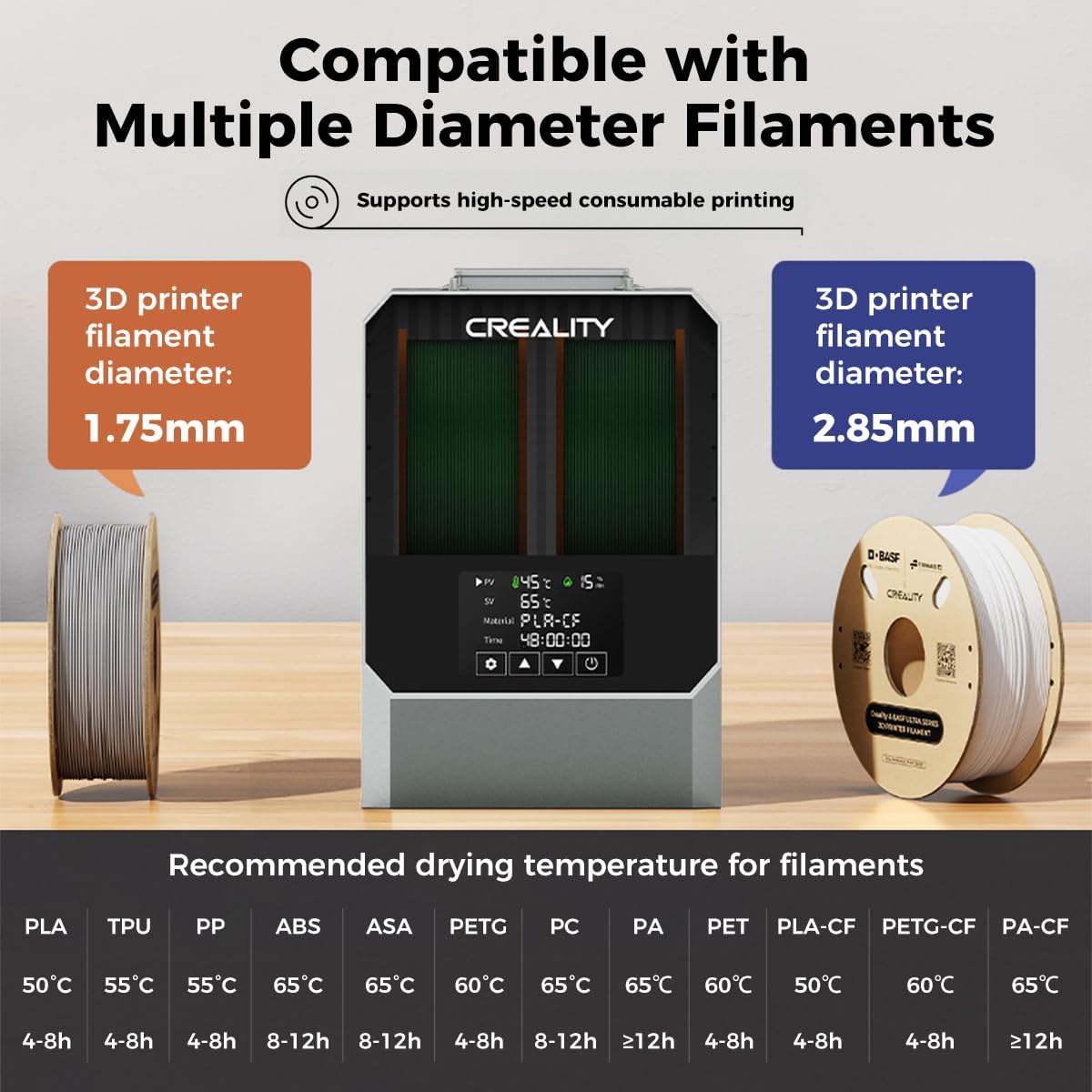
Image 6.1: Filament Compatibility and Recommended Drying Temperatures. This image displays the dryer's compatibility with 1.75mm and 2.85mm filaments and provides a table of recommended drying temperatures and times for various filament types.
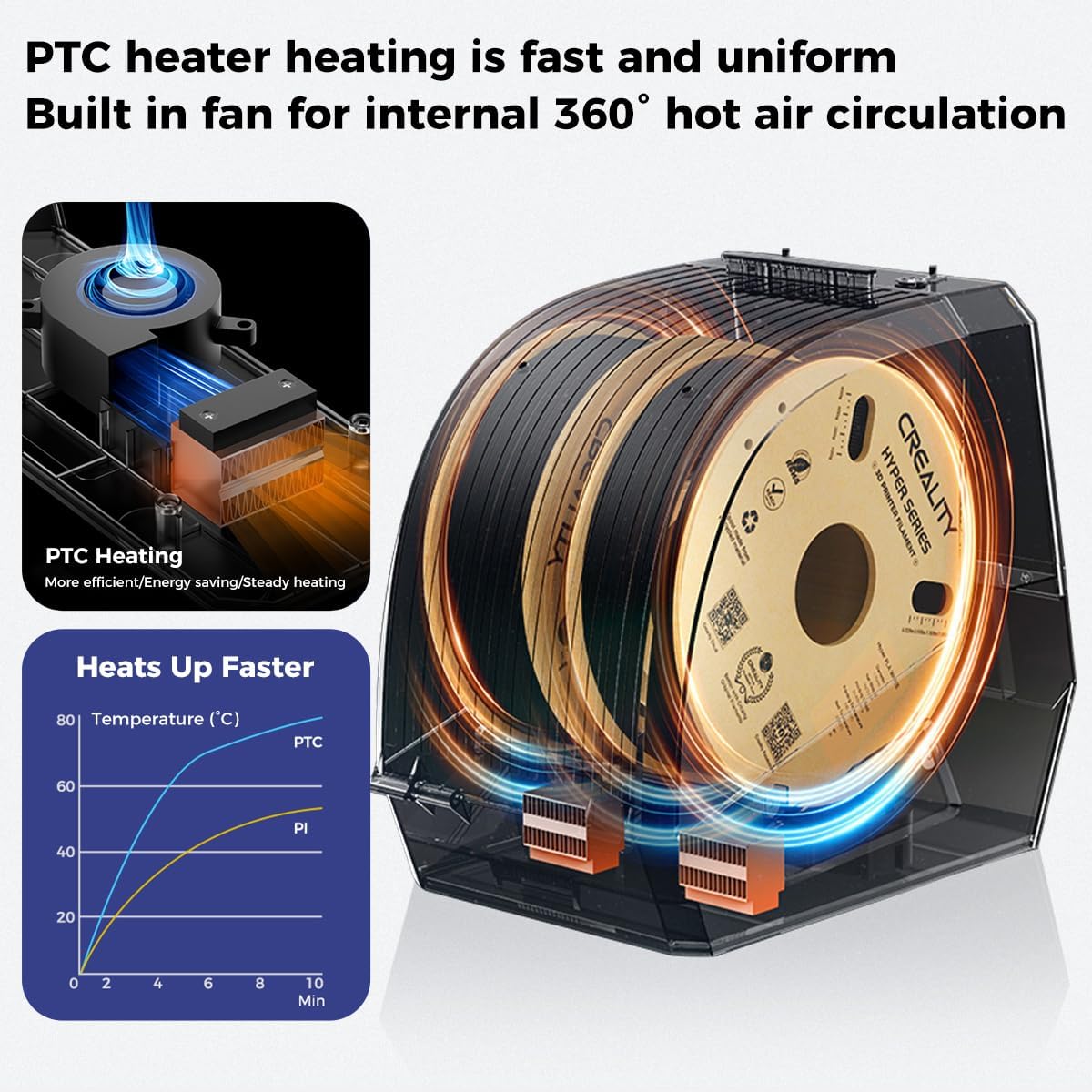
Image 6.2: PTC Heater and 360° Hot Air Circulation. This image illustrates the internal PTC heating element and the fan-driven 360-degree hot air circulation system, designed for efficient and uniform filament drying.
6.3. Drying Multiple Filaments
When drying two spools, ensure both filaments are properly loaded and threaded through their respective PTFE tubes to their printers. The dryer will apply the selected settings to both spools.
7. Creality PLA Plus Filament Usage
7.1. Filament Characteristics
Creality Ender-PLA+ filament offers enhanced toughness and improved printing performance compared to standard PLA. Key characteristics include:
- Stronger Toughness: Less susceptible to breakage, allowing for repeated bending.
- Neat Winding: Full mechanical winding ensures tidy spools, reducing tangling and potential snaps.
- Improved Print Quality: Designed to minimize odor, bubbles, tangling, clogging, and cracking during printing.

Image 7.1: Creality PLA Plus Filament Benefits. This image lists the advantages of using Creality PLA Plus filament, including 'No Odor', 'No Bubble', 'No Tangling', 'No Clog', and 'No Cracking'.

Image 7.2: High Strength and Better Toughness. This image visually compares the flexibility and strength of Creality Ender PLA+ filament (shown bending without breaking) against common PLA filament (shown breaking easily).

Image 7.3: Neat Winding of Filament. This image demonstrates the precise and neat winding of the filament on the spool, highlighting an accuracy of ±0.02mm for the 1.75mm diameter.
7.2. Recommended Printing Parameters for PLA Plus
For optimal results with Creality PLA Plus filament, consider the following printing parameters:
- Extruder Temperature: ៦០-៧០ អង្សាសេ
- Hotbed Temperature: No heating - 60°C
- ល្បឿនបោះពុម្ព៖ 40-100 មម / វិ

Image 7.4: Recommended Print Parameters for PLA Plus. This image displays the recommended extruder temperature (190-230°C), hotbed temperature (No heating - 60°C), and printing speed (40-100mm/s) for Creality Ender-PLA+ filament.
8. ការថែទាំ
8.1. ការសម្អាត
To maintain the dryer's performance and appearance:
- ត្រូវប្រាកដថាឧបករណ៍ត្រូវបានបិទ និងផ្តាច់ចេញមុនពេលសម្អាត។
- ជូតផ្នែកខាងក្រៅដោយក្រណាត់ទន់ និងស្ងួត។
- កុំប្រើសារធាតុសម្អាត ឬសារធាតុរំលាយ។
- Periodically check the filament path for any debris and clear as needed.
8.2. ការផ្ទុក
When not in use, store the dryer in a cool, dry place away from direct sunlight. If storing for extended periods, consider using the original packaging.
9. ការដោះស្រាយបញ្ហា
ប្រសិនបើអ្នកជួបប្រទះបញ្ហា សូមយោងទៅលើបញ្ហាទូទៅ និងដំណោះស្រាយខាងក្រោម៖
| បញ្ហា | មូលហេតុដែលអាចកើតមាន | ដំណោះស្រាយ |
|---|---|---|
| Dryer does not power on | No power supply; Faulty power adapter | Check power connection; Try a different outlet; Contact support if adapter is faulty. |
| Filament not drying effectively | Incorrect temperature/time settings; Overly saturated filament | Verify settings against recommended values (Section 6.2); Extend drying time. |
| Filament tangling inside dryer | Improper loading; Filament cross-wound | Ensure filament is loaded correctly and unwinds freely; Manually untangle if necessary. |
| បង្ហាញមិនឆ្លើយតប | កំហុសកម្មវិធីបណ្ដោះអាសន្ន | បិទថាមពល ហើយចាប់ផ្តើមឧបករណ៍ឡើងវិញ។ |
10. លក្ខណៈបច្ចេកទេស
10.1. Creality Space PI Filament Dryer Plus
- សមត្ថភាព៖ 2 rolls of 1KG filament spools
- ប្រភេទម៉ាស៊ីនកម្តៅ៖ 110W PTC Heater
- លំហូរខ្យល់៖ 360° hot air circulation with built-in fan
- ជួរសីតុណ្ហភាព៖ 45 ° C - 70 ° C
- ជួរម៉ោងកំណត់៖ 0 - 48 ម៉ោង។
- ភាពឆបគ្នានៃសរសៃ៖ Supports 12 types including PLA, ABS, TPU, PETG, PP, PC, PA, PET, PLA-CF, PA-CF, PETG-CF, ASA. Compatible with 1.75mm and 2.85mm diameter filaments.
- ទំងន់ធាតុ៖ Approximately 2.2 pounds (unit only)
10.2. Creality PLA Plus Filament (1KG Rainbow)
- សម្ភារៈ៖ Polylactic Acid (PLA+)
- ទំងន់សុទ្ធ៖ ០,៦ គីឡូក្រាម
- អង្កត់ផ្ចិត៖ 1.75mm (typical, check spool for exact)
- Diameter Accuracy: ± 0.02 ម។
- ពណ៌៖ ឥន្ទធនូ
11. ការធានា និងការគាំទ្រ
For warranty information, technical support, or service inquiries, please contact Creality customer support through their official webគេហទំព័រ ឬអ្នកលក់រាយដែលផលិតផលត្រូវបានទិញ។ សូមមានគំរូផលិតផលរបស់អ្នក និងកាលបរិច្ឆេទទិញដែលមានពេលទាក់ទងផ្នែកជំនួយ។


