
KEESON RF396B Remote Control User Manual
Product Overview

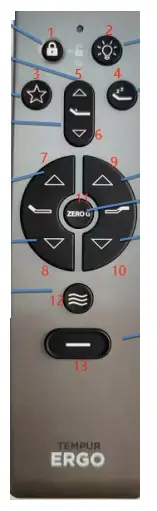
Fig 1: Button of Remote
- Child Lock 1
Click the Child Lock button for 3 second to lock or unlock the remote. - Bed lamp 2
Click the bed lamp button to open or shut the light under the bed. - Antisnore 3
Click the Antisnore button, the bed moves to Antisnore position, press and hold Antisnore button for 5s, until backlight flashes, the control set the current position as Antisnore position - TV 4
Click the TV button, the bed moves to TV position, press and hold TV button for 5s, until backlight flashes, the control set the current position as TV position. - LUMBAR UP 5
Press and hold LUMBAR UP button, Lumbar actuator moves out, stop when released. - LUMBAR DOWN 6
Press and hold LUMBAR DOWN button, Lumbar actuator moves in, stop when released. - HEAD UP 7
Press and hold HEAD UP button, head actuator moves out stop when released. - HEAD DOWN 8
Press and hold HEAD DOWN button, head actuator moves in, stop when released. - FOOT UP 9
Press and hold FOOT UP button, foot actuator moves out, stop when released. - FOOT DOWN 10
Press and hold FOOT DOWN button. foot actuator moves in, stop when released. - ZG 13
Click the ZG button, the bed moves to zeroG position, press and hold zeroG button for 5s, until backlight flashes, the control set the current position as zeroG position - MASSAGE
Click the MASSAGE button, massage motor switches massage intensity. massage intensity switches among 0-1-2-3: - Flat 13
Click the FLAT button, the bed goes flat
FCC
Any Changes or modifications not expressly approved by the party responsible for compliance could void the user’s authority to operate the equipment. This device complies with part 15 of the FCC Rules. Operation is subject to the following two conditions: (1) This device may not cause harmful interference, and (2) this device must accept any interference received, including interference that may cause undesired operation.
ISED RSS Warning:
This device complies with Innovation, Science and Economic Development Canada license exempt RSS standard(s). Operation is subject to the following two conditions: (1) this device may not cause interference, and (2) this device must accept any interference, including interference that may cause undesired operation of the device.
ISED RF exposure statement:
This equipment complies with ISED radiation exposure limits set forth for an uncontrolled environment. The device has been evaluated to meet general RF exposure requirement.
Documents / Resources
 | RF396B Remote Control |
References
- User Manualmanual.tools
I am trying to sync my controller to my bed and then to each other and alll I get is this crap. not helpful at all
How do I sync the KEESON RF396B remote control to the bed and pair multiple controllers?
The provided manual for the KEESON RF396B (Tempur Ergo) focuses on button functions and does not explicitly detail the initial pairing or multi-remote synchronization steps. However, based on standard procedures for this model type, please try the following:
If these steps do not work, please check the label on your control box under the bed for a specific 'Pairing' button, as the remote requires the base to be in 'Learning Mode' to sync.
Read the full Q&A page