


EGN100

EGN100 Multi Function Time Switch
 Device to be installed only by a qualified electrician according to the installation standards applicable in the country.
- Not suitable for controlling SELV loads.
Product Presentation
The EGN100 time switch is a clock with weekly and annual electronic programming that automatically controls different loads.
Examples of applications: street lighting, neon signs, shop windows, monuments, facades etc.
The integrated astronomical clock can be set to switch loads according to sunset and sunrise times.
The EGN100 switch is also compatible with the Hager Quicklink radio product line.
The connection of an EEN002 / EEN003 twilight sensor (optional) makes it possible to switch the loads according to brightness.
Programming is performed with a mobile terminal via Bluetooth ® technology using the configuration application (iOS and Android) available as a free download.
The keys
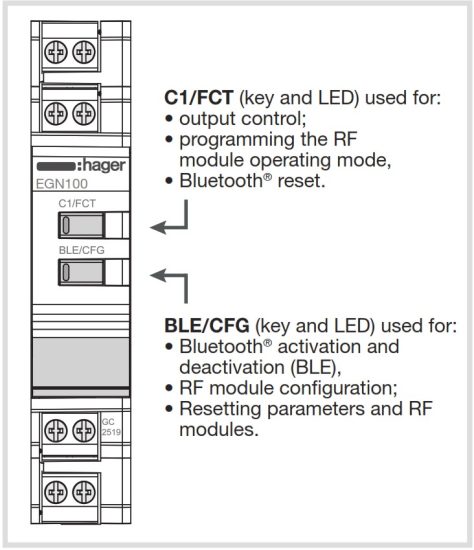
Image 1: Presentation of keys
Main features
- Product delivered with updated time and day (Paris).
- Programming by application via Bluetooth ® technology:
– automatic daylight savings time change;
– astronomical mode;
– programming by day or group of days;
– 100 program steps On, Off, pulses .
. - Permanent overrides On or Off.
- Temporary overrides On or Off.
- Exceptions (temporary, permanent or delayed) can be activated remotely using a push button.
- Twilight switch function via an EEN002 or EEN003 wired brightness sensor.
Multi-function Time Switch 1 Channel Bluetooth®
Additional information is available by scanning the displayed QR code with your mobile terminal.

 Before connecting the cell, or before carrying out any operations on it, cut the 230 V power supply to the clock.
Connection diagram

Figure 2: EGN100 connection diagram (1 output)
1 Override input or exception
2 Brightness sensor
Technical specifications
Electrical specifications
- Supply voltage: 230 V~ +10/-15% and 240 V~ ± 6%
- Network frequency: 50/60 Hz
- Consumption: < 170 mW
- Output: 1 non-insulated changeover contact with a voltage measurement of < 1 V for zero-crossing switching.
- Max. breaking capacity: AC1 μ 10A 230 V~
- Incandescent light bulbs:
– Power relay with normally open contact/2300 W
– Power relay with normally closed contact/1500 W - Halogen lamps: 230 V~ 2300 W
- Fluorescent tubes, compensated // (max. 45 μF):
– Power relay with normally open contact/400 W
– Power relay with normally closed contact/300 W - Fluorescent tubes, uncompensated, series compensated: 1000 W
- Compact fluorescent lamps and LED lamps:
– Power relay with normally open contact/400 W
– Power relay with normally closed contact/300 W - Min. breaking capacity: AC1 100 mA 230 V~
- Rated shock voltage: 4 kV
- Maximum switching speed at full load: 6 switching cycles/minute
Functional features
- Programming capacity: 100 steps
- Min. time between 2 steps: 1 minute
- Precision of operation: ± 0.25 s / day
- Bluetooth® radio frequency: 2.4 – 2.483 GHz
– Max. transmitting power: 10 mW
– Range: 10 m in free field
– Version: 4.2 - Mobile/PC terminal configuration
– iOS version equal to or greater than 8
– Android version equal to or greater than 5.1
– Windows version equal to or greater than 10
– Bluetooth® : version equal to or greater than 4.2 - Quicklink radio frequency: 868 – 870 MHz
– Max. transmitting power: 25 mW
– Receiver category 2
– Range: 100 m in free field - Insulation class: 2
- Action type: 2B
- Software class: Class A
- Ball test T°: 75 °C
- Upstream protection: 10 A circuit breaker
- Stated voltage and current for EMC emissions testing: 230 V~ / – 0.5 A
- Protection class: IP20 (case), IP30 (case under faceplate)
- Impact resistance: IK04
Battery
- Power reserve: 10 years
- Non-replaceable and non-rechargeable
Case
- Dimensions: 18 mm / 1 module
- DIN rail mounted independent product according to EN 60715
Environment
- Operating T° -5 °C to +45 °C
- Storage T° -25 °C to +70 °C
- Relative humidity: 95 % to 20 °C
- Pollution category 2
Connection with screw terminals
- Rigid 0.2 to 4 mm 2
- Flexible 0.2 to 2.5 mm 2
- Screw recess: PH1
Initial set-up
BLUETOOTH
The product must not be in “Quicklink” configuration mode.
To program and set the clock with a mobile terminal, the Bluetooth ® function must be activated.
Each time the BLE key is pressed (> 2 s) the function is enabled or disabled.
| BLE | LED status / Operation | |
 |
off | Bluetooth® disabled |
 |
 |
Bluetooth® enabled |
|
 |
Bluetooth® assembled and connected |
Figure 3: LED operation and status
CONFIGURATION APPLICATION
To set the clock, use the application and perform the installation as described below.
- Directly access the application’s download link by scanning the QR code printed on the instructions with a mobile terminal.
- Download and install the configuration application.
- Check that Bluetooth ® is enabled (see Initial set-up / BLUETOOTH).
- Pair your mobile terminal and your clock via the Bluetooth ® application.
- Program your product via the application. To do this, follow the application instructions to configure the clock.
Settings via the configuration application:
Settings for the use of your clock are available via the application as settings of:
- date and time;
- astronomical clock;
- wired input;
- daylight savings time change;
- twilight sensor.
LED status – Override – Exception
- Bluetooth® must be disconnected.
- The product must not be in “Quicklink” configuration mode.
Each time the C1 key is pressed briefly, the output status will change according to the following cycle:
| C1 | LED status / Operation | |
 |
off | “OFF /” exception on OFF of the output with regard to the current program; return to automatic mode will occur at the next program step |
 |
 |
The OFF override function forces an output when in OFF status. No other lower priority command is taken into account if the override is active. Only cancelling the override or a manual command via the front panel will authorize other commands again. |
 |
 |
Manual on OFF of the output (command only available if the product has an FCT button) |
 |
|
“ON /” exception on ON of the output with regard to the current program; return to automatic mode will occur at the next program step |
|
 |
Override on ON of the output (permanent command): the ON override function forces an output when in ON status. No other command is taken into account if the override is active. Only cancelling the override authorizes other commands again |
|
 |
Manual on ON of the output (command only available if the product has an FCT button) |
Figure 4: LED operation and status
Priority: Manual mode > Override > Exception
Configuration / “Quicklink”
FUNCTION CONFIGURATION
The RF module is used to associate the clock output (receiver) with one or more Quicklink radio comfort products (10 x transmitters max.).
Bluetooth® must be disconnected.
To associate a comfort product (transmitter), follow the steps indicated below:
- Start the function setup procedure on the transmitter by briefly pressing the CFG button.
• The CFG LED of the transmitter will turn on (red).
• The CFG LED of the receiver (clock) will turn on (red). - Select the input or push button to configure from the transmitter.
• The CFG LED of the transmitter will flash for 1 s (red). - Select the function to be configured on the receiver by briefly pressing the FCT key on the clock.
• The FCT LED of the receiver (clock) will turn on (the status and color of the LED indicate the function chosen; for more information on the LED functions and associated colors, refer to the Quicklink configuration by scanning the QR code opposite). - Confirm the function selected on the receiver by pressing (press > 2 s) the FCT key on the clock until the CFG LED flashes (red).
• The function identified by the color of the FCT LED is enabled on the receiver (clock). - Confirm the configuration on the transmitter by briefly pressing the CFG button.
• The CFG LED of the transmitter will turn off.
• The CFG LED of the clock (receiver) will turn off.
DELETING A FUNCTION
Resume the principle described in the previous chapter Function configuration, in step 3, select the “delete” function and then confirm it.
Key lock
The product must not be in “Quicklink” configuration mode.
The key lock / unlock function can be accessed via the configuration application or locally on the clock via the BLE/CFG and C1/FCT keys (Bluetooth ® must be disconnected).
To enable or disable this function locally, simultaneously press (> 2 s) both keys, CFG + FCT, (both LED(s) will flash quickly until released).
The time during which both CFG + FCT keys are pressed must not be > 10 s; otherwise, the product settings and programming may be deleted (see Reset).
Reset
The product must not be in “Quicklink” configuration mode.
Reset is accessible via the configuration application or locally on the clock via the BLE/CFG and C1/FCT keys (the Bluetooth® must be disconnected).
- To reset the Bluetooth® settings (installation key), press and hold (> 10 s) the FCT key until the LED flashes.
Other settings and programs will be preserved. - To reset the “Quicklink” RF settings and modules to the factory configuration, press and hold (> 10 s) the CFG key until the LED flashes.
The product settings will be preserved. - To reset the product settings and programs to factory settings, simultaneously press (> 10 s) both keys, CFG + FCT, (both LED(s) will flash quickly until released).
The “Bluetooth ® ” and RF settings and modules will be preserved.
Update
The clock firmware is updated via the configuration application.
A new “version” of the clock firmware is proposed when:

- the application starts on your mobile device;
- the mobile terminal and the clock are connected together via Bluetooth®.
Hager Controls hereby declares that this EGN100 Time Switch radio equipment complies with the essential requirements and other relevant provisions of Directive 2014/53/EU.
The EC declaration can be consulted on the website: www.hager.com
 How to dispose of this product (electrical and electronic equipment waste). (Applicable in the countries of the European Union and other European countries with selective collection systems). This symbol on the product or its documentation indicates that it should not be disposed of at the end of its life with other household waste. Since uncontrolled disposal of waste may be harmful to the environment or to human health, please separate it from other types of waste and recycle it responsibly. This allows sustainable reuse of material resources. Individuals may contact the distributor who sold the product or inquire with their city hall about where and how they can dispose of this product so that it is recycled in an environmentally friendly manner. Companies may contact their suppliers and consult the conditions of their sales contract. This product should not be disposed of with other commercial waste.
Usable anywhere in Europe  and Switzerland
The Bluetooth® word mark and logos are registered trademarks owned by Bluetooth SIG, Inc. and any use of such marks by Hager is under license. Other trademarks and trade names are those of their respective owners.
Hager Controls S.A.S., 33 rue Saint-Nicolas, B.P. 10140, 67703 SAVERNE CEDEX, France – www.hager.com
Hager 11.2020 – 6LE005554C
Documents / Resources
 | EGN100 Multi Function Time Switch |
References
- Hager worldwidewww.hager.com
- User Manualmanual.tools
Bonjour
Nous avons mélanger sur la même programmation des déclenchements sur données horaires et des déclenchements sur la lever et le coucher de soleil
Apparemment ça ne fonctionne pas bien
J’en pierre HERBET
Nous avons mélanger sur la même programmation des déclenchements sur données horaires et des déclenchements sur la lever et le coucher de soleil
Apparemment ça ne fonctionne pas bien
J’en pierre HERBET
Why is the EGN100 not working correctly when mixing time-based and astronomical (sunrise/sunset) triggers in the same program?
The Hager EGN100 supports both astronomical (sunrise/sunset) and time-based programming, but conflicts can occur if the logic of the steps overlaps or if the priority levels are misunderstood. Here are steps to troubleshoot and resolve the issue:
Read the full Q&A page