
1. Yliview
The Philips TAZ2200 is a versatile portable sound machine designed for enjoying various audio formats. It features a top-loading CD player, a front-loading cassette player, FM radio, Bluetooth 6.0 connectivity, USB playback, and a 3.5mm audio input. Equipped with dynamic bass boost and 6W stereo speakers, it delivers rich sound. The unit can be powered by AC mains or batteries and includes a carrying handle for portability.
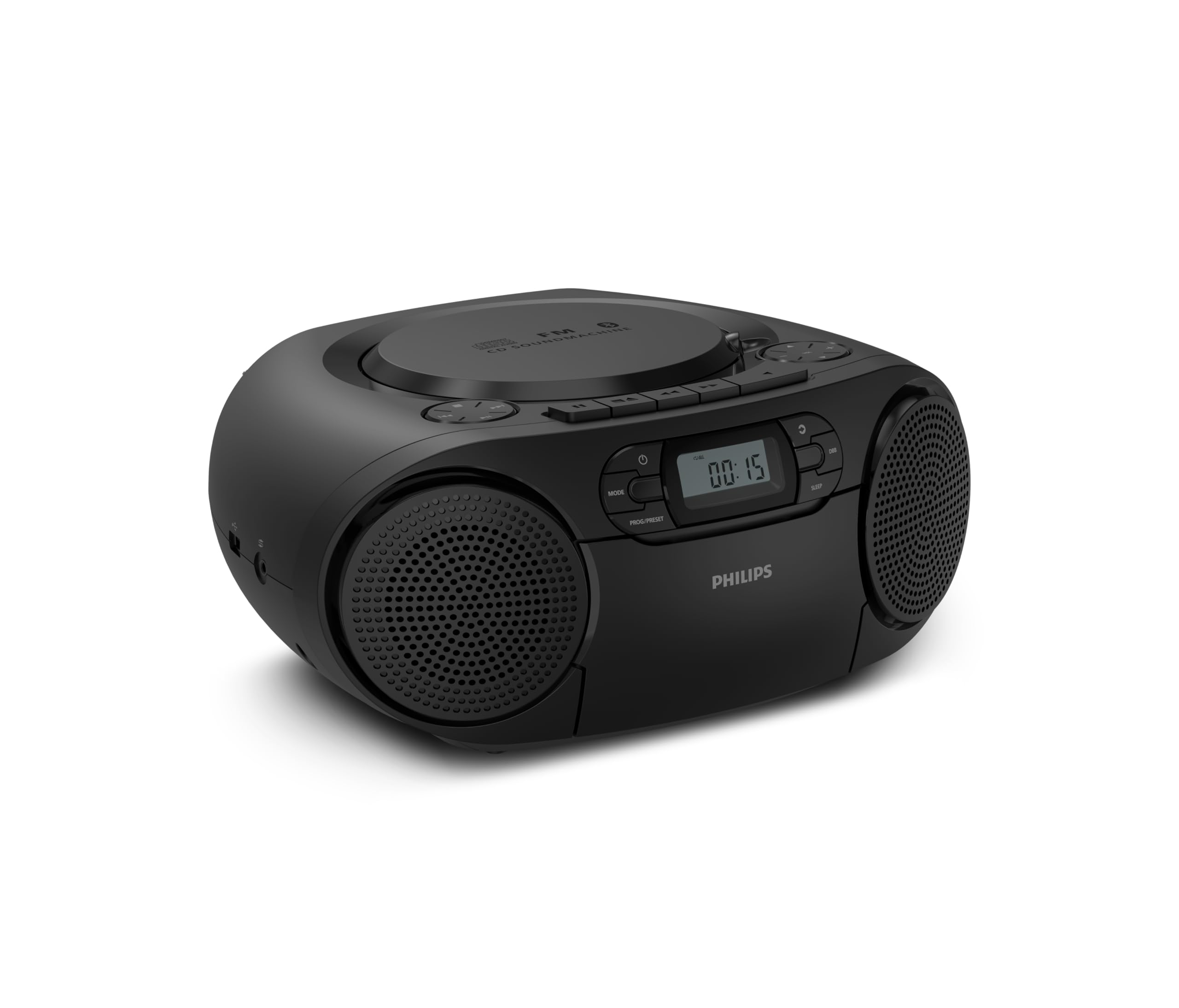
Edessä view of the Philips TAZ2200 CD Soundmachine, showing the main display and control buttons.
2. Turvallisuustiedot
Please read these safety instructions carefully before using your device and keep them for future reference. Incorrect use may result in hazards.
- Virtalähde: Käytä ainoastaan määritettyä verkkolaitetta tai akkuja. Varmista, että jännite ontage vastaa laitteen vaatimuksia.
- Vesi ja kosteus: Älä altista laitetta sateelle, kosteudelle, tippuvalle vedelle tai roiskeille. Älä aseta laitteen päälle nesteitä sisältäviä esineitä, kuten maljakoita.
- Ilmanvaihto: Ensure adequate ventilation. Do not block any ventilation openings. Maintain a minimum distance around the unit for sufficient ventilation.
- Lämpö: Älä aseta laitetta lähelle lämmönlähteitä, kuten pattereita, lämmönlähteitä, liesiä tai muita laitteita (mukaan lukien ampnostimet), jotka tuottavat lämpöä.
- Akut: Follow correct polarity when inserting batteries. Do not mix old and new batteries, or different types of batteries. Remove batteries if the unit is not used for a long period.
- Puhdistus: Irrota laite pistorasiasta ennen puhdistamista. Käytä pehmeää, kuivaa liinaa. Älä käytä nestemäisiä puhdistusaineita tai aerosolipuhdistusaineita.
- Huolto: Älä yritä huoltaa tätä tuotetta itse. Anna kaikki huoltotoimenpiteet pätevän huoltohenkilöstön tehtäväksi.
3. Mitä laatikossa on
Pura pakkausta varmistaessasi, että kaikki alla luetellut osat ovat mukana:
- Philips TAZ2200 CD Soundmachine
- Virtajohto
- Pika-aloitusopas
- Takuukirja
- Turvallisuuslomake
4. Ohjaimet ja liitännät
Etupaneelin säätimet
The front panel features the main display, power button, mode selection, program/preset buttons, and dynamic bass boost (DBB) control. Playback controls for CD and USB are also located here.

Yksityiskohtainen etuosa view showing the display, power, mode, program/preset, and DBB buttons.
Side and Rear Connections
The side of the unit provides a USB port for digital audio playback and a 3.5mm audio input jack for connecting external devices.

Sivu view illustrating the USB port and Audio Input jack.
The top of the unit houses the CD compartment and additional playback controls, while the rear features the AC power input and the FM antenna.

Yläosa view showing the CD compartment and associated controls.

Takaosa view displaying the AC power input and the telescopic FM antenna.
5. Asennus
5.1 Virtalähde
AC virta
- Varmista, että laite on sammutettu.
- Connect the supplied power cable to the AC IN socket on the rear of the sound machine.
- Plug the other end of the power cable into a wall power outlet.
Akun teho
For portable use, the unit can operate on 6 x C-type batteries (not included).
- Avaa paristolokeron kansi, joka sijaitsee laitteen pohjassa.
- Insert 6 C-type batteries, ensuring correct polarity (+/-) as indicated inside the compartment.
- Sulje paristolokeron kansi kunnolla.
5.2 Antennin säätö
For optimal FM radio reception, fully extend the telescopic antenna located at the rear of the unit. Adjust its position and angle to achieve the clearest signal.
6. Käyttöohjeet
6.1 Yleinen käyttö
- Virta päälle/pois: Paina POWER painiketta kytkeäksesi laitteen päälle tai pois päältä.
- Äänenvoimakkuuden säätö: Käytä VOL+ or ÄÄNENVOIMAKKUUS - painikkeita säätääksesi äänenvoimakkuutta.
- Dynaaminen bassonkorostus (DBB): Paina DBB button to activate or deactivate the dynamic bass boost feature for enhanced bass sound.
- Tilan valinta: Paina MODE button repeatedly to switch between CD, Cassette, FM Radio, Bluetooth, USB, and Audio Input modes.
6.2 CD-toisto
- Avaa laitteen päällä olevan CD-lokeron kansi.
- Place a CD (CD, CD-R, or CD-RW) with the label side facing up onto the spindle.
- Sulje CD-lokeron kansi.
- Paina MODE painiketta CD-tilan valitsemiseksi.
- Paina TOISTA/TAUKO -painiketta toiston aloittamiseksi.
- Käytä OHITA painikkeet (|< or >> |) ohittaaksesi kappaleita.
- Paina ja pidä painettuna |< or >> | to search within a track.
- Paina STOP -painiketta toiston lopettamiseksi.
6.3 Kasetin toisto
- Open the cassette compartment door on the front of the unit.
- Aseta kasetti sisään avoin reuna ylöspäin.
- Sulje kasettipesän luukku.
- Paina MODE -painiketta valitaksesi kasettitilan.
- Paina PELATA -painiketta toiston aloittamiseksi.
- Käytä NOPEA ETEENPÄIN or KEELA TAAKSEPÄIN painikkeita nauhan nopeaan kelaamiseen eteen- tai taaksepäin.
- Paina STOP -painiketta toiston lopettamiseksi.
6.4 FM -radio
- Paina MODE -painiketta valitaksesi FM-radiotilan.
- Automaattinen skannaus: Paina ja pidä painettuna PROG/PRESET -painiketta, joka skannaa ja tallentaa automaattisesti saatavilla olevat FM-asemat.
- Manuaalinen viritys: Paina TUNING painikkeet (|< or >> |) virittääksesi manuaalisesti halutulle taajuudelle.
- Esiasetusten tallentaminen: After tuning to a station, press PROG/PRESET once, then use |< or >> | valitaksesi esiasetetun numeron ja paina PROG/PRESET uudelleen vahvistaaksesi.
- Esiasetusten haku: Paina FM -tilassa PROG/PRESET repeatedly to cycle through saved preset stations.
6.5 Bluetooth-toisto
- Paina MODE -painiketta valitaksesi Bluetooth-tilan. Näytössä näkyy 'BT' ja se vilkkuu osoittaen, että laite on pariliitostilassa.
- Ota Bluetooth käyttöön Bluetooth-laitteessasi (älypuhelin, tabletti) ja hae käytettävissä olevia laitteita.
- Select "Philips TAZ2200" from the list of devices.
- Once paired, the unit will emit a confirmation sound, and 'BT' will stop flashing.
- Start playing audio on your connected device. The sound will be streamed to the sound machine.
6.6 USB-toisto
- Insert a USB flash drive into the USB port on the side of the unit.
- Paina MODE -painiketta valitaksesi USB-tilan.
- Laite tunnistaa automaattisesti yhteensopivan äänitiedoston ja aloittaa sen toistamisen. files (MP3, WAV, WMA).
- Käytä toiston säätimiä (TOISTA/TAUKO, OHITA, STOP) kuten tekisit CD-levyn toistossa.
6.7 Äänitulo (AUX)
- Connect one end of a 3.5mm audio cable (not included) to the AUDIO IN jack on the side of the sound machine.
- Connect the other end of the audio cable to the headphone jack or audio output of your external device (e.g., MP3 player, turntable).
- Paina MODE button to select Audio Input mode.
- Start playing audio on your external device. The sound will be played through the sound machine.
7. Huolto
- Laitteen puhdistus: Pyyhi laitteen ulkopinta pehmeällä, hieman kosteallaamp kangas. Älä käytä hankaavia puhdistusaineita tai liuottimia.
- CD-soittimen hoito: Keep the CD compartment clean. If the lens is dirty, use a specialized CD lens cleaner. Avoid touching the lens.
- Kasettisoittimen hoito: Puhdista teippipäät ja puristusrullat säännöllisesti kevyesti vanupuikolla.ampisopropyylialkoholilla.
- Akun vaihto: If using batteries, replace all 6 C-type batteries when the unit's performance diminishes or if the unit will not be used for an extended period.
- Varastointi: Kun laitetta ei käytetä, säilytä sitä puhtaassa, kuivassa paikassa, poissa suorasta auringonvalosta ja äärimmäisistä lämpötiloista.
8. Vianmääritys
If you encounter any issues with your Philips TAZ2200, please refer to the table below for common problems and solutions.
| Ongelma | Mahdollinen syy | Ratkaisu |
|---|---|---|
| Ei virtaa | Virtajohto ei ole kytketty; Paristot ovat tyhjentyneet tai asetettu väärin. | Tarkista verkkovirtaliitäntä; Vaihda paristot tai varmista oikea napaisuus. |
| Ei ääntä | Äänenvoimakkuus liian alhainen; Väärä tila valittu; Kuulokkeet kytketty. | Increase volume; Select the correct source mode (CD, FM, BT, etc.); Disconnect headphones. |
| CD-levy ei soi | CD inserted incorrectly; CD is dirty or scratched; CD format not supported. | Insert CD with label side up; Clean or replace CD; Ensure CD is CD-R/RW compatible. |
| Kasetti ei soi | Cassette inserted incorrectly; Tape is damaged. | Insert cassette correctly; Try a different cassette. |
| Huono FM -vastaanotto | Antennia ei ole ojennettu tai sijoitettu oikein; Heikko signaali. | Vedä teleskooppiantenni kokonaan ulos ja säädä sitä; kokeile siirtää laite toiseen paikkaan. |
| Bluetooth ei muodosta yhteyttä | Unit not in pairing mode; Bluetooth device too far; Device already paired with another unit. | Ensure unit is in Bluetooth mode and flashing; Move device closer; Disconnect from other devices. |
| USB-toisto-ongelmat | USB-asema ei ole asetettu oikein; Yhteensopimaton file alustus; USB-asema vioittunut. | Aseta USB-asema uudelleen; Varmista files are MP3, WAV, or WMA; Try a different USB drive. |
9. Tekniset tiedot
| Ominaisuus | Erittely |
|---|---|
| Merkki | Philips |
| Mallinumero | TAZ2200/10 |
| Yhteystekniikka | Bluetooth 6.0, USB, Audio Input (3.5mm) |
| Kaiuttimen tyyppi | Stereo (2 speakers) |
| Lähtöteho | 6 wattia (enintään) |
| Tuetut mediat | CD, CD-R, CD-RW, Cassette, USB (MP3, WAV, WMA) |
| Radioviritin | Digital FM with 20 presets |
| Virtalähde | AC (wired), 6 x C-type batteries (not included) |
| Mitat (PxLxK) | 24.5 x 28.5 x 12.5 cm |
| Paino | 1.35 kiloa |
| Väri | Hopea |
10. Takuu ja tuki
10.1 Tuotetakuu
This Philips TAZ2200 CD Soundmachine comes with a 2 vuoden takuu ostopäivästä lukien. Säilytä ostokuitti takuuvaatimuksia varten. Takuu kattaa valmistusvirheet ja toimintahäiriöt normaaleissa käyttöolosuhteissa.
10.2 Asiakastuki
For technical assistance, troubleshooting beyond this manual, or warranty service, please refer to the contact information provided in the warranty booklet included with your product. You can also visit the official Philips support website for your region for further assistance and FAQs.