Johdanto
Thank you for choosing the FiiO EH11 Retro On-Ear Bluetooth Headphones. These headphones combine classic design with modern wireless technology, offering high-resolution audio and versatile connectivity. This manual provides essential information for the proper use, setup, and maintenance of your EH11 headphones.
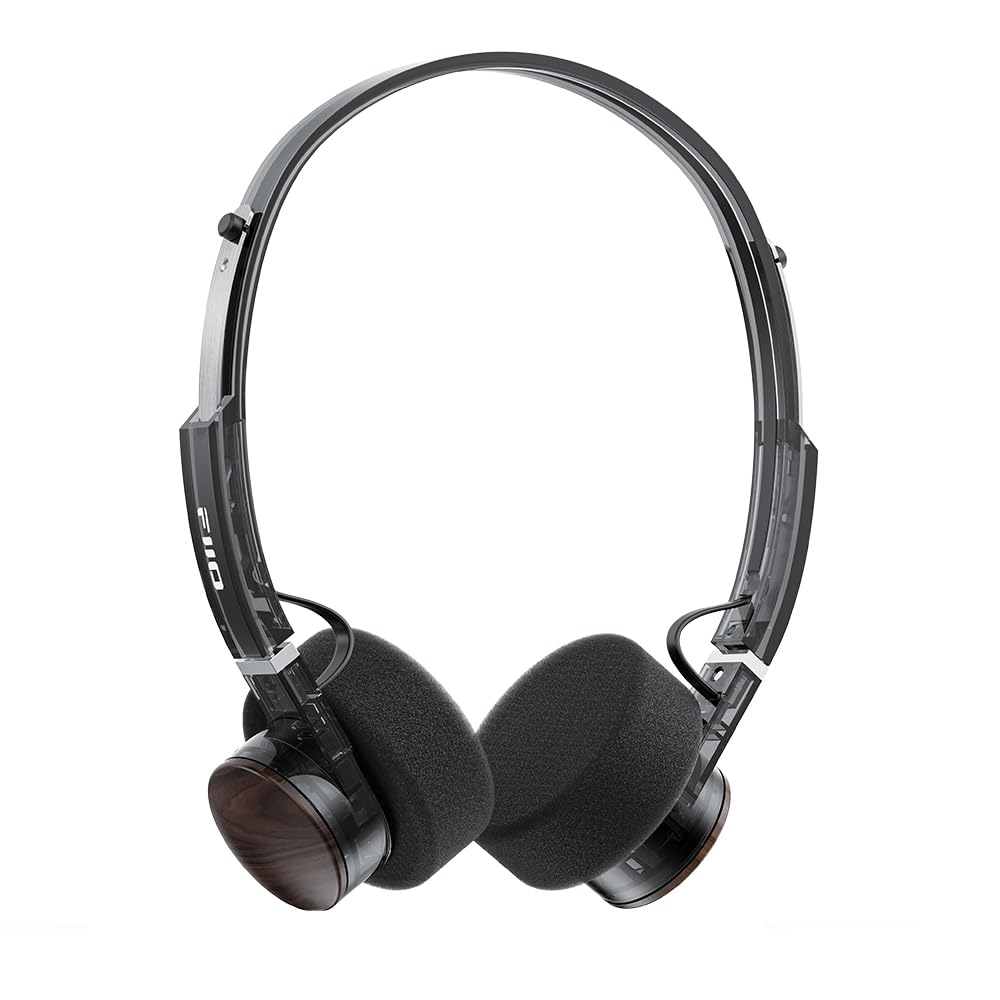
Image: FiiO EH11 Retro On-Ear Bluetooth Headphones, Transparent Black variant. This image displays the overall design of the headphones, highlighting the on-ear form factor and retro aesthetic.
Turvallisuustiedot
- Älä altista kuulokkeita äärimmäisille lämpötiloille, kosteudelle tai syövyttäville ympäristöille.
- Vältä kuuntelua suurella äänenvoimakkuudella pitkiä aikoja kuulovaurioiden estämiseksi.
- Älä pura, korjaa tai muuta laitetta itse. Ota yhteyttä valtuutettuun huoltohenkilöstöön saadaksesi apua.
- Pidä laite poissa lasten ja lemmikkien ulottuvilta.
- Hävitä tuote ja sen akku vastuullisesti paikallisten määräysten mukaisesti.
Pakkauksen sisältö
Tarkista, että pakkauksessasi on kaikki tarvittavat osat:
- FiiO EH11 Retro On-Ear Bluetooth Headphones
- Foam earpads (2 pairs)
- USB A to Type-C charging cable (1)
- Quick guide (1)
Tuote loppuview
Familiarize yourself with the main components and controls of your FiiO EH11 headphones.
Ohjaimet ja portit
- Virta-/monitoimipainike: Used for power on/off, play/pause, answering/ending calls.
- Äänenvoimakkuuden säädin: Rotatable knob for volume adjustment and track control.
- USB Type-C -portti: Kuulokkeiden lataamiseen.
- Mikrofoni: Sisäänrakennettu puheluita ja äänikomentoja varten.
- LED-ilmaisin: Näyttää virran, latauksen ja Bluetooth-tilan.
Note: Specific button functions and LED indicator behaviors are detailed in the 'Operating' section.
Asennus
1. Kuulokkeiden lataaminen
- Liitä USB Type-C -latauskaapeli kuulokkeiden latausporttiin.
- Liitä kaapelin toinen pää USB-virtalähteeseen (ei sisälly toimitukseen) tai tietokoneen USB-porttiin.
- LED-merkkivalo näyttää latauksen tilan (esim. punainen latauksen aikana, sammunut, kun täyteen ladattu).
- Täysi lataus kestää noin 1.5 tuntia ja tarjoaa jopa 30 tuntia toistoaikaa.
Description: Connect the provided USB-C cable to the headphone's charging port and a power source to charge the internal battery.
2. Virta päälle / pois
- Virta päälle: Press and hold the Power/Multi-function button for approximately 3 seconds until the LED indicator lights up and you hear a power-on prompt.
- Virta pois: Press and hold the Power/Multi-function button for approximately 5 seconds until the LED indicator turns off and you hear a power-off prompt.
3. Bluetooth-pariliitos
- Varmista, että kuulokkeista on katkaistu virta.
- Paina virta-/monitoimipainiketta noin 5–7 sekuntia, kunnes LED-merkkivalo vilkkuu vuorotellen punaisena ja sinisenä osoittaen pariliitostilaa.
- Ota Bluetooth käyttöön laitteellasi (älypuhelin, tabletti, tietokone) ja hae käytettävissä olevia laitteita.
- Select "FiiO EH11" from the list of found devices.
- Once connected, the LED indicator will flash blue periodically, and you will hear a connection prompt.
4. Kahden laitteen yhteys
The EH11 supports simultaneous connection to two Bluetooth devices.
- Yhdistä kuulokkeet ensimmäiseen laitteeseen yllä kuvatulla tavalla.
- Poista Bluetooth käytöstä ensimmäisessä laitteessa. Kuulokkeet siirtyvät takaisin pariliitostilaan.
- Yhdistä kuulokkeet toisen laitteen kanssa.
- Ota Bluetooth uudelleen käyttöön ensimmäisessä laitteessa. Kuulokkeiden pitäisi muodostaa automaattisesti yhteys molempiin laitteisiin.
- You can now seamlessly switch between audio sources from the two connected devices.
5. FiiO Control App
Download the FiiO Control App from your device's app store to unlock additional features and customization options, including EQ presets and gaming mode settings.
- Etsi "FiiO Control" in the App Store (iOS) or Google Play Store (Android).
- Install the app and ensure your EH11 headphones are connected via Bluetooth.
- Open the app to access settings such as EQ, gaming mode, and firmware updates.
Käyttöohjeet
Musiikin toisto
- Toista/tauko: Paina virta-/monitoimipainiketta lyhyesti.
- Ääni kovemmalle: Rotate the Volume knob clockwise.
- Äänenvoimakkuutta pienemmälle: Rotate the Volume knob counter-clockwise.
- Seuraava kappale: Double-click the Volume knob.
- Edellinen kappale: Triple-click the Volume knob.
Puhelujen hallinta
- Puhelun vastaaminen/lopetus: Paina virta-/monitoimipainiketta lyhyesti.
- Hylkää puhelu: Paina virta-/monitoimipainiketta ja pidä sitä painettuna 2 sekunnin ajan.
Pelitila
Activate Gaming Mode via the FiiO Control App to enhance in-game audio cues like footsteps and gunshots for a more immersive experience. This mode also optimizes latency.
LDAC High-Resolution Audio
The FiiO EH11 supports LDAC codec for high-resolution wireless audio. Ensure your source device also supports LDAC and that it is enabled in your device's Bluetooth settings for the best audio quality.
Huolto
Puhdistus
- Pyyhi kuulokkeet pehmeällä, kuivalla ja nukkaamattomalla liinalla.
- Älä käytä vahvoja kemikaaleja, puhdistusliuottimia tai vahvoja pesuaineita.
- Vältä kosteuden joutumista aukkoihin.
Korvatyynyn vaihto
The foam ear pads are detachable for easy cleaning and replacement. Gently pull the ear pads off the earcups to remove them. Align the new ear pads with the earcups and press them firmly into place until they are securely attached.
Two pairs of different-colored official ear pads are included in the package for customization.
Varastointi
When not in use, store the headphones in a cool, dry place, away from direct sunlight and extreme temperatures. Avoid placing heavy objects on the headphones.
Vianetsintä
- Ei virtaa:
- Varmista, että kuulokkeet ovat täyteen ladatut.
- Try connecting to a different charging cable or power source.
- Ei voida yhdistää laitteeseen:
- Varmista, että kuulokkeet ovat pariliitostilassa (LED-valo vilkkuu punaisena ja sinisenä).
- Varmista, että Bluetooth on käytössä laitteessasi.
- Siirrä kuulokkeet lähemmäs laitettasi.
- Kokeile käynnistää sekä kuulokkeet että laite uudelleen.
- Tyhjennä aiemmat Bluetooth-yhteydet laitteestasi.
- Ei ääntä tai hiljainen äänenvoimakkuus:
- Tarkista äänenvoimakkuus sekä kuulokkeista että yhdistetystä laitteesta.
- Varmista, että kuulokkeet on kytketty oikein laitteeseesi.
- Kokeile toistaa ääntä toisesta sovelluksesta tai lähteestä.
- Huono äänenlaatu:
- Varmista, ettei kuulokkeiden ja laitteen välissä ole esteitä.
- Siirry kauemmas häiriölähteistä (esim. Wi-Fi-reitittimet, muut Bluetooth-laitteet).
- If using LDAC, ensure your source device supports it and it is enabled.
Tekniset tiedot
| Ominaisuus | Erittely |
|---|---|
| Mallin nimi | EH11 |
| Yhteystekniikka | Bluetooth |
| Langaton viestintätekniikka | Bluetooth |
| Ääniohjaimen tyyppi | Dynaaminen elementti (40 mm) |
| Kuulokkeen muoto | Korvassa |
| Akun kesto | Jopa 30 tuntia |
| Latausaika | Noin 1.5 tuntia |
| Paino | Noin 92 g (3.25 unssia) |
| Erikoisominaisuus | LDAC High-Resolution Bluetooth Audio, Dual Device Connection, FiiO Control App Support, Gaming Mode |
| Mukana olevat komponentit | Foam earpads*2, Quick guide*1, USB A to Type-C charging cable*1 |
Takuu ja tuki
FiiO products come with a limited warranty. For detailed warranty information, technical support, or service inquiries, please refer to the official FiiO websivustolta tai ota yhteyttä paikalliseen jälleenmyyjään.
Lisätietoja ja yhteystiedot löydät osoitteesta FiiO Official Store.


