1. Johdanto
Thank you for choosing the HARDELL Mini Cordless Rotary Tool. This versatile and compact tool is designed for various light-duty tasks such as sanding, polishing, drilling, carving, and engraving. Its cordless design and multiple speed settings provide flexibility and precision for your DIY projects and crafts. Please read this manual thoroughly before use to ensure safe and optimal operation.
2. Turvallisuustiedot
- Käytä aina asianmukaisia henkilönsuojaimia, mukaan lukien suojalaseja, käytön aikana.
- Pidä työalue puhtaana ja hyvin valaistuna. Sotkuiset tai tummat alueet aiheuttavat onnettomuuksia.
- Älä käytä sähkötyökaluja räjähdysvaarallisissa tiloissa, kuten syttyvien nesteiden, kaasujen tai pölyn lähellä.
- Pidä lapset ja sivulliset loitolla käyttäessäsi sähkötyökalua. Häiriöt voivat johtaa siihen, että menetät hallinnan.
- Vältä käynnistymistä vahingossa. Varmista, että kytkin on pois päältä -asennossa ennen kuin kytket akun, nostat tai kannat työkalua.
- Älä käytä sähkötyökalua väkisin. Käytä sovellukseesi sopivaa sähkötyökalua.
- Irrota akku sähkötyökalusta ennen säätöjen tekemistä, lisävarusteiden vaihtamista tai sähkötyökalujen varastointia.
- Säilytä käyttämättömät sähkötyökalut poissa lasten ulottuvilta äläkä anna sähkötyökalua tai näitä ohjeita tuntemattomien käyttää sähkötyökalua.
- Huolla sähkötyökaluja ja tarvikkeita. Tarkista liikkuvien osien kohdistusvirhe tai kiinnittyminen, osien rikkoutuminen ja muut olosuhteet, jotka voivat vaikuttaa sähkötyökalun toimintaan.
- Käytä sähkötyökalua, lisävarusteita ja työkalun teriä näiden ohjeiden mukaisesti ottaen huomioon työolosuhteet ja suoritettava työ.
- This rotary tool is not designed for heavy-duty tasks.
3. Pakkauksen sisältö
The HARDELL Mini Cordless Rotary Tool kit includes the following items:
- HARDELL Mini Cordless Rotary Tool (Orange)
- USB-C latauskaapeli
- Sekalaisia lisävarusteita (35 osaa), mukaan lukien:
- Hiomanauhat
- Kiillotustyynyt
- Hiomapäät
- Poranterät
- Engraving tips
- Leikkauspyörät
- Collets (various sizes)
- Wrench for accessory changes

Image: The HARDELL Mini Cordless Rotary Tool shown with its included USB-C charging cable and various accessories, such as sanding bands, cutting discs, drill bits, and grinding heads.
4. Tuote ohiview
Familiarize yourself with the components of your HARDELL Mini Cordless Rotary Tool:

Image: Diagram showing the key parts of the rotary tool, including the Locking Collar, Spindle Lock Button, On/Off Button, Speed Control Button, Unique Cooling Device, and Type-C Charging Port.
- Lukituskaulus: Kiinnittää lisävarusteet tukevasti paikoilleen.
- Karan lukituspainike: Quick collet lock for fast accessory changes. Caution: Do not press this button when the device is running.
- Päälle/pois-painike: Käynnistää tai sammuttaa työkalun.
- Nopeudensäätöpainikkeet (+/-): Adjusts the rotational speed. The "+" button increases speed, and the "-" button decreases speed.
- LED-valo: Illuminates the work area for enhanced precision and visibility.
- Type-C latausportti: For convenient charging using a USB-C cable.
- Ainutlaatuinen jäähdytyslaite: Designed to dissipate heat during operation.
Nopeusasetukset
The tool features 5-speed settings for various applications:
- Nopeus 1: 5000 RPM (Recommended for polishing)
- Nopeus 2: 8000 RPM (Recommended for sanding)
- Nopeus 3: 11000 RPM (Recommended for carving)
- Nopeus 4: 14000 RPM (Recommended for grinding)
- Nopeus 5: 18000 RPM (Recommended for drilling)
5. Asennus ja lisävarusteiden asennus
Lisävarusteiden asianmukainen asennus on ratkaisevan tärkeää turvallisen ja tehokkaan toiminnan kannalta.
General Accessory Installation
- Paina karan lukituspainike alas ja ruuvaa mutteri irti.
- Choose the suitable collet and insert it into the tool. Then, place the black nut over the collet. Install the accessory you need to use.
- Press the spindle lock button again, then tighten the nut to secure the accessory.

Image: Visual guide demonstrating the four steps to install various accessories into the rotary tool's collet.
Installing a Sanding Band
- Aseta hiomarumpu holkkiin ja kiristä mutteri.
- Löysää hiomarummun ruuvia.
- Install the sanding band onto the drum.
- Press down the spindle lock button and tighten the screw of the sanding drum with the provided wrench.

Image: Visual instructions for attaching a sanding band to the rotary tool, showing the drum, band, and tightening process.
Installing an HSS Cutting Disc or Sanding Paper
- Aseta pyörän kara holkkiin ja kiristä mutteri.
- Dismantle the screw of the wheel mandrel.
- Install the wheel mandrel and assemble the HSS cutting disc or sanding paper.
- Press down the spindle lock button and tighten the screw of the wheel mandrel with the provided wrench.
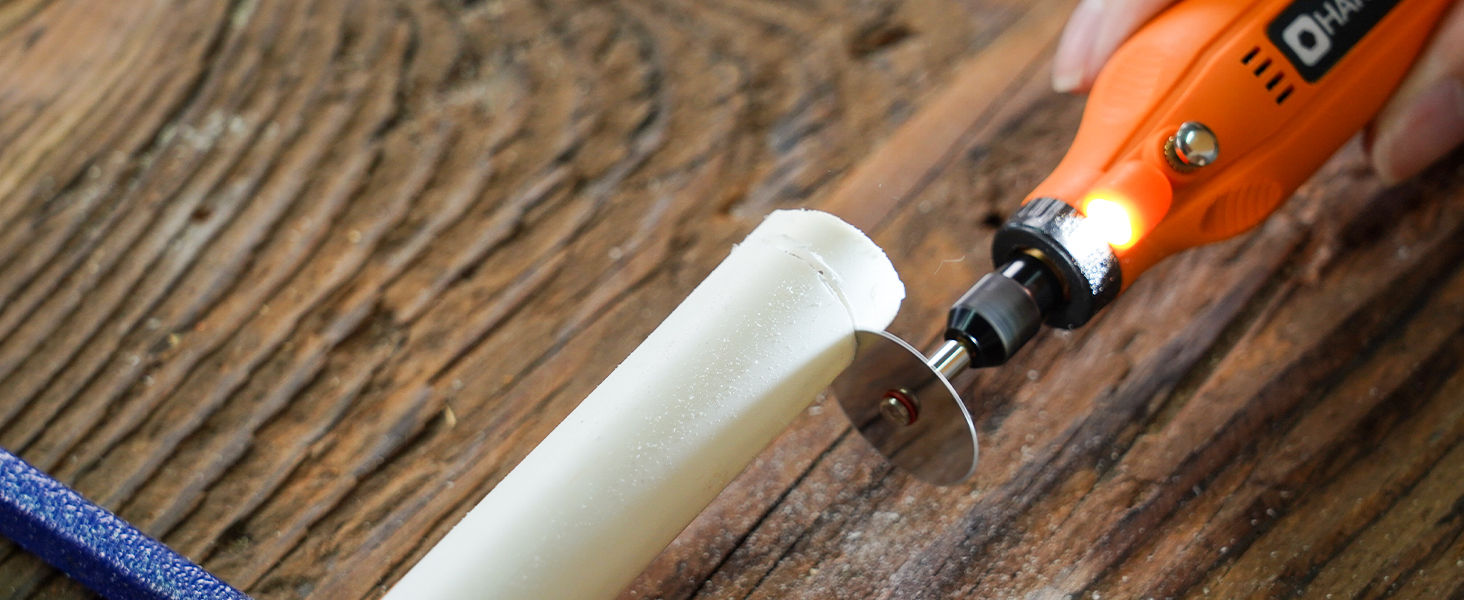
Image: Visual instructions for attaching an HSS cutting disc or sanding paper to the rotary tool, detailing the mandrel and securing steps.
6. Käyttöohjeet
- Virta päälle/pois: Press the On/Off button to turn the tool on or off.
- Säädä nopeutta: Use the '+' and '-' buttons to cycle through the 5 available speed settings (5000 RPM to 18000 RPM). The LED indicators will show the current speed level.
- LED-valo: The integrated LED light automatically illuminates when the tool is powered on, providing visibility for detailed work.
- Toiminta: Hold the tool firmly and apply gentle pressure to the workpiece. Allow the tool to do the work; excessive force can lead to poor results or damage to the tool/workpiece.

Image: A person using the HARDELL Mini Cordless Rotary Tool for carving a wooden piece, demonstrating its ergonomic design and precision.

Kuva: Lähikuva view of the rotary tool in action, with its LED light brightly illuminating the precise point of contact on a workpiece, highlighting its utility in detailed tasks.
7. Sovellukset
The HARDELL Mini Cordless Rotary Tool is ideal for a variety of light-duty projects, including but not limited to:
- Engraving on various materials
- Sanding small surfaces or edges
- Carving intricate designs
- Drilling small holes
- Grinding for shaping or smoothing
- Polishing for a smooth finish
- Trimming excess material

Kuva: Kollaasinäyttelyasing the multi-purpose capabilities of the rotary tool, including sanding wood, carving glass, polishing beads, grinding metal, drilling shells, and cutting plastic.
8. Huolto
Työkalun lataaminen
- Connect the provided USB-C charging cable to the charging port at the base of the tool.
- Plug the other end of the USB-C cable into a compatible power source (e.g., computer, car charger, power bank).
- The LED indicators will show the charging status. A full charge provides up to 100 minutes of continuous use under no-load conditions.
Puhdistus ja varastointi
- After each use, disconnect any accessories and gently wipe the tool body with a clean, dry cloth.
- Remove any dust or debris from the collet and spindle area.
- Store the tool and its accessories in a dry, clean place, preferably in its original carrying case, away from direct sunlight and extreme temperatures.
9. Vianmääritys
- Työkalu ei käynnisty: Ensure the tool is fully charged. If the battery is low, connect it to a power source using the USB-C cable.
- Heikentynyt suorituskyky: Check if the accessory is securely installed. Ensure the battery is adequately charged. The tool is designed for light-duty tasks; avoid using it for heavy-duty applications that may exceed its capacity.
- Liiallinen tärinä tai melu: Ensure the accessory is correctly inserted and tightened. A loose or damaged accessory can cause vibration. Replace any worn or damaged accessories.
- Ylikuumeneminen: If the tool feels excessively hot, discontinue use and allow it to cool down. Ensure the cooling vents are not obstructed.
10. Tekniset tiedot
| Ominaisuus | Erittely |
|---|---|
| Merkki | HARDELL |
| Mallinumero | DM12405ORANGEH-2 |
| Virtalähde | Akkukäyttöinen (3.7 V litiumioniakku) |
| Nopeusasetukset | 5-Speed (5000-18000 RPM) |
| Lataustyyppi | USB-C |
| Tuotteen paino | 0.3 paunaa (7.4 unssia / 0.21 kilogrammaa) |
| Erikoisominaisuudet | Compact, LED Light |
| Mukana olevat komponentit | 35 Accessories, USB-C Cable |
11. Takuu ja tuki
For warranty information, technical support, or any questions regarding your HARDELL Mini Cordless Rotary Tool, please refer to the documentation included in your product packaging or contact HARDELL customer service directly. Contact details can typically be found on the manufacturer's websivustolla tai tuotepakkauksessa.


