
1. Johdanto
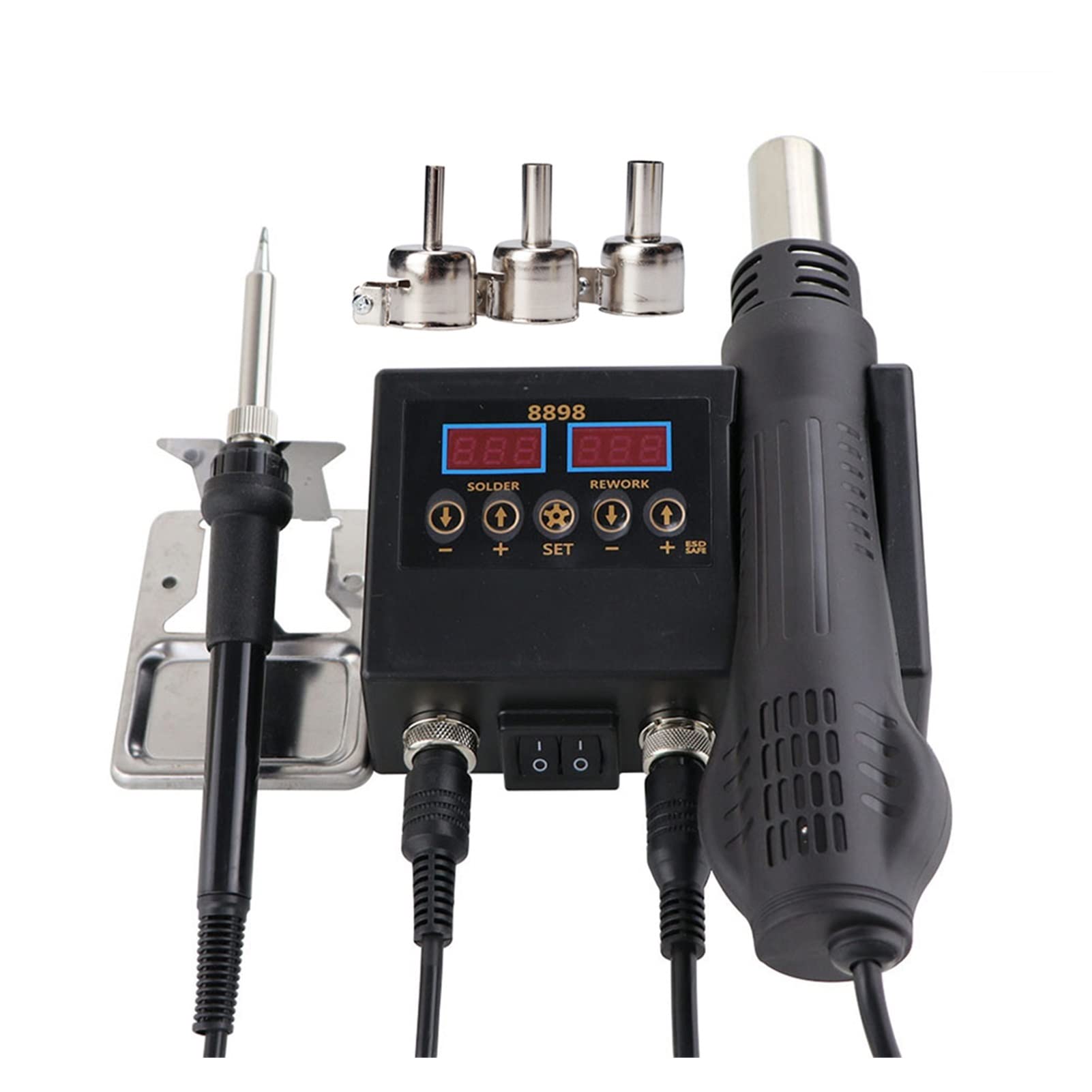
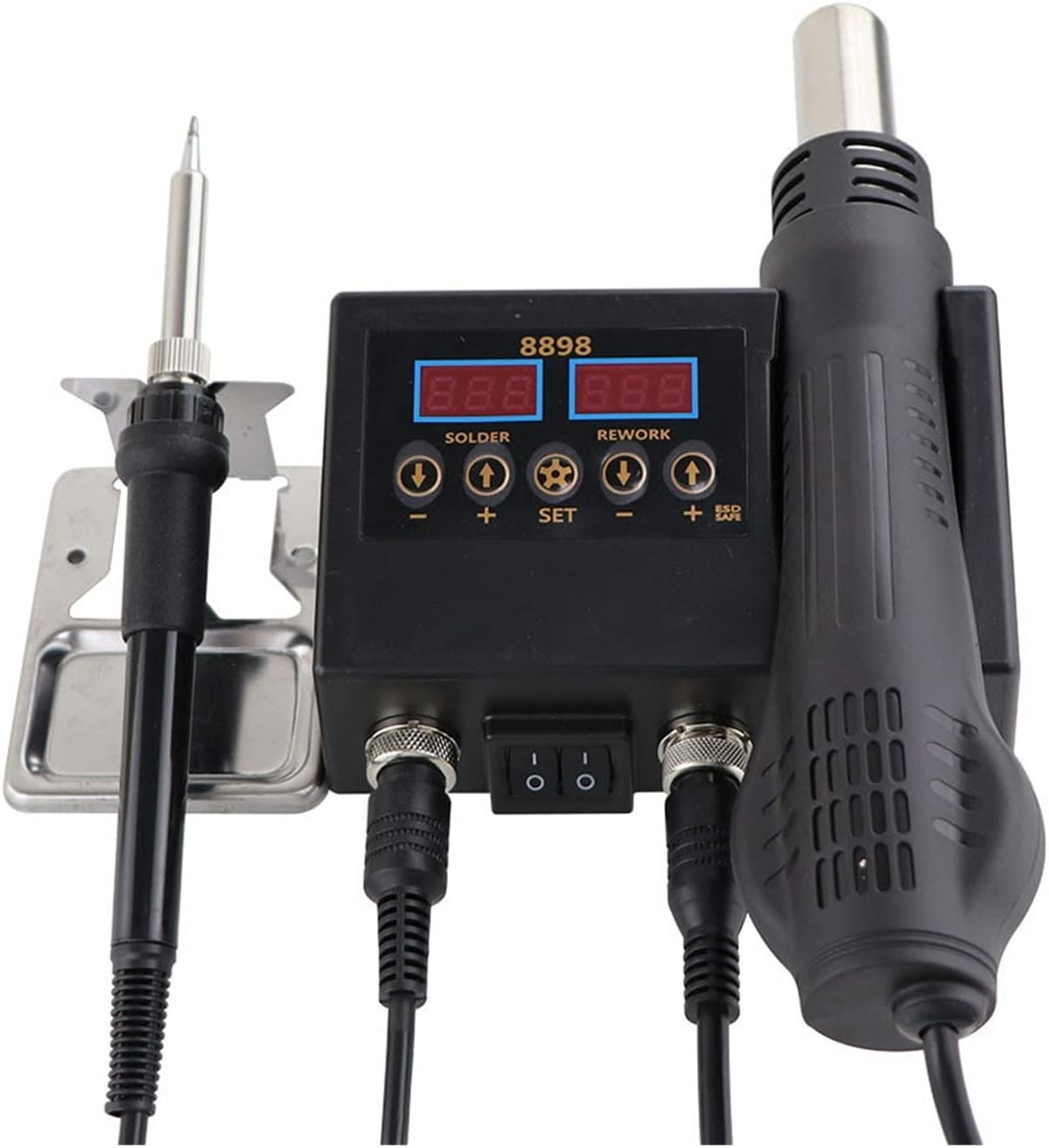
Thank you for choosing the ZHDBD 8898 2-in-1 Soldering Rework Station. This device integrates a hot air gun and a soldering iron into a single unit, providing versatile functionality for electronic repair, SMD component rework, and general soldering tasks. This manual provides essential information for safe operation, setup, and maintenance of your new equipment. Please read it thoroughly before use.
2. Tuotteen ominaisuudet
- Integrated hot air gun and soldering iron for 2-in-1 rework station functionality.
- Dual LCD digital displays for precise temperature monitoring of both tools.
- Compact design with extremely low noise operation, optimizing workspace.
- Intelligent self-detection function ensures safe personal operation.
- Automatic cooling function extends heater lifespan and protects the hot air gun.
- Handle with sensor switch for quick access to operation mode and automatic standby.
3. Pakkauksen sisältö
Tarkista pakkauksen sisältö vastaanotettaessa varmistaaksesi, että kaikki osat ovat mukana:
- ZHDBD 8898 Main Control Unit
- Kuumailmapistoolin kahva
- Juotosraudan kahva
- Kuumailmapistoolin pidike
- Soldering Iron Stand with Sponge
- Assorted Hot Air Nozzles (typically 3-4 sizes)
- Virtajohto
- Käyttöopas (tämä asiakirja)
4. Tekniset tiedot
| Ominaisuus | Erittely |
|---|---|
| Kokonaisteho | 750W |
| Tulo Voltage | (Typically 110V/220V, 50Hz/60Hz - not specified, assuming standard) |
| Hot Air Gun | |
| Teholähtö | 500W |
| Lämpötila-alue | 100–480 °C |
| Lämpötilan vakaus | ±2°C |
| Ilmavirtaus | 120 L/min (Max) |
| Juotin | |
| Teholähtö | 60W |
| Lämpötila-alue | 180–500 °C |
| Lämpötilan vakaus | ±1°C |
| Lämmittimen materiaali | Keraaminen |
| Design | ESD turvallinen |
| Näytön tyyppi | LCD |
5. Turvallisuusohjeet
To prevent injury or damage to the equipment, always observe the following safety precautions:
- Korkeat lämpötilat: The hot air gun and soldering iron tips reach very high temperatures. Avoid direct contact with skin or flammable materials.
- Ilmanvaihto: Use the station in a well-ventilated area to avoid inhaling solder fumes, which can be harmful.
- Silmien suojaus: Always wear safety glasses to protect your eyes from solder splatter or flying debris.
- Sähköturvallisuus: Ensure the power cord is properly grounded. Do not operate with wet hands or in damp Katkaise virta ennen puhdistusta tai huoltoa.
- Oikea sijoitus: Place the unit on a stable, heat-resistant surface. Ensure the hot air gun is always placed in its holder when not in use, allowing it to cool down safely.
- Lapset ja lemmikit: Pidä laite poissa lasten ja lemmikkien ulottuvilta.
- Syttyvät materiaalit: Keep flammable liquids, gases, and materials away from the work area.
- ESD-suojaus: The soldering iron features an ESD-safe design. For sensitive components, ensure proper grounding practices are followed.
6. Asennus
Follow these steps to set up your ZHDBD 8898 Soldering Rework Station:
- Pura pakkauksesta: Poista kaikki osat varovasti pakkauksesta.
- Sijoitus: Place the main control unit on a stable, heat-resistant, and level workbench. Ensure adequate space around the unit for ventilation.
- Liitä kuumailmapistooli: Connect the hot air gun handle cable to the corresponding port on the main unit. Secure the connector by tightening the retaining ring.
- Liitä juotin: Connect the soldering iron handle cable to its designated port on the main unit. Secure the connector.
- Install Holders: Attach the hot air gun holder to the side of the main unit. Place the soldering iron stand on your workbench and insert the soldering iron into it. Ensure the cleaning sponge is moistened.
- Virtaliitäntä: Connect the power cord to the main unit and then plug it into a grounded electrical outlet.
7. Käyttöohjeet
This section details the operation of both the hot air gun and the soldering iron.
7.1 Yleinen käyttö
- Virta päälle: Flip the main power switch on the front panel to the "ON" position. The digital displays will illuminate.
- Työkalun valinta: The unit allows independent operation of the hot air gun and soldering iron. Use the respective power switches for each tool if available, or simply pick up the tool to activate it (due to sensor switch).
- Lämpötilan säätö: Käytä UP ja ALAS buttons below each display to set the desired temperature for the hot air gun and soldering iron. The SARJA button may be used to cycle through settings or confirm.

7.2 Kuumailmapistoolin käyttö
- Valitse suutin: Choose an appropriate nozzle size for your application and attach it securely to the hot air gun.
- Aseta lämpötila: Adjust the hot air gun temperature using the controls. Recommended range for most SMD rework is 300°C - 400°C, but consult component datasheets.
- Set Airflow: Adjust the airflow using the dedicated knob or buttons (if present) to a suitable level. Start with lower airflow for delicate components.
- Aktivointi: Pick up the hot air gun from its holder. The unit will automatically start heating to the set temperature.
- Toiminta: Direct the hot air stream evenly over the component to be reworked. Maintain a safe distance to avoid overheating or damaging surrounding components.
- Standby/Cool-down: When finished, place the hot air gun back into its holder. The unit will automatically enter cool-down mode, blowing cool air until a safe temperature is reached, then entering standby. Do not unplug the unit during cool-down.
7.3 Juotosraudan käyttö
- Puhtaat komponentit: Ensure the electronic components and PCB pads to be soldered are clean and free of oxidation.
- Aseta lämpötila: Adjust the soldering iron temperature. A common starting point is 300°C - 400°C, depending on the solder type and component sensitivity.
- Vihjeen tinaus: Once the iron reaches the set temperature, apply a small amount of solder to the tip. This "tins" the tip, preventing oxidation and improving heat transfer. Wipe excess solder on the moistened sponge.
- Juotos:
- Place the hot soldering iron tip onto the joint where the component lead meets the PCB pad.
- Apply solder to the joint, not directly to the iron tip. The heat from the iron should melt the solder, allowing it to flow smoothly around the joint.
- Remove the solder wire, then remove the soldering iron. Allow the joint to cool naturally without disturbance.
- Puhdistus: Regularly clean the soldering iron tip on the moistened sponge during use to remove oxidation and old solder.
8. Huolto
Proper maintenance ensures the longevity and optimal performance of your rework station.
- Juotosraudan kärjen hoito:
- Always tin the tip before and after use.
- Puhdista kärki säännöllisestiamp sieni tai messinkivilla.
- Avoid excessive pressure when cleaning, as this can damage the tip plating.
- Replace tips when they become pitted or heavily oxidized and cannot be tinned.
- Kuumailmapistoolin suuttimet: Ensure nozzles are clean and free of debris. Replace if damaged or clogged.
- Yleinen puhdistus:
- Katkaise virta ennen puhdistusta.
- Wipe the main unit and handles with a soft, damp kangas. Älä käytä hankaavia puhdistusaineita tai liuottimia.
- Ensure no liquids enter the unit's vents or ports.
- Varastointi: Säilytä laitetta kuivassa ja pölyttömässä paikassa, kun sitä ei käytetä.
9. Vianmääritys
Yleisimmät ongelmat ja niiden ratkaisut löytyvät alla olevasta taulukosta:
| Ongelma | Mahdollinen syy | Ratkaisu |
|---|---|---|
| Yksikkö ei käynnisty. | Ei virtaa; virtakytkin pois päältä; viallinen virtajohto. | Check power cord connection; ensure power switch is ON; test outlet. |
| Hot air gun not heating or no airflow. | Handle not seated correctly; heater element failure; fan failure. | Ensure hot air gun is properly placed in its holder and then removed to activate; check connections. If problem persists, contact support. |
| Juotosrauta ei kuumene. | Iron not connected; heater element failure; tip not making good contact. | Check soldering iron cable connection; ensure tip is securely fastened. If problem persists, contact support. |
| Soldering iron tip not tinning or poor heat transfer. | Oxidized tip; insufficient temperature; incorrect tip. | Clean and re-tin the tip; increase temperature; replace with a new tip if severely damaged. |
| Näytöllä näkyvä virhekoodi. | Internal fault; sensor issue. | Refer to specific error codes in a more detailed manual (if available) or contact customer support with the error code. |
10. Takuu ja tuki
The ZHDBD 8898 Soldering Rework Station is designed for reliability and performance. For warranty information, please refer to the documentation provided at the time of purchase or contact your retailer. If you encounter any issues or require technical assistance, please contact ZHDBD customer support through your purchase platform or the official brand website for prompt service.