
Johdanto
Thank you for choosing the Hournor Digital LED Wall Clock. This clock features a large, clear LED display, remote control operation, and displays time, date, day of the week, and temperature. This manual provides comprehensive instructions for setup, operation, and maintenance to ensure optimal performance and longevity of your device.
Tuotteen ominaisuudet
- Suuri LED-näyttö: 11.5-inch screen with 3.6-inch high-contrast jumbo digits for easy readability. Displays time, date, week, and temperature.
- Säädettävä kirkkaus: Four levels of brightness can be adjusted via remote control. Automatic dimming function available by pressing and holding the SNOOZE key.
- Monipuolinen asennus: Designed for both wall mounting and desktop placement.
- Kaukosäätimen toiminta: All settings and operations can be conveniently performed using the included remote control.
- Muistin toiminto: Built-in memory retains time data even if power is disconnected.
- Tehontarve: The clock requires continuous power via a USB cable. An adapter (5V/1A or 5V/2A) is required and not included.
Pakkauksen sisältö
Tarkista pakkauksesta seuraavat tuotteet:
- Hournor Digital LED Wall Clock
- Kaukosäädin
- USB-virtakaapeli
- Käyttöopas (tämä asiakirja)
Huomautus: A 5V/1A or 5V/2A power adapter is required and not included in the package. Two CR2032 batteries are required for the clock's memory function and are not included.
Asennus
- Insert Memory Batteries (Optional but Recommended): Open the battery compartment on the back of the clock and insert two CR2032 batteries (not included). These batteries maintain time settings during power outages.
- Liitä virta: Connect the provided USB power cable to the clock's power input port. Plug the other end into a 5V/1A or 5V/2A USB power adapter (not included) and then into a wall outlet. The clock display will light up.
- Kaukosäätimen paristot: Insert batteries into the remote control if not already present.
- Alkuasetukset: Upon first power-up, the clock may display default settings. Use the remote control to set the correct time, date, and preferred temperature unit.

Kuva: The Hournor Digital LED Wall Clock displaying 10:53, October 18th, Thursday, and 78°F. This image illustrates the large LED display and its various informational segments.
Käyttöohjeet
Kaukosäätimen käyttäminen
All clock settings and operations are managed via the remote control. Ensure the remote has working batteries and is pointed towards the clock for optimal response.
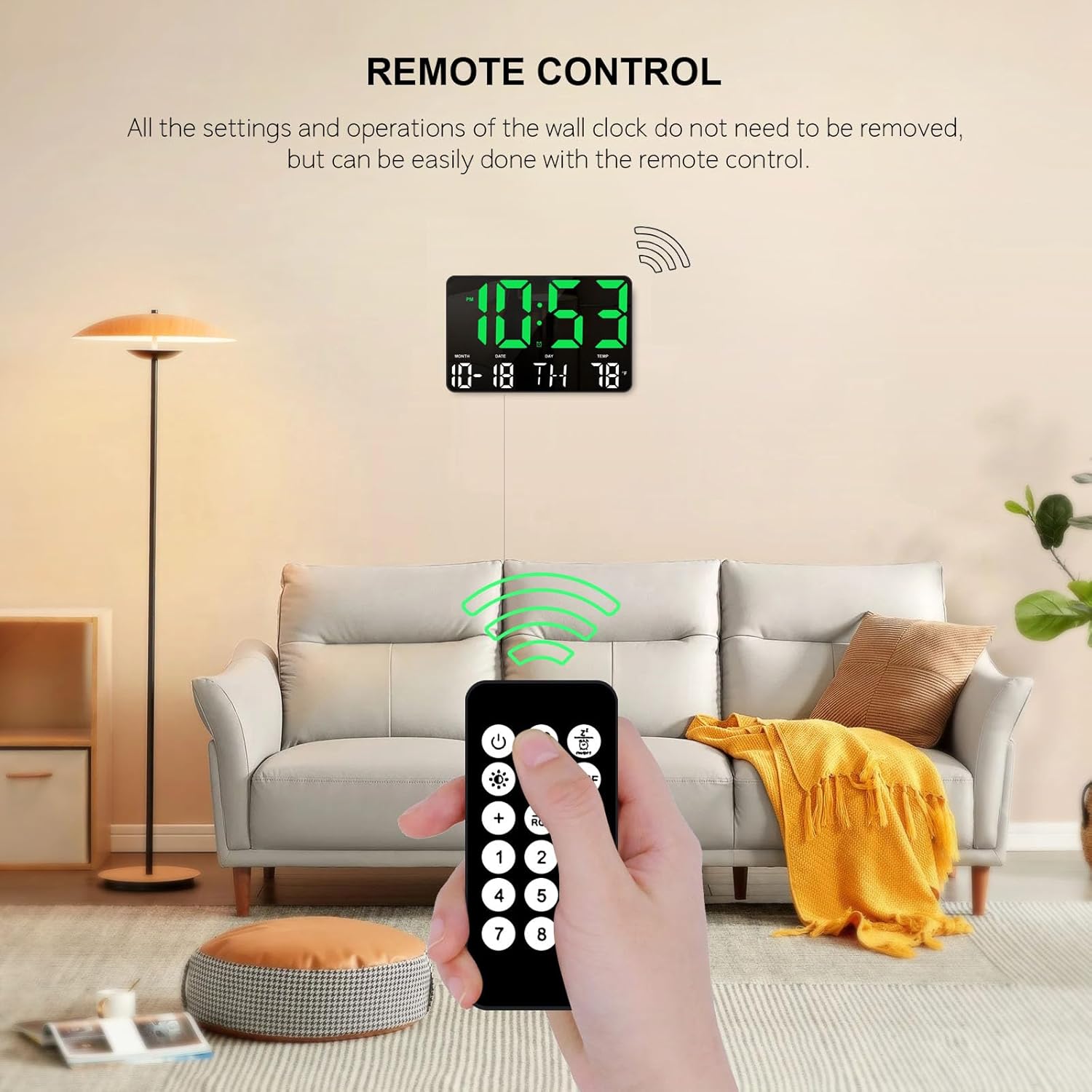
Kuva: A hand holding the remote control, pointing towards the Hournor Digital LED Wall Clock mounted on a wall. This demonstrates the convenience of remote operation.
Kellonajan ja päivämäärän asettaminen
- Paina SARJA button on the remote control. The hour digits will start flashing.
- Käytä UP ja ALAS nuolia tuntien säätämiseksi.
- Paina SARJA again to move to the minute digits, then use UP ja ALAS säätää.
- Jatka painamista SARJA selaa vuoden, kuukauden ja päivän asetuksia ja säädä kutakin UP ja ALAS nuolet.
- Päivän asettamisen jälkeen paina SARJA one last time to save all changes and exit the setting mode.
Hälytyksen asettaminen
- Paina HÄLYTYS -painiketta kaukosäätimessä. Herätyksen tuntinumerot vilkkuvat.
- Käytä UP ja ALAS arrows to set the desired alarm hour.
- Paina HÄLYTYS again to move to the minute digits, then use UP ja ALAS asettaaksesi herätysminuutin.
- Paina HÄLYTYS viimeisen kerran vahvistaaksesi ja aktivoidaksesi hälytyksen. Näyttöön ilmestyy hälytyskuvake.
- Voit poistaa hälytyksen käytöstä painamalla HÄLYTYS button again. The alarm icon will disappear.
Lämpötilayksikön valinta (°C/°F)
Paina ° C / ° F button on the remote control to switch between Celsius and Fahrenheit temperature displays.
Kirkkauden himmennin
The LED display offers four levels of brightness to suit different environments and preferences. You can adjust this manually or enable an automatic dimming feature.
- Manuaalinen säätö: Use the dedicated brightness buttons on the remote control (often labeled with sun icons or numbers 1-4) to cycle through the four brightness levels.
- Automaattinen himmennys: Paina ja pidä painettuna TORKUTA button on the remote control to activate the automatic dimming function. The clock will adjust its brightness based on ambient light conditions. Press and hold TORKUTA uudelleen deaktivoidaksesi.

Kuva: A visual representation of the Hournor Digital LED Wall Clock's display at 100%, 80%, 50%, and 20% brightness levels, demonstrating the adjustable dimmer feature.
Asennusvaihtoehdot
The Hournor Digital LED Wall Clock is designed for flexible placement, allowing it to be either wall-mounted or placed on a desktop.
- Seinäasennus: Use appropriate screws and anchors (not included) to secure the clock to a wall. Ensure the mounting location is stable and near a power outlet.
- Työpöydän sijoittelu: The clock can be placed on any flat surface such as a desk, shelf, or table. Ensure it is stable and not prone to falling.

Kuva: The Hournor Digital LED Wall Clock displayed in a bedroom on a nightstand, mounted in a gym, and on a wall in an office/garage setting. This illustrates its versatility for different environments.
Huolto
- Puhdistus: Gently wipe the clock's display and body with a soft, dry cloth. Do not use abrasive cleaners or solvents, as they may damage the surface.
- Battery Replacement (Memory): If the clock consistently loses time settings after a power outage, the internal CR2032 batteries may need replacement. Replace them carefully, observing polarity.
- Kaukosäätimen paristot: Replace the remote control batteries when its range decreases or it becomes unresponsive.
Vianetsintä
| Ongelma | Mahdollinen syy | Ratkaisu |
|---|---|---|
| Kellon näyttö on pois päältä. | Ei virtalähdettä tai viallinen liitäntä. | Ensure the USB cable is securely connected to the clock and the power adapter, and the adapter is plugged into a working outlet. Check if the power adapter is 5V/1A or 5V/2A. |
| Time/Date is incorrect after power loss. | Memory batteries (CR2032) are dead or not installed. | Install or replace the two CR2032 batteries in the clock's battery compartment. |
| Kaukosäädin ei vastaa. | Remote batteries are dead or incorrectly inserted. Obstruction between remote and clock. | Replace the remote control batteries. Ensure there is a clear line of sight between the remote and the clock. |
| Näyttö on liian kirkas tai liian himmeä. | Kirkkausasetusta on säädettävä. | Use the brightness buttons on the remote control to adjust to a comfortable level. Alternatively, activate or deactivate the automatic dimming function by pressing and holding the SNOOZE button. |
Tekniset tiedot
| Merkki | Hournor |
| Mallinumero | clock0717 |
| Väri | Vihreä |
| Tuotteen mitat (P x L x K) | 24.89 x 3.81 x 16 cm (9.8 x 1.5 x 6.3 tuumaa) |
| Tuotteen paino | 531 grammaa (1.17 lbs) |
| Näytön tyyppi | Digitaalinen LED |
| Erikoisominaisuudet | Memory Function, Large LED Display, Remote Control, Automatic Dimmer |
| Virtalähde | Corded Electric (USB cable, 5V/1A or 5V/2A adapter required) |
| Memory Batteries | 2 x CR2032 (for memory retention, not included) |
Takuu ja tuki
Hournor provides a 12 kuukauden huoleton takuu for this product. If you encounter any questions or issues, please contact us through the buyer-seller message system. Our customer service team is available 24 hours to assist you and ensure your satisfaction.