
Johdanto
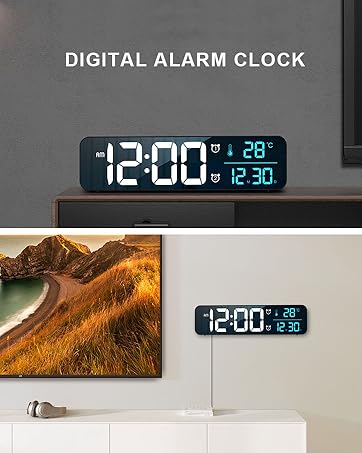
This manual provides detailed instructions for the setup, operation, and maintenance of your Hournor Digital Alarm Clock Model 8810. This versatile clock features a large display, adjustable brightness, dual alarm functionality, and displays time, date, and indoor temperature. Please read this manual thoroughly before use to ensure optimal performance and longevity of your device.
Turvallisuustiedot
ATTENTION: PLEASE connect with the USB port or ONLY 5V/1A and 5V/2A adapter! Excessive voltage may cause screen damage.
Ensure the clock is placed on a stable, flat surface or securely mounted on a wall. Keep away from water and direct heat sources. Do not attempt to disassemble or repair the device yourself.
Tuote loppuview
Front Display Features
- Large Digital Time Display: Shows hours and minutes clearly.
- AM/PM-indikaattori: For 12-hour format.
- Dual Alarm Icons: Ilmaisee aktiivisia hälytyksiä.
- Lämpötilanäyttö: Näyttää sisälämpötilan.
- Päivämäärän näyttö: Näyttää kuukauden ja päivän.

Kuva 1: Etuosa view of the Hournor Digital Clock, highlighting the large time, temperature, and date display.
Yläohjaimet
- TORKKU/VALO-painike: Touch-sensitive button for snoozing alarms and adjusting display brightness.

Kuva 2: Yläosa view of the clock, indicating the Snooze/Light touch button.
Rear Controls and Ports
- AIKA-ASETUS-painike: For entering time setting mode.
- YLÖS/ALAS-painikkeet: To adjust values during setting.
- ALARM SET -painike: For entering alarm setting mode.
- ON/OFF-painike: To turn alarms on or off.
- VALO -painike: To adjust display brightness.
- 12/24HR Button: To switch between 12-hour and 24-hour time formats.
- °C/°F-painike: To switch between Celsius and Fahrenheit temperature units.
- VOLUME Slider: To adjust alarm volume.
- DST ON/OFF Switch: For Daylight Saving Time adjustment.
- DAY/TEMP Button: To cycle between day and temperature display.
- DIMMER Slider: For fine-tuning display brightness.
- USB-C-virtalähde: Virtalähteen liittämiseen.
- USB-A-lähtö: Ulkoisten laitteiden lataamiseen.
Kuva 3: Takaosa view of the clock, detailing the control buttons, sliders, and power/charging ports.
Asennus
1. Virtaliitäntä
Connect the provided USB-C power adapter to the USB-C input port on the back of the clock. Plug the adapter into a standard wall outlet. Use only a 5V/1A or 5V/2A adapter to prevent screen damage.
2. Akun varmuuskopiointi
The clock has a built-in memory function. In case of a power disconnection, time data will not be lost, eliminating the need to reset the time. No additional batteries are required for this memory function.
3. Alkuperäinen aika-asetus
- Paina ja pidä painettuna AJAN ASETUS -painiketta kellon takana, kunnes tuntinumerot alkavat vilkkua.
- Käytä UP ja ALAS painikkeita säätääksesi tuntia.
- Paina AJAN ASETUS again to move to minute adjustment. Use UP ja ALAS asettaa minuutit.
- Jatka painamista AJAN ASETUS to cycle through setting the year, month, and day, adjusting each with the UP ja ALAS painikkeita.
- Kun kaikki asetukset on tehty, paina AJAN ASETUS viimeisen kerran poistuaksesi asetustilasta.
Käyttöohjeet
Time Format (12/24 Hour)
Paina 12/24 button on the back of the clock to switch between 12-hour (with AM/PM indicator) and 24-hour time formats.
Hälytysasetus
The clock supports dual alarms. Each alarm can be set independently.
- Paina ja pidä painettuna HÄLYTYSASETUS button on the back. The alarm 1 hour digits will flash.
- Käytä UP ja ALAS -painikkeita halutun herätysajan asettamiseksi.
- Paina HÄLYTYSASETUS again to move to alarm 1 minute adjustment. Use UP ja ALAS asettaa minuutit.
- Repeat steps 1-3 for Alarm 2.
- Paina HÄLYTYSASETUS one last time to exit alarm setting mode.
Hälytysten kytkeminen päälle/pois
Paina ON/OFF button on the back to toggle alarms on or off. An alarm icon will appear on the display when an alarm is active.
Torkkutoiminto
When an alarm sounds, gently tap the SNOOZE / VALO button on the top of the clock to activate a 5-minute snooze. The alarm will sound again after 5 minutes.

Figure 4: Activating the 5-minute snooze by tapping the top of the clock.
Kirkkauden säätö
The clock offers 5 levels of brightness and an automatic dimming function.
Manual Brightness
Napauta SNOOZE / VALO button on the top or use the VALOA button on the back to cycle through the 5 brightness levels.
Automaattinen kirkkaus
The display brightness automatically adjusts based on the time of day:
- 7:00–17:59: Highlight brightness
- 18:00–22:59: Keskivahva
- 23:00–5:59: Darkest brightness
- 6:00–6:59: Medium highlight brightness
Manual adjustments made during a period will be remembered for that specific period on subsequent days. The brightness will revert to the system's preset rule when a new period begins.

Figure 5: Visual representation of the 5 adjustable brightness levels.
Lämpötilanäyttö (°C/°F)
Paina ° C / ° F button on the back to switch the temperature display between Celsius and Fahrenheit.
USB-latauslähtö
The USB-A output port on the back of the clock can be used to charge small electronic devices like smartphones or smartwatches.
Huolto
Puhdista kello pyyhkimällä näyttö ja c varovastiasing with a soft, dry cloth. Avoid using abrasive cleaners or solvents, as these may damage the surface. Ensure the clock is unplugged before cleaning.
Vianetsintä
- Screen Flicker: If the screen flickers, ensure you are using a 5V/1A or 5V/2A USB adapter. Excessive voltage can cause screen damage.
- Time Not Saving: The clock has a built-in memory function. If time settings are not retained after a power outage, ensure the internal battery backup is functioning correctly.
- Hälytys ei soi: Verify that the alarm is set correctly and the alarm volume is not set to the lowest level.
Tekniset tiedot
| Ominaisuus | Yksityiskohta |
|---|---|
| Merkki | Hournor |
| Mallinumero | 8810 |
| Väri | Black Case+blue Digit |
| Näytön tyyppi | Digitaalinen |
| Virtalähde | Johdollinen sähkölaite (USB-C) |
| Tuotteen mitat | 10.4 x 1.5 x 2.8 tuumaa |
| Tuotteen paino | 11.7 unssia |
| Herätyskello | Yes (Dual Alarms) |
| Asennustyyppi | Desk Clock, Wall Mount |
Viralliset tuotevideot
Digital Alarm Clock Large Display Overview
Tämä video tarjoaa yleiskuvanview of the Hournor Digital Alarm Clock's large display and key features.
KOSUMOSU Alarm Clocks for Living Room, 6.7in Digital Clock
This video demonstrates the features and functionality of a similar digital clock, showcasing its suitability for living room environments.
Takuu ja tuki
This product comes with a Manufacturer's Warranty. For specific warranty details or technical support, please refer to the contact information provided with your product packaging or visit the official Hournor websivusto.