1. Johdanto
This manual provides instructions for the installation, operation, and maintenance of the MokerLink 4 Port Gigabit PoE Extender, Model 4 Port 1000M. This device is designed to extend Power over Ethernet (PoE) and data transmission distances, providing a flexible solution for network deployment.
2. Tuote ohiview
2.1 Tärkeimmät ominaisuudet
- 4 gigabitin PoE-porttia: Includes 1 PoE In port and 3 PoE Out ports, supporting 10/100/1000Mbps speeds. PoE transmission distance up to 100 meters per segment.
- IEEE 802.3 af/at Compliance: All ports support standard PoE, with a maximum input of 30W and a maximum output of 24W, averaging 8W per port. PoE voltage range is 44-57 Vdc. PoE pin configuration: Input 1/2 (+), 3/6 (-), 4/5(+), 7/8(-); Output 1/2 (+), 3/6 (-).
- Hallitsematon Plug & Play: Features automatic power detection for connected devices, requiring no configuration. Simply connect Ethernet cables.
- Helppo asennus: Powered by the PoE network, eliminating the need for an additional power adapter. Supports both wall mount and DIN rail mount options for versatile placement.
- Cascading Capability: Supports up to 3 levels of cascading, allowing for extended PoE coverage for devices such as PoE access points, IP cameras, and VoIP phones.
2.2 Pakkauksen sisältö
- MokerLink 4 Port Gigabit PoE Extender (Model 4 Port 1000M)
2.3 Tuotekaavio

Kuva 1: Etuosa view of the MokerLink 4 Port Gigabit PoE Extender, showing the four Ethernet ports and the ON/OFF switch.
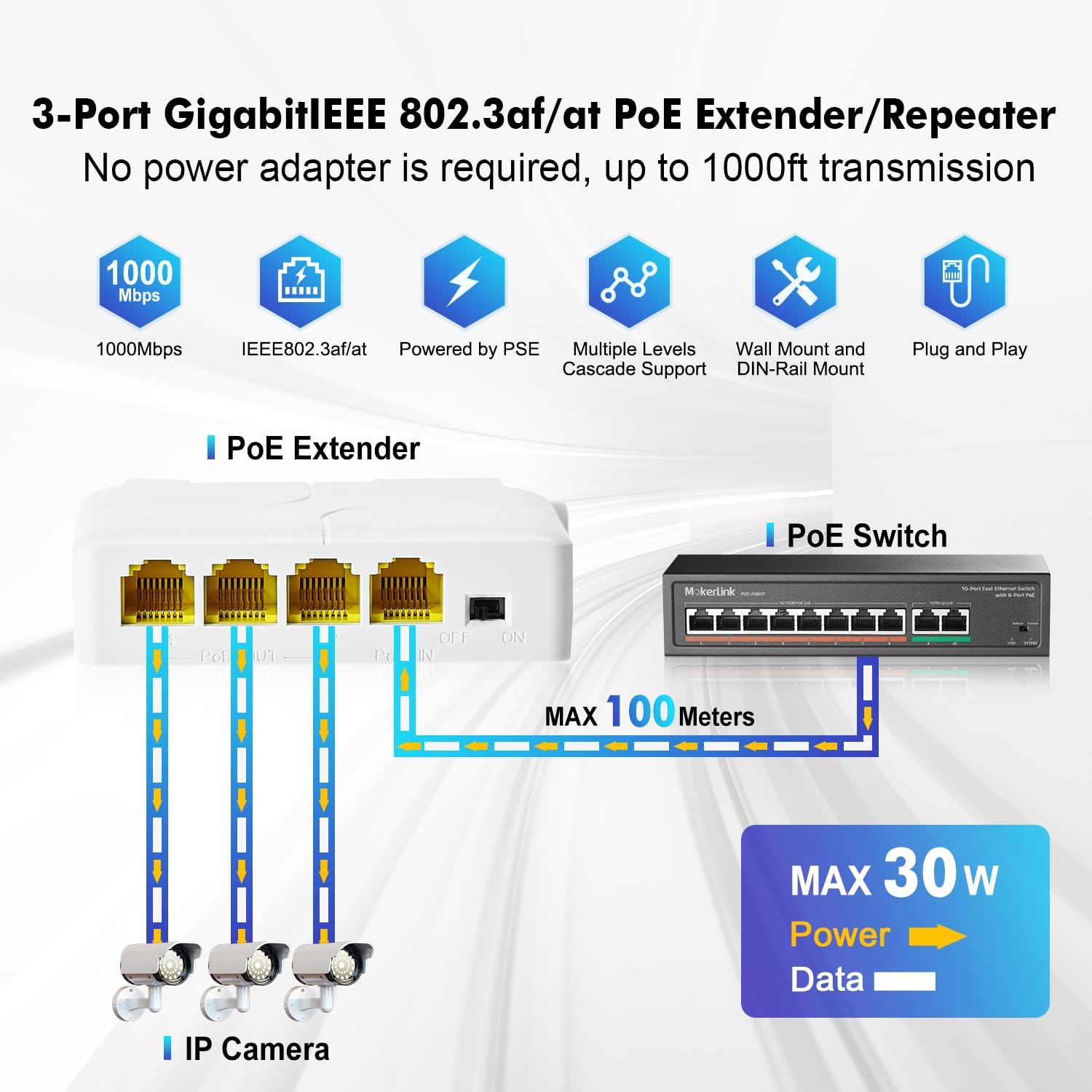
Figure 2: Diagram illustrating the 1 PoE In and 3 PoE Out port configuration, connecting to IP cameras and a PoE switch.
3. Tekniset tiedot
| Attribuutti | Arvo |
|---|---|
| Mallinumero | 4 Port 1000M |
| Porttien määrä | 4 (1 PoE In, 3 PoE Out) |
| Tiedonsiirtonopeus | 10/100/1000 Mbps (gigabitti) |
| PoE-standardi | IEEE 802.3 af/at |
| Tuloteho (maks.) | 30W |
| Lähtöteho (maks.) | 24W (Average 8W per port) |
| PoE Voitage | 44-57 Vdc |
| PoE Pin Assignment (Input) | 1/2 (+), 3/6 (-), 4/5(+), 7/8(-) |
| PoE Pin Assignment (Output) | 1/2 (+), 3/6 (-) |
| Kotelon materiaali | Muovi |
| Mitat | 82 mm (P) x 52 mm (L) x 23 mm (K) |
| Tuotteen paino | 0.08 kiloa (2.82 unssia) |
| Käyttölämpötila | Jopa 55 celsiusastetta |
| Asennusvaihtoehdot | Wall Mount, DIN Rail Mount |
4. Asennus ja asennus
4.1 Perusyhteys
- Ensure your upstream network device (e.g., PoE switch or PoE injector) provides IEEE 802.3af/at compliant PoE power.
- Connect an Ethernet cable from your PoE source to the PoE IN port on the MokerLink Extender. This port will supply both power and data to the extender.
- Connect your PoE-powered devices (e.g., IP cameras, wireless access points, VoIP phones) to the PoE OUT 1, 2, or 3 ports using standard Ethernet cables.
- The extender is plug-and-play and will automatically detect and power the connected devices. No software configuration is required.

Figure 3: Illustration of PoE+ IEEE 802.3af/at support, showing the extender powering an IP camera, wireless AP, and IP phone.
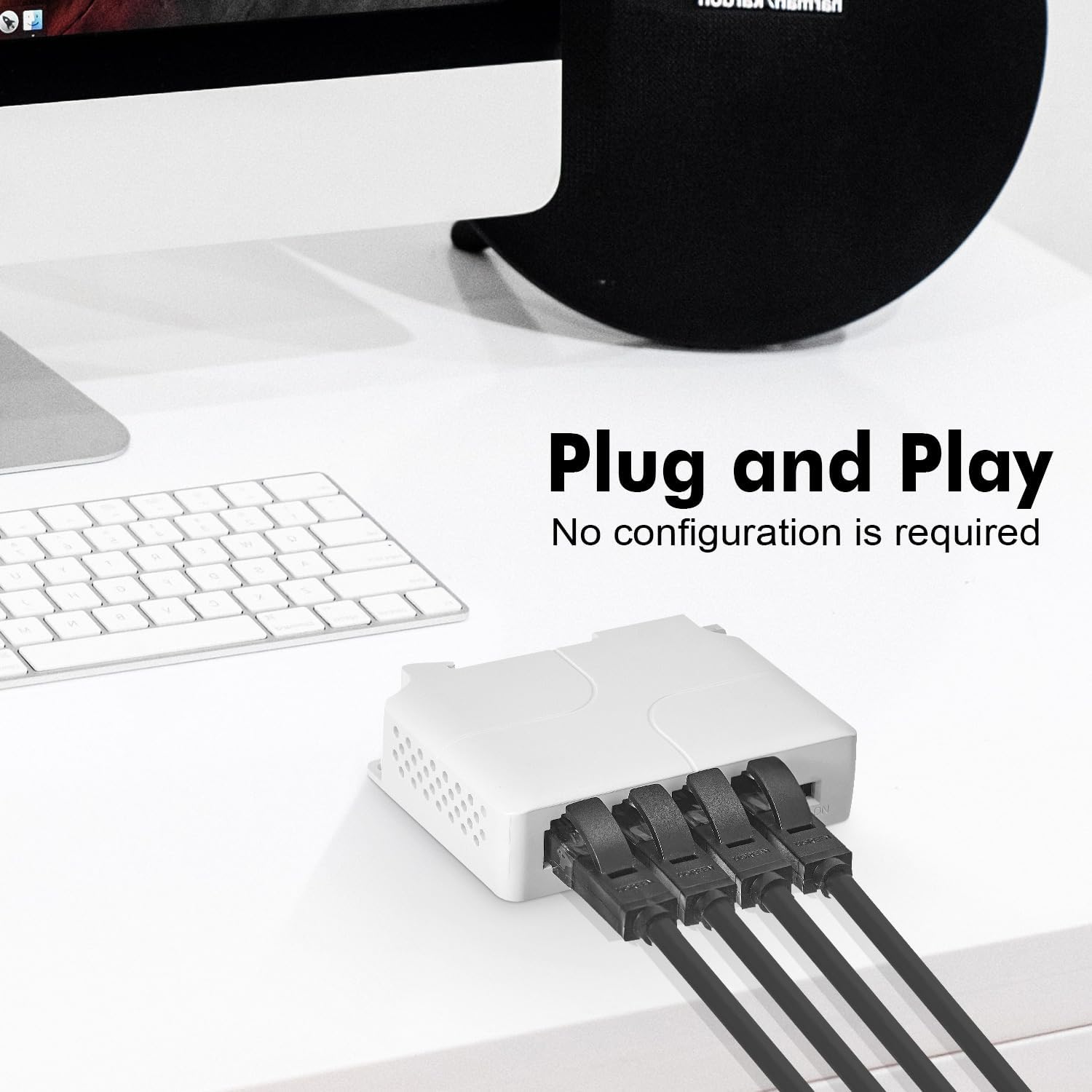
Figure 4: The extender with Ethernet cables connected, demonstrating its plug-and-play functionality.
4.2 Asennusvaihtoehdot
The MokerLink PoE Extender offers flexible mounting options:
- Seinäkiinnitys: Use screws to secure the extender to a wall or flat surface.
- DIN-kiskoon kiinnitys: Attach the extender to a standard DIN rail for industrial or organized installations.

Figure 5: Depiction of the extender mounted on a DIN rail (left) and secured to a wall (right).
5. Käyttöohjeet
The MokerLink PoE Extender is designed for simple operation:
- Once connected as described in Section 4.1, the device will automatically power on and begin functioning.
- The extender will automatically detect if a connected device requires PoE power and supply it accordingly.
- Data transmission will occur at the highest supported speed (10/100/1000Mbps) negotiated with the connected devices.
6. Lisäominaisuudet
6.1 Cascading Multiple Extenders
The MokerLink PoE Extender supports cascading up to 3 levels, allowing you to extend the reach of your PoE network significantly. Each extender can extend the PoE and data signal by an additional 100 meters.

Figure 6: Diagram showing three MokerLink PoE Extenders cascaded to extend network reach up to 300 meters for IP cameras.
6.2 Port-based VLAN Feature
The extender includes a DIP switch for enabling a port-based VLAN feature. When activated, ports 2-4 can be isolated from each other. This helps prevent broadcast storms from IP cameras or other devices on one port from affecting devices on other ports, enhancing network stability.
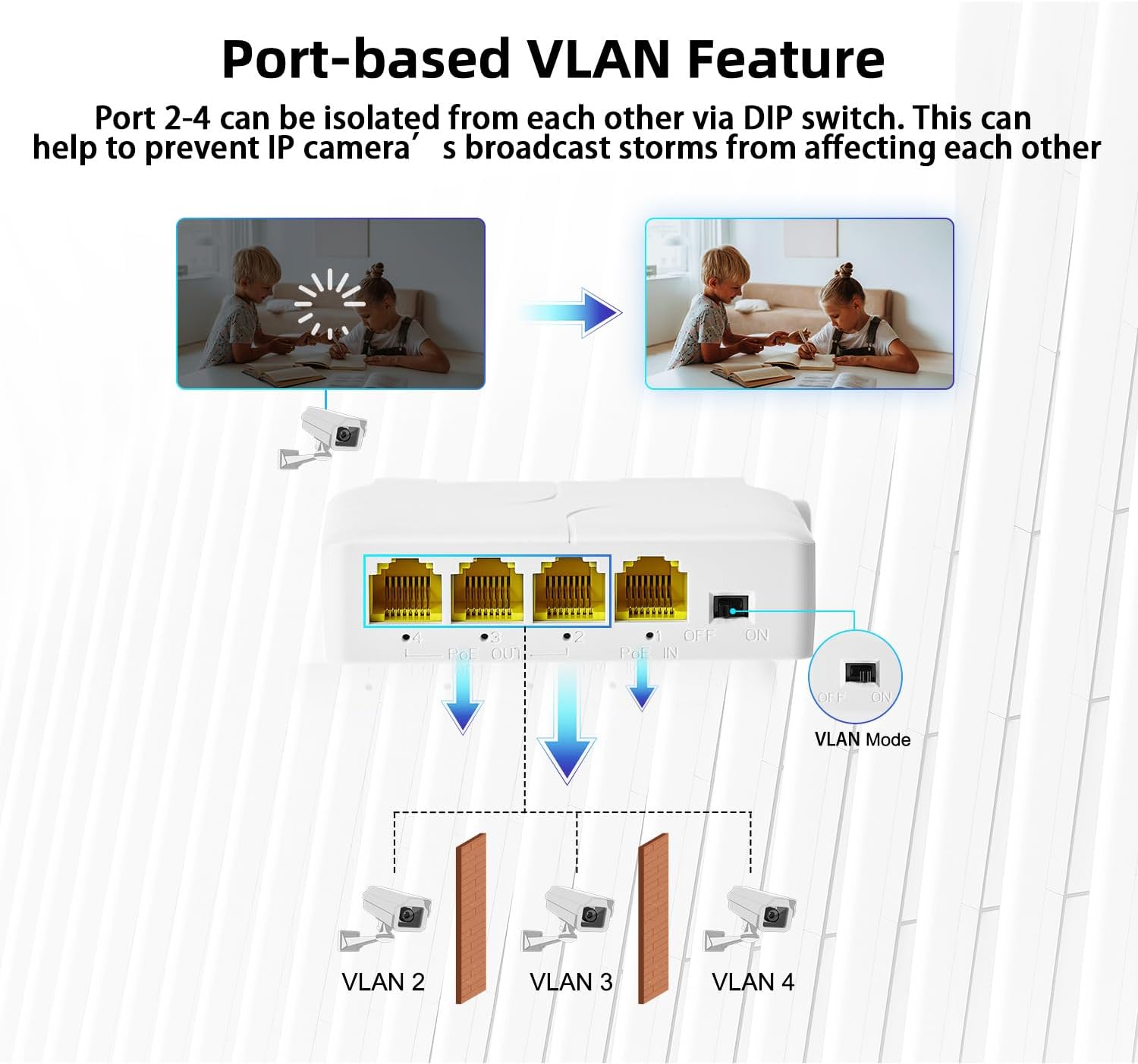
Figure 7: Illustration of the port-based VLAN feature, showing how ports 2-4 can be isolated using the DIP switch.
7. Vianmääritys
- Ei virtaa kytkettyihin laitteisiin:
- Ensure the PoE IN port is connected to an active IEEE 802.3af/at compliant PoE source.
- Verify the PoE source is providing sufficient power for all connected devices. The extender has a maximum output of 24W.
- Check all Ethernet cable connections for proper seating and integrity.
- Ei datayhteyttä:
- Confirm that the upstream network connection is active and functioning.
- Ensure Ethernet cables are correctly connected to the PoE IN and PoE OUT ports.
- Test with different Ethernet cables to rule out cable faults.
- Verify the connected device is operational and its network settings are correct.
- Hidas verkon nopeus:
- Ensure all connected devices and cables support Gigabit Ethernet (1000Mbps) for optimal performance.
- Check for excessive cable lengths. While the extender extends range, total cable length should still adhere to Ethernet standards for reliable performance.
8. Turvallisuustiedot
- Älä altista laitetta vedelle tai liialliselle kosteudelle.
- Älä avaa laitetta casing. Anna kaikki huoltotoimenpiteet pätevän henkilöstön tehtäväksi.
- Varmista riittävä ilmanvaihto ylikuumenemisen estämiseksi.
- Use only with IEEE 802.3af/at compliant PoE sources.
9. Takuu ja tuki
For warranty information and technical support, please refer to the MokerLink official websivustolta tai ota yhteyttä valtuutettuun jälleenmyyjään. Säilytä ostokuitti takuuvaatimuksia varten.


