
1. Johdanto
This manual provides essential information for the safe and effective use of your Accutime iTIME Kids Smart Watch, Model ITK2005AZ. Please read these instructions thoroughly before initial use and retain them for future reference.
The iTIME Kids Smart Watch is designed for children, offering various features such as a camera, learning games, and activity tracking, without requiring internet connectivity, Wi-Fi, or Bluetooth for core functions, ensuring a secure experience.
2. Turvallisuustiedot
- Tukehtumisvaara: This device contains small parts. Keep out of reach of very young children.
- Akun turvallisuus: The watch contains a built-in rechargeable lithium-ion battery. Do not attempt to replace the battery yourself. Do not expose the watch to extreme temperatures or dispose of it in fire.
- Vedenkestävyys: This watch is not waterproof. Avoid submersion in water or exposure to heavy rain.
- Näytön hoito: The touchscreen display is fragile. Avoid dropping the watch or subjecting it to strong impacts to prevent screen damage.
- Puhdistus: Käytä puhdistamiseen pehmeää, kuivaa liinaa. Älä käytä voimakkaita kemikaaleja tai hankaavia materiaaleja.
- Valvonta: Aikuisen valvontaa suositellaan käytön aikana, erityisesti pienille lapsille.
3. Pakkauksen sisältö
Varmista, että pakkauksessa on kaikki tarvittavat osat:
- Accutime iTIME Kids Smart Watch (Model: ITK2005AZ)
- USB-latauskaapeli
- Käyttöohje


Left: Packaging box for the iTIME Kids Smart Watch. Right: Included USB charging cable.
4. Asennus
4.1. Alkulataus
Before first use, fully charge the watch for at least two hours to ensure optimal battery performance. Subsequent charges should be at least one hour.
- Connect the small end of the USB charging cable to the charging port on the side of the watch.
- Liitä USB-kaapelin suurempi pää tavalliseen USB-virtalähteeseen (ei sisälly toimitukseen) tai tietokoneen USB-porttiin.
- The watch display will indicate that it is charging.
4.2. Virta päälle / pois
- Virran kytkeminen: Press and hold the power button (usually located on the side of the watch) until the screen illuminates.
- Virran sammuttaminen: Press and hold the power button until a power-off option appears on the screen, then tap to confirm. Alternatively, hold the button longer until the screen turns off.
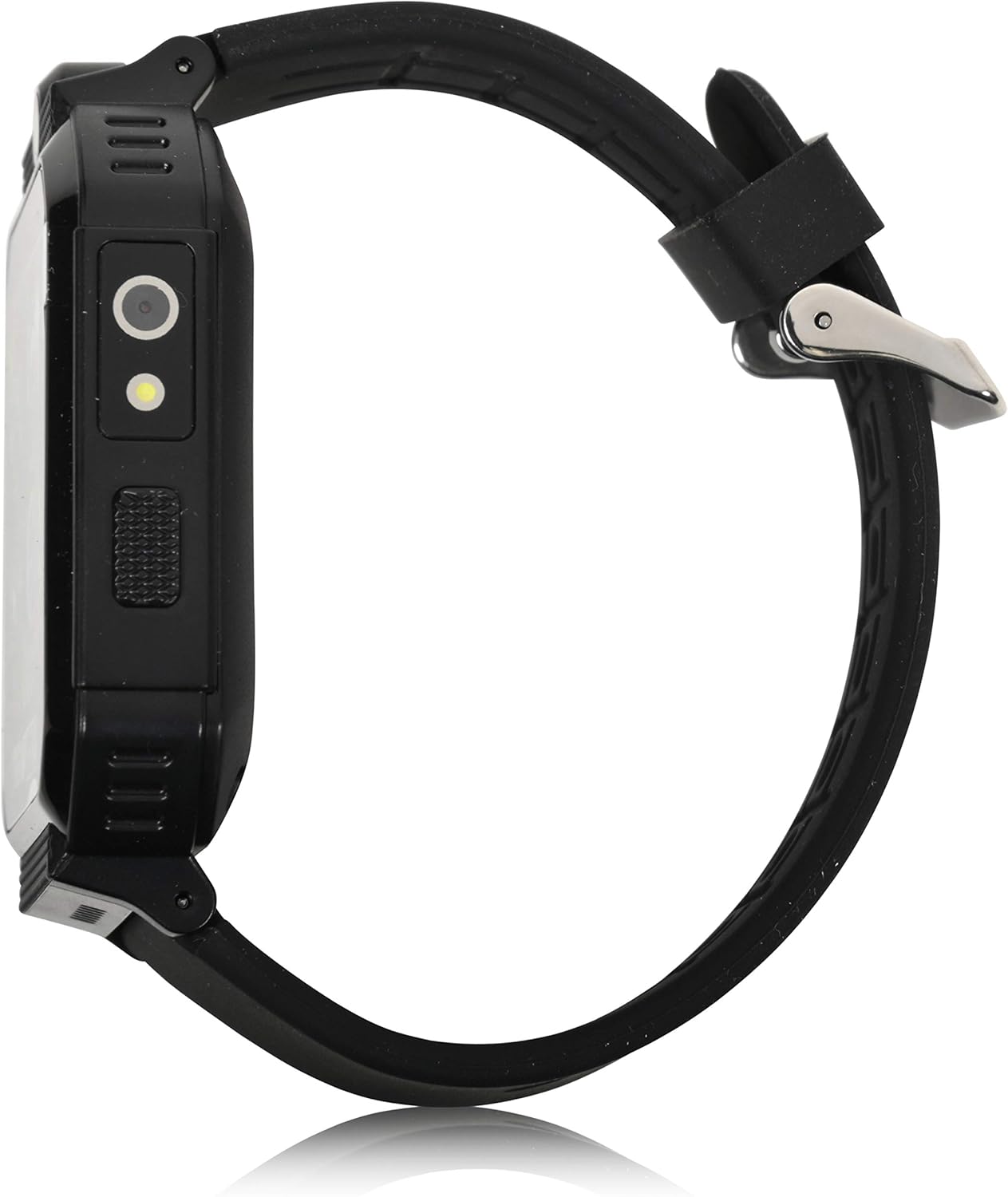
Sivu view of the smartwatch, highlighting the power button and charging port.
5. Käyttöohjeet
The iTIME Kids Smart Watch features a touchscreen interface for navigation. Swipe left or right to browse through applications and tap an icon to select.
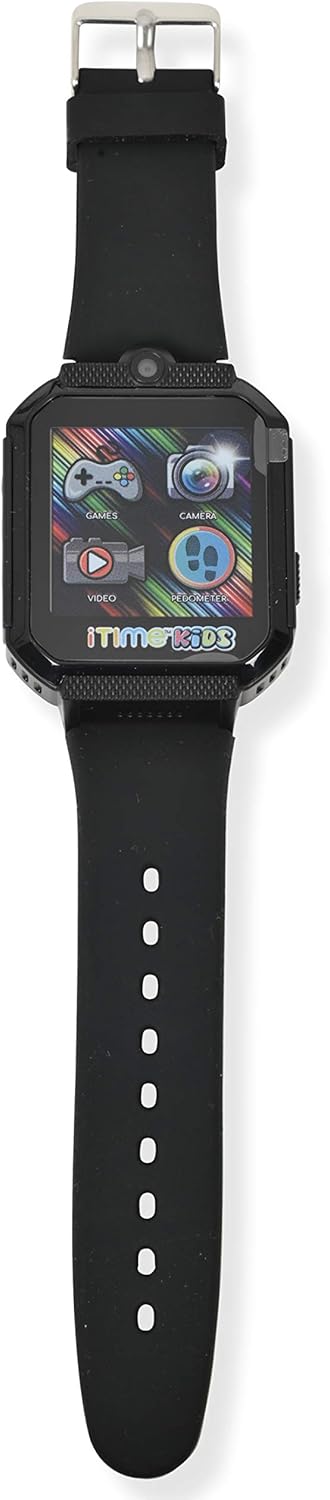
Edessä view of the smartwatch display, showing various application icons.
5.1. Time Display and Watch Faces
- The home screen displays the current time.
- To change watch faces, tap and hold on the home screen, then swipe to select a different design.
5.2. Camera and Photo Album
- Napauta Kamera icon to open the selfie camera.
- Ota valokuva napauttamalla näyttöä.
- Napauta Valokuva-albumi -kuvaketta view otettuja kuvia.
5.3. Pelit
- Napauta Pelit icon to access the preloaded games.
- Select a game from the list and follow the on-screen instructions to play.
5.4. Askelmittari ja aktiivisuuden seuranta
- Napauta Askelmittari -kuvaketta view your step count.
- The watch automatically tracks steps, distance, and estimated calories burned.
5.5. Muut ominaisuudet
- Videosoitin: Napauta Video icon to play recorded videos.
- Ääninauhuri: Napauta Ääninauhuri icon to record and playback audio.
- Laskin: Access basic arithmetic functions.
- Herätyskello: Aseta hälytykset muistutuksille.
- Taskulamppu: Ota käyttöön sisäänrakennettu taskulamppu.
- Sekuntikello: Käytä ajoitusaktiviteetteihin.
- Kehon lämpötila-anturi: Access the sensor to view real-time body temperature readings.
6. Ominaisuudet Yliview
The Accutime iTIME Kids Smart Watch ITK2005AZ includes the following functionalities:
- Kosketusnäyttö
- Selfie Camera for photos and videos
- Valokuva-albumi Viewer
- Videosoitin
- Ääninauhuri
- Laskin
- Herätyskello
- Askelmittarin askellaskuri
- Kalorilaskuri
- Etäisyyslaskuri
- 26 Preloaded Playable Games
- Vaihdettavat kellotaulut
- Taskulamppu
- Sekuntikello
- Real-time Body Temperature Sensor
- Sisäänrakennettu ladattava akku
7. Huolto
7.1. Puhdistus
Wipe the watch and strap with a soft, dry, lint-free cloth. Do not use liquid cleaners or sprays directly on the watch.
7.2. Varastointi
When not in use for extended periods, store the watch in a cool, dry place away from direct sunlight and extreme temperatures. Ensure the battery has some charge before storing to prevent deep discharge.
8. Vianmääritys
- Kello ei käynnisty: Varmista, että kello on ladattu täyteen. Liitä se laturiin vähintään 30 minuutiksi ennen kuin yrität käynnistää sen uudelleen.
- Näyttö ei reagoi tai on jumiutunut: Try restarting the watch by pressing and holding the power button until it powers off, then power it back on.
- Akun käyttöikä on lyhyt: Ensure the watch is charged for the recommended duration (at least 1 hour for regular use, 2 hours for initial use). Reduce screen brightness or frequency of game use to conserve battery.
- Ääniongelmat: Check the volume settings within the watch's menu. If games have separate volume controls, adjust them accordingly.
- Latausongelmat: Verify that the USB cable is securely connected to both the watch and the power source. Try a different USB port or power adapter.
9. Tekniset tiedot
| Merkki | Accutime |
| Malli | ITK2005AZ |
| Näytön tyyppi | LCD |
| Näytön koko | 40 millimetriä |
| Ihmisen käyttöliittymän syöttö | Kosketusnäyttö |
| Akun tyyppi | Litiumioni (ladattava) |
| Latausaika | 1-2 tuntia |
| Erikoisominaisuudet | Alarm Clock, Audio Recording, Camera, Pedometer, Time Display, Body Temperature Sensor |
| Yhteystekniikka | USB (latausta varten) |
| Langaton tiedonsiirtostandardi | Bluetooth (Note: Product description states no Bluetooth for safety, but specifications list it. For core functions, it does not connect to internet/Wi-Fi/Bluetooth. Bluetooth may be for internal components or specific accessories not advertised for general use.) |

Takaisin view of the smartwatch, displaying model information.
10. Takuu ja tuki
10.1. Takuutiedot
This Accutime iTIME Kids Smart Watch comes with a yhden vuoden takuu from Accutime Watch Corp. Please retain your proof of purchase for warranty claims.
10.2. Asiakastuki
For further assistance, technical support, or warranty inquiries, please contact Accutime Watch Corp. customer service. Refer to the packaging or Accutime's official websivusto yhteystiedot.


