
1. Johdanto
The PARD NV007V2 is a versatile digital night vision monocular designed for enhanced observation in low-light conditions and complete darkness. This device offers a high-resolution sensor, an adjustable infrared (IR) illuminator, and integrated recording capabilities, making it suitable for various outdoor activities.
This manual provides essential information for the safe and effective use of your PARD NV007V2 Night Vision Monocular. Please read it thoroughly before operation.
2. Turvallisuustiedot
- Do not look directly into the IR illuminator at close range, as it emits invisible infrared light that can be harmful to the eyes.
- Keep the device away from direct sunlight for prolonged periods to prevent damage to internal components.
- Vältä laitteen pudottamista tai altistamista voimakkaille iskuille.
- Älä yritä purkaa tai korjata laitetta itse. Ota yhteyttä pätevään huoltohenkilöstöön saadaksesi apua.
- Varmista, että paristo on asetettu oikein napaisuusmerkintöjen mukaisesti.
- Use only the specified battery type and charging cable.
3. Tuote ohiview
The PARD NV007V2 features a compact and lightweight design, making it easy to carry and attach. Key components include the objective lens, eyepiece, IR illuminator, control buttons, and a USB-C port for charging and data transfer.

Kuva 3.1: Oikea etuosa view of the PARD NV007V2 Night Vision Monocular.

Kuva 3.2: Sivu view showing the control panel and eyepiece.
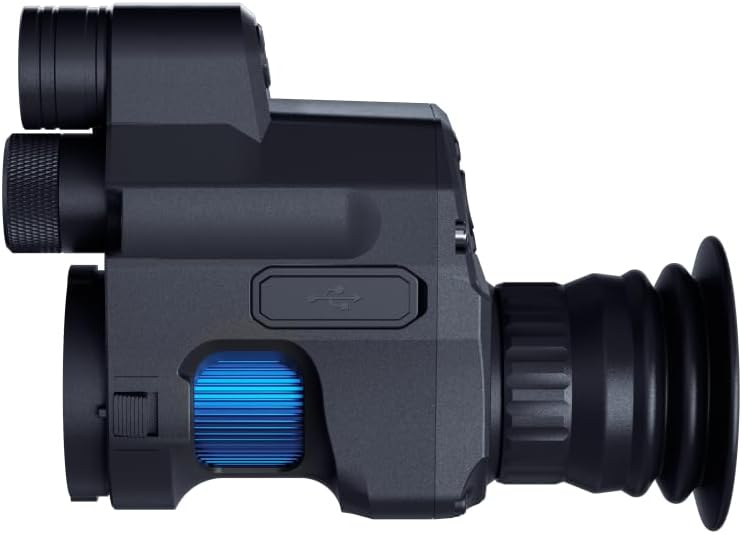
Kuva 3.3: Sivu view highlighting the USB-C port and focus ring.
Tärkeimmät ominaisuudet:
- 2560 x 1440 CMOS Sensor: Provides enhanced sensitivity for clearer and more detailed imaging in low light.
- 350m Extendable IR Illuminator: Adjustable infrared light (850nm or 940nm wavelength options) for extended night vision range.
- Full HD Photo and Video Recording: Capture images and videos at 1440 x 1080 resolution.
- Optinen ja digitaalinen zoom: 1.4x optical magnification with 1.5x-3.5x digital zoom for detailed observation.
- Multi-Coated Glass Lens: Reduces glare and reflections, offering sharp, high-contrast images.
- Wi-Fi-yhteys: Connect to external devices like phones or tablets for synchronous viewing.
- Kompakti muotoilu: Lightweight and easy to carry, designed for quick attachment and detachment.
4. Asennus
4.1 Akun asennus ja lataaminen
The NV007V2 uses one C-type battery (included). Ensure correct polarity when inserting the battery. The device supports charging via a Type-C cable and can also be powered by a mobile power supply (power bank).

Figure 4.1: Rechargeable battery options, including power bank and USB-C charging.
4.2 Laitteen asennus
The NV007V2 is designed for quick and easy attachment to a riflescope. It can be installed in approximately 3 seconds without needing to remove the riflescope from its mount.
- Wrap PVC tape around your riflescope's eyepiece to ensure a snug fit, then select a sleeve ring of appropriate thickness.
- Connect the NV007V2 to your riflescope's eyepiece.
- Tighten the screws to secure the device. Ensure the reticle of your scope is upright on the screen after installation.

Figure 4.2: Illustration of attaching the NV007V2 to a riflescope.

Figure 4.3: Step-by-step guide for easy installation.
5. Käyttöohjeet
5.1 Power On/Off and Standby Mode
- Kytke virta päälle pitämällä virtapainiketta painettuna.
- Sammuta virta pitämällä virtapainiketta uudelleen painettuna.
- Valmiustila: A single press of the power key will swiftly put the device into standby, reducing power consumption and allowing for quick reactivation.

Figure 5.1: Standby Mode icon.
5.2 Päivä- ja yöhavainnointi
The NV007V2 offers both day and night observation modes. The advanced sensor and OLED display provide clear images in various lighting conditions.

Figure 5.2: Comparison of day and night vision capabilities.
5.3 IR-valaisimen säätö
The integrated IR illuminator can be adjusted to enhance night vision. It offers a viewing range of up to 350 meters. The intensity of the fill light can be adjusted to reveal more distinct details. The 850nm wavelength is brighter for longer distances, while the 940nm band is suitable for covert observation without a visible red glow.

Figure 5.3: Illustration of the 350m night vision range.
5.4 Zoomaustoiminto
The device features 1.4x optical magnification and a digital zoom range of 1.5x to 3.5x. This allows for magnified viewing of targets without significant distortion, improving visibility and target identification.

Figure 5.4: Visual representation of optical and digital zoom.
5.5 Valokuvaus- ja videotallennus
Capture Full HD photos and videos with a single click. The image resolution is 1440 x 1080, and video resolution is also 1440 x 1080, providing smooth and detailed recordings of your observations. Captured media can be shared on social networks.
5.6 Wi-Fi Connectivity and HDMI Output
- Wi-Fi: Built-in Wi-Fi allows you to connect the NV007V2 to your smartphone, PC, or tablet, enabling synchronous viewsuuremmalla näytöllä.
- HDMI-lähtö: Equipped with an HDMI interface for high-definition photo and video transmission to external displays.

Figure 5.5: HDMI Output icon.
6. Huolto
- Linssien puhdistus: Use a soft, lint-free cloth specifically designed for optical lenses to clean the objective and eyepiece. Avoid abrasive materials or harsh chemicals.
- Kehon puhdistus: Pyyhi laitteen runko pehmeällä,amp kangas. Älä upota laitetta veteen.
- Akun hoito: Remove the battery if the device will not be used for an extended period. Store batteries in a cool, dry place.
- Varastointi: Store the monocular in its protective case in a dry, dust-free environment, away from extreme temperatures.
7. Vianmääritys
| Ongelma | Mahdollinen syy | Ratkaisu |
|---|---|---|
| Laite ei käynnisty | Low or depleted battery; Incorrect battery insertion | Charge the battery or replace it; Check battery polarity. |
| Huono kuvanlaatu / epäselvä kuva | Lens is dirty; Focus is not adjusted; IR illuminator not active or too low | Clean lenses; Adjust focus ring; Activate or increase IR illuminator intensity. |
| Valokuvia/videoita ei voi tallentaa | No SD card inserted; SD card full or corrupted | Insert a compatible SD card; Delete files or format SD card. |
| Wi-Fi-yhteysongelmia | Device not in Wi-Fi mode; Incorrect password; Interference | Ensure Wi-Fi is enabled on the device; Verify password; Move closer to the connected device. |
8. Tekniset tiedot
| Ominaisuus | Erittely |
|---|---|
| Mallinumero | NV007V2-14.5/850 |
| Anturi | 2560 x 1440 CMOS |
| Näyttö | OLED 1440 x 1080 |
| Optinen suurennus | 1.4x |
| Digitaalinen zoom | 1.5–3.5 kertaa |
| Objektiivin linssin halkaisija | 14.5 mm |
| IR-valaisimen aallonpituus | 850 nm (or 940 nm variant) |
| Yönäköalue | Jopa 350 metriä |
| Valokuvan resoluutio | 1440 x 1080 |
| Videon resoluutio | 1440 x 1080 |
| Silmien helpotus | 35 mm |
| Materiaali | Alumiini |
| Mitat (P x L x K) | 13.5 x 5.5 x 10 cm |
| Paino | 250 grammaa |
| Akun tyyppi | 1 C (included) |
| Yhteydet | Wi-Fi, USB Type-C, HDMI |
| Mukana olevat komponentit | C-tyypin kaapeli |
9. Takuu ja tuki
9.1 Takuutiedot
This PARD NV007V2 Night Vision Monocular comes with a 1 vuoden takuu ostopäivästä lukien. Tämä takuu kattaa valmistusvirheet ja varmistaa, että tuote toimii tarkoitetulla tavalla normaalissa käytössä. Säilytä ostokuitti takuuvaatimuksia varten.
9.2 Asiakastuki
For technical assistance, troubleshooting beyond this manual, or warranty inquiries, please contact PARD customer support. Refer to the official PARD website or your retailer's contact information for the most up-to-date support channels.