1. Johdanto
Welcome to your Garmin Approach S62 Premium GPS Golf Watch. This manual provides detailed instructions for setting up, operating, maintaining, and troubleshooting your device. Please read this manual thoroughly to ensure optimal performance and longevity of your watch.
2. Mitä laatikossa on
- Garmin Approach S62 Premium GPS Golf Watch
- Lataus/datakaapeli
- Dokumentaatio
- Wearable4U Power Bank (E-Bank)
- Wearable4U Wall Charger
- Wearable4U Car Charger

Image: Contents of the Wearable4U bundle, including the Garmin Approach S62 watch, power bank, wall charger, and car charger.
3. Laite loppuview
The Garmin Approach S62 is a premium GPS golf watch designed to provide essential golf course information and smart features directly on your wrist. It features a large, easy-to-read color touchscreen display.

Image: The Garmin Approach S62 watch displaying the time, steps count, and current date.

Image: The Garmin Approach S62 watch displaying detailed golf course information for a specific hole, including distances to the green.
4. Asennus
4.1. Laitteen lataaminen
Before first use, fully charge your Approach S62. Connect the charging clip to the watch and plug the USB cable into a power source. A full charge typically takes approximately 2 hours.
4.2. Virta päälle / pois
- Virran kytkeminen: Press and hold the power button (usually the top right button) until the Garmin logo appears.
- Virran sammuttaminen: Press and hold the power button until the power options menu appears, then select 'Power Off'.
4.3. Alkuasetukset ja pariliitos
Upon first power-on, the watch will guide you through initial setup steps, including language selection and personal data input. To unlock full smart features, pair your watch with the Garmin Golf app on your smartphone via Bluetooth. Follow the on-screen instructions on both the watch and the app.
5. Käyttöohjeet
5.1. Golfin ominaisuudet
The Approach S62 is preloaded with over 41,000 golf courses worldwide. Once you start a round, the watch automatically detects your location and displays course information.
5.1.1. Virtual Caddie
The Virtual Caddie feature suggests a club based on your typical hitting distance for each club, considering wind speed and direction. It also indicates where to aim on the course map.

Image: The Garmin Approach S62 watch showing the Virtual Caddie feature, suggesting a club and aim point for a shot.
5.1.2. Hazard View
Quickly scroll through each hazard on the map to view distances to the front and back of bunkers, water hazards, and other obstacles.
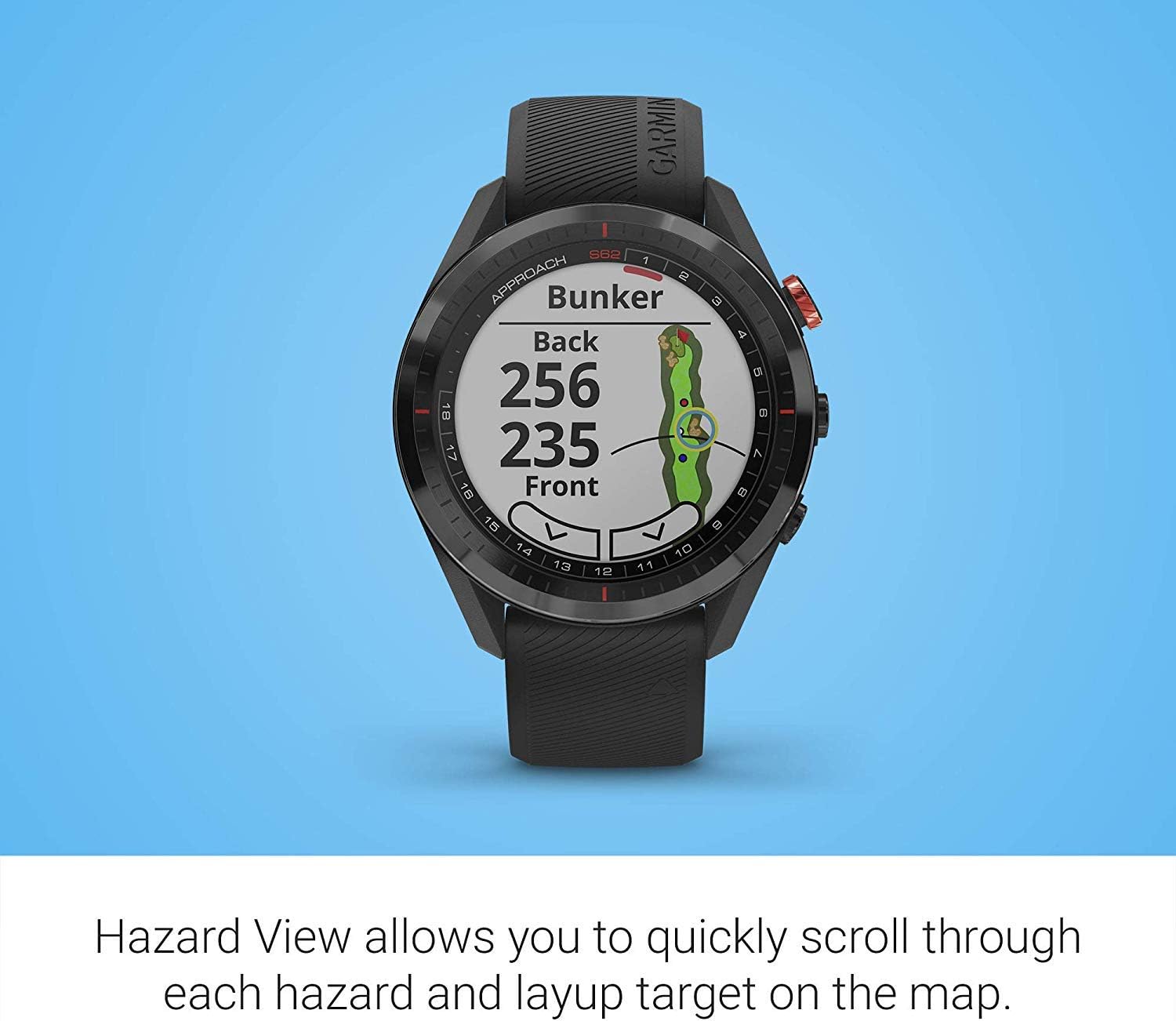
Image: The Garmin Approach S62 watch displaying the Hazard View, showing distances to the front and back of a bunker.
5.1.3. PlaysLike Distance
This feature adjusts yardage measurements to account for uphill and downhill shots, providing a more accurate distance to the target.
5.1.4. Vihreä View
Vihreä View feature allows you to manually position the pin for the day, providing precise distances to the front, middle, and back of the green, as well as to hazards and doglegs.

Image: The Garmin Approach S62 watch displaying the Green View, showing the green layout and allowing for manual pin positioning.
5.1.5. Course Selection and Scoring
The watch automatically detects nearby courses. Select your course and begin your round. The watch can track your score, shots, and other statistics, which can be reviewed on the watch or in the Garmin Golf app.
5.2. Älykkäät ominaisuudet
5.2.1. Garmin Pay
Garmin Pay is a contactless payment solution that allows you to make convenient payments directly from your watch. Set up your cards in the Garmin Connect app.
5.2.2. Ilmoitukset
Receive smart notifications for calls, texts, and app alerts directly on your watch when paired with your smartphone.
5.3. Customizing Your Watch
You can customize watch faces, widgets, and settings through the watch menu or the Garmin Connect app to suit your preferences.
6. Huolto
6.1. Laitteen puhdistaminen
Puhdista kellosi säännöllisesti pehmeällä,amp liinalla. Vältä voimakkaita kemikaaleja tai hankaavia materiaaleja. Varmista, että latauskontaktit ovat puhtaat ja kuivat ennen lataamista.
6.2. Akun hoito
To maximize battery life, avoid exposing the watch to extreme temperatures. Charge the device regularly, but avoid leaving it fully discharged for extended periods. The battery life is approximately 20 hours in GPS mode.
6.3. Ohjelmistopäivitykset
Keep your watch's software updated to ensure optimal performance and access to the latest features. Updates can be performed via the Garmin Connect app or Garmin Express on a computer.
7. Vianmääritys
7.1. Yleisiä ongelmia
- Kello ei käynnisty: Ensure the watch is fully charged. Try connecting it to a power source.
- GPS ei löydä signaalia: Varmista, että olet avoimella alueella, jossa on esteetön view of the sky. Allow several minutes for the watch to acquire satellites.
- Bluetooth-yhteysongelmat: Ensure Bluetooth is enabled on both your watch and smartphone. Try restarting both devices and re-pairing them through the Garmin Connect app.
- Epätarkat etäisyydet: Ensure the course map is up-to-date. Perform a software update if available.
- Kosketusnäyttö ei reagoi: Try restarting the device. If the issue persists, contact Garmin support.
8. Tekniset tiedot
| Ominaisuus | Yksityiskohta |
|---|---|
| Tuotteen paino | 1.25 kiloa |
| Tuotteen mitat | 1.85 x 0.58 x 1.85 tuumaa |
| Tuotteen mallinumero | wa001 |
| Paristot | Tarvitaan 2 litiumioniakku |
| Näytön koko | 3 tuumaa |
| Akunkesto (GPS-tila) | 20 tuntia |
| Äänikomento | Kosketusnäyttö |
| Yhteystekniikka | Bluetooth Smart and ANT+ |
| Karttatyyppi | Pohjois-Amerikassa |
| Asennustyyppi | Rannekiinnitys |
| Näytön tyyppi | Auringonvalossa näkyvä, transflektiivinen muisti pikselissä (MIP) |
9. Takuu ja tuki
Takuutiedot löytyvät tuotteen mukana toimitetuista dokumenteista tai Garminin viralliselta verkkosivustolta. websivusto. Teknistä tukea, tuoterekisteröintiä ja lisäresursseja varten käy osoitteessa garmin.com/tuki.
10. Virallinen tuotevideo
Video: Official product video demonstrating key features and benefits of the Garmin Approach S62 Premium GPS Golf Watch.