
1. Johdanto
This manual provides essential information for the safe and efficient use of your Lenovo IdeaPad Miix 510-12ISK 2-in-1 Tablet. The Miix 510 is a versatile device designed to function as both a laptop and a tablet, adapting to various tasks with its detachable keyboard and integrated kickstand. Please read this manual thoroughly before operating your device.
2. Pakkauksen sisältö
Varmista, että tuotepakkauksessa on kaikki tarvittavat osat:
- Lenovo IdeaPad Miix 510-12ISK Tablet
- Irrotettava näppäimistö
- Webnokka-akseli (integroitu)
- Virtalähde
- Pikaopas (jos mukana)
3. Asennus
3.1 Ensimmäinen lataus
Before first use, connect the tablet to a power outlet using the provided power adapter. Allow the device to charge fully. The charging indicator light will typically change color or turn off when charging is complete.
3.2 Näppäimistön kiinnittäminen
Align the magnetic connectors on the bottom edge of the tablet with the corresponding connectors on the keyboard. The keyboard will snap into place securely. To detach, gently pull the tablet away from the keyboard.

Image: The Lenovo IdeaPad Miix 510-12ISK in laptop mode, showing the tablet connected to its detachable keyboard. The screen displays the Windows 10 operating system interface.
3.3 Ensimmäinen käynnistys
Press and hold the power button (usually located on the side or top edge of the tablet) until the Lenovo logo appears. Follow the on-screen instructions to complete the initial Windows 10 Pro setup, including language selection, network connection, and user account creation.
4. Käyttöohjeet
4.1 Virran kytkeminen päälle/pois ja lepotila
- Virta päälle: Pidä virtapainiketta painettuna.
- Virta pois: From the Windows Start menu, select Power > Shut down.
- Nukkumismoodi: Briefly press the power button, or select Power > Sleep from the Start menu.
4.2 Using Tablet and Laptop Modes
The Miix 510 automatically switches between tablet and laptop modes when the keyboard is attached or detached. You can also manually switch modes via the Action Center in Windows 10.
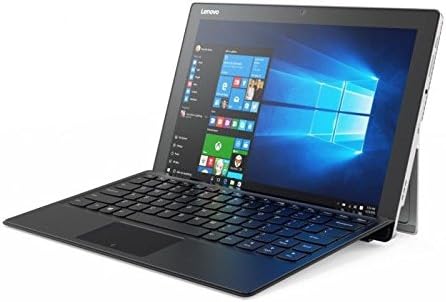
Kuva: Kulmikas view of the Lenovo IdeaPad Miix 510-12ISK, showcasing its kickstand functionality when used with the detachable keyboard in laptop configuration.
4.3 Touch Screen and Keyboard Usage
- Kosketusnäyttö: Use gestures such as tap, swipe, pinch-to-zoom, and long-press for navigation and interaction.
- Näppäimistö: The detachable keyboard provides a full QWERTY layout and a touchpad for precise input.
4.4 Yhteydet
Your device supports Wi-Fi and Bluetooth for wireless connectivity. Access network settings via the Windows Action Center or Settings app to connect to available networks and pair Bluetooth devices.
5. Huolto
5.1 Puhdistus
- Käytä pehmeää, nukkaamatonta liinaa hieman dampvedellä tai näytönpuhdistusaineella näytön puhdistamiseksi.
- Wipe the exterior surfaces with a soft, dry cloth. Avoid harsh chemicals or abrasive materials.
5.2 Ohjelmistopäivitykset
Regularly check for and install Windows updates to ensure optimal performance, security, and compatibility. Access updates via Windows Settings > Update & Security.
5.3 Akun hoito
To prolong battery life, avoid extreme temperatures and allow the battery to discharge partially before recharging. For long-term storage, charge the battery to approximately 50%.
6. Vianmääritys
6.1 Laite ei käynnisty
- Ensure the device is charged. Connect the power adapter and wait a few minutes before attempting to power on.
- Kokeile pitää virtapainiketta pohjassa 10–15 sekuntia suorittaaksesi laitekäynnistyksen.
6.2 Näyttöongelmat
- If the screen is blank, ensure the device is powered on and not in sleep mode.
- Säädä näytön kirkkausasetuksia.
6.3 Keyboard or Touchpad Not Responding
- Ensure the keyboard is securely attached to the tablet.
- Käynnistä tabletti uudelleen.
- Check for updated drivers in Windows Device Manager.
6.4 Wi-Fi- tai Bluetooth-yhteysongelmat
- Ota Wi-Fi tai Bluetooth käyttöön ja poista se käytöstä Windowsin asetuksissa.
- Käynnistä reititin/modeemi uudelleen Wi-Fi-ongelmien ratkaisemiseksi.
- Ensure devices are within range and properly paired for Bluetooth.
Jatkuvien ongelmien varalta katso Lenovon tukipalvelua. websivustolla tai ota yhteyttä asiakaspalveluun.
7. Tekniset tiedot
| Merkki | Lenovo |
| Mallin nimi | 80U1006EUS |
| Näytön koko | 12.2 tuumaa |
| Näytön resoluutio | 1920 x 1080 pikseliä |
| Prosessori | 2.3 GHz:n Intel Core i5-6200U -suoritin |
| RAM | 8 Gt |
| Kiintolevy | 256 Gt:n SSD-levy |
| Grafiikka rinnakkaisprosessori | Intel HD Graphics 520 |
| Käyttöjärjestelmä | Windows 10 Pro |
| Langaton tyyppi | Bluetooth |
| Tuotteen paino | 2.78 kiloa |
| Tuotteen mitat | 4.48 x 5.8 x 0.6 tuumaa |
| Takaosa Webkameran resoluutio | 5 MP |
8. Takuu ja tuki
This product is covered by Lenovo's standard warranty. For detailed warranty terms, registration, and technical support, please visit the official Lenovo support websivustolta tai ota yhteyttä heidän asiakaspalveluunsa. Säilytä ostokuitti takuuvaatimuksia varten.
No official product videos were provided by the seller for this model.