
Johdanto
This manual provides comprehensive instructions for the Superior Hotel TV Universal Programmable Remote Control, Model 8054242080070. This remote is specifically designed for hotel environments, featuring large buttons for ease of use and a disabled menu access button to prevent unauthorized changes to TV settings. It is programmable via PC for simple setup.
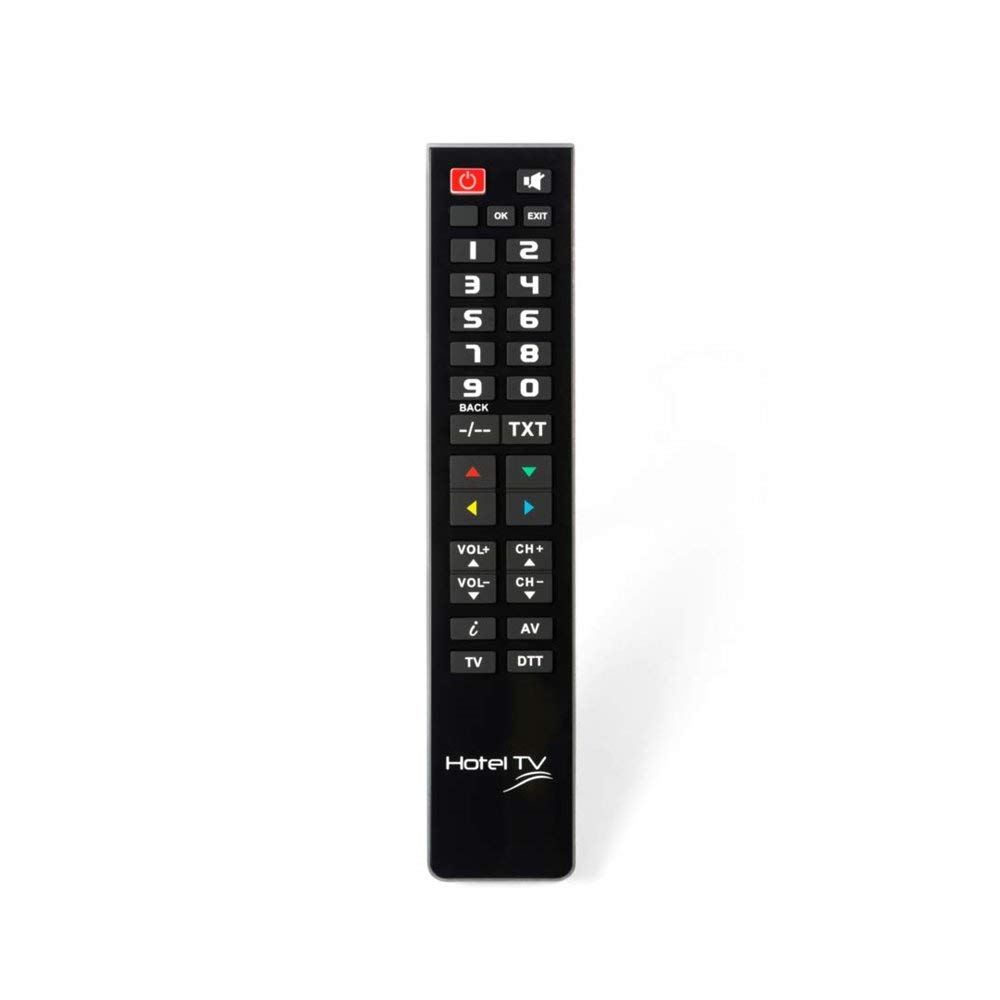
Image: Superior Hotel TV Universal Programmable Remote Control, showing its compact design and large buttons.
Asennus
1. Akun asennus
- Paikanna paristolokeron kansi kaukosäätimen takaa.
- Avaa kansi liu'uttamalla sitä alaspäin tai painamalla salpaa.
- Insert two AAA (LR03) batteries, ensuring the correct polarity (+ and -) as indicated inside the compartment. Huomautus: Paristot eivät sisälly toimitukseen.
- Sulje paristolokeron kansi, kunnes se napsahtaa tukevasti paikalleen.
2. PC-ohjelmointi
The remote control requires programming via a personal computer to function with your specific TV model. Follow these steps:
- Visit the official programming software websivusto: www.telecontrol.tv.
- Download and install the programming software onto your PC.
- Connect the remote control to your PC using a compatible USB cable (not included).
- Follow the on-screen instructions within the software to select your TV brand and model, and program the remote control.
- Once programming is complete, disconnect the remote control from your PC.
Käyttöohjeet
After successful programming, the remote control is ready for use. Its design focuses on essential functions for hotel guests.
- Virtapainike: Kytke televisio päälle tai pois päältä painamalla.
- Kanava ylös/alas: Use these buttons to change TV channels sequentially.
- Äänenvoimakkuus ylös/alas: Adjust the TV's audio volume.
- Mykistyspainike: Temporarily silence the TV audio.
- Numeropainikkeet (0-9): Valitse TV-kanavat suoraan.
Tärkeä huomautus: The menu access button is intentionally inactive on this remote control. This design prevents guests from altering TV settings, ensuring consistent operation within a hotel environment.
Huolto
Akun vaihto
When the remote control's performance degrades or it stops responding, replace the batteries. Follow the battery installation steps outlined in the "Setup" section. Always use new AAA (LR03) alkaline batteries.
Puhdistus
Puhdista kaukosäädin pyyhkimällä sen pinta varovasti pehmeällä, kuivalla liinalla. Pinttyneeseen likaan, pyyhi kevyestiampen the cloth with water or a mild, non-abrasive cleaner. Avoid using harsh chemicals or submerging the remote in liquid.
Vianetsintä
- Kaukosäädin ei vastaa:
- Tarkista, että paristot on asetettu oikein ja että niissä on riittävästi virtaa. Vaihda tarvittaessa.
- Varmista, ettei kaukosäätimen ja television infrapunavastaanottimen välissä ole esteitä.
- Verify that the remote was programmed correctly for your TV model using the PC software.
- Painikkeet eivät toimi:
- Some buttons, like the menu button, are intentionally disabled for hotel use.
- If essential buttons are not working, re-program the remote control via PC.
- Puhdista kaukosäädin varmistaaksesi, ettei roskat häiritse painikkeiden painamista.
- Ohjelmointiongelmat:
- Ensure your PC meets the minimum requirements for the programming software.
- Use a reliable USB cable for connection.
- Refer to the software's help section or the telecontrol.tv website for specific programming guidance.
Tekniset tiedot
| Merkki | Huippuluokan elektroniikka |
| Mallinumero | 8054242080070 |
| Yhteensopivat laitteet | Televisio |
| Yhteystekniikka | Radiotaajuus (RF) |
| Erikoisominaisuus | Pre-programmed (via PC) |
| Tuettujen laitteiden enimmäismäärä | 1 |
| Painikkeiden lukumäärä | 1 (referring to the main function set, not individual keys) |
| Suurin kantama | 10 metriä |
| Akun kuvaus | AAA (LR03) |
| UPC / EAN | 08054242080070 |
Takuu ja tuki
Takuutiedot
Specific warranty details for the Superior Hotel TV Universal Programmable Remote Control are not provided in this manual. Please refer to your purchase documentation or contact your vendor for warranty terms and conditions.
Tekninen tuki
For technical assistance, programming software, and additional information, please visit the official websivusto: