
Johdanto
Kiitos ostoksestasiasing the TWINBIRD Portable Waterproof DVD Player ZABADY VD-J719W. This device is designed to provide entertainment in various environments, including wet areas like bathrooms, thanks to its waterproof construction. It features a one-segment TV tuner for live broadcasts, DVD playback, and SD card compatibility for multimedia files. The built-in rechargeable battery ensures portability and convenience for daily use. This manual provides essential information for safe and effective operation.
Tuote loppuview
The VD-J719W combines a DVD player with a one-segment digital TV tuner in a compact, portable, and waterproof design. Its high-definition LCD panel ensures clear image reproduction, especially for DVDs. The unit is equipped with an easy-to-carry handle and a user-friendly interface for enhanced daily usability.

Edessä view of the TWINBIRD ZABADY VD-J719W Portable Waterproof DVD Player.

Takaisin view of the device, highlighting its IPX7 waterproof rating, one-segment TV tuner, and SD card compatibility.
Asennus
1. Pakkauksen purkaminen ja alkutarkastus
Carefully remove all components from the packaging. Ensure the main unit, remote control, power adapter, and any included cables are present. Inspect the device for any visible damage.
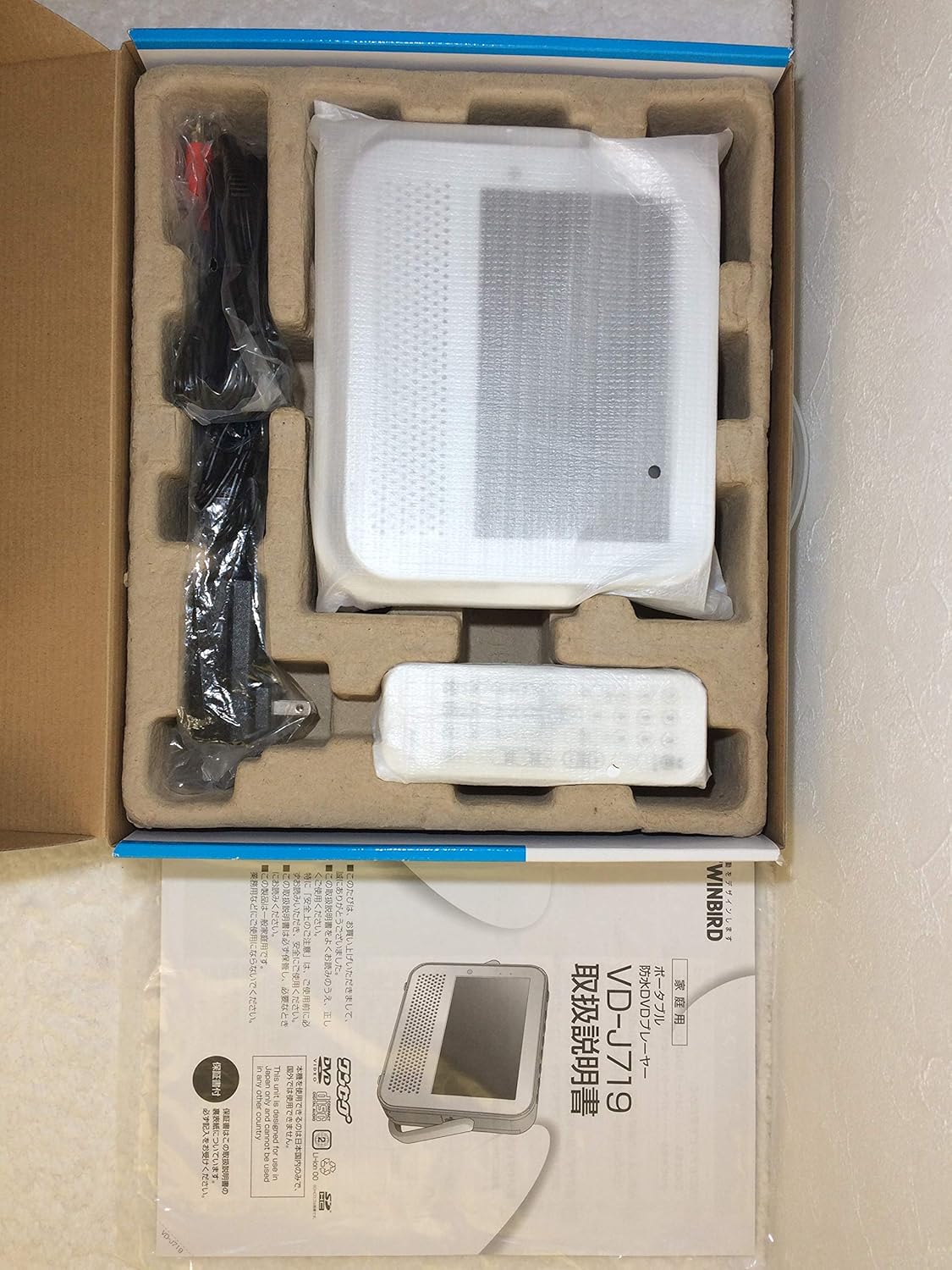
The DVD player and its accessories as they appear in the packaging, including the instruction manual.
2. Akun lataaminen
Before first use, fully charge the device. Connect the AC adapter to the unit's power input and then to a wall outlet. The charging indicator will illuminate. A full charge typically provides approximately 3 hours of playback time.
3. Virta päälle / pois
Press and hold the power button on the unit or remote control to turn the device on or off.
4. DVD-levyn asettaminen
Open the disc compartment cover. Carefully place a DVD disc onto the spindle with the label side facing up. Close the cover securely until it clicks into place. Ensure the cover is properly sealed to maintain waterproofing.
5. SD-kortin asettaminen
Locate the SD card slot, usually protected by a waterproof cover. Open the cover and insert the SD card with the contacts facing down until it clicks. Close the waterproof cover firmly.
Käyttöohjeet
1. DVD-toisto
- Insert a DVD as described in the Setup section.
- The player should automatically detect the disc and begin playback. If not, select the DVD source from the menu.
- Use the remote control or on-unit buttons for Play, Pause, Stop, Fast Forward, Rewind, and Chapter Skip.
2. One-Segment TV Viewing
- Extend the built-in antenna for optimal reception.
- Select the TV source from the main menu.
- Perform an initial channel scan to find available one-segment broadcasts in your area.
- Use the channel up/down buttons on the remote or unit to change channels.
- The remote control features a "Warp Button" for quick navigation:
- Press once for 30 seconds forward skip.
- Press once for 15 seconds backward skip.

The device displaying a one-segment TV program.
3. SD-kortin toisto
- Insert an SD card containing compatible media files.
- Select the SD card source from the main menu.
- Navigoi omassa files and select the desired video or audio content for playback.
- Supported video formats include MPEG4 (non-H264).
4. Volume and Display Adjustment
Use the volume buttons on the unit or remote control to adjust the audio level. While the device features a high-definition panel, specific brightness or contrast adjustments may be limited. Ensure the screen is clean for optimal viewing.

The device screen displaying a copyright notice, indicating program usage restrictions.
Huolto
1. Puhdistus
Pyyhi laitteen ulkopuoli pehmeällä, damp cloth. Avoid abrasive cleaners or solvents. The smooth design with few irregularities makes cleaning easy. For the screen, use a specialized screen cleaning cloth.
2. Vedenpitävyyden hoito
Always ensure all covers (e.g., SD card slot, USB port, power input) are securely closed to maintain the device's waterproof integrity. Do not submerge the device beyond its specified IPX7 rating. After use in wet environments, wipe the device dry.
3. Akun hoito
To prolong battery life, avoid fully discharging the battery frequently. Recharge the device regularly. If storing for an extended period, charge the battery to about 50% and store in a cool, dry place.
Vianetsintä
- Ei virtaa: Ensure the battery is charged or the AC adapter is properly connected. Check the power outlet.
- Levy ei toistu: Ensure the DVD is inserted correctly with the label side up. Check if the disc is clean and free from scratches. Ensure the disc compartment cover is fully closed.
- Huono TV-vastaanotto: Extend the antenna fully. Try repositioning the device or moving to an area with better signal strength. One-segment TV reception can vary significantly based on location and environmental factors.
- SD-kortti FileEi soita: Varmista, että media files on the SD card are in a compatible format (e.g., MPEG4 for video, not H264). Ensure the SD card is inserted correctly.
- Screen Appears White/Blurry: This may indicate a signal issue for TV or a specific file format problem for media playback. Ensure the screen is clean. If the issue persists across all functions, contact customer support.
- Audio Issues (Cracked/Inaudible Sound): Check the volume level. If using headphones, ensure they are properly connected. If the issue persists, it may indicate a hardware problem.
Tekniset tiedot
| Merkki | TWINBIRD |
| Mallinumero | VD-J719W |
| Mediatyyppi | DVD, SD Card |
| Näytön tyyppi | LCD |
| Yhteydet | USB |
| Äänilähtö | Stereot |
| Vedenkestävyys | IPX7 |
| Mitat (P x L x K) | 20 cm x 17 cm x 5 cm |
| Paino | 2064 grammaa (noin 2.06 kg) |
Takuu ja tuki
This product comes with a standard manufacturer's warranty. Please refer to the warranty card included in your packaging for specific terms and conditions, including the warranty period and coverage details. For technical support, service, or inquiries regarding your TWINBIRD ZABADY VD-J719W, please contact TWINBIRD customer service through their official websivustolla tai takuuasiakirjoissa annettujen yhteystietojen kautta.
Tärkeä huomautus: Unauthorized reproduction, broadcasting, or public screening of copyrighted programs is prohibited for personal or family use. If you discover any illegal acts of piracy or unauthorized screening, please contact the relevant authorities.