1. Johdanto ja loppuview
This manual provides essential instructions for the safe and efficient use of your Samsung EC-SH100 Wi-Fi Digital Camera. The EC-SH100 is a 14.2-megapixel digital camera featuring a 5x optical zoom, a 3-inch touchscreen, and integrated Wi-Fi capabilities for easy sharing and connectivity.
Keskeisiä ominaisuuksia ovat:
- Wi-Fi technology for direct photo and video uploads to social media (Facebook, YouTube) or email.
- Intuitive 3-inch LCD touchscreen with drag-and-scroll functionality.
- 14.2-megapixel resolution and 5x optical zoom for high-quality images.
- Face, smile, and blink detection for optimal portrait shots.
- Wireless, automatic file backup to your personal computer.

Kuva 1.1: Etuosa view of the Samsung EC-SH100 Wi-Fi Digital Camera, showcasing objektiivi ja salama.
2. Mitä laatikossa on
Tarkista, että tuotepakkauksessa on kaikki seuraavat osat:
- Samsung EC-SH100 Digital Camera
- AC Adapter/USB Cable
- Ladattava litiumioniakku
- Hihna
- Kosketa kynää
- Käyttöopas CD-ROM-levyllä
- Pika-aloitusopas
3. Asennus
3.1. Akun lataaminen
- Insert the rechargeable lithium-ion battery into the camera's battery compartment.
- Connect the camera to the AC adapter using the provided USB cable.
- Kytke verkkolaite pistorasiaan. Latauksen merkkivalo syttyy.
- Anna akun latautua täyteen ennen ensimmäistä käyttökertaa.
3.2. Muistikortin asettaminen
The camera requires a microSD card (up to 8 GB supported) to store photos and videos. A memory card is not included in the box and must be purchased separately.
- Avaa muistikorttipaikan kansi.
- Aseta microSD-kortti kultaiset koskettimet alaspäin, kunnes se napsahtaa paikalleen.
- Sulje muistikorttipaikan kansi tiiviisti.
3.3. Virta päälle / pois
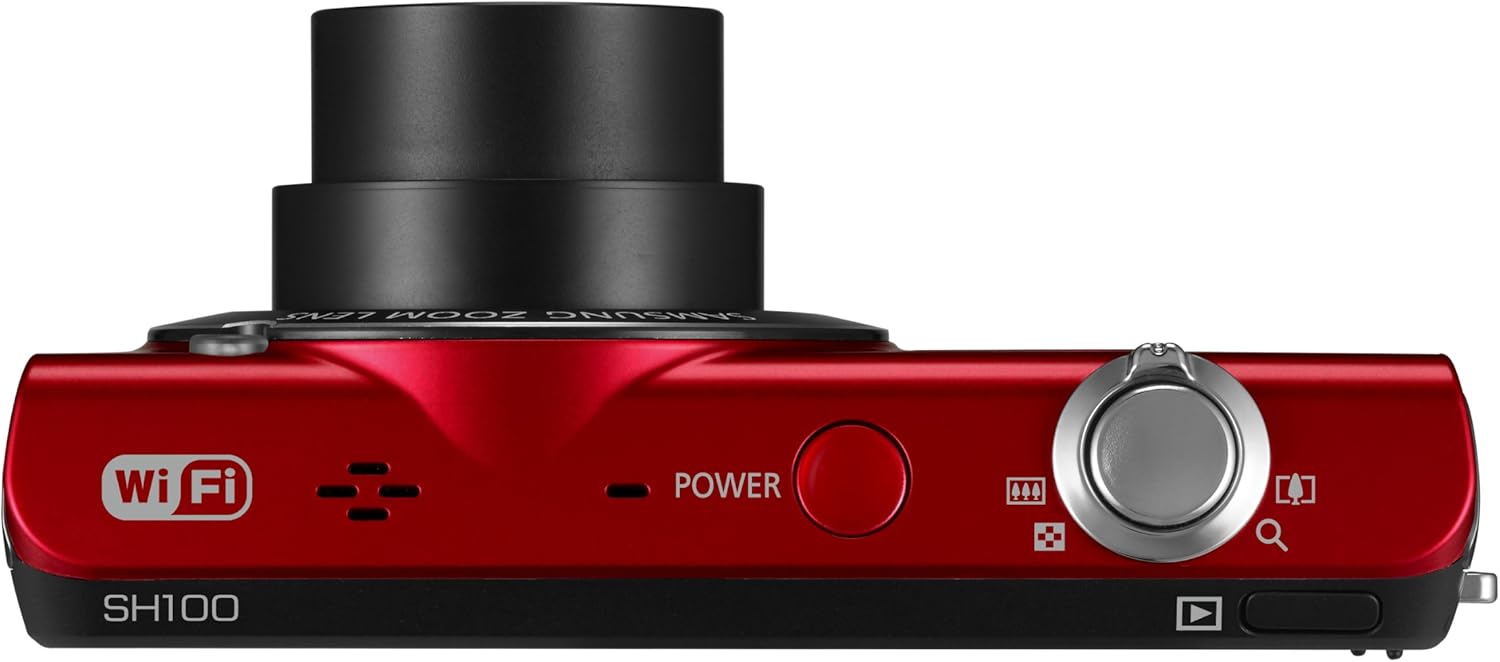
Kuva 3.1: Yläosa view of the camera, highlighting the power button.
Paina POWER kameran päällä olevaa painiketta sen kytkemiseksi päälle tai pois päältä.
4. Kameran käyttö
4.1. Perusvalokuvaus
- Kytke kamera päälle.
- Frame your shot using the 3-inch LCD touchscreen.
- Paina laukaisin puoliväliin tarkentaaksesi ja paina sitten pohjaan ottaaksesi kuvan.
4.2. Using the Smart Touch Interface

Kuva 4.1: Takaosa view of the camera, showing the Smart Touch interface.
The 3-inch LCD touchscreen allows for intuitive navigation similar to a smartphone. Use the included touch pen or your finger to tap icons, drag, and scroll through menus and images. The "Home" icon provides quick access to the main menu.
4.3. Smart Auto 2.0
The Smart Auto 2.0 feature automatically analyzes the scene and selects the most appropriate shooting mode from 17 photo modes and 4 movie modes to ensure optimal image quality.
4.4. Face, Smile, and Blink Detection
This feature detects up to nine faces in a frame, adjusting lighting for optimal results. The camera can be set to automatically capture a photo when subjects smile or laugh, and prevent a shot if anyone's eyes are closed.
4.5. Digitaalinen kuvanvakautus
Digital Image Stabilization (DIS) helps reduce blur caused by camera shake, especially in low light conditions or when using the zoom. This feature digitally corrects image data before it is recorded.
4.6. Wi-Fi Connectivity and Sharing
The EC-SH100's integrated Wi-Fi allows for direct sharing:
- Sosiaalinen jakaminen: Upload photos and videos directly to Facebook, Picasa, or YouTube.
- Sähköposti: Send photos directly from the camera via email.
- AllShare: Wirelessly connect to a compatible Samsung TV to view valokuvia ja videoita.
- PC Auto Backup: Automatically transfer photos and videos to your PC when within range of a configured Wi-Fi network. The camera will power off after backup to conserve energy.
4.7. Magic Frame
Use Magic Frame to combine two photos using predefined templates, creating unique visual effects and poster-quality images.
4.8. Kaukosäädin Viewetsijä
When paired with a compatible Samsung Galaxy Phone, the Remote Viewfinder feature allows you to preview images and control the camera's zoom remotely using your smartphone. This also enables geo-tagging of images if your smartphone has GPS.
5. Huolto
5.1. Kameran puhdistaminen
- Puhdista kameran runko pehmeällä, kuivalla liinalla.
- Käytä linssin ja LCD-näytön puhdistukseen erityistä linssinpuhdistusliinaa ja -liuosta. Vältä voimakkaita kemikaaleja.
5.2. Akun hoito
- Säilytä akkua viileässä ja kuivassa paikassa, kun sitä ei käytetä.
- Vältä altistamasta akkua äärimmäisille lämpötiloille.
- Charge the battery regularly, even if the camera is not used frequently, to maintain its lifespan.
5.3. Laiteohjelmistopäivitykset
Periodically check the Samsung support website for available firmware updates for your camera. Firmware updates can improve performance and add new features. Follow the instructions provided by Samsung carefully when performing an update, typically involving connecting the camera to a computer.
6. Vianmääritys
- Kamera ei käynnisty: Varmista, että akku on ladattu täyteen ja asetettu oikein.
- Ei voi ottaa kuvia/videoita: Verify that a microSD card is inserted and has sufficient free space.
- Epäselvät kuvat: Ensure Digital Image Stabilization is active. Hold the camera steady. In low light, use a tripod if possible.
- Poor video audio: Ensure the microphone is not obstructed. Note that some users have reported limited audio quality in video recordings.
- Wi-Fi-yhteysongelmat: Check your Wi-Fi network settings and ensure the camera is within range. Re-enter network passwords if necessary.
- Camera turns on by itself: The power button may be accidentally pressed if the camera is stored in a tight space like a purse. Ensure the camera is stored in a way that prevents accidental button presses.
7. Tekniset tiedot
| Tuotteen mitat | 3.66 x 0.75 x 2.13 tuumaa (L x S x H) |
| Tuotteen paino | 3.84 unssia |
| Kuvan anturi | 14.2 Megapixels CCD |
| Optinen zoom | 5x |
| Linssi | 26mm Samsung lens, 4.7-23.5mm (35mm equivalent: 26-130mm) |
| Suurin aukko | f/3.3-5.9 |
| Näyttö | 3 tuuman LCD-kosketusnäyttö |
| Kuvanvakautus | Digitaalinen, optinen |
| Sisäinen muisti | 6.9 Mt |
| Ulkoinen muisti | microSD-kortti 8 Gt asti |
| Akku | Ladattava litium-ioni (mukana) |
| Tuettu File Muoto | MP4 (Video) |
| Yhteydet | Wi-Fi, USB |
| Käyttöjärjestelmän yhteensopivuus | Windows 2000, XP, Vista, 7; Mac OS X 10.3 or higher |
8. Takuu ja tuki
8.1. Rajoitettu takuu
The Samsung EC-SH100 Wi-Fi Digital Camera is backed by a one-year limited warranty on parts and labor. Please refer to the warranty card included in your product package for full terms and conditions.
8.2. Asiakastuki
For further assistance, technical support, or to download the latest drivers and firmware, please visit the official Samsung support website. You may also refer to the User Manual CD-ROM and Quick Start Manual provided with your camera.


