1. Johdanto
This manual provides detailed instructions for the safe and efficient operation of your Samsung Glyde U940 mobile phone. Please read this manual thoroughly before using your device to ensure proper functionality and to understand all features.
2. Pakkauksen sisältö
Varmista, että tuotepakkauksesi sisältää seuraavat osat:
- Samsung Glyde U940 Mobile Phone
- Vakioakku
- Travel Adapter/Charger
- Käyttöopas (tämä asiakirja)
- Huomautus: Tietyt lisävarusteet voivat vaihdella alueittain tai jälleenmyyjiltä riippuen.
3. Laite loppuview
The Samsung Glyde U940 features a large touch-sensitive display and a slide-out QWERTY keyboard for versatile input.
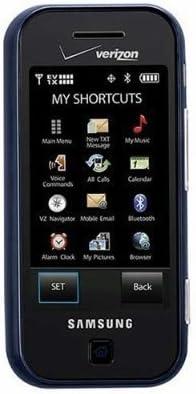
Kuva 3.1: Edessä view of the Samsung Glyde U940, showing the 2.8-inch display and navigation buttons. The screen displays "MY SHORTCUTS" with icons for various functions like Main Menu, New TXT Message, My Music, Voice Commands, All Calls, Calendar, Mobile Email, Bluetooth, Alarm Clock, My Pictures, and Browser. "SET" and "Back" buttons are visible below the screen.
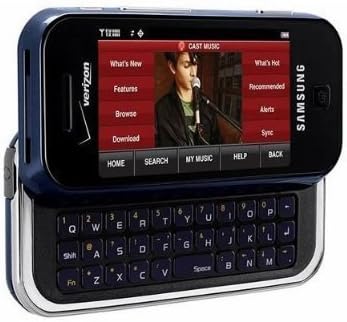
Kuva 3.2: Samsung Glyde U940 with its full QWERTY keyboard extended. The phone is oriented horizontally, displaying a media interface on the screen with options like "What's New", "Features", "Browse", "Download", "What's Hot", "Recommended", "Alerts", and "Sync". Navigation buttons for "HOME", "SEARCH", "MY MUSIC", "HELP", and "BACK" are visible below the screen.
Tärkeimmät ominaisuudet:
- Large 2.8" Display
- Slide-out QWERTY Keyboard
- Kosketusnäyttöliittymä
- Full HTML Browser
- 2.0 MP Camera and Camcorder
4. Asennus
4.1. Akun asennus
- Paikanna akun kansi puhelimen takaosasta.
- Gently remove the battery cover by sliding or lifting it.
- Kohdista akun kultaiset koskettimet akkulokeron koskettimiin.
- Insert the battery firmly into place.
- Replace the battery cover, ensuring it clicks securely.
4.2. Akun lataaminen
- Connect the travel adapter to the charging port on your phone.
- Plug the other end of the travel adapter into a standard electrical outlet.
- Anna puhelimen latautua kokonaan ennen ensimmäistä käyttökertaa. Näytön akun merkkivalo näyttää latauksen tilan.
- Irrota laturi, kun akku on latautunut täyteen.
4.3. Virta päälle / pois
- Virran kytkeminen: Press and hold the Power/End key until the screen lights up.
- Virran sammuttaminen: Press and hold the Power/End key until the power-off options appear, then select "Power off".
5. Käyttöohjeet
5.1. Kosketusnäytön käyttäminen
The Samsung Glyde U940 features a resistive touch screen. Use your fingertip or a stylus (if provided) to interact with the display.
- Napauta: Lightly touch the screen once to select an item or open an application.
- Raahata: Kosketa kohdetta ja pidä sitä painettuna ja siirrä sitten sormeasi näytön poikki siirtääksesi sitä.
- Selaa: Slide your finger up or down on the screen to navigate through lists or web sivuja.
5.2. Using the QWERTY Keyboard
Slide the screen horizontally to reveal the full QWERTY keyboard. This keyboard is ideal for typing messages, emails, and web osoitteita.
- Press individual keys to input characters.
- Käytä Siirtää isojen kirjainten ja symbolien näppäin.
- The Fn key provides access to additional functions or symbols.
5.3. Puheluiden soittaminen ja vastaanottaminen
- Soittaminen: From the home screen, tap the Phone icon or dial the number using the keypad and press the Call key.
- Puhelun vastaanottaminen: When a call comes in, tap the "Answer" button on the screen.
- Puhelun lopettaminen: Tap the "End" button on the screen or press the Power/End key.
5.4. Viestit (SMS/MMS)
To send a text or multimedia message:
- From the main menu, select "Messages" or "New TXT Message".
- Anna vastaanottajan puhelinnumero tai valitse se yhteystiedoistasi.
- Type your message using either the touch screen or the QWERTY keyboard.
- To add multimedia (pictures, videos, audio), select the attachment option.
- Napauta "Lähetä".
5.5. Camera and Camcorder Functions
The Glyde U940 is equipped with a 2.0 MP camera.
- Ottaa valokuvia: Open the Camera application, frame your shot, and press the dedicated camera button or tap the capture icon on the screen.
- Videoiden tallentaminen: Switch to camcorder mode within the Camera application, press the record button to start, and press again to stop.
- Access your captured media in the "My Pictures" or "Gallery" application.
5.6. Web Selain
Utilize the full HTML browser to access the internet.
- From the main menu, select "Browser".
- Syötä haluamasi web osoite URL baari.
- Use the touch screen to navigate pages, zoom in/out, and click links.
6. Huolto
6.1. Akun hoito
- Vältä altistamasta akkua äärimmäisille lämpötiloille.
- Älä puhkaise tai vahingoita akkua.
- For optimal battery life, avoid frequent partial discharges and charges.
- Jos puhelinta ei käytetä pitkään aikaan, säilytä sitä osittain ladatulla akulla.
6.2. Laitteen puhdistaminen
- Use a soft, lint-free cloth to clean the screen and exterior of the phone.
- Älä käytä voimakkaita kemikaaleja, puhdistussuihkeita tai hankaavia materiaaleja.
- Ensure no moisture enters openings such as the charging port or headphone jack.
6.3. Ohjelmistopäivitykset
Periodically check for available software updates to improve performance and add new features. Consult your service provider or the Samsung websivusto päivitysmenettelyjä varten.
7. Vianmääritys
This section addresses common issues you might encounter with your Samsung Glyde U940.
| Ongelma | Mahdollinen ratkaisu |
|---|---|
| Puhelin ei käynnisty. | Ensure the battery is correctly installed and fully charged. Connect the charger and attempt to power on. |
| Touch screen is unresponsive or erratic. |
|
| Akku tyhjenee nopeasti. |
|
| Puheluita ei voi soittaa tai vastaanottaa. | Check network signal strength. Ensure "Airplane Mode" is not enabled. Contact your service provider if network issues persist. |
| QWERTY keyboard input is incorrect. | Ensure the keyboard is fully extended and locked into position. Restart the device if keys are unresponsive. |
8. Tekniset tiedot
| Ominaisuus | Yksityiskohta |
|---|---|
| Mallinumero | U940 |
| Näyttö | 2.8 Inches, Touch Screen |
| Syöttötapa | Touch Screen, Slide-out QWERTY Keyboard |
| Kamera | 2.0 MP (Camera and Camcorder) |
| Selain | Full HTML Browser |
| Tuotteen paino | 11.2 unssia |
| Mitat | 8.1 x 5.4 x 2.2 tuumaa (pakkauksen mitat) |
| Yhteydet | Wireless, USB 2.0 |
| Valmistaja | Samsung |
9. Takuu ja tuki
Takuutiedot löytyvät tuotteen mukana toimitetusta takuukortista tai Samsungin virallisesta verkkosivustosta. website. For technical support, contact your service provider or Samsung customer service.
Samsungin asiakaspalvelu: www.samsung.com/us/support/


