
LIGE FV12-D-XY-US-CJQ
LIGE Smart Watch User Manual
Model: FV12-D-XY-US-CJQ
Brand: LIGE
1. Introduction
This manual provides detailed instructions for the operation and maintenance of your LIGE Smart Watch FV12-D-XY-US-CJQ. Please read this manual thoroughly before using the device to ensure proper functionality and to maximize your user experience.
The LIGE Smart Watch is designed for women, featuring a 1.43" AMOLED HD display, Bluetooth calling capabilities, and over 100 sports modes. It is 5ATM/IP68 waterproof and compatible with both iOS and Android smartphones.
2. What's in the Box
Upon opening your LIGE Smart Watch package, you should find the following items:
- Smart Watch
- Metal Strap
- Silicone Strap
- Strap Accessories
- Charger
- Instructions Manual
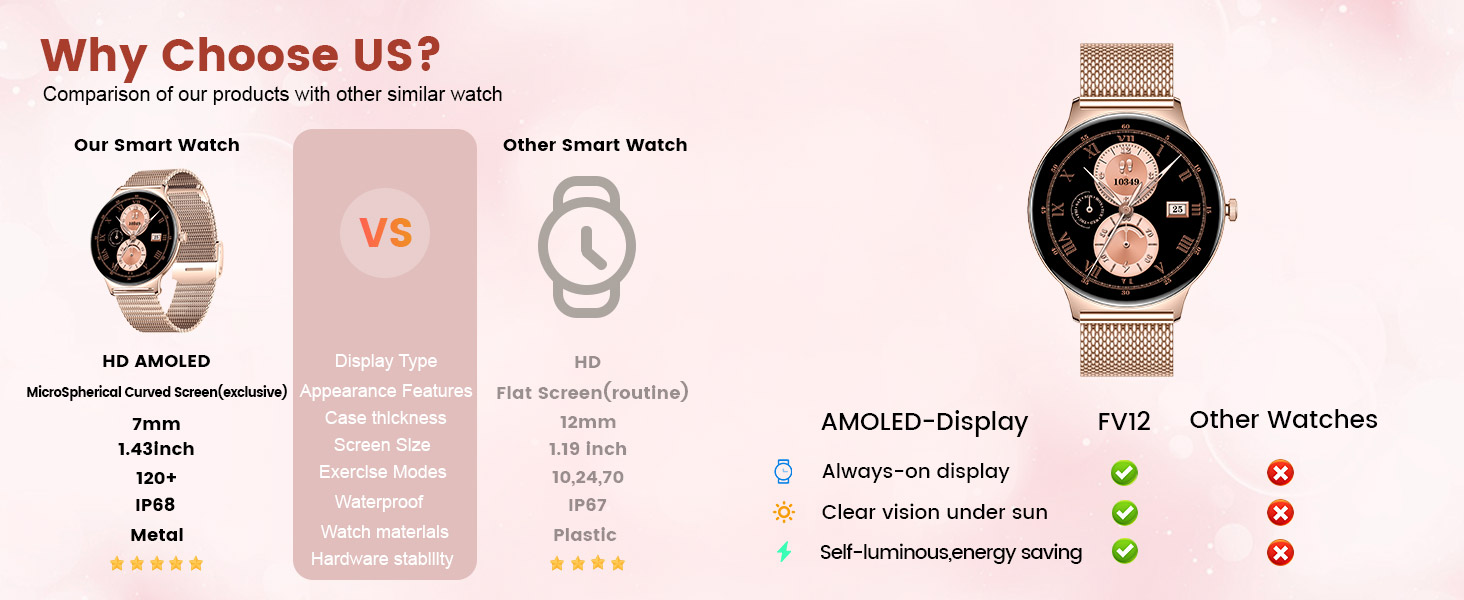
Image: Contents of the LIGE Smart Watch package.
3. Setup and Pairing
Follow these steps to set up your LIGE Smart Watch and pair it with your smartphone:
- Charge the Watch: Before first use, fully charge your smartwatch using the provided charger.
- Download the App: Scan the QR code provided in the manual or search for "FitCloudPro" in your smartphone's app store (App Store for iOS, Google Play Store for Android). Install the application. (App Download Link)
- Enable Bluetooth: Turn on Bluetooth on your smartphone.
- Open App and Add Device: Open the FitCloudPro app, navigate to the "Device" section, and select "Add Device". The app will search for available devices.
- Select Your Watch: From the list of found devices, select "FV12".
- Confirm Pairing: A Bluetooth pairing request will appear on your phone. Confirm by selecting "Pair".
- Enable Call Function (iOS 13+): For iOS users, to enable the one-touch call function, ensure your iOS version is 13 or higher. After initial pairing, go to your phone's Bluetooth settings, find "FV12" (or similar name for the call function), and ensure "Connected to Call Audio" is enabled.

Image: Visual guide for watch setup and app pairing.
4. Operating Instructions
4.1. Display and Watch Faces
The watch features a 1.43" AMOLED full-screen colorful display with 466x466 pixels, offering vibrant colors and clear details. It supports full touch interaction.
You can customize your watch face from over 200 free dials available through the app, or upload personal photos to create a unique look.

Image: Customizable watch faces on the AMOLED display.
4.2. Bluetooth Calling and Notifications
With Bluetooth connectivity, the smartwatch allows you to dial and answer calls directly from your wrist. It also provides real-time alerts for texts, calls, emails, and social media notifications (e.g., Instagram, YouTube, Line, Skype, WhatsApp, Snapchat, LinkedIn).

Image: Bluetooth calling and message notifications.
Video: Demonstrates the LIGE FV12 Smart Watch's IP68 waterproof capabilities and general usage.
4.3. Sports Modes and Activity Tracking
The watch supports over 100 sports modes, accurately recording activity data such as steps, distance, and calories burned. This data can be synced with the app to help you create effective fitness plans.

Image: Overview of sports modes and activity tracking.
Video: Showcases the ultra-thin body and various features of the LIGE FV12 1.43'' AMOLED Women's Smart Watch.
4.4. Health Monitoring
The watch monitors and tracks your health data 24/7, including heart rate, blood oxygen, sleep patterns, and stress levels. It also includes a sedentary reminder.
- Heart Rate: Continuously monitors your heart rate.
- Blood Oxygen (SpO2): Measures blood oxygen saturation.
- Sleep Monitoring: Tracks sleep stages (awake, light sleep, deep sleep) to provide insights into your sleep quality.
- Sedentary Reminders: Alerts you to move after periods of inactivity.
- Female Cycle Tracking: Scientific cycle monitoring to care for women at every stage of their lives.
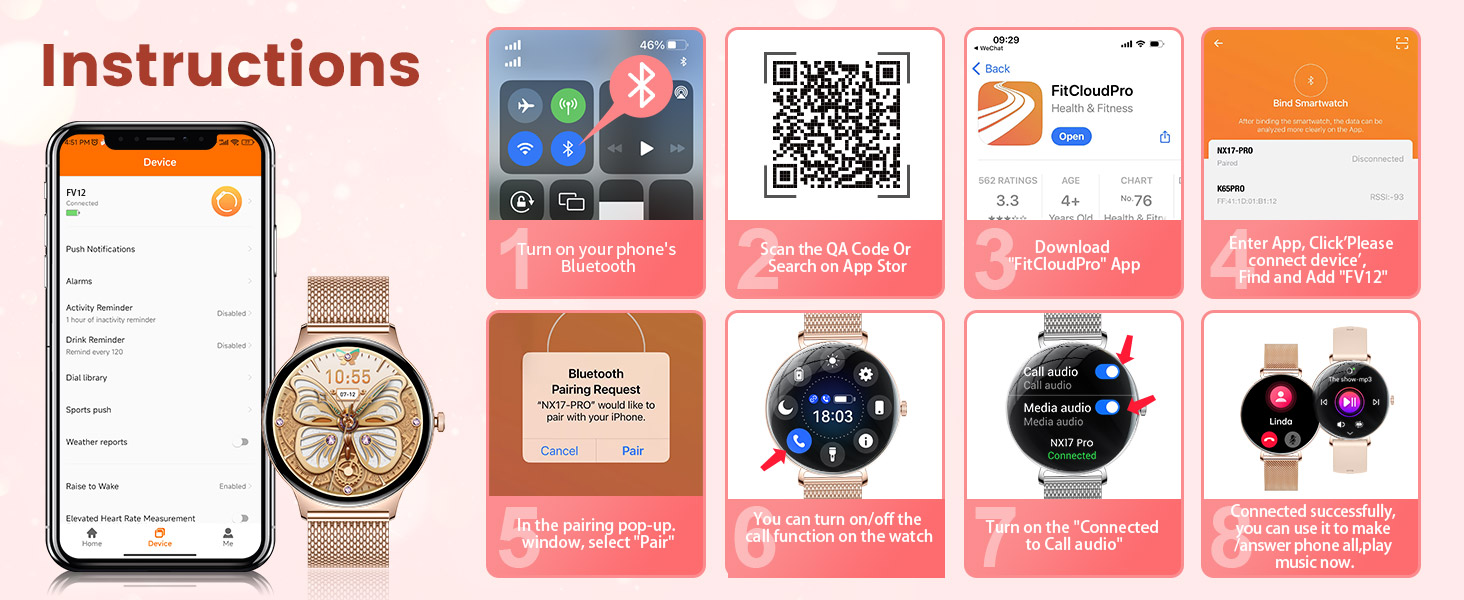
Image: Health tracking features.
4.5. Additional Features
The LIGE Smart Watch offers a range of additional functionalities for daily convenience:
- Music Control: Control music playback on your smartphone.
- Alarm Clock: Set alarms directly from your watch.
- Weather Forecast: Get real-time weather updates.
- Remote Photography: Use your watch as a remote shutter for your phone's camera.
- Drink Water Reminder: Helps you stay hydrated.
- Stopwatch & Timer: Built-in timing functions.
- Find Phone: Locate your misplaced smartphone.
- Voice Assistant: Access your phone's voice assistant.

Image: Multifunctional features of the smartwatch.
5. Maintenance
5.1. Battery Life
The LIGE Smart Watch is equipped with a 260mAh high-performance battery. A single charge can last for several days, with typical daily use providing 4-7 days of battery life and up to 15 days on standby. The intelligent power management system optimizes energy consumption.

Image: Battery life and charging.
5.2. Water Resistance
The watch has an IP68 waterproof rating, making it suitable for various daily scenarios such as hand washing, rain, and swimming. Avoid hot water, saunas, or diving with the watch.

Image: IP68 Waterproof feature.
5.3. Cleaning and Care
To maintain your watch's appearance and functionality:
- Wipe the watch and straps regularly with a soft, damp cloth.
- Ensure the charging contacts are clean and dry before charging.
- Avoid exposing the watch to extreme temperatures or harsh chemicals.
6. Troubleshooting
If you encounter any issues with your LIGE Smart Watch, please refer to the following common solutions:
| Problem | Possible Solution |
|---|---|
| Watch not turning on | Ensure the watch is fully charged. Connect it to the charger and wait a few minutes. |
| Unable to pair with phone | Ensure Bluetooth is enabled on your phone. Restart both the watch and phone. Make sure the watch is within range. Check if the app has necessary permissions. |
| Notifications not received | Check app notification settings on both the watch and phone. Ensure the app is running in the background. Verify Bluetooth connection is stable. |
| Inaccurate health data | Ensure the watch is worn snugly on your wrist. Avoid excessive movement during measurements. Clean the sensor on the back of the watch. |
| Short battery life | Reduce screen brightness, disable unnecessary notifications, and limit continuous heart rate monitoring if not needed. |
If the issue persists, please contact customer support for assistance.
7. Specifications
| Feature | Detail |
|---|---|
| Model Number | FV12-D-XY-US-CJQ |
| Display Size | 1.43 Inches |
| Display Type | AMOLED HD Touch Always Display |
| Resolution | 466 x 466 pixels |
| Case Thickness | 7.9 mm |
| Waterproof Rating | IP68 / 5ATM |
| Battery Capacity | 260 Milliamp Hours (Lithium Polymer) |
| Connectivity | Bluetooth |
| Compatibility | Android 5.0+ / iOS 8.0+ (iOS 13+ for one-touch call) |
| Sports Modes | 100+ |
| Health Monitoring | Heart Rate, Blood Oxygen, Sleep, Stress, Sedentary Reminder, Female Cycle Tracking |
| Product Dimensions | 8.11 x 3.78 x 0.87 inches |
| Item Weight | 6.4 ounces |
| Manufacturer | LIGE |
| Country of Origin | China |
8. Warranty and Support
LIGE provides a 365-day after-sales service for this product. If you have any questions, experience usage problems, or are not 100% satisfied, please contact the customer service team directly.
Customer service is available 7/24 hours online to provide a satisfactory reply within 24 hours.

Image: LIGE Customer Service details.
Related documentsFV12-D-XY-US-CJQ


Ask a question about this manual
Ask about setup, troubleshooting, compatibility, parts, safety, or missing instructions. Manuals+ will review the question and use this page’s manual context to help answer it.