

Dexcom G7 Receiver

G7 Basics
G7 shows your glucose information on your display devices
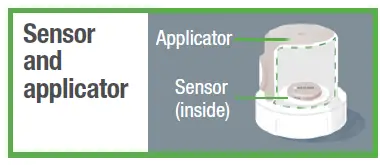
- During setup, we’ll show you how to use the applicator to insert the built-in sensor under your skin
- The sensor sends a glucose reading to your receiver or other display device every 5 minutes
- The sensor lasts up to 10 days with a 12-hour grace period
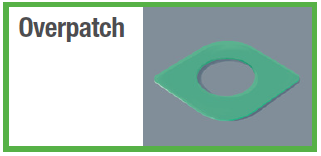
After you insert the sensor, you must apply the overpatch to keep the sensor on your body.
Receiver setup
- Insert sensor
- You must insert your sensor before pairing to the receiver.
- For instructions go to Inserting Sensor in the sensor box.
- Set up receiver
- Press the Select button for 3-5 seconds to turn on receiver. (Go to Receiver navigation.)
- Follow receiver instructions to set up the receiver. Insert sensor before pairing.
- After inserting and pairing, follow local guidelines for throwing out the applicator and recycling the Dexcom packaging.
- Sensor warmup
Sensor warmup timer tells you when you’ll start getting readings and alerts.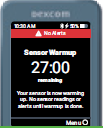
- Your sensor session
Go to Using Your Receiver in the receiver box and the online User Guide at dexcom.com/guides to find out more.
The receiver screen tells you which button to use.
- To scroll faster hold down the Scroll button
- To move to next field use the Select button

Use up to 3 display devices
Get your glucose information on your phone, Apple watch, and the Dexcom receiver. You can set up the app, the receiver, or both, in either order. Review Safety Information in product instructions. All graphics are representational. Your product may look different.
2022 Dexcom, Inc. All rights reserved. Covered by patents dexcom.com/patents. Dexcom, Dexcom Share, Share, Dexcom Follow, and Dexcom Clarity are registered trademarks of Dexcom, Inc. in the United States and/or other countries. Bluetooth is a registered trademark owned by Bluetooth SIG. Apple is a trademark of Apple Inc., registered in the U.S. and other countries. Android is a trademark of Google LLC. All other marks are property of their respective owners.
Dexcom, Inc. 6340 Sequence Drive San Diego, CA 92121 USA 1.888.738.3646 dexcom.com
Documents / Resources
 | G7 Receiver |
References
- dexcom.comdexcom.com
- Dexcom G7 and G6 CGM Quick Start User Guides | Dexcomdexcom.com
- dexcom.com/patentsdexcom.com
- User Manualmanual.tools
how many times can i load from the sensor before down loading it?
how many times can i load info from the sensor and down load to the reciever? once, twice etc.
how many times can i load info from the sensor and down load to the reciever? once, twice etc.
How many times can I load data from the Dexcom G7 sensor to the receiver?
The Dexcom G7 sensor is designed to send glucose readings to your receiver automatically every 5 minutes. You do not need to manually "load" or trigger a download for these regular readings; the system handles the data transfer continuously via Bluetooth as long as the receiver is within range (typically 20 feet).
Regarding data storage and back-filling:
If you are referring to downloading data from the receiver to a computer for reports (Dexcom Clarity), you can do this as often as you like, though most users do so every few days or weeks to review their trends.
Read the full Q&A page