1. Rhagymadrodd
The HUAWEI MateStation B515 is a compact and powerful desktop PC designed for various computing tasks, from office work to multimedia consumption. It features an AMD Ryzen 5 4600G processor with integrated Radeon Graphics, 8GB of RAM, and a fast 256GB NVMe SSD, providing efficient performance and quick responsiveness. This manual provides essential information for setting up, operating, maintaining, and troubleshooting your MateStation B515.
2. Gwybodaeth Diogelwch
- Darllenwch yr holl gyfarwyddiadau yn ofalus cyn defnyddio'r ddyfais.
- Peidiwch â gwneud y ddyfais yn agored i dymheredd eithafol, lleithder na golau haul uniongyrchol.
- Sicrhewch awyru priodol i atal gorboethi. Peidiwch â rhwystro agoriadau awyru.
- Use only the power adapter and cables provided or approved by HUAWEI.
- Osgoi gosod gwrthrychau trwm ar y ddyfais.
- Peidiwch â cheisio dadosod na thrwsio'r ddyfais eich hun. Cysylltwch â phersonél gwasanaeth awdurdodedig i gael cymorth.
- Keep the device away from liquids and corrosive substances.
3. Cynnwys Pecyn
Gwiriwch fod yr holl eitemau yn bresennol yn y pecyn:
- HUAWEI MateStation B515 Desktop PC
- Addasydd Pŵer a Chebl
- Wired Keyboard (may vary by region)
- Wired Mouse (may vary by region)
- Canllaw Cychwyn Cyflym / Cerdyn Gwarant
4. Cynnyrch Drosview
4.1 Panel Blaen

Figure 1: Front Panel of MateStation B515
Mae'r panel blaen yn darparu mynediad cyfleus i borthladdoedd a rheolyddion hanfodol:
- Botwm Pŵer: Press to turn the PC on or off.
- Porth USB-A: Ar gyfer cysylltu dyfeisiau USB.
- Porthladd USB-C: Ar gyfer cysylltu dyfeisiau USB-C.
- Jac Clustffonau/Meicroffon: Ar gyfer mewnbwn/allbwn sain.
4.2 Panel Cefn

Figure 2: Rear Panel Connectivity
The rear panel houses the main connectivity options:
- Porthladd HDMI: For connecting to a monitor or display.
- Porthladd VGA: For connecting to older monitors or displays.
- USB-A Ports (Multiple): For connecting various USB peripherals.
- Ethernet (RJ45) Port: Ar gyfer cysylltiad rhwydwaith gwifrau.
- Jaciau Sain: Line-in, Line-out, Microphone.
- Serial (COM) Port: For legacy device connectivity.
- Mewnbwn pŵer: Ar gyfer cysylltu'r cebl pŵer.
4.3 Ochr View and Ventilation

Figure 3: Side Ventilation
The side panel features ventilation grilles designed to ensure optimal airflow and heat dissipation, maintaining stable performance even under heavy loads.
4.4 Complete Setup Example
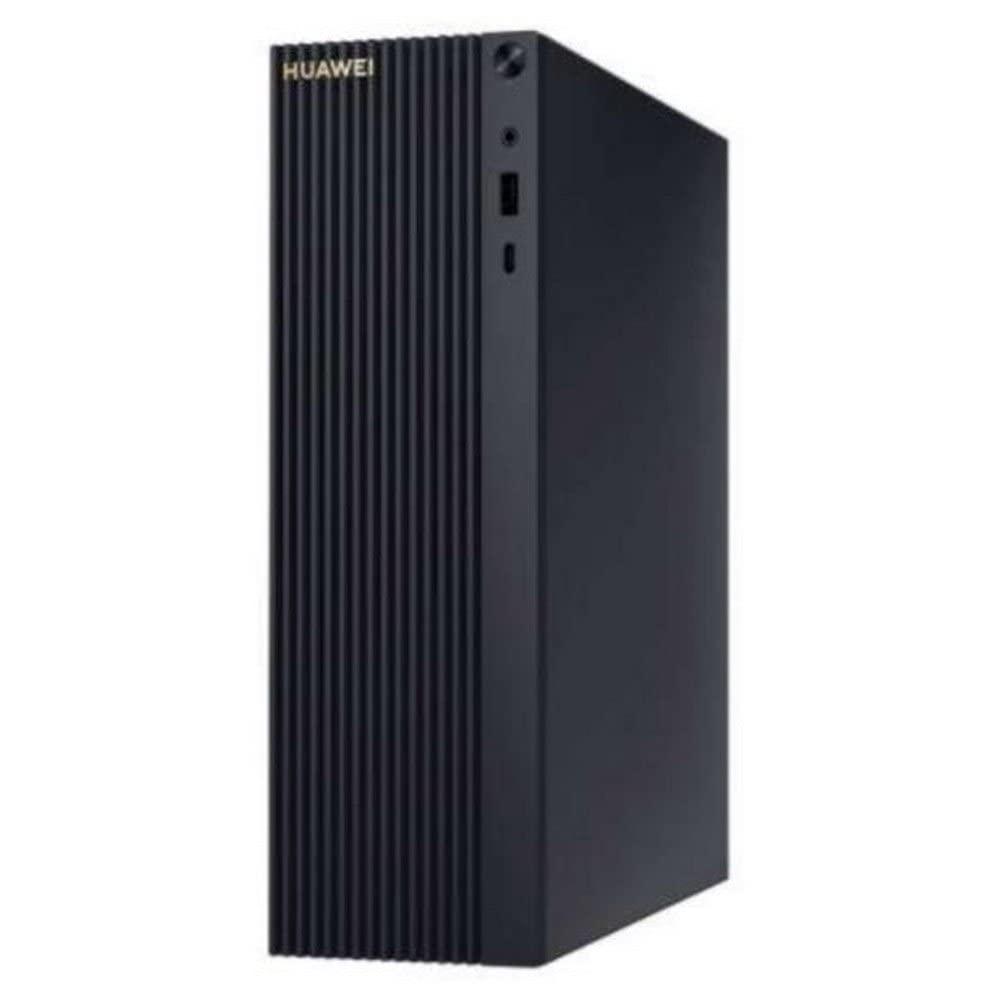
Figure 4: MateStation B515 in a typical desktop environment
This image illustrates a typical setup of the MateStation B515, connected to a monitor and peripherals, ready for use.
5. Cyfarwyddiadau Gosod
5.1 Cysylltu Perifferolion
- Cysylltu'r Monitor: Use an HDMI or VGA cable to connect your monitor to the corresponding port on the rear panel of the MateStation B515.
- Cysylltu'r Bysellfwrdd a'r Llygoden: Plug the USB cables of your keyboard and mouse into any available USB-A ports on the front or rear panel.
- Cysylltu Rhwydwaith (Dewisol): For a wired internet connection, connect an Ethernet cable from your router or modem to the RJ45 port on the rear panel. Alternatively, the device supports Wi-Fi.
- Cysylltu Sain (Dewisol): If using external speakers or a headset, connect them to the appropriate audio jacks on the front or rear panel.
5.2 Pweru Ymlaen
- Pwer Cysylltu: Plug the power cable into the power input on the rear panel of the MateStation B515, then plug the other end into a power outlet.
- Pŵer Ymlaen: Press the power button located on the front panel of the PC. The power indicator light will illuminate.
5.3 Gosodiad Cychwynnol Windows
Upon first boot, the system will guide you through the Windows 10 Pro setup process. Follow the on-screen instructions to configure language, region, network settings, user accounts, and other preferences. Ensure you have an active internet connection for updates and account synchronization.
6. Cyfarwyddiadau Gweithredu
6.1 Gweithrediad Sylfaenol
- Starting the PC: Pwyswch y botwm pŵer.
- Cau i Lawr: Cliciwch y botwm Cychwyn yn Windows, yna dewiswch Pŵer > Cau i Lawr.
- Ailgychwyn: Cliciwch y botwm Cychwyn yn Windows, yna dewiswch Pŵer > Ailgychwyn.
- Modd Cwsg: Cliciwch y botwm Cychwyn yn Windows, yna dewiswch Pŵer > Cysgu.
6.2 HUAWEI Share
The HUAWEI MateStation B515 supports HUAWEI Share, allowing seamless interaction with compatible HUAWEI smartphones. This feature enables you to:
- Multi-screen Collaboration: Project your phone screen onto the PC for easier file transfer, editing, and app usage.
- File Trosglwyddo: Quickly transfer photos, videos, and documents between your phone and PC.
- Cross-device Editing: Golygu files from your phone directly on the MateStation B515, with changes automatically saved to your phone.
To use HUAWEI Share, ensure your HUAWEI smartphone supports the feature and follow the on-screen instructions provided by the HUAWEI PC Manager software on your MateStation B515.
7. cynnal
7.1 System Oeri
The MateStation B515 features a specially designed cooling system with custom air circulation channels to efficiently dissipate heat from the processor and other components. This ensures stable performance and quiet operation.
- Ensure that the ventilation openings on the device are not obstructed.
- Place the PC on a flat, stable surface with adequate space around it for airflow.
7.2 Glanhau
- Before cleaning, power off the PC and disconnect it from the power outlet.
- Use a soft, dry, lint-free cloth to wipe the exterior surfaces of the PC.
- Ar gyfer staeniau ystyfnig, ychydig dampjw.org cy y brethyn â dŵr neu lanhawr ysgafn nad yw'n sgraffiniol.
- Do not spray liquids directly onto the PC.
- Use compressed air to gently clear dust from ventilation grilles, holding the can upright to prevent liquid discharge.
8. Datrys Problemau
If you encounter issues with your MateStation B515, try the following basic troubleshooting steps:
- Dim pŵer: Ensure the power cable is securely connected to both the PC and the power outlet. Try a different power outlet.
- Dim Arddangosfa: Check that the monitor cable (HDMI/VGA) is securely connected to both the PC and the monitor. Ensure the monitor is powered on and set to the correct input source.
- Perifferolion Ddim yn Gweithio: Try connecting the keyboard or mouse to a different USB port. Ensure drivers are up to date (check Windows Device Manager).
- Perfformiad Araf: Close unnecessary applications. Check for background processes using Task Manager. Ensure Windows and drivers are updated. Consider running a disk cleanup.
- Problemau Cysylltedd Rhwydwaith: For wired connections, check the Ethernet cable and router. For Wi-Fi, ensure the Wi-Fi adapter is enabled and you are connected to the correct network. Restart your router/modem.
If problems persist, consult the HUAWEI support websafle neu cysylltwch â gwasanaeth cwsmeriaid.
9. manylebau
| Nodwedd | Manyleb |
|---|---|
| Brand | HUAWEI |
| Rhif Model | 53012CPF |
| System Weithredu | Windows 10 Pro |
| Model CPU | AMD Ryzen 5 4600G |
| Cyflymder CPU | 4.2 GHz |
| Cydbrosesydd graffeg | Radeon Graphics (Integrated) |
| HWRDD | 8 GB |
| Storio | 256 GB NVMe SSD |
| Cyfanswm Porthladdoedd USB | 6 |
| Cysylltiadau | Bluetooth, WiFi |
| Nodweddion Arbennig | Modd Pwynt Mynediad |
| Math o Gynnyrch | PC Mini |
| Lliw | Multicolour (Chassis is typically black/dark grey) |
| Gwneuthurwr | Huawei |
| Gwlad Tarddiad | Tsieina |
10. Gwarant a Chefnogaeth
10.1 Gwybodaeth Gwarant
The HUAWEI MateStation B515 typically comes with a manufacturer's warranty. Availability of spare parts is guaranteed for 2 years from the date of purchase. Please refer to your specific purchase documentation for detailed warranty terms and conditions.
10.2 Diweddariadau Meddalwedd
Software updates for the device are guaranteed until April 13, 2030, ensuring continued security and feature enhancements for your Windows 10 Pro operating system.
10.3 Cefnogaeth i Gwsmeriaid
For technical assistance, warranty claims, or further inquiries, please visit the official HUAWEI support website or contact your local HUAWEI customer service center. Keep your product model number (B515 or 53012CPF) and proof of purchase handy when contacting support.


