1. Cynnyrch Drosview
The Philips SRP5016/10 is a modern and elegant 6-in-1 universal remote control designed to simplify your home entertainment experience. It allows you to control up to six different devices, such as televisions, DTVs, DVRs, home theater systems, soundbars, and streaming devices. This remote features a learning function, enabling it to receive and store infrared codes from your original remote controls, providing comprehensive control over various brands and models.
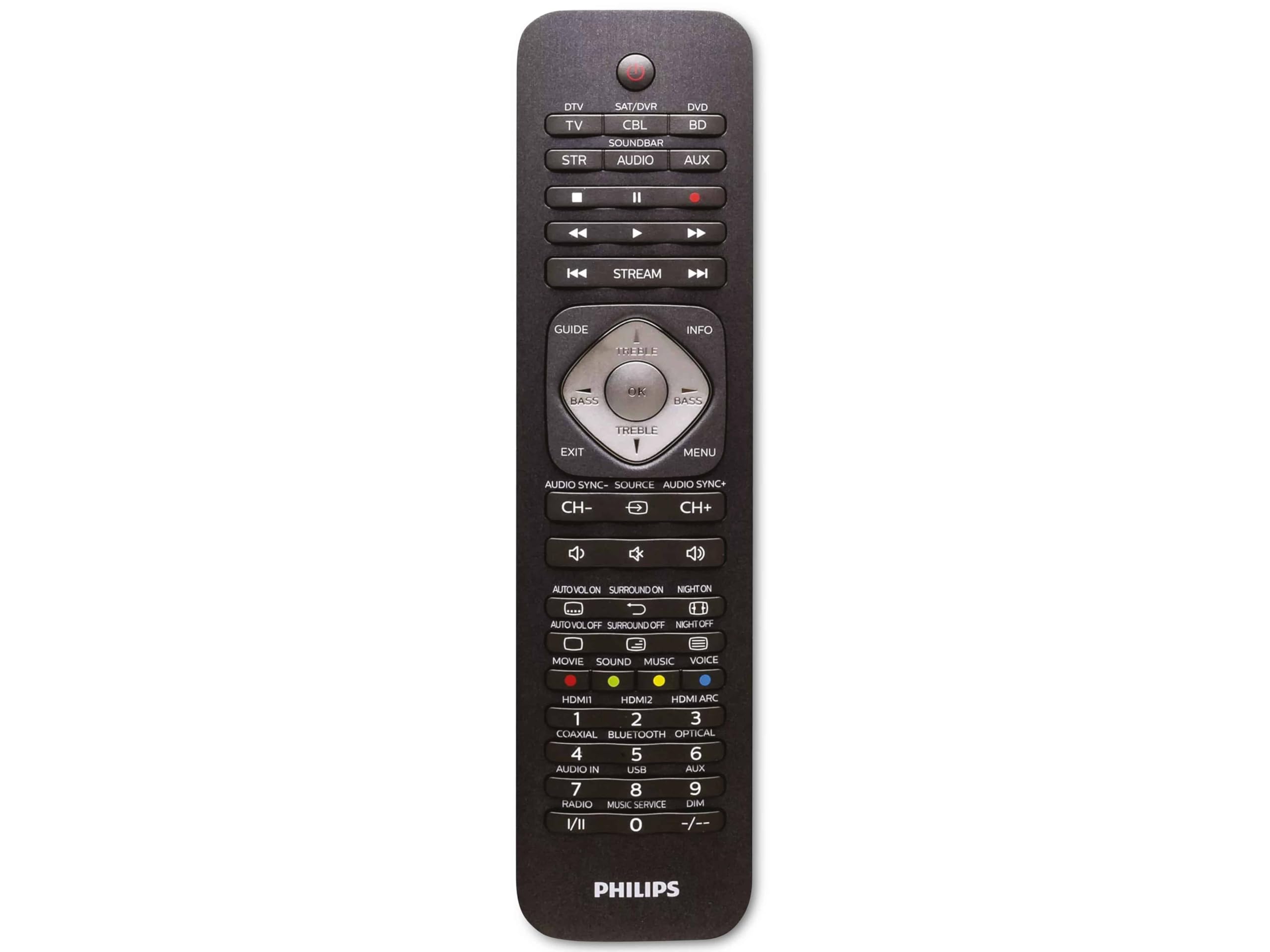
Image 1.1: Philips SRP5016/10 6-in-1 Universal Remote Control. This image displays the front view of the black universal remote control, highlighting its ergonomic design and button layout.
2. Gosod
2.1. Gosod Batri
- Agorwch glawr adran y batri sydd wedi'i leoli ar gefn y teclyn rheoli o bell.
- Mewnosodwch ddau fatri AAA, gan sicrhau'r polaredd cywir (+ a -) fel y nodir y tu mewn i'r adran.
- Caewch y clawr adran batri yn ddiogel.
Nodyn: Nid yw batris wedi'u cynnwys a rhaid eu prynu ar wahân.
2.2. Programming Devices
The Philips SRP5016/10 can be programmed using either direct code entry or the learning function.
2.2.1. Direct Code Entry (Recommended for common brands)
- Trowch y ddyfais rydych chi am ei rheoli ymlaen (e.e., teledu, chwaraewr DVD).
- Press and hold the desired device button on the universal remote (e.g., TV, DVD) for approximately 3 seconds until the device button lights up.
- Enter the 4-digit code for your device's brand (refer to the code list provided with your remote, if available, or search online for Philips universal remote codes).
- If the device turns off or responds, the code is correct. Press the device button again to save the code. If not, try the next code for your brand.
2.2.2. Learning Function (For devices not in the code list or advanced functions)
- Place the universal remote and your original remote control head-to-head, approximately 1-3 cm apart.
- Press and hold the desired device button on the universal remote (e.g., TV) for approximately 3 seconds until the device button lights up.
- Pwyswch a dal y DYSGU button on the universal remote until the device button starts blinking.
- On your original remote, press the button you wish to teach (e.g., GRYM). The device button on the universal remote will blink rapidly and then stay solid, indicating successful learning.
- Repeat step 4 for all other buttons you wish to learn.
- Gwasgwch y DYSGU button again to exit learning mode.
3. Cyfarwyddiadau Gweithredu
3.1. Selecting a Device
To control a specific device, press the corresponding device button (e.g., TV, DVD, SAT, AUX, SAINBAR, FFRWD) once. The selected device button will light up briefly to confirm your selection. You can then use the remote's buttons to control that device.
3.2. Swyddogaethau Sylfaenol
- PŴER: Yn troi'r ddyfais a ddewiswyd ymlaen neu i ffwrdd.
- CYFROL +/-: Adjusts the volume of the selected audio device.
- CHANNEL +/-: Changes channels on the selected TV or DTV device.
- MUTE: Yn tewi'r sain.
- RHIF BUTTONS (0-9): Ar gyfer mynediad uniongyrchol i sianeli neu fewnbynnau rhifiadol eraill.
- NAVIGATION (Arrow buttons, OK): Ar gyfer llywio a dewis dewislen.
4. cynnal
4.1. Amnewid Batri
When the remote control's range decreases or buttons become unresponsive, it is time to replace the batteries. Follow the battery installation steps in Section 2.1. Always replace both AAA batteries simultaneously with new ones.
4.2. Glanhau
I lanhau'r teclyn rheoli o bell, defnyddiwch frethyn meddal, sych. Ar gyfer baw ystyfnig, sychwch ychydig.ampen the cloth with water or a mild cleaning solution. Avoid using abrasive cleaners, solvents, or alcohol, as these can damage the remote's surface or internal components.
5. Datrys Problemau
- Ddim yn gweithio o bell:
- Gwiriwch a yw'r batris wedi'u mewnosod yn gywir ac nad ydynt wedi gwanhau. Amnewidiwch os oes angen.
- Sicrhewch nad oes unrhyw rwystrau rhwng y teclyn anghysbell a'r ddyfais.
- Verify that the correct device button (e.g., TV, DVD) is selected.
- Dyfais ddim yn ymateb i orchmynion:
- The device code may be incorrect. Try reprogramming the device using a different code from the code list or use the learning function.
- Ensure the remote's infrared emitter is pointed directly at the device's infrared receiver.
- Learning function not working:
- Gwnewch yn siŵr bod batris y teclyn rheoli o bell gwreiddiol yn ffres a'i fod yn gweithio'n gywir.
- Make sure the remotes are positioned correctly (head-to-head, 1-3 cm apart) during the learning process.
- Try learning the button again. Some original remotes have weaker IR signals that require multiple attempts.
6. manylebau
| Nodwedd | Manyleb |
|---|---|
| Brand | Philips |
| Enw Model | 6-yn-1 |
| Rhif Model | SRP5016/10 |
| Dyfeisiau Cydnaws | Home Theater, DVD/Blu-ray Player, SoundBar, Television, Streaming Device |
| Nodwedd Arbennig | Universal, Learning Function |
| Technoleg Cysylltedd | Isgoch |
| Uchafswm Nifer o Ddyfeisiau a Gefnogir | 6 |
| Math o Reolwr | Rheoli Botwm |
| Nifer y Botymau | Not specified (typical universal remote layout) |
| Ystod Uchaf | 10 o Fesurau |
| Ffynhonnell Pwer | 2 x Batri AAA (heb eu cynnwys) |
| Math o Ddeunydd | Plastig |
| Dimensiynau Cynnyrch | 21.4 x 5.3 x 2.2 cm |
| Pwysau Cynnyrch | 130 g |
7. Gwarant a Chefnogaeth
For warranty information, please refer to the documentation provided at the time of purchase or contact your retailer. Philips offers customer support for their products. If you encounter issues that cannot be resolved using this manual, please visit the official Philips support websafle neu cysylltwch â'u gwasanaeth cwsmeriaid am gymorth.
Cadwch eich prawf prynu ar gyfer hawliadau gwarant.