
Zoom Telephonics Model 5341 DOCSIS 3.0 Cable Modem
Modem InformationDOCSIS 3.0 Cable Modem 4×4 channel bonding with speeds of up to 50 Mbps on a wired connection Cox recommends a DOCSIS 3.0 16×4 or higher modem What does this mean?DOCSIS 3.0 modems with 4×4 channel bonding have a maximum speed of 50 Mbps on the Cox network. |
Highest Service LevelEssential |
Front View
|
|
|
Back View
|
The Zoom 5341 has the following ports available on the back of the modem:
|
|
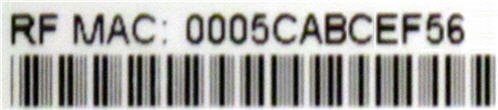
MAC Address
|
MAC addresses are written as 12 digits containing both letters and numbers (0-9, A-F). A MAC address is unique. The first six characters of the MAC address are unique to the manufacturer of the device. |



Troubleshooting

The lights indicate the current status of your modem. To troubleshoot any connection problems, use the table below.
| Modem Light | Status | Problem |
|---|---|---|
| DS | Blinking | Establishing a connection from the Internet to the computer. Verify all cable connections and try resetting the modem. |
| Solid | None. Connection from the computer to the internet established. | |
| US | Off | Establishing a connection from the computer to the internet. Verify all cable connections and try resetting the modem. |
| Solid | None | |
| STATUS | Blinking | Establishing a connection to the cable provider. Verify all cable connections and try resetting the modem. |
| Solid | None – modem connection established | |
| LINK | Blinking | None. Data is flowing between the computer and the internet |
| Solid | None. Modem is connected to LAN device, like computer or router. |
References
- User Manualmanual.tools
Published: August 10, 2021
Updated: February 11, 2023