
Details
Modem InformationCable Modem DOCSIS 2.0 with speeds of up to 25 Mbps on a wired connection. Cox recommends a DOCSIS 3.1 modem or gateway What does this mean?DOCSIS 2.0 has a maximum speed of 25 Mbps on the Cox network. |
Highest Service LevelStarter |
|
Front View
|
After the cable modem has successfully registered on the network, the USB or Enet, Ready, and Sync indicators illuminate continuously to indicate that the modem is online and fully operational. |
|
Back View
|
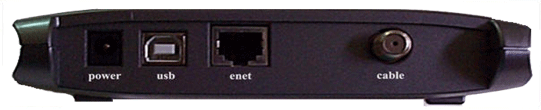
The Ubee / Ambit SpeedStream 60678EU has the following ports available on the back of the modem.
|
|
MAC Address
|
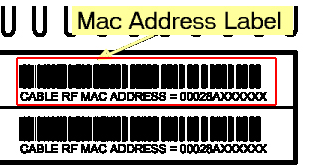
MAC addresses are written as 12 digits containing both letters and numbers (0-9, A-F).A MAC address is unique. The first six characters of the MAC address are unique to the manufacturer of the device. |


Troubleshooting
The modem lights indicate the current status of your cable modem. To troubleshoot any connection problems, use the table below.
| Modem Light | Status | Problem |
|---|---|---|
| Power | Solid Green | None. |
| Off | No power. Verify power supply connections and electrical outlet. Also make sure the outlet is not connected to a switch. | |
| USB | Solid Green | None. USB connection to the computer found. |
| Off | No USB found. Verify USB cable connections, the TCP/IP settings and the USB cable. You might need to reinstall the USB drivers. | |
| Enet | Solid Green | None. Ethernet connection to computer found. |
| Off | No Ethernet found. Verify Ethernet cable connections, the TCP/IP settings and the NIC. You might need to reinstall the NIC drivers. | |
| Send | Flashing Green | None. Transferring data. |
| Recv | Flashing Green |
Sync and Ready LED Off. Searching for cable connection. Sync and Ready LED On. Transmitting data. Verify all cable connections and try resetting the modem. |
| Off | No cable connection. Verify all cable connections and try resetting the modem. | |
| Sync | Solid Green | None |
| Ready | Solid Green | None |
References
- User Manualmanual.tools