
Cisco DPC3008 DOCSIS 3.0 Cable Modem
Modem InformationDOCSIS 3.0 modem 8×4 channel bonding with speeds of up to 150 Mbps on a wired connection Cox recommends a DOCSIS 3.1 modem or gateway |
Highest Service LevelPreferred 150 |
Front View
|
The Cisco DPC3008 is a DOCSIS 3.0 device offering 8×4 channel bonding. After the cable modem successfully registers on the network, the POWER, DS, US, and ONLINE indicators illuminate continuously to indicate that the cable modem is online and fully operational. | |
Back View
|
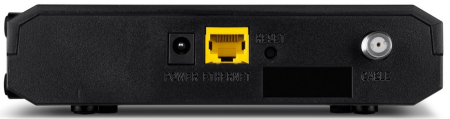
The Cisco DPC3008 has the following ports available on the back of the modem.
|
|
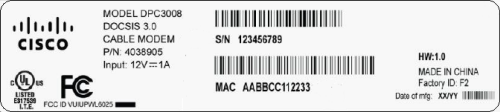
MAC Address
|
MAC addresses are written as 12 digits containing both letters and numbers (0-9, A-F). A MAC address is unique. The first six characters of the MAC address are unique to the manufacturer of the device. |


Troubleshooting
The lights indicate the current status of your gateway. To troubleshoot any connection problems, use the table below.
| Gateway Light | Status | Problem |
|---|---|---|
| POWER | Off | No power – Verify all cable connections and try resetting the modem. |
| On | None | |
| DS | Blinking | Modem establishing connection from the Internet to the computer – Verify all cable connections and try resetting the modem. |
| On | None | |
| US | Off | Upstream channel inactive – Verify all cable connections and try resetting the modem |
| Blinking | Scanning for upstream channel – Verify all cable connections and try resetting the modem | |
| On | None | |
| ONLINE | Off | No connection – Verify all cable connections and try resetting the modem. |
| Blinking | None – scanning for configuration parameters | |
| On | None – operational | |
| LINK | Blinking | None – single device connected via Ethernet and data is being transferred between the computer and the cable modem. |
| On | A single device is connected to the Ethernet port and no data is being sent to or from the cable modem – Verify all cable connections and try resetting the modem. | |
| Off | No devices connected – Verify all cable connections and try resetting the modem. |
Manufacturer Resources
For more detailed technical information on the DPC3008, use the resources below.
References
- User Manualmanual.tools
Published: August 10, 2021
Updated: April 26, 2023
Thanks, I was looking for the manual.
Gracias, estaba buscando el manual.
Gracias, estaba buscando el manual.
Where can I find the user manual and setup information for the Cisco DPC3008 DOCSIS 3.0 Cable Modem?
The Cisco DPC3008 is a DOCSIS 3.0 cable modem capable of speeds up to 150 Mbps. Below is a summary of the setup and troubleshooting information found in the manual:
Rear Panel Connections:
LED Indicator Status:
How to Reset:
If you are experiencing connection issues, you can use a paperclip to press the RESET button on the back of the device. For a full factory reset (30-30-30 method), hold the button for 30 seconds while powered on, another 30 seconds while unplugged, and a final 30 seconds after plugging it back in.
For more detailed technical specifications, you can refer to the Cisco DPC3008 Installation Guide.
Read the full Q&A page