

CipherLab RK96 Mobile Computer

Specifications
- Model: RK96 Mobile Computer
- Previous Generation Comparison (RK95 vs. RK96):
- 1.1 cm longer base for effortless hold.
- Honeycomb-patterned rubber boot for superior shock resistance.
- Innovative e-paper display for property numbers, employee IDs, or other essential information.
- Power Supply:
- Input: AC 100-240V, 50/60 Hz
- Output: DC 5V, 2A
- CipherLab approved power adapter required.
- Standard Battery:
- Capacity: 3.6V, 6800mAh
- Working Hours (Minimum): 14 hours
- Charging Time: Approx. 4 hours
- Cold Chain Battery:
- Capacity: 3.7V, 5500mAh
- Charging Time: Approx. 4 hours
- Ingress Protection: IP65/1000 (1m) Tumbles
- Impact Resistance: 1.8m / 2.4m with Rubber Boot, multiple drops onto concrete. Operating temperature down to 1.5m.
- Charging & Communication: Can be charged and connected for data communication using either the Snap-on Cable or a USB Type-C cable.
Compared to the previous generation RK95, the new RK96 features 1) 1.1 cm longer base for effortless hold; 2) A honeycomb-patterned rubber boot for superior shock resistance; 3) an innovative e-paper display to showcase property numbers, employee IDs, or other essential information.
Open Your Box
- RK96 Mobile Computer
- Rechargeable Li-ion Battery
- Quick Start Guide
- Rubber Boot (Optional)
- AC Adapter(Optional)
- Hand Strap (Optional)
- Pistol Grip (Optional)
- Snap-on Charging & Communication Cable (Optional)
Device Overview
- Front Camera
- Ambient light & Proximity Sensors
- NFC Detection Area 1
- Receiver
- Status LED (Right)
- Speaker (Right)
- Touchscreen
- USB-C Port with Cover
- Side Trigger (Right)
- Battery Release Latch (Right)
- Power Button
- Charging & Communication Pins
- Front Microphone
- Scan Key
- Status LED (Left)
- Rear Camera
- Rear Camera Flash
- Scan Window
- Rear Microphone
- Temperature Sensor
- Speaker (Left)
- E-Paper Display
- Hand Strap Hole (Cover)
- Side Trigger (Left)
- Battery Release Latch (Left)
- Battery
- Hand Strap Hole
- NFC Detection Area 2 (For e-paper only)

Install& Remove Battery
Installing the battery
Step 1 :
Insert the battery into the battery chamber from the top, then press down the lower end to secure it A click sound is made once the battery is in place.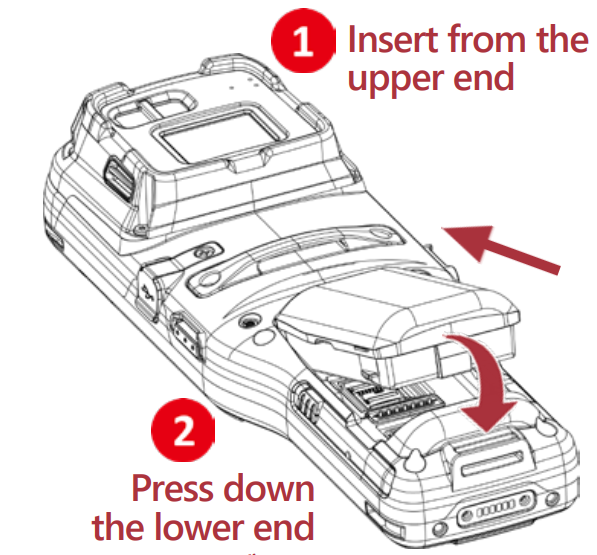
Removing the battery
Step 1 :
Press the release bottoms on both sides of the device at the same time.
The battery will tilt up slightly, ready to be removed.
Step 2 :
Lift the battery from the bottom while pressing the release buttons.
Battery Information

Install SD Card
Installing the SD card
- Step 1 : Remove the battery.
- Step 2 : Open the black inner lid using the notch on the right side.
Opening the inner lid reveals the card socket and its hinge cover.
- Step 3 : Push the socket’s hinge cover forward to unlock it, then lift the cover open.
- Step 4 : Insert the microSD card into the socket.
- Step 5 : Close the hinge cover, then push it back until it locks in place.
- Step 6 : Close the inner lid and secure the battery back in place.

Charging & Communication
The RK96 Mobile Computer can be charged and connected for data communication using either the Snap-on Cable or a USB Type-C cable.

FCC CAUTION
USA (FCC):
This device complies with Part 15 of the FCC Rules. Operation is subject to the following two conditions:
- This device may not cause harmful interference, and
- This device must accept any interference received, including interference that may cause undesired operation.
This equipment has been tested and found to comply with the limits for a Class B digital device, pursuant to Part 15 of the FCC Rules. These limits are designed to provide reasonable protection against harmful interference in a residential installation. This equipment generates, uses and can radiate radio frequency energy and, if not installed and used in accordance with the instructions, may cause harmful interference to radio communications. However, there is no guarantee that interference will not occur in a particular installation. If this equipment does cause harmful interference to radio or television reception, which can be determined by turning the equipment off and on, the user is encouraged to try to correct the interference by one of the following measures:
- Reorient or relocate the receiving antenna.
- Increase the separation between the equipment and receiver.
- Connect the equipment into an outlet on a circuit different from that to which the receiver is connected.
- Consult the dealer or an experienced radio/TV technician for help.
FCC Caution: Any changes or modifications not expressly approved by the party responsible for compliance could void the user’s authority to operate this equipment.
This transmitter must not be co-located or operating in conjunction with any other antenna or transmitter
RF Exposure Information (SAR)
- This device is designed and manufactured not to exceed the emission limits for exposure to radio frequency (RF) energy set by the Federal Communications Commission of the United States.
- During SAR testing, this device was set to transmit at its highest certified power level in all tested frequency bands, and placed in positions that simulate RF exposure in usage against the head with no separation, and near the body with the separation of 10 mm. To support body-worn operation, choose the belt clips or holsters, which do not contain metallic components, to maintain a separation of 10 mm between this device and your body. Although the SAR is determined at the highest certified power level, the actual SAR level of the device while operating can be well below the maximum value.
- The exposure standard for wireless devices employing a unit of measurement is known as the Specific Absorption Rate, or SAR.
- The SAR limit set by the FCC is 1.6W/kg.
- The FCC has granted an Equipment Authorization for this model device with all reported SAR levels evaluated as in compliance with the FCC RF exposure guidelines.
Canada (ISED) :
This device complies with ISED’s license-exempt RSSs. Operation is subject to the following two conditions:
- This device may not cause harmful interference, and
- This device must accept any interference received, including interference that may cause undesired operation.
IC Radiation Exposure Statement
This EUT is compliance with SAR for general population/uncontrolled exposure limits in IC RSS-102 and had been tested in accordance with the measurement methods. This equipment should be installed and operated with minimum distance 10 mm between the radiator and your body. This device and its antenna(s) must not be co-located or operating in conjunction with any other antenna or transmitter.
Devices shall not be used on aircraft, except for the low-power indoor access points, indoor subordinate devices, low power client devices, and very low-power devices operating in the 5925-6425 MHz band, that may be used on large aircraft as defined in the Canadian Aviation Regulations, while flying above 3,048 meters (10,000 feet).
- Devices shall not be used on automobiles.
- Devices shall not be used on trains.
- Devices shall not be used on maritime vessels.
EU Declaration of Conformity
EU / UK (CE/UKCA):
Hereby, CIPHERLAB CO., LTD. declares that the radio equipment type RK96 is in compliance with Directive 2014/53/EU.
The full text of the EU declaration of conformity is available at the following internet address: www.cipherlab.com
The device is restricted to indoor use only when operating in the 5250 to 5350 MHz, 5945 to 6425MHz (WIFI 6E LPI)
frequency range.
UK Declaration of Conformity
Hereby, CIPHERLAB CO., LTD. declares that the radio equipment type RK96 is in compliance with the essential requirements and other relevant provisions of the Radio Equipment Regulations 2017.
The full text of the UK Declaration of Conformity may be found at h at the following internet address: www.cipherlab.com
In accordance with the relevant statutory requirements in UK, the 5250 to 5350 MHz, 5945 to 6425MHz (WIFI 6E LPI) frequency range is restricted to indoor use only in the United Kingdom
RF Exposure warning
This device meets the EU requirements (2014/53/EU) on the limitation of exposure of the general public to electromagnetic fields by way of health protection.
The limits are part of extensive recommendations for the protection of the general public. These recommendations have been developed and checked by independent scientific organizations through regular and thorough evaluations of scientific studies. The unit of measurement for the European Council’s recommended limit for mobile devices is the “Specific Absorption Rate” (SAR). This equipment should be installed and operated with minimum distance 5 mm between the radiator and your body. and the SAR limit is 2.0 W/Kg averaged over 10 grams of body tissue. It meets the requirements of the International Commission on Non-Ionizing Radiation Protection (ICNIRP).
For next-to-body operation, this device has been tested and meets the ICNRP exposure guidelines and the European Standard EN 50566 and EN 62209-2. SAR is measured with the device directly contacted to the body while transmitting at the highest certified output power level in all frequency bands of the mobile device.

CAUTION
- Risk of explosion if battery is replaced by an incorrect type.
- Dispose of used batteries according to the instructions.
All operational modes:

FAQ
- Where can I find the regulatory label?
The regulatory label can be found in your device from the path: Settings > Legal Information > Electronic authentication. - What are the key improvements of the RK96 over the RK95?
The RK96 features a 1.1 cm longer base for effortless hold, a honeycomb-patterned rubber boot for superior shock resistance, and an innovative e-paper display to showcase property numbers, employee IDs, or other essential information. - What type of SD cards are supported?
The device supports SD/SDHC/SDXC microSD cards. - How do I charge the device?
The RK96 can be charged using either the Snap-on Cable or a USB Type-C cable, connected to a CipherLab approved power adapter.
Documents / Resources
 | RK96 Mobile Computer |
References
- cipherlab.comwww.cipherlab.com
- User Manualmanual.tools