
Artiphon Orba 3
Artiphon Orba 3 User Manual
Model: Orba 3 (900-00024)
Introduction to Artiphon Orba 3
The Artiphon Orba 3 is a compact and versatile multi-instrument designed for music creation on the go. It combines the functionalities of a looper, instant sampler, and MIDI controller into a portable device. Its intuitive design allows users to create full songs by layering sounds, capture and playback audio samples, and connect to various digital audio workstations (DAWs) and mobile applications.

Image: The Artiphon Orba 3, showcasing its compact, spherical design with touch-sensitive pads on the top surface.
Setup and First Use
Before using your Orba 3, ensure it is fully charged. Use the provided USB-C cable to connect the device to a power source or computer. A full charge typically provides up to five hours of battery life.
Charging and Connectivity
- Charging: Connect the included USB-C cable to the USB-C port on the Orba 3 and to a USB power adapter or computer. The device's indicator lights will show charging status.
- Wired Connection: For direct connection to a computer, use the USB-C port. The Orba 3 functions as a USB 2.0 Class Compliant Audio/MIDI device.
- Wireless Connection: The Orba 3 supports Bluetooth MIDI connectivity for wireless control with compatible devices and applications.
- Audio Output: Use the 3.5mm (1/8") TRS analog headphone stereo out for connecting headphones or external speakers.
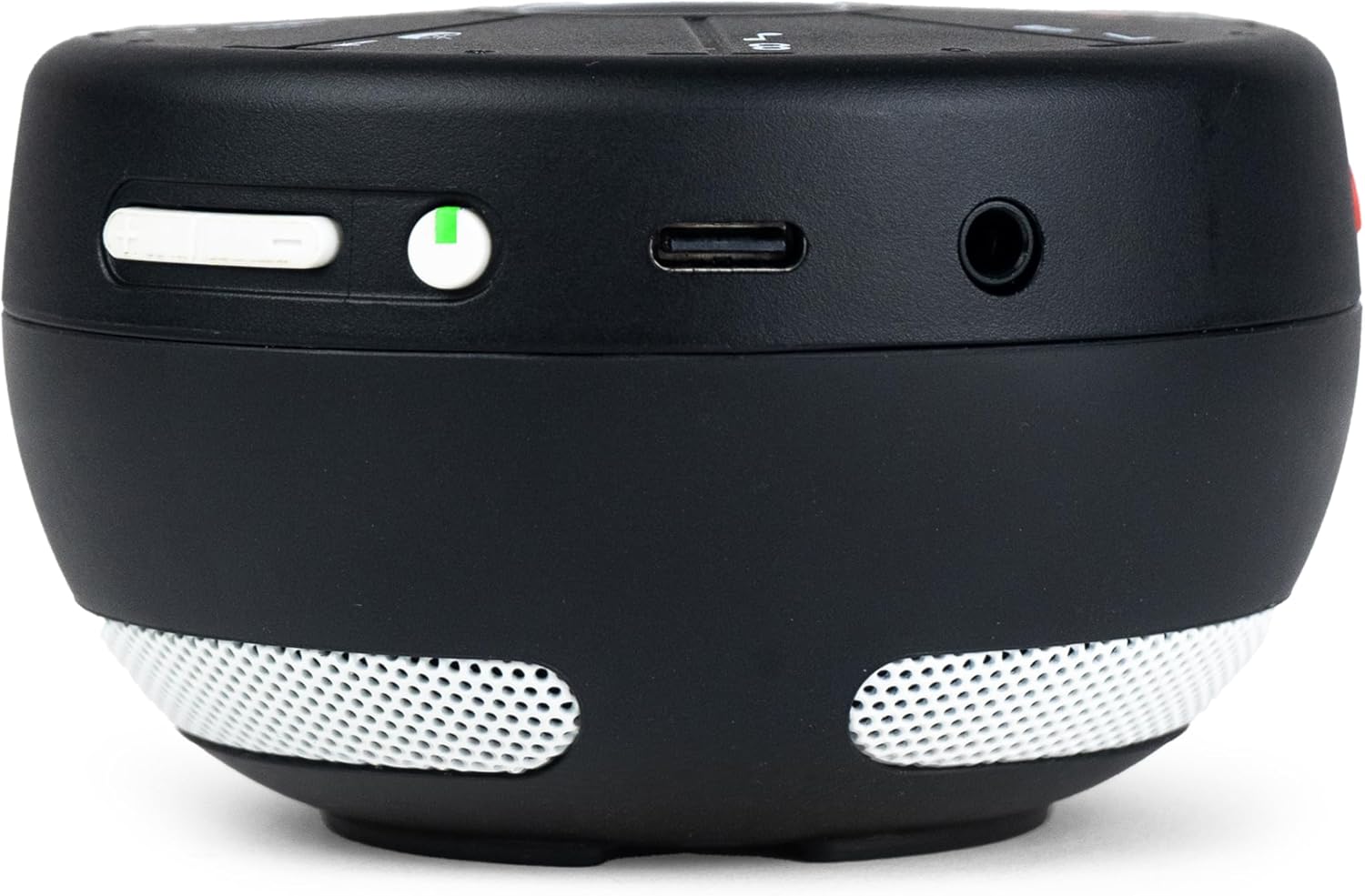
Image: The side of the Orba 3 showing its power button, USB-C port, and headphone jack for various connections.
Artiphon Connect App
For full functionality, including sound updates, sample saving, and sharing, download and install the Artiphon Connect App on your compatible smartphone, tablet, or computer (MacOS, Windows, iOS, Android). The app allows for deeper customization and management of your Orba 3.
Operating the Orba 3
The Orba 3 features eight touch-sensitive pads and a central button for intuitive interaction. It supports various gestures and pressure sensitivity for expressive musical control.
Core Functions
- Loop and Song Creation: Build complete musical pieces by layering sounds across four distinct parts. The device's internal looper allows for real-time recording and playback of your performances.
- Instant Sound Sampling: Utilize the built-in omni-directional microphone and dedicated 'SAMPLE' button to capture and immediately integrate any sound into your compositions.
- MIDI Controller: Connect the Orba 3 to your digital audio workstation (DAW) or production software via USB or Bluetooth to use it as a MIDI Polyphonic Expression (MPE) MIDI controller, offering advanced control over virtual instruments.

Image: A diagram illustrating the key features of the Orba 3, including navigation icons, the omni-directional microphone, the sample button, and the upgraded white speakers.
Basic Controls and Gestures
The Orba 3's surface is divided into eight segments, each acting as a touch-sensitive pad. The central 'A' button is used for mode selection and other functions. Specific gestures like tilting, sliding, and varying pressure on the pads allow for dynamic expression.

Image: A top-down view of the Orba 3, clearly showing the layout of its eight touch-sensitive pads and the central Artiphon logo.
Refer to the Artiphon Connect App for detailed tutorials and advanced control options, including instrument key selection (Pentatonic, Diatonic, Chromatic) and sound library management.
Maintenance
Proper care and maintenance will ensure the longevity of your Artiphon Orba 3.
- Cleaning: Use a soft, dry cloth to wipe the surface of the Orba 3. Avoid using abrasive cleaners or solvents, which can damage the material.
- Battery Care: To preserve battery life, avoid fully discharging the device frequently. If storing for an extended period, charge the battery to approximately 50% and store in a cool, dry place.
- Storage: Store the Orba 3 in a protective case or a safe environment to prevent scratches or damage from impacts.
- Environmental Conditions: Avoid exposing the device to extreme temperatures, humidity, or direct sunlight.
Troubleshooting
This section addresses common issues you might encounter with your Orba 3.
| Problem | Possible Cause | Solution |
|---|---|---|
| Device does not power on | Low battery; Power button not pressed correctly | Charge the device using the USB-C cable. Press and hold the power button for a few seconds. |
| No sound from built-in speaker | Volume too low; Device connected to headphones; Speaker obstructed | Increase volume. Disconnect headphones. Ensure speaker grilles are clear. |
| Bluetooth connection issues | Device not in pairing mode; Bluetooth disabled on host device; Interference | Ensure Orba 3 is discoverable. Check Bluetooth settings on your computer/mobile device. Move away from other wireless devices. |
| App not recognizing Orba 3 | App outdated; Firmware outdated; Connection issue | Update the Artiphon Connect App. Check for firmware updates via the app. Reconnect the device (USB or Bluetooth). |
| Sampling not working | Microphone obstructed; Sample button not pressed correctly | Ensure the omni-directional microphone is clear. Press the 'SAMPLE' button firmly. |
Specifications
Key technical specifications for the Artiphon Orba 3.
| Feature | Detail |
|---|---|
| Model Name | Orba 3 |
| Item Model Number | 900-00024 |
| Brand | Artiphon |
| Dimensions (L x W x H) | 3 x 2 x 2 inches |
| Item Weight | 0.741 ounces (21 Grams) |
| Color | Black |
| Material | 50% Glass Filled Polyarylamide, ABS Substrate and TPU |
| Battery Type | 1 Lithium Polymer battery (included) |
| Connector Type | 3.5mm (1/8") TRS Analog Headphone Stereo Out, Bluetooth MIDI, USB-C (USB 2.0 Class Compliant Audio/MIDI) |
| Compatible Devices | Laptop, PC, Tablet, Smartphone |
| Hardware Platform | MacOS, Windows, iOS, Android |
| Supported Software | Ableton Live (and other DAWs via MIDI) |
| Instrument Key | Pentatonic, Diatonic, Chromatic |
| Included Components | USB Cable |
| UPC | 850019703214 |
Warranty and Support
For detailed warranty information, please refer to the official Artiphon website or the documentation included with your purchase. For product support, frequently asked questions, and additional resources, please visit the Artiphon Store on Amazon or the manufacturer's official support channels.
Related documentsOrba 3

Ask a question about this manual
Ask about setup, troubleshooting, compatibility, parts, safety, or missing instructions. Manuals+ will review the question and use this page’s manual context to help answer it.