
iSpring RO5004F
iSpring RO5004F Reverse Osmosis Water Filter with UV System User Manual
Model: RO5004F | Brand: iSpring
1. Introduction
This manual provides detailed instructions for the installation, operation, and maintenance of your iSpring RO5004F Reverse Osmosis Water Filter with UV system. This advanced tankless system is designed to provide high-quality purified water by reducing over 99% of 1,000+ harmful contaminants, including PFAS and TDS, and features a built-in UV filter for enhanced water safety.
The iSpring RO5004F offers a 500 GPD (Gallons Per Day) flow rate, a 2:1 pure to drain ratio, and a compact tankless design for space-saving convenience. Please read this manual thoroughly before installation and use to ensure proper function and longevity of your system.

Image: Streamlined for Comfort. This image illustrates the compact, tankless design of the iSpring RO5004F, saving valuable under-sink space.
2. Safety Information
Observe the following safety precautions to prevent injury and damage to the system:
- Always turn off the main water supply before performing any installation or maintenance.
- Ensure all connections are secure to prevent leaks. Check for leaks periodically after installation.
- The system includes electrical components (pump, UV light). Ensure proper electrical connections and avoid exposing electrical parts to water.
- Do not operate the system if any part is damaged. Contact customer support for assistance.
- Keep the system away from direct sunlight and heat sources.
- This system is designed for cold water use only. Do not connect to a hot water supply.
- The built-in leak-stop valve provides an additional safeguard by automatically shutting off the system in the unlikely event of a leak.
3. Package Contents
Verify that all components are present in the package:
- iSpring RO5004F System Unit
- Set of Filters (PP Sediment, Anti-Scale, RO Membrane, Taste-Polishing CTO)
- User Manual
- Installation Kit (includes tubing, faucet, drain saddle, feed water adapter, etc.)
4. Specifications
| Feature | Detail |
|---|---|
| Brand | iSpring |
| Model Name | RO5004F |
| Product Dimensions | 15.2"L x 6.1"W x 16.6"H |
| Material | Metal |
| Capacity | 500 gallons per day (GPD) |
| Installation Type | Under Sink |
| Purification Method | Reverse Osmosis, Ultraviolet (UV) |
| Maximum Flow Rate | 0.35 gpm |
| Supported Water TDS Level Maximum | 2000 PPM |
| Item Weight | 6.8 kg |
5. Setup and Installation
The iSpring RO5004F features a patented top-mounted design for simplified installation. Refer to the detailed installation video for a visual guide.
5.1 Installation Video Guide
Video: How to Install iSpring RO5004F Reverse Osmosis System. This video provides a step-by-step guide for the complete installation process of your RO system.
5.2 Key Installation Steps
- Prepare the Installation Area: Ensure sufficient space under your sink for the tankless unit (15.2"L x 6.1"W x 16.6"H).
- Install the Faucet: The top-mounted design simplifies faucet installation. Drill a hole (3/4" to 1 1/4" diameter) if one is not already present.
- Connect Water Supply: Use the provided feed water adapter to connect the system to your cold water line.
- Connect Drain Line: Attach the drain saddle to the drain pipe and connect the black tubing from the system's DRAIN port.
- Connect Pure Water Line: Connect the pure water line from the system to the faucet.
- Power Connection: Plug in the system. The built-in pump will activate as needed to boost water pressure and enhance RO membrane efficiency.
- Flush the System: Follow the manual's instructions to flush the system before first use to remove any manufacturing residues.
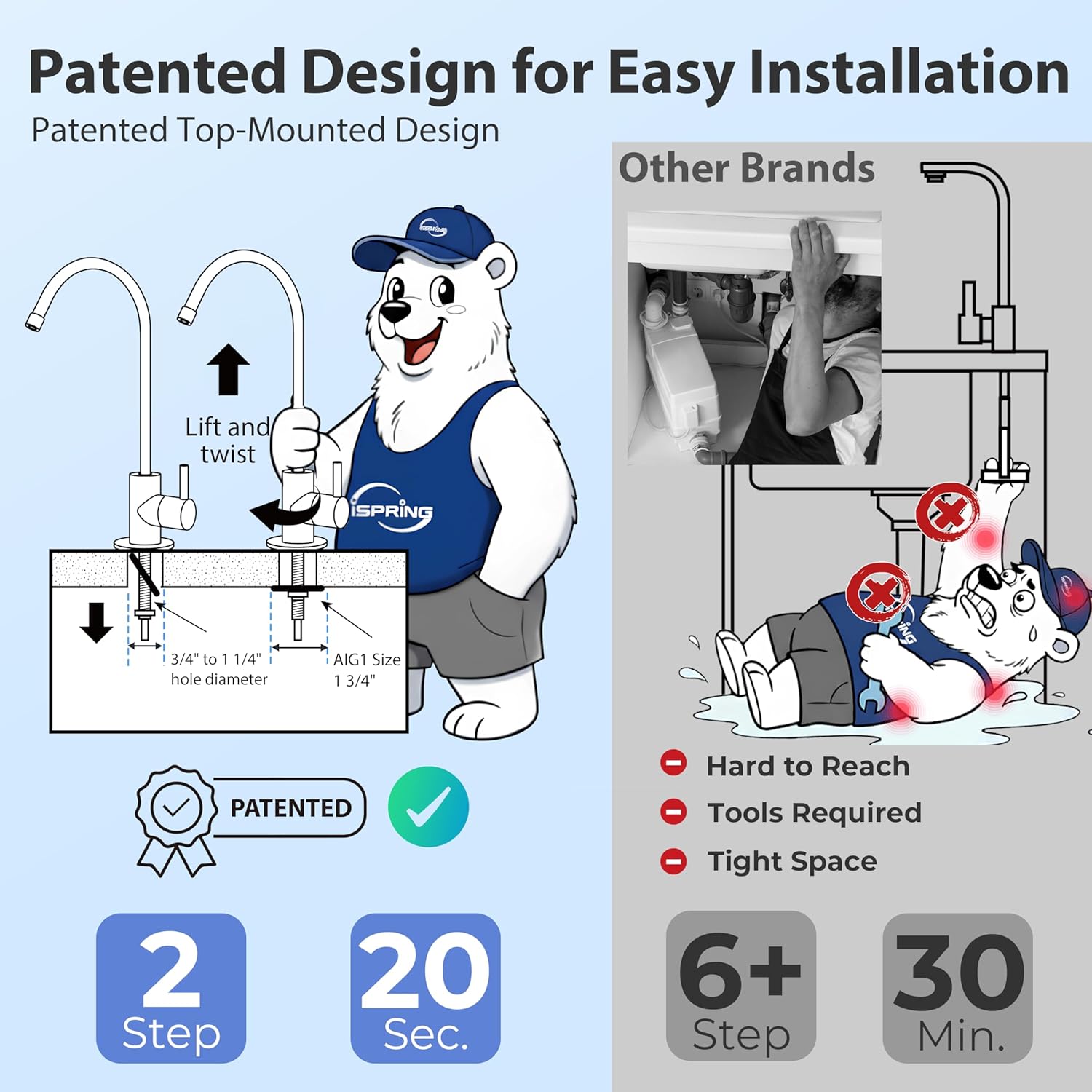
Image: Patented Design for Easy Installation. This image illustrates the simplified, top-mounted faucet installation process, contrasting it with more complex installations of other brands.

Image: Quick & Easy Set Up. This image highlights the ease of installing the top-mounted faucet, avoiding common difficulties associated with under-sink work.
6. Operating Instructions
Your iSpring RO5004F system is designed for continuous, on-demand purified water. The tankless design means water is filtered as you need it.
6.1 Water Dispensing
- Open the dedicated RO faucet to dispense purified water.
- The system provides a high flow rate of 500 GPD, capable of filling a cup in approximately 10 seconds.
- The built-in pump ensures consistent water pressure and efficient operation, even in areas with low incoming water pressure. The pump operates quietly for a comfortable experience.

Image: Fast Flow, Less Waste. This image highlights the system's high flow rate and efficient 2:1 pure to drain water ratio.

Image: Quiet and Powerful Pump. This image illustrates the internal workings of the system's booster pump, designed for efficient and quiet operation.
6.2 Filtration Process
The system utilizes an advanced 6-layer filtration process:
- PP Sediment Filter: Removes sediment, rust, and other large particles.
- Anti-Scale Filter: Reduces scale buildup to protect the RO membrane.
- CTO (Carbon Block) Filter: Removes chlorine, odors, and organic chemicals.
- 0.0001-micron RO Membrane: Eliminates over 99% of 1,000+ contaminants including PFAS (PFOA and PFOS), vinyl chloride, chlorine, fluoride, lead, arsenic, asbestos, calcium, sodium, and others.
- Taste-Polishing CTO Filter: Further improves water taste and odor.
- Built-in UV Light: Provides an additional layer of purification, lasting up to 8,000 working hours, ensuring safe and clean water.

Image: Advanced 6-Layer Filtration. This graphic details each stage of filtration and the types of contaminants removed.
6.3 UV Light Operation
The UV light operates automatically when water flows through the system. A status indicator on the unit monitors its function, ensuring it is active and providing protection.
7. Maintenance
Regular maintenance, primarily filter replacement, is crucial for optimal performance and water quality.
7.1 Filter Life Monitoring
The integrated filter life indicator provides automatic replacement reminders:
- Blue Light: Filters are in good condition.
- Purple Light: Approximately 5% filter life remaining. Prepare for replacement.
- Red Light: Filter replacement is needed.
To reset the filter life indicator after replacement, select the stage and hold "Reset" for 3 seconds.

Image: Easy Filter Replacement with Smart Monitoring. This image demonstrates the filter life indicator and the simple twist-to-unlock design for filter changes.
7.2 Filter Replacement Procedure
The simple twist-to-unlock design makes filter changes quick and easy:
- Turn off the water supply to the RO system.
- Twist the old filter counter-clockwise to unlock and remove it.
- Insert the new filter and twist clockwise to lock it into place.
- Turn on the water supply and check for leaks.
- Reset the filter life indicator as described above.
Replacement filters are available in 1-year (F4RO5004F) and 2-year (F9RO5004F) packs for long-term savings and hassle-free maintenance.
8. Troubleshooting
This section addresses common issues you might encounter with your iSpring RO5004F system.
| Problem | Possible Cause | Solution |
|---|---|---|
| Low Water Flow from Faucet | Clogged filters, low incoming water pressure, kinked tubing. | Check filter life indicator and replace filters if needed. Ensure water supply valve is fully open. Inspect tubing for kinks. |
| Unusual Taste or Odor | Expired post-carbon filter (Taste-Polishing CTO), new system flushing incomplete. | Replace the Taste-Polishing CTO filter. Ensure initial system flushing was completed as per instructions. |
| Water Leakage | Loose connections, damaged O-rings, cracked housing. | Turn off water supply immediately. Check all connections for tightness. Inspect O-rings and housings for damage. The built-in leak-stop valve should automatically shut off the system in case of a leak. |
| UV Light Indicator Off | UV lamp expired or malfunction. | Check the UV light status indicator. If the UV lamp has exceeded its 8,000-hour lifespan or is malfunctioning, contact customer support for replacement. |
If you encounter issues not listed here or require further assistance, please contact iSpring customer support.
9. Warranty and Support
iSpring is committed to providing reliable products and excellent customer service.
- US-Based Support: Our dedicated team in Atlanta, GA, offers responsive and personalized service.
- Lifetime Support: Enjoy lifetime technical support for your iSpring RO5004F system.
- For any questions regarding installation, operation, maintenance, or replacement filters, please contact iSpring customer service.

Image: Reliable Support When You Need It. This image emphasizes the availability of iSpring's customer support for various inquiries.
Related documentsRO5004F


Ask a question about this manual
Ask about setup, troubleshooting, compatibility, parts, safety, or missing instructions. Manuals+ will review the question and use this page’s manual context to help answer it.