
Introduction
Thank you for purchasing the TOKSOM 60-inch Black Makeup Vanity Desk. This manual provides essential information for the safe assembly, operation, and maintenance of your new vanity desk. Please read these instructions carefully before use and retain them for future reference.
Setup and Assembly
The TOKSOM vanity desk requires assembly. All necessary parts and accessories are clearly marked. Detailed step-by-step assembly instructions are included in the packaging. It is recommended to follow these instructions precisely, arranging each part according to its number to ensure quick and correct assembly.
- Unpack all components and verify against the parts list provided in the assembly guide.
- Ensure you have all required tools as specified in the assembly guide.
- Assemble the vanity desk on a soft, clean surface to prevent scratches.
- Tighten all screws and fasteners securely, but do not overtighten.
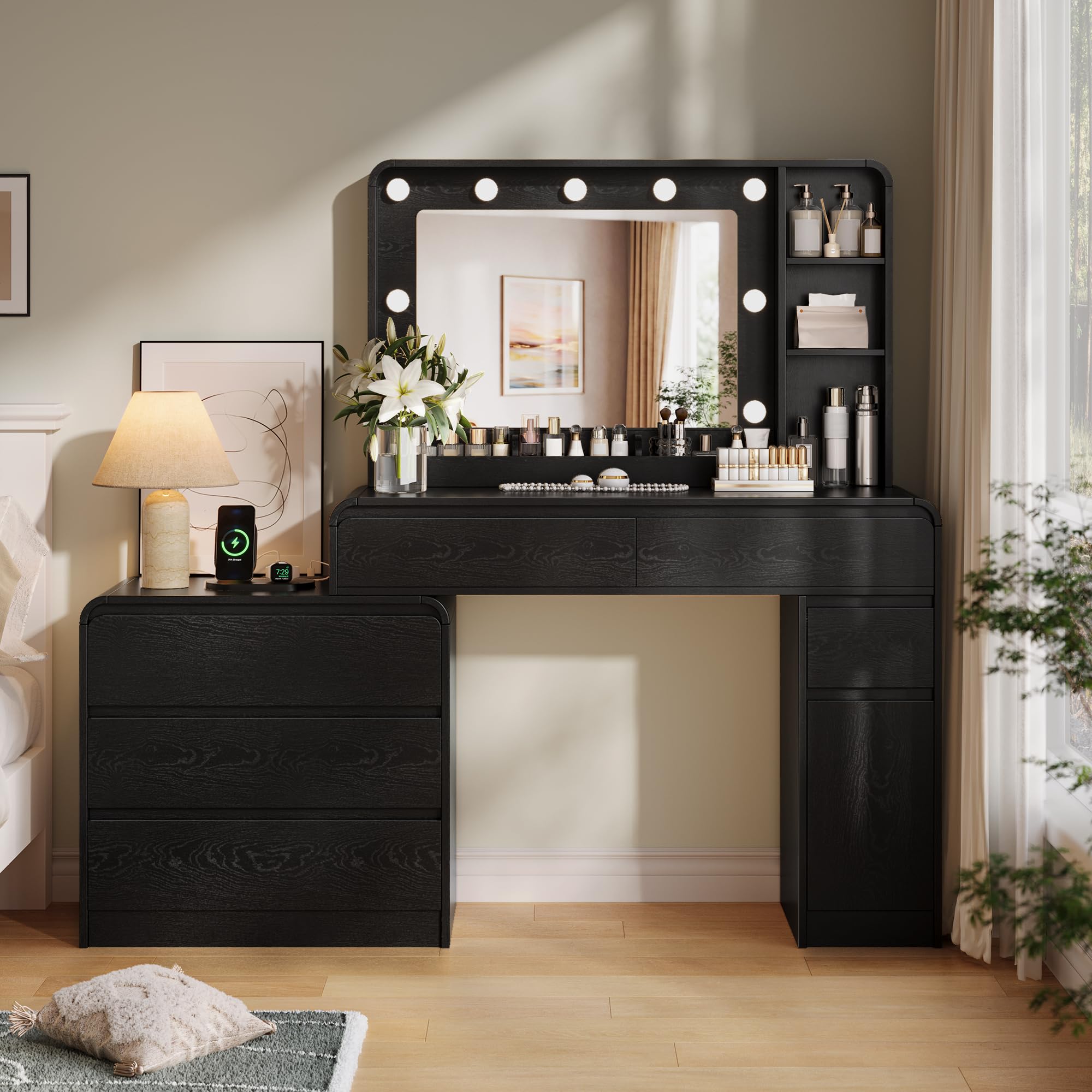
Image: Fully assembled TOKSOM 60-inch Black Makeup Vanity Desk, showcasing its design and features.
Operating Instructions
Mirror Lighting System
The vanity mirror features integrated LED bulbs with three adjustable color modes and brightness levels. To operate the lighting system:
- Power On/Off: Touch the designated switch on the mirror surface to turn the lights on or off.
- Change Color Mode: Briefly touch the switch to cycle through the three color modes: Warm Light, Daylight, and Cool Light.
- Adjust Brightness: Press and hold the switch to continuously adjust the brightness level. Release when the desired brightness is achieved.

Image: Illustration of the three distinct lighting modes (Cold White, Warm White, Warm Yellow) and the brightness adjustment function of the vanity mirror.
Integrated Power Strip
The vanity desk is equipped with a power strip on the tabletop for convenient charging and powering of electronic devices. The charging station includes:
- 2 AC Outlets (125V/2A)
- 1 USB Port (5V/2A)
- 1 Type-C Port (5V/2A)
Connect your devices directly to these ports for power. The power cord for the vanity desk is 5 feet long.

Image: Detailed view of the power strip integrated into the vanity desk, showing the AC outlets, USB, and Type-C ports.
Maintenance
Proper care and maintenance will extend the life and appearance of your vanity desk.
- Cleaning: Wipe surfaces with a soft, damp cloth. Avoid abrasive cleaners or harsh chemicals that may damage the finish.
- Spills: Clean up spills immediately to prevent staining or damage to the engineered wood.
- Mirror Care: Use a glass cleaner specifically designed for mirrors and a lint-free cloth to clean the mirror surface. Avoid spraying cleaner directly onto the LED bulbs or electrical components.
- Drawer Rails: Periodically check drawer rails for smooth operation. If a drawer becomes stiff, a small amount of silicone lubricant can be applied to the rails.

Image: Close-up view of the vanity desk's smooth, rounded edge, highlighting the durable engineered wood finish.
Troubleshooting
If you encounter issues with your vanity desk, refer to the following common problems and solutions:
| Problem | Possible Cause | Solution |
|---|---|---|
| Mirror lights do not turn on. | Power cord not connected; loose wiring; faulty switch. | Ensure power cord is securely plugged into a working outlet. Check all connections. If problem persists, contact customer support. |
| Lights are dim or flickering. | Brightness setting too low; unstable power supply. | Adjust brightness using the touch switch. Ensure the power outlet is stable. |
| Drawers are stiff or difficult to open/close. | Misalignment; debris in rails; overtightened screws. | Check for obstructions. Ensure assembly screws are not overtightened. Apply silicone lubricant to drawer rails if needed. |
| Power strip outlets/USB ports not working. | Vanity not powered; device not compatible; internal fault. | Verify the vanity is plugged in and receiving power. Test with another device. If still not working, contact customer support. |
If you experience any issues not listed here or if the suggested solutions do not resolve the problem, please contact TOKSOM customer service for assistance.
Specifications
Detailed specifications for the TOKSOM 60-inch Black Makeup Vanity Desk:
| Feature | Detail |
|---|---|
| Model Number | 63811 |
| Color | Black |
| Size | 60 inch |
| Material | Engineered Wood |
| Product Dimensions (D x W x H) | 15.7"D x 60"W x 53.9"H |
| Item Weight | 105 pounds |
| Number of Drawers | 6 |
| Included Components | Large Vanity Table with 6 Deep Drawers, Mirror with Lights |
| Power Strip | 2 AC Outlets, 1 USB Port, 1 Type-C Port |

Image: Technical drawing illustrating the precise dimensions of the vanity desk and its components.
Warranty Information
Specific manufacturer warranty details were not provided in the product data. For information regarding the product warranty, please refer to the documentation included with your purchase or contact TOKSOM customer support directly.
Customer Support
Should you encounter any problems during the installation or use of your TOKSOM vanity desk, or if you have any questions, please do not hesitate to contact our customer service team. We are committed to providing proper solutions and assistance.
For further information or to explore other TOKSOM products, please visit the official TOKSOM store: TOKSOM Store on Amazon