
Introduction
This manual provides detailed instructions for the assembly, operation, and maintenance of your KINKUNCO Vanity with LED Mirror and Charging Station, Model H01. This vanity is designed to offer a professional makeup experience with its adjustable LED lighting, integrated charging station, and extensive storage solutions. Please read this manual thoroughly before assembly and use to ensure proper function and longevity of your product.

Image: The KINKUNCO Vanity with LED Mirror, showing its overall design and included stool.
Setup and Assembly
The KINKUNCO Vanity is designed for straightforward assembly. It includes an illustrated manual and numbered components to facilitate the process. Please follow these general steps:
- Unpack Components: Carefully remove all parts from the packaging. Verify that all components listed in the included parts list are present and undamaged.
- Identify Hardware: Separate and identify all screws, dowels, and other hardware using the provided labels.
- Follow Illustrated Manual: Refer to the detailed, step-by-step illustrated assembly manual provided in the package. Each step will guide you through connecting the numbered parts.
- Assemble Base Structure: Begin by assembling the main desk and drawer units. Ensure all connections are secure.
- Attach Mirror Unit: Securely attach the mirror and shelving unit to the main desk. Pay close attention to electrical connections for the LED mirror and charging station.
- Install Drawers and Shelves: Insert the drawers into their respective slides and place any adjustable shelves.
- Connect Power: Once fully assembled, connect the power cable for the LED mirror and charging station to a suitable electrical outlet.
Dimensions: The vanity measures approximately 110 cm (width) x 40 cm (depth) x 145 cm (height). Ensure you have adequate space for assembly and placement.

Image: Technical drawing showing the detailed dimensions of the vanity in centimeters.
Operating Instructions
LED Mirror Operation
The integrated LED mirror features three adjustable lighting modes to suit various makeup needs and ambient light conditions. A touch sensor on the mirror controls the lighting.
- Power On/Off: Lightly touch the sensor to turn the LED light on or off.
- Adjust Brightness/Color Temperature: With the light on, press and hold the sensor to cycle through the three lighting modes:
- Cool Light: Ideal for detailed makeup application, simulating bright daylight.
- Natural Light: Provides a balanced illumination, suitable for everyday makeup.
- Warm Light: Creates a softer, warmer glow, perfect for evening looks or low-light environments.

Image: Visual representation of the three adjustable LED light modes (Cool, Natural, Warm) available on the mirror.
Integrated Charging Station
The vanity includes a convenient charging station with two electrical outlets (125V/12A) and two USB ports (5V/2.1A). This allows you to power beauty tools and charge mobile devices simultaneously.
- Electrical Outlets: Plug in hair dryers, curling irons, or other beauty appliances.
- USB Ports: Connect your smartphones, tablets, or other USB-powered devices for charging.
Ensure the vanity is properly connected to a wall outlet for the charging station to function.
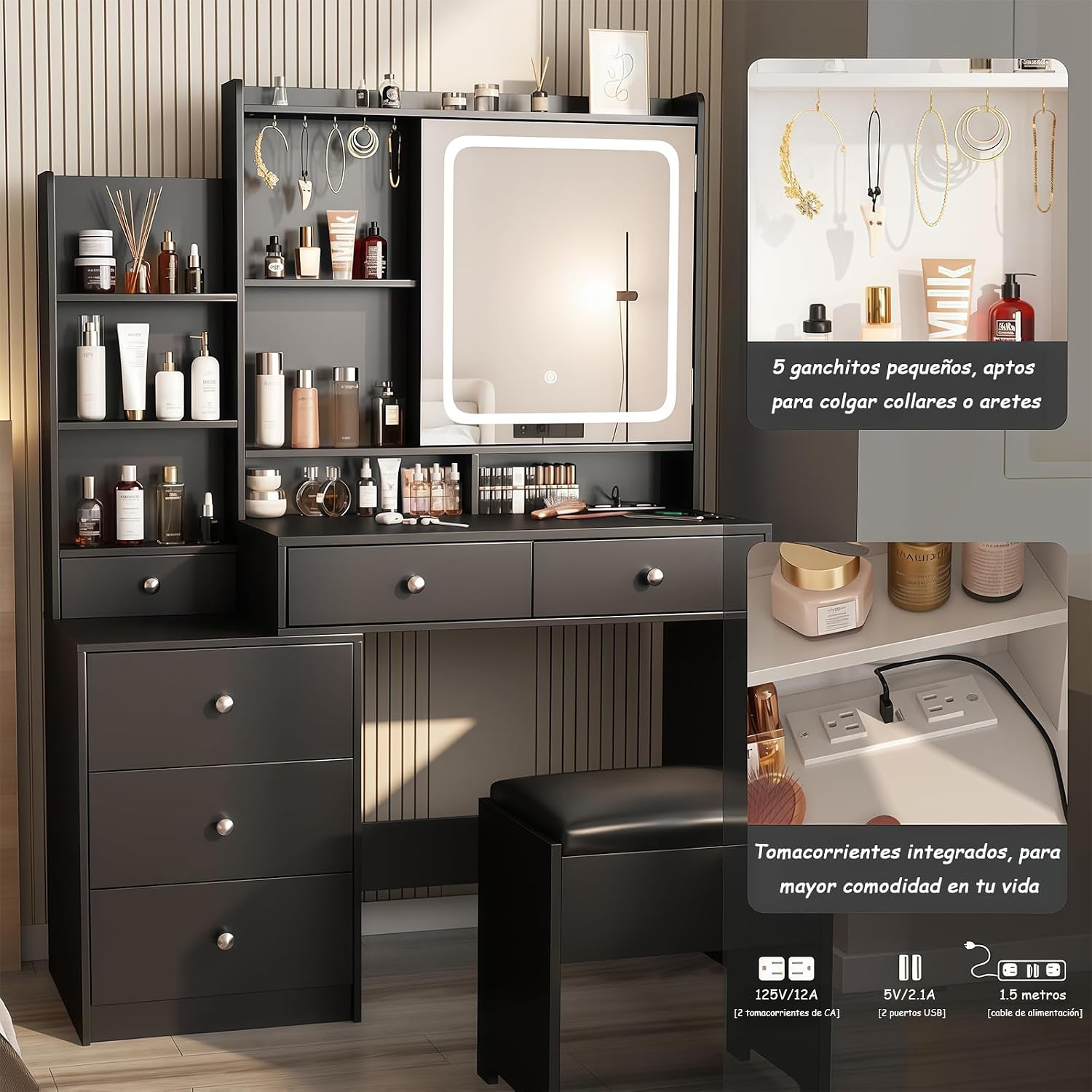
Image: Close-up view of the integrated power strip, showing two electrical outlets and two USB charging ports.
Storage Features
The vanity offers extensive storage options to keep your cosmetics and accessories organized:
- Six Drawers: Multiple drawers provide ample space for various items.
- Ten Shelves: Open and closed shelving units for display and organized storage.
- Hidden Compartments: Two concealed compartments behind the mirror offer discreet storage for valuables or less frequently used items.
- Accessory Hooks: Small hooks are provided for hanging necklaces, bracelets, or other jewelry.

Image: The vanity with its drawers and cabinet doors open, illustrating the various storage compartments and shelves.

Image: An aerial view of the vanity, showing all drawers and hidden compartments fully extended and accessible.
Maintenance
Proper care and maintenance will ensure the longevity and appearance of your KINKUNCO Vanity.
- Cleaning Surfaces: Wipe all surfaces with a soft, damp cloth. Avoid abrasive cleaners or harsh chemicals that could damage the finish.
- Mirror Cleaning: Use a glass cleaner specifically designed for mirrors and a lint-free cloth to clean the LED mirror. Do not spray cleaner directly onto the mirror; apply it to the cloth first.
- Electrical Components: Ensure the charging station and LED mirror components remain dry. Do not expose them to excessive moisture.
- Drawer Slides: Periodically check drawer slides for smooth operation. If needed, a small amount of silicone lubricant can be applied.
- Tighten Fasteners: Over time, fasteners may loosen. Periodically check and tighten all screws and connections to maintain structural integrity.
Troubleshooting
If you encounter any issues with your vanity, please refer to the following common troubleshooting steps:
| Problem | Possible Cause | Solution |
|---|---|---|
| LED Mirror does not light up. |
|
|
| Charging Station (outlets/USB) not working. |
|
|
| Drawers are stiff or difficult to open/close. |
|
|
If the problem persists after attempting these solutions, please contact KINKUNCO customer support.
Specifications
| Model | H01 |
| Brand | KINKUNCO |
| Color | Negro (Black) |
| Material | Engineered Wood |
| Dimensions (L x W x H) | 110 cm x 40 cm x 145 cm (43.3 x 15.7 x 57.1 inches) |
| Item Weight | 10 Kilograms (22 lbs) |
| Number of Drawers | 6 |
| Assembly Required | Yes |
| Power Outlets | 2 (125V/12A) |
| USB Ports | 2 (5V/2.1A) |
| Care Instructions | Wipe with a damp cloth |
Warranty Information
KINKUNCO products are manufactured to high-quality standards. Specific warranty terms and conditions may vary. For detailed information regarding the warranty period and coverage for your Model H01 vanity, please refer to the documentation included with your purchase or contact KINKUNCO customer support directly. Extended protection plans may also be available through your retailer.
Customer Support
Should you require assistance with assembly, operation, or troubleshooting, KINKUNCO offers specialized technical support. Our team is committed to providing solutions to your inquiries within 24 hours.
For support, please refer to the contact information provided in your product packaging or visit the official KINKUNCO website.