
1. Introduction
The Neoteck VC837 Digital Multimeter is a versatile and reliable tool designed for accurate electrical measurements. It features 6000 counts, True RMS (Root Mean Square) for precise readings of non-sinusoidal waveforms, and Non-Contact Voltage (NCV) detection for enhanced safety. This manual provides detailed instructions for the safe and effective use of your multimeter.
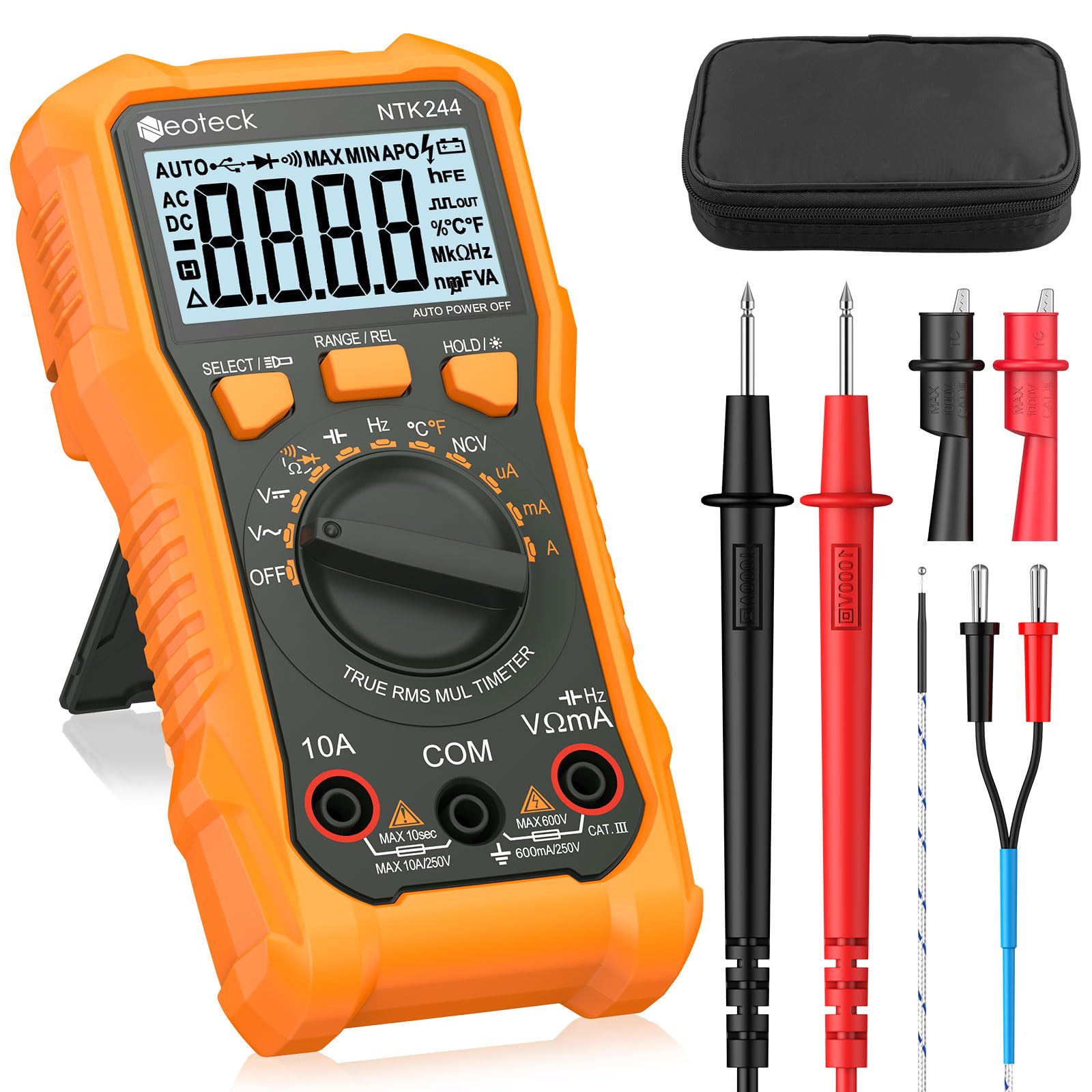
Figure 1: Neoteck VC837 Digital Multimeter, front view.
2. Safety Information
Always read and understand all safety warnings and operating instructions before using this instrument. Failure to observe safety precautions may result in electric shock, injury, or damage to the meter.
- Overload Protection: The multimeter is equipped with overload protection on all ranges and a built-in double fuse to prevent damage to the instrument and ensure user safety.
- Safety Rating: This device is rated CAT III 600V, indicating its suitability for measurements in distribution boards, circuit breakers, wiring, including cables, bus-bars, junction boxes, switches, and socket outlets in the fixed installation, and industrial use.
- Inspect Before Use: Before each use, inspect the meter and test leads for any damage. Do not use if damaged.
- Proper Terminal Use: Always connect the test leads to the correct input terminals for the desired measurement.
- Voltage Limits: Do not apply more than the rated voltage, as marked on the meter, between the terminals or between any terminal and earth ground.
- Live Circuits: Exercise extreme caution when working with live circuits. Always assume circuits are live until proven otherwise.
- Battery Replacement: Replace batteries immediately when the low battery indicator appears to ensure accurate readings.

Figure 2: Internal components showing high-performance chipset and safety fuses.
3. Package Contents
Verify that all items are present in the package:
- 1 x Neoteck VC837 Digital Multimeter (6000 Counts)
- 1 x Pair of Test Leads (Red and Black)
- 1 x Type K Thermocouple Temperature Probe
- 2 x AAA 1.5V Batteries
- 1 x Small Screwdriver
- 1 x Carrying Case
- 1 x User Manual

Figure 3: Included accessories and main unit.
4. Product Features
The Neoteck VC837 Digital Multimeter offers a range of features for comprehensive electrical testing:
- Versatile Measurements: Accurately measures DC/AC Voltage, DC/AC Current, Resistance, Capacitance, Frequency, and Duty Cycle.
- Additional Tests: Includes Continuity Test, Diode Test, Temperature Measurement (with Type K thermocouple), and Non-Contact Voltage (NCV) detection.
- 6000 Counts LCD Display: A large, backlit LCD provides clear and precise readings, even in low-light conditions.
- True RMS: Ensures accurate measurements for both sinusoidal and non-sinusoidal AC waveforms.
- Auto-Ranging: Automatically selects the appropriate measurement range, simplifying operation. Manual ranging is also available.
- Data Hold Function: Freezes the displayed reading for easy recording.
- Durable Design: Housed in a robust silicone casing for protection against accidental drops.
- Integrated Kickstand: Allows for hands-free viewing at a 45-degree angle.
- Test Lead Storage: Convenient clips on the back for organizing test leads.
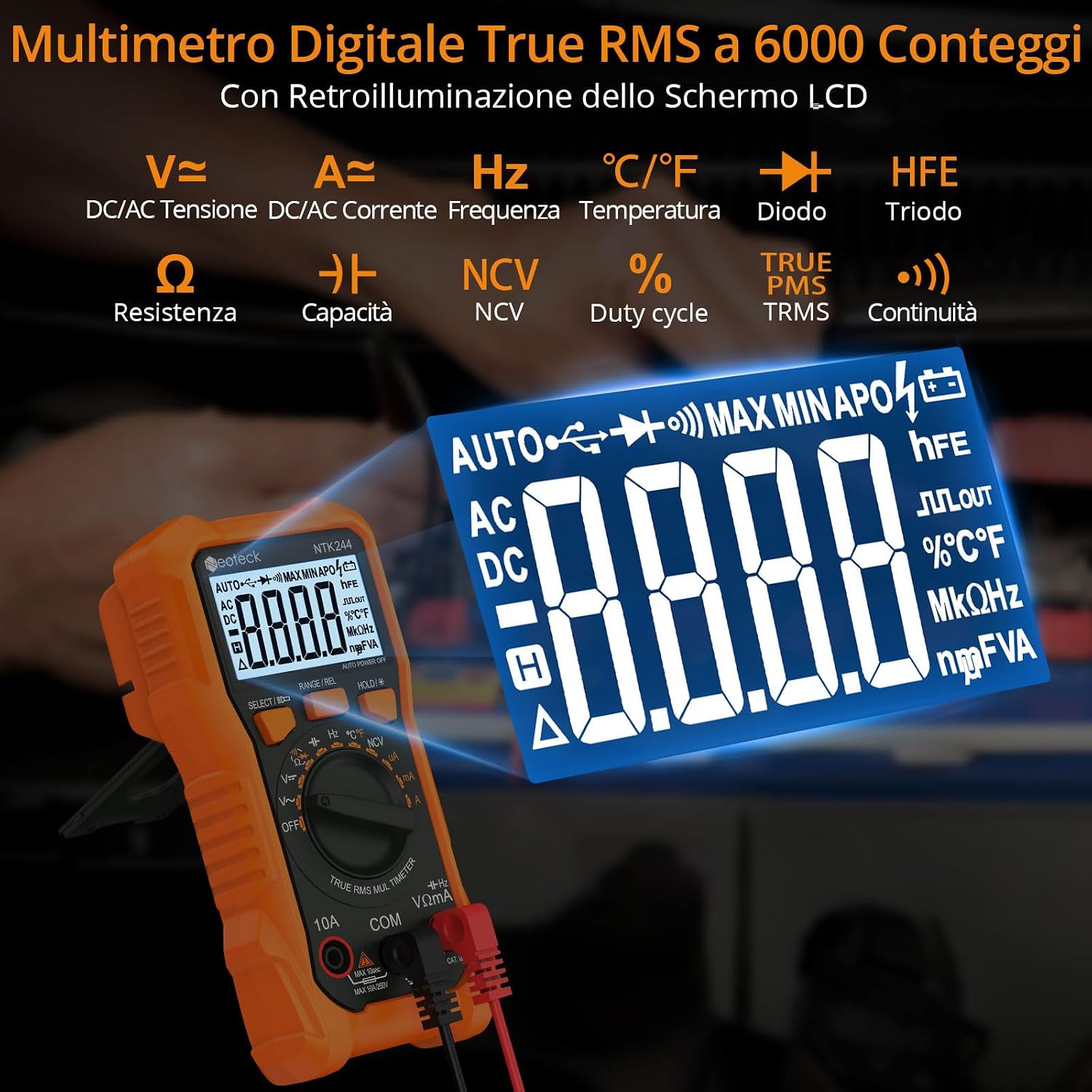
Figure 4: Multimeter display showing various measurement functions.
5. Setup
5.1 Battery Installation
- Ensure the multimeter is turned OFF.
- Locate the battery compartment cover on the back of the unit.
- Use the included screwdriver to loosen the screw securing the battery cover.
- Remove the cover and insert the two AAA 1.5V batteries, observing the correct polarity (+ and -).
- Replace the battery cover and tighten the screw.
5.2 Connecting Test Leads
The multimeter uses standard test leads. Always ensure they are securely connected before taking measurements.
- Insert the black test lead into the COM (Common) terminal.
- For most measurements (Voltage, Resistance, Capacitance, Frequency, Diode, Continuity, Temperature, NCV, and small currents up to 600mA), insert the red test lead into the VΩmA terminal.
- For large current measurements (up to 10A), insert the red test lead into the 10A terminal.

Figure 5: Proper connection of test leads and temperature probe.
6. Operating Instructions
The multimeter's functions are selected using the central rotary switch. The display will show the selected mode and measurement units.
6.1 Basic Measurements
- DC/AC Voltage (V͡ / V∼): Turn the rotary switch to the V͡ (DC Voltage) or V∼ (AC Voltage) position. Connect the test leads in parallel to the circuit or component being measured. The meter will automatically select the range.
- DC/AC Current (A͡ / A∼): Turn the rotary switch to the A͡ (DC Current) or A∼ (AC Current) position. For currents up to 600mA, use the VΩmA terminal. For currents up to 10A, use the 10A terminal. Connect the meter in series with the circuit.
- Resistance (Ω): Turn the rotary switch to the Ω position. Connect the test leads across the component. Ensure the circuit is de-energized before measuring resistance.
- Capacitance (′′): Turn the rotary switch to the capacitance position. Connect the test leads across the capacitor. Ensure the capacitor is discharged before measurement.
- Frequency (Hz): Turn the rotary switch to the Hz position. Connect the test leads to the signal source.
- Diode Test (→|): Turn the rotary switch to the Diode position. Connect the red lead to the anode and the black lead to the cathode of the diode.
- Continuity Test (♫): Turn the rotary switch to the Continuity position. Touch the test leads together to hear a beep, indicating continuity. Connect the leads across the circuit or component to test for continuity.
- Temperature (°C/°F): Turn the rotary switch to the °C/°F position. Connect the Type K thermocouple to the dedicated input jacks. Place the probe tip on or in the object to be measured.
6.2 Special Functions
- Non-Contact Voltage (NCV): Turn the rotary switch to the NCV position. Bring the top part of the multimeter near an AC voltage source. The meter will indicate the presence of voltage with an audible beep and visual indicator.
- Data Hold (HOLD): Press the "HOLD" button to freeze the current reading on the display. Press again to release.
- Backlight: The LCD backlight can be activated for better visibility in dark environments. It may automatically turn off after a period of inactivity.

Figure 6: Rotary switch for function selection and measurement ranges.

Figure 7: Non-Contact Voltage (NCV) detection in use.
7. Maintenance
7.1 Cleaning
Wipe the meter with a damp cloth and mild detergent. Do not use abrasives or solvents. Keep the terminals free from dirt and moisture.
7.2 Battery Replacement
When the low battery indicator appears on the display, replace the batteries as described in Section 5.1. Using the meter with low batteries may lead to inaccurate readings.
7.3 Fuse Replacement
If the current measurement function stops working, the fuse may need replacement. Refer to a qualified technician for fuse replacement to ensure proper safety and functionality. The meter uses a double fuse system for protection.
8. Troubleshooting
| Problem | Possible Cause | Solution |
|---|---|---|
| No display or dim display | Low or dead batteries; Incorrect battery installation | Replace batteries; Check battery polarity |
| Inaccurate readings | Low batteries; Incorrect function selection; Poor test lead connection | Replace batteries; Select correct function; Ensure secure test lead connection |
| Current measurement not working | Blown fuse; Incorrect terminal connection | Consult a technician for fuse replacement; Ensure red lead is in 10A or VΩmA terminal as appropriate |
| No NCV detection | Not in NCV mode; No AC voltage present | Select NCV mode; Verify AC voltage presence |
9. Specifications
| Parameter | Value |
|---|---|
| Brand | Neoteck |
| Model | VC837 |
| Display | 6000 Counts LCD with Backlight |
| Power Source | 2 x AAA Batteries |
| Max Operating Voltage | 600 Volts |
| Safety Rating | CAT III 600V |
| Item Weight | 195 Grams |
| Item Dimensions | 18 x 9.5 x 4.5 cm |
| Operating Temperature Upper Limit | 1000 Degrees Celsius (for temperature measurement) |
| DC Voltage Range | 600mV/6V/60V/600V |
| AC Voltage Range | 600mV/6V/60V/600V |
| DC Current Range | 600uA/6000uA/60mA/600mA/6A/10A |
| AC Current Range | 600uA/6000uA/60mA/600mA/6A/10A |
| Resistance Range | 600Ω/6KΩ/60KΩ/600KΩ/6MΩ/60MΩ |
| Capacitance Range | 60nF/600nF/6uF/60uF/600uF/6mF/60mF |
| Frequency Range | 10Hz/100Hz/1KHz/10KHz/100KHz/1MHz/10MHz |
| Temperature Range | -40 ℃ to 1000 ℃ / -40 ℉ to 1832 ℉ |
| Duty Cycle | 1% ~ 99% |
10. Warranty and Support
Neoteck products are designed for reliability and performance. This product comes with a standard manufacturer's warranty. For specific warranty details, please refer to the documentation included with your purchase or contact Neoteck customer support.
If you encounter any issues or have questions regarding the operation or maintenance of your Neoteck VC837 Digital Multimeter, please contact Neoteck customer support through the retailer's platform or the official Neoteck website. Please have your model number (VC837) and purchase information ready when contacting support.


