
1. Important Safety Information
Read all instructions carefully before installation and use. Failure to follow these instructions may result in electric shock, fire, or serious injury.
- Electrical Safety: Always disconnect power at the circuit breaker before installing, servicing, or cleaning the unit. Ensure all wiring complies with local electrical codes and standards. This product must be grounded.
- Qualified Personnel: Installation and wiring should be performed by a qualified electrician.
- UL Certified: This product is UL certified, ensuring it meets high safety standards.
- Location: Install the fan in a ceiling location where it will not be exposed to direct water spray. Do not install above a shower or bathtub without proper protection.
- Ducting: Ensure proper ducting is used and sealed to prevent air leakage and maintain efficiency.
- Remote Control: Keep the remote control away from water. AAA batteries (not included) are required for operation.
2. Product Overview
The Oeukas BF-193 is a versatile 5-in-1 bathroom exhaust fan designed to enhance your bathroom environment. It integrates multiple functions into a single unit for optimal comfort and convenience.
- Smart Humidity Sensor: Automatically detects and responds to moisture levels, activating ventilation when needed.
- Powerful Ventilation: Provides 190 CFM airflow to quickly remove steam and odors.
- Ultra-Quiet Operation: Operates at a low 1.0 Sone for minimal noise disturbance.
- Fast Heating: Features an 1800W heater for rapid warmth during colder periods.
- Bright LED Illumination: Equipped with a 1500LM LED light for clear and efficient lighting.
- Remote Control: Conveniently manage all functions from anywhere in the bathroom.

Figure 2.1: Oeukas BF-193 5-in-1 Bathroom Exhaust Fan with remote control.
3. Package Contents
Verify that all components are present before beginning installation:
- Oeukas BF-193 5-in-1 Bathroom Exhaust Fan Unit
- Wireless Remote Control
- Installation Hardware (screws, wire connectors)
- User Manual
4. Specifications
| Feature | Specification |
|---|---|
| Model Number | BF-193 |
| Air Flow Capacity | 190 CFM |
| Noise Level | 1.0 Sone |
| Heating Power | 1800W |
| LED Illumination | 1500 Lumens |
| Voltage | 110 Volts AC |
| Control Method | Remote Control |
| Product Dimensions (D x W x H) | 6.7" x 13.78" x 13.78" |
| Ceiling Opening Requirements | 11.22" x 11.22" |
| Weight | 9.3 pounds |
| Special Features | Humidity Sensor, LED Light, Heater, Ventilation |
| Certifications | UL Certified |
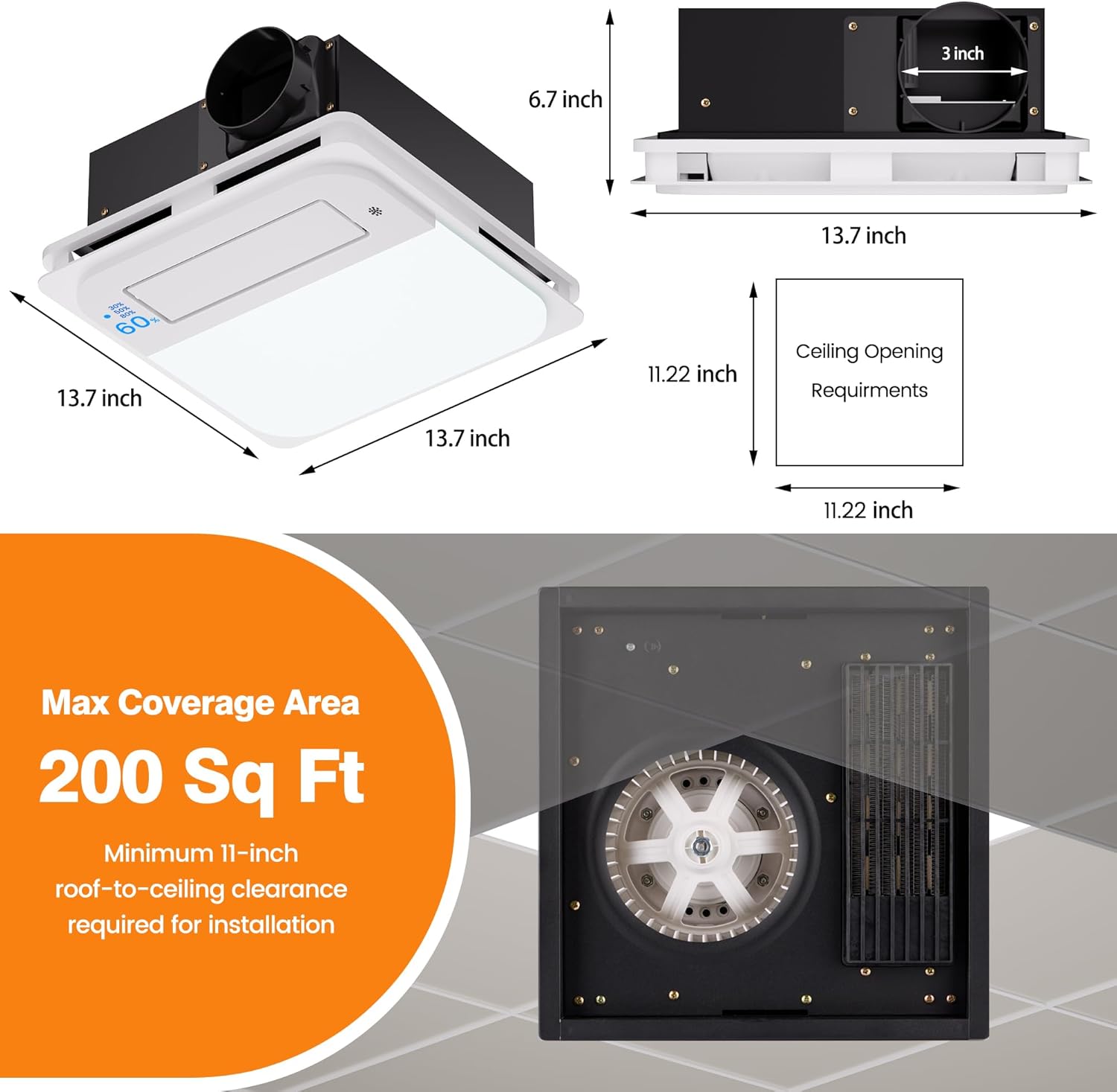
Figure 4.1: Detailed product dimensions and required ceiling opening for installation.
5. Installation Instructions
Follow these steps for proper installation. Ensure power is disconnected at the circuit breaker before starting.
- Prepare the Opening: Measure and cut a ceiling opening of 11.22" x 11.22". Ensure there is a minimum 11-inch roof-to-ceiling clearance.
- Test the Unit: Before final installation, connect the unit to a power source to ensure all functions (fan, light, heater) are working correctly.
- Position the Machine: Angle the unit into the ceiling opening and secure it to the ceiling joists using appropriate fasteners.
- Connect Ducting: Fit the air duct over the exhaust outlet (typically 3-inch diameter) and secure it with tape or a clamp to ensure an airtight seal.
- Electrical Wiring: Connect the electrical wires according to local codes. Match white to neutral (N), green to ground (G), and black to live (L). Ensure all connections are secure.
- Attach the Panel: Align the exhaust vent on the decorative panel with the black rectangular air outlet of the machine and secure the panel to the unit.

Figure 5.1: Visual guide for the installation process, from measuring to attaching the panel.
Video 5.1: Official installation guide for the Oeukas 5-in-1 Bathroom Exhaust Fan. This video demonstrates the process of fitting the air duct and securing it with tape, as well as other key installation steps.
6. Operating Instructions
The Oeukas BF-193 is controlled via the included wireless remote. Ensure AAA batteries are installed in the remote.

Figure 6.1: Remote control functions including power, heating, fan, ventilation, and timer settings.

Figure 6.2: Remote control functions including light, oscillation, humidity control, and humidity level selection.
Remote Control Functions:
- Standby (Power On/Off): Press to turn the unit on or off.
- Heat: Activates or deactivates the 1800W heating function.
- Fan: Turns the fan function on or off for general air circulation.
- Ventilation: Activates or deactivates the exhaust fan for moisture and odor removal.
- Timer: Enables cycle timer mode with selectable durations of 2H, 4H, 6H, and 8H.
- Cancel Timer: Deactivates any active recurring timer setting.
- Light: Turns the 1500LM LED light on or off.
- Oscillation: After turning on the Fan function, press this button to activate the fan oscillation feature.
- Humidity Controller: Enables or disables the automatic humidity sensing function. When activated, the unit will automatically detect current humidity levels.
- Humidity Levels: After enabling the humidity controller, select from three preset humidity settings: 30%, 60%, or 80%. The fan will activate automatically when the indoor humidity exceeds the selected threshold.

Figure 6.3: The humidity sensor automatically activates the fan when the set humidity level is reached.
7. Maintenance
Regular maintenance ensures optimal performance and longevity of your exhaust fan. Always disconnect power at the circuit breaker before performing any maintenance.
- Cleaning the Grille/Panel: Periodically wipe the exterior grille and panel with a soft, damp cloth. Do not use abrasive cleaners or solvents.
- Cleaning the Fan Blades: If accessible, gently clean the fan blades with a soft brush or cloth to remove dust and debris.
- Ducting Inspection: Annually inspect the ducting for any blockages, leaks, or damage. Ensure it remains securely connected.
- Light Replacement: The LED light is designed for long life. If replacement is ever needed, consult a qualified electrician or contact customer support.
8. Troubleshooting
If you encounter issues with your Oeukas BF-193, refer to the following common problems and solutions:
| Problem | Possible Cause | Solution |
|---|---|---|
| Unit does not power on | No power supply, loose wiring, tripped circuit breaker. | Check circuit breaker. Ensure power cord is securely plugged in. Verify all wire connectors are securely reattached (Green to green, white to white, black to black). |
| Fan is noisy or vibrating | Loose mounting, debris in fan blades, damaged motor. | Ensure unit is securely mounted. Disconnect power and clean fan blades. If noise persists, contact support. |
| Poor ventilation/humidity removal | Blocked ducting, incorrect humidity sensor setting. | Check ducting for obstructions. Adjust humidity sensor setting to a lower percentage (e.g., 30%). |
| Heater not working | No power, heater element failure. | Ensure unit has power. If other functions work, contact support for heater issues. |
| Remote control not responding | Dead batteries, remote out of range. | Replace AAA batteries in the remote. Ensure you are within effective range of the unit. |

Figure 8.1: Wiring diagram for checking connections if the unit does not power on. Always unplug the power before connecting terminals.
9. Warranty Information
Oeukas products are manufactured to high-quality standards and are warranted to be free from defects in materials and workmanship for a period of one (1) year from the original date of purchase. This warranty applies only to the original purchaser and is not transferable.
This warranty does not cover:
- Damage caused by improper installation, misuse, abuse, or neglect.
- Damage caused by unauthorized repairs or modifications.
- Normal wear and tear.
- Damage due to acts of nature.
For warranty service, please retain your proof of purchase. Contact Oeukas customer support for assistance.
10. Customer Support
If you have any questions, require technical assistance, or need to report a problem, please contact Oeukas customer support:
- Website: Visit the official Oeukas website for FAQs and support resources.
- Email: support@oeukas.com
- Phone: Refer to your product packaging or the Oeukas website for regional contact numbers.
Please have your model number (BF-193) and purchase date ready when contacting support.