
Introduction
This manual provides detailed instructions for the Mindrose Smart Watch Health Fitness Tracker. It covers setup, operation, maintenance, and troubleshooting to ensure optimal use of your device. Please read this manual thoroughly before using your smart watch.
1. Setup
1.1 What's in the Box
Your Mindrose Smart Watch package includes:
- Mindrose Smart Watch Health Fitness Tracker
- Magnetic USB Charging Cable
- User Manual (this document)
1.2 Charging the Device
Before first use, fully charge your smart watch.
- Connect the magnetic USB charging cable to a USB power source (e.g., computer, wall adapter).
- Align the magnetic end of the cable with the charging contacts on the back of the watch. The magnets will snap it into place.
- The watch display will indicate charging status. A full charge typically takes 1.5 to 2 hours.
A full charge provides approximately 6-7 days of heavy use or 10-12 days of daily use, with a standby time of up to 30 days.

Image: The Mindrose Smart Watch connected to its magnetic charging cable, displaying a charging icon. This image illustrates the easy magnetic charging process.
1.3 App Installation and Pairing
To unlock the full features of your smart watch, download and install the companion app.
- Search for the "Da Fit" app in your smartphone's app store (Google Play Store for Android, Apple App Store for iOS).
- Download and install the "Da Fit" app.
- Ensure your phone's Bluetooth is enabled.
- Open the "Da Fit" app and follow the on-screen instructions to create an account or log in.
- In the app, navigate to the device pairing section and select your smart watch from the list of available devices.
- Confirm the pairing request on both your phone and the smart watch.
The smart watch is compatible with Android 4.4 / iOS 8.4 or above smartphones.
2. Operating Instructions
2.1 Basic Navigation
The Mindrose Smart Watch features a 1.47-inch HD-color full touch screen for intuitive operation.
- Swipe Up/Down: Scroll through menus and notifications.
- Swipe Left/Right: Access quick widgets or different data screens.
- Tap: Select an item or confirm an action.
- Press Side Button: Return to the home screen or power on/off the device.
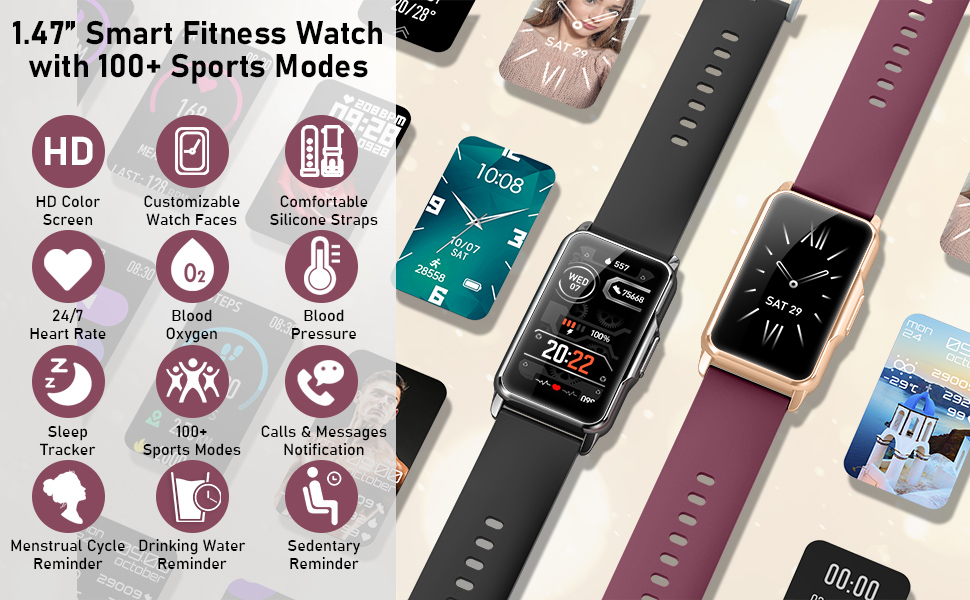
Image: A close-up of the Mindrose Smart Watch display, highlighting its 1.47-inch curved HD-color full touch screen and customizable watch faces. This image demonstrates the visual clarity and interactive nature of the display.
2.2 Health Monitoring
Your smart watch provides 24/7 health metrics monitoring. Access these features directly from the watch or view detailed historical data in the "Da Fit" app.
- Heart Rate: Monitors your heart rate continuously throughout the day.
- Blood Oxygen (SpO2): Measures your blood oxygen saturation levels.
- Blood Pressure: Provides blood pressure readings. Note: This device is not a medical device. Readings are for reference only and should not be used for medical diagnosis or treatment.
- Sleep Tracker: Automatically tracks your sleep patterns, including REM, light sleep, deep sleep, and awake times, to help you understand your sleep quality.

Image: The Mindrose Smart Watch displaying real-time heart rate, blood pressure, and blood oxygen measurements. This image illustrates the watch's health monitoring capabilities.

Image: A person sleeping with the Mindrose Smart Watch on their wrist, alongside a smartphone displaying detailed sleep tracking data from the companion app. This image highlights the sleep monitoring function.
2.3 Sports Modes and Activity Tracking
The watch offers over 115 sports modes and all-day activity tracking to support your fitness journey.
- 115+ Sports Modes: Select from a wide range of activities like walking, running, cycling, swimming, yoga, and more.
- GPS Connectivity: Connects to your phone's GPS to map your outdoor workout routes in the app.
- Activity Tracking: Monitors steps, distance, and calories burned throughout the day.

Image: A collage showing various sports icons (walking, running, cycling, swimming, etc.) alongside the Mindrose Smart Watch displaying activity data and a smartphone showing a mapped workout route. This image illustrates the extensive sports modes and GPS connectivity.
2.4 Notifications and Reminders
Stay connected and informed with notifications and helpful reminders directly on your wrist.
- Call Notifications: See caller ID, reject calls, or mute the ringtone.
- Message Notifications: Read full text messages and app alerts (e.g., SMS, WhatsApp, Facebook).
- Drinking Water Reminder: Prompts you to stay hydrated.
- Sedentary Reminder: Reminds you to move after periods of inactivity.
- Menstrual Cycle Reminder: Helps track and predict menstrual cycles (for women).

Image: A person's wrist with the Mindrose Smart Watch displaying an incoming call notification, and another image showing message notifications from various apps. This illustrates the call and message alert features.
2.5 Additional Features
The smart watch includes several convenient tools for daily life:
- Real-time Weather Display: Get current weather information.
- Remote Camera Shooting: Control your phone's camera remotely.
- Music Control: Play, pause, skip tracks on your phone's music player.
- Timer: Use the built-in timer function.
- Do-Not-Disturb Mode: Silence notifications during specific times.
- Customizable Watch Faces: Choose from over 150 watch face options in the app or use your own photos.

Image: A collage showing various smart watch features such as weather display, music control, and remote camera shutter. This image demonstrates the additional utility features of the watch.
3. Maintenance
3.1 Water Resistance
The Mindrose Smart Watch is IP68 waterproof, making it suitable for:
- Washing hands
- Taking a shower
- Working out in the rain
- Swimming
Note: Not suitable for hot water, saunas, or diving. Avoid prolonged exposure to steam or hot water, as this may affect the waterproof seal.

Image: A person in water wearing the Mindrose Smart Watch, with icons indicating its suitability for rain, swimming, washing hands, and showering. This image highlights the IP68 waterproof rating.
3.2 Cleaning and Care
To maintain your watch's appearance and functionality:
- Wipe the watch and strap regularly with a soft, damp cloth.
- Ensure the charging contacts are clean and dry before charging.
- Avoid exposing the watch to extreme temperatures or harsh chemicals.
3.3 Strap Replacement
The watch features a comfortable, durable, replaceable, and washable strap. Refer to the "Da Fit" app or manufacturer's website for instructions on how to replace the strap.
4. Troubleshooting
4.1 Common Issues and Solutions
- No Notifications:
- Check if "Do Not Disturb" mode is active on your watch. Swipe down from the watch face to access the control center. If the moon icon is white, "Do Not Disturb" is on. Tap it to turn it off.
- Ensure Bluetooth is connected and the "Da Fit" app is running in the background on your phone.
- Verify notification permissions for the "Da Fit" app in your phone's settings.
- Inaccurate Health Readings:
- Ensure the watch is worn snugly on your wrist, but not too tight.
- Keep your wrist still during measurements.
- Remember: Health metrics are for reference only and not for medical purposes.
- Watch Not Connecting to App:
- Ensure Bluetooth is enabled on your phone.
- Restart both your phone and the smart watch.
- Try unpairing and re-pairing the device through the "Da Fit" app.
- Short Battery Life:
- Reduce screen brightness.
- Limit continuous heart rate monitoring or frequent use of power-intensive features.
- Ensure the watch is fully charged (1.5-2 hours).
5. Specifications
| Brand | Mindrose |
| Model | Smart Watch Health Fitness Tracker |
| Display Size | 1.47 inches HD-color Full Touch Screen |
| Battery Life | 6-7 days (heavy use), 10-12 days (daily use), 30 days (standby) |
| Charging Time | 1.5 - 2 hours |
| Water Resistance | IP68 |
| Compatibility | Android 4.4 / iOS 8.4 or above |
| Material | Metal, Silicone |
| Included Components | Fitness Tracker Watch, Charging Cable, User Manual |
6. Warranty and Support
6.1 Manufacturer's Warranty
The Mindrose Smart Watch Health Fitness Tracker comes with a 3-Year Manufacturer's Warranty. This warranty covers defects in materials and workmanship under normal use. Please retain your proof of purchase for warranty claims.
6.2 Customer Support
For further assistance, technical support, or warranty inquiries, please refer to the contact information provided on the Mindrose official website or the packaging of your product. You may also contact the seller directly through your purchase platform.