
Introduction
This manual provides essential information for the safe and effective operation of your DREO Air Purifier DR-HAP009. Please read it thoroughly before use and retain it for future reference. The DREO DR-HAP009 is designed to improve indoor air quality by filtering various airborne particles and odors.
Important Safety Instructions
To reduce the risk of fire, electric shock, or injury, always follow basic safety precautions when operating this appliance.
- Ensure the power supply matches the voltage specified on the air purifier.
- Do not operate the air purifier with a damaged cord or plug.
- Keep the air purifier away from water or wet areas.
- Do not block air inlets or outlets.
- Unplug the appliance before cleaning or performing any maintenance.
- This appliance is for indoor use only.
Package Contents
Verify that all items are included in your package:
- 1 x DREO Air Purifier (DR-HAP009)
- 1 x Filter (pre-installed)
- 1 x Bottom Cover
- 1 x User Guide (this document)
- 1 x Important Safety Instructions
Product Overview
The DREO DR-HAP009 Air Purifier features a 3-in-1 filtration system and real-time air quality monitoring to provide clean air in your home.
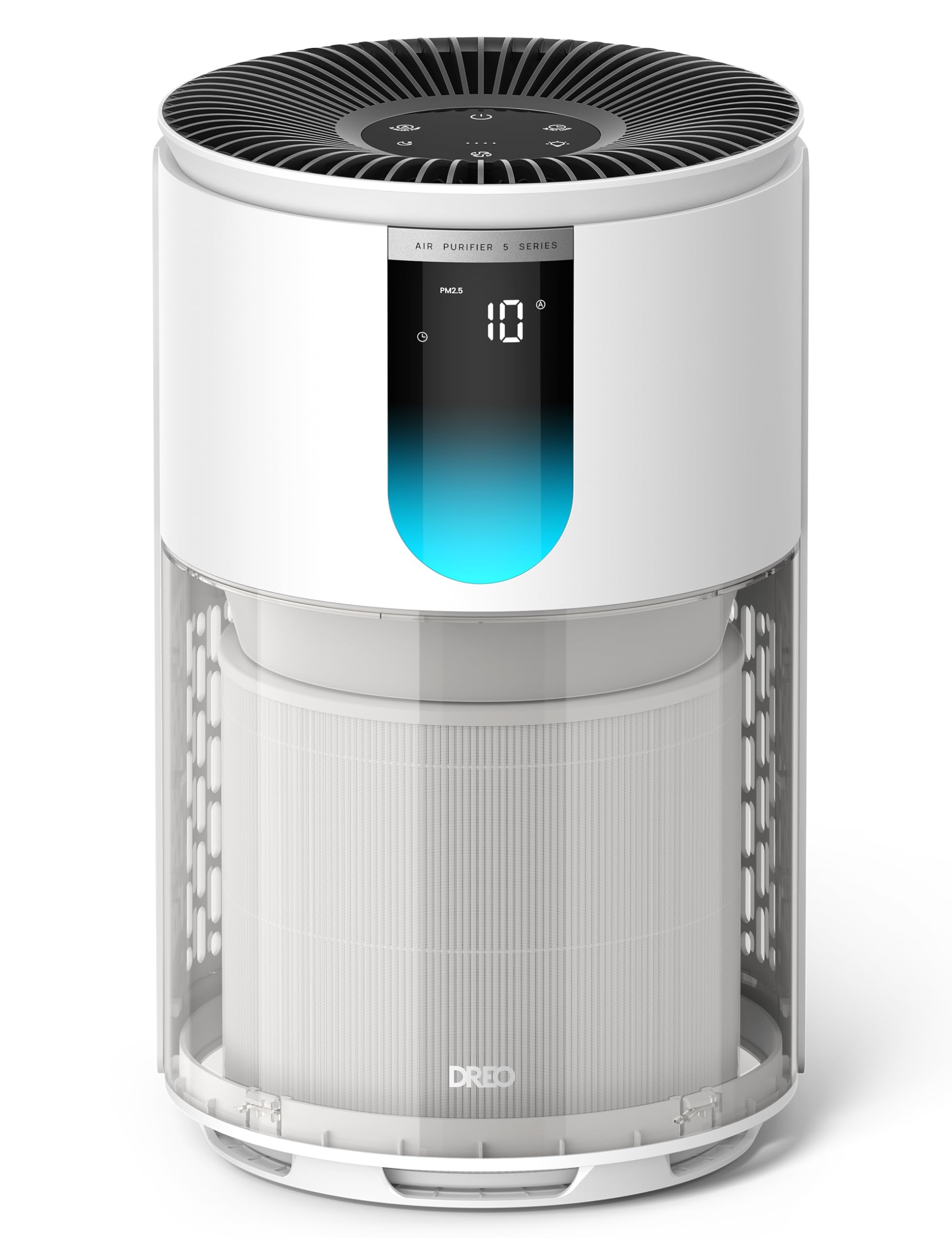
Image: DREO Air Purifier DR-HAP009 in white, showcasing its compact and modern design.
Key Features:
- AHAM Verified Performance: Independently tested with a Clean Air Delivery Rate (CADR) of 158 CFM, refreshing air in rooms up to 245 sq. ft. every 12.4 minutes (4.8 ACH). Covers up to 1,176 sq. ft. at 1 ACH.
- TurboPure Technology: Large air intake and 360° spiral airflow for faster air circulation and improved intake efficiency.
- 3-in-1 Filtration System: Includes a pre-filter, high-efficiency HEPA filter, and activated carbon layer to capture PM2.5, pollen, dust, smoke, and reduce household odors.
- Real-Time Air Monitoring: High-precision PM2.5 sensor displays AQI levels (0–999) on an LED screen with a 4-color RGB indicator (blue, green, orange, red) for air quality recognition.
- Quiet Operation: Efficient BLDC motor and optimized airflow reduce noise to as low as 18 dB in Sleep Mode, suitable for bedrooms and offices.
- Energy Efficient: ENERGY STAR certified, consuming approximately 162 kWh annually.
- Versatile Purification Modes: Auto, Turbo, Sleep, and Normal Mode with 4 fan speeds.
- Easy Filter Maintenance: Intelligent filter life algorithm provides accurate replacement reminders. Transparent filter viewing window for visual inspection.

Image: Internal view of the DREO Air Purifier, highlighting the TurboPure airflow system and the multi-layer filtration.
Setup
Follow these steps to set up your DREO Air Purifier:
- Unpack: Carefully remove the air purifier and all accessories from the packaging.
- Remove Filter Packaging: The filter is pre-installed but may have protective packaging. Unscrew the bottom cover, remove the filter, unwrap any plastic packaging, and reinsert the filter. Secure the bottom cover.
- Placement: Place the air purifier on a firm, level surface. Ensure there is at least 15 inches (38 cm) of clearance on all sides for optimal airflow.
- Power On: Plug the power cord into a standard electrical outlet.

Image: The air purifier displaying real-time PM2.5 levels and its transparent filter window for easy inspection.
Operating Instructions
Your DREO Air Purifier offers various modes and settings for customized air purification.
Control Panel:
The control panel is located on the top of the unit. It includes buttons for Power, Mode, Fan Speed, Timer, and Display Light.
Modes:
- Auto Mode: The air purifier automatically adjusts the fan speed based on real-time air quality detected by the PM2.5 sensor.
- Turbo Mode: Operates at maximum fan speed for rapid air purification, ideal for quickly clearing smoke, pet dander, or strong odors.
- Sleep Mode: Operates at the lowest fan speed (18 dB) and turns off display lights for an undisturbed sleeping environment. Any button press will reactivate the display.
- Normal Mode: Allows manual selection of 4 fan speeds (1-4) for everyday control.
Air Quality Indicator:
The LED screen displays the PM2.5 level, and an RGB indicator light changes color to reflect air quality:
- Blue: Excellent air quality
- Green: Good air quality
- Orange: Moderate air quality
- Red: Poor air quality

Image: The DREO Air Purifier operating in a living room, illustrating its effective coverage for large spaces.
Maintenance
Regular maintenance ensures optimal performance and extends the lifespan of your air purifier.
Filter Replacement:
The air purifier uses a DREO original replacement filter, model DR-HPA038. The intelligent filter life algorithm will indicate when replacement is needed. The transparent filter viewing window allows you to visually check the filter's condition.
- Unplug the air purifier from the power outlet.
- Turn the unit upside down and twist the bottom cover counter-clockwise to unlock it.
- Remove the old filter.
- Insert the new DREO DR-HPA038 filter (ensure all packaging is removed).
- Replace the bottom cover and twist clockwise to lock it securely.
- Plug in the air purifier and reset the filter life indicator (refer to the control panel section for specific reset instructions if needed).

Image: A DREO DR-HPA038 replacement filter, essential for maintaining air purifier performance.
Cleaning:
- Wipe the exterior of the air purifier with a soft, dry cloth.
- Do not use abrasive cleaners or solvents.
- The pre-filter can be gently vacuumed to remove larger dust particles between replacements.
Troubleshooting
If you encounter issues with your DREO Air Purifier, refer to the following common problems and solutions:
| Problem | Possible Cause | Solution |
|---|---|---|
| Air purifier does not turn on. | Not plugged in; power outage; filter not installed correctly. | Ensure unit is plugged in; check power outlet; verify filter is unwrapped and installed correctly with bottom cover secured. |
| Airflow is weak. | Filter is dirty; air inlets/outlets blocked. | Replace filter; ensure no obstructions around the unit. |
| Unusual noise. | Filter not seated properly; foreign object inside. | Reinstall filter; unplug and check for foreign objects. |
| Air quality reading seems inaccurate. | Sensor is dirty. | Gently clean the PM2.5 sensor area with a dry cotton swab. |
If the problem persists, please contact DREO customer support.
Specifications
| Feature | Detail |
|---|---|
| Model Number | DR-HAP009 |
| Product Dimensions | 9.37 x 9.37 x 15.35 inches |
| Item Weight | 6.86 pounds |
| Power Source | Corded Electric |
| Control Method | Touch |
| Filter Type | Pleated (3-in-1 HEPA) |
| Floor Area Coverage | Up to 1176 sq. ft. (1 ACH) / 245 sq. ft. (4.8 ACH) |
| Noise Level | As low as 18 dB |
| Particle Retention Size | 0.3 micrometer |
| Contaminant Filtration | Cigarette Smoke, Dust, Pet Hair, Pollen, Wildfire Smoke, Odors |
| Certifications | AHAM Certified, CARB Certified, EPA Certified, ETL Certified, Energy Star Certified |
| Color | White |

Image: AHAM Certified Performance table, detailing the air purifier's effectiveness across various room sizes.
Warranty and Support
DREO provides a warranty for this product. For detailed warranty information, please refer to the warranty card included in your package or visit the official DREO website. For technical support, troubleshooting assistance, or to inquire about replacement parts, please contact DREO customer service through their official channels.
Online Support: Visit www.dreo.com for FAQs and support resources.


