
Introduction
Thank you for choosing the KUAIVO K600H Dual Platform Food Kitchen Scale. This manual provides essential information for the proper setup, operation, and maintenance of your new scale. Please read these instructions carefully before use to ensure accurate measurements and prolong the life of your device.
The KUAIVO K600H is designed for precise weighing in various kitchen applications, featuring two distinct weighing platforms for different measurement needs. The large platform offers a capacity of up to 33 lbs (15 kg) with an accuracy of 0.1 oz (1 g), while the small platform provides high precision for up to 1.1 lbs (500 g) with an accuracy of 0.001 oz (0.01 g).
Product Features
- Dual Weighing Platforms: Large platform (33 lbs / 0.1 oz accuracy) and Small platform (1.1 lbs / 0.001 oz accuracy) for versatile use.
- Multiple Units: Measures in g, kg, lb, oz, lb:oz, ml, and MILK ml.
- Tare Function: Allows you to subtract the weight of a container for net weight measurement.
- Accumulation Function: Sums weights from both platforms for a total measurement.
- LCD Display: Clear, backlit display for easy reading in various lighting conditions.
- Auto-Off Feature: Automatically shuts off after 210 seconds of inactivity to conserve battery life.
- Durable Construction: Stainless steel weighing surface for easy cleaning and longevity.
Package Contents
Please check the package for the following items:
- 1 x KUAIVO Dual Platform Kitchen Scale
- 1 x User Manual (this document)
- 2 x AAA Batteries
Setup
- Unpacking: Carefully remove the scale from its packaging. Retain packaging for future storage or transport.
- Battery Installation: Open the battery compartment on the underside of the scale. Insert the two AAA batteries, ensuring correct polarity (+/-). Close the compartment securely.
- Placement: Place the scale on a hard, flat, and stable surface. Avoid placing it on soft or uneven surfaces, or near strong electromagnetic fields, as this may affect accuracy.

Image: The KUAIVO K600H Dual Platform Food Kitchen Scale, ready for use.
Operating Instructions
Power On/Off
- To Power On: Press the ON/OFF button. The display will light up and show '0.00' or '0.000' when ready.
- To Power Off: Press and hold the ON/OFF button for a few seconds until the display turns off. The scale will also automatically shut off after 210 seconds of inactivity.
Unit Conversion
The scale supports 7 weighing units: grams (g), kilograms (kg), pounds (lb), ounces (oz), pounds:ounces (lb:oz), milliliters (ml), and MILK milliliters (MILK ml).
- To Change Units: Press the UNIT button repeatedly to cycle through the available units. The selected unit will be displayed.

Image: Overview of the scale's buttons, including ON/OFF, TARE, UNIT, and Accumulation functions.
Tare Function
The Tare function allows you to weigh items in a container by subtracting the container's weight.
- Place the empty container on the desired weighing platform (Scale 1 for large, Scale 2 for small).
- Wait for the display to stabilize and show the container's weight.
- Press the corresponding TARE 1 (for large platform) or TARE 2 (for small platform) button. The display will reset to '0.00' or '0.000'.
- Add the ingredients into the container. The display will now show only the net weight of the ingredients.
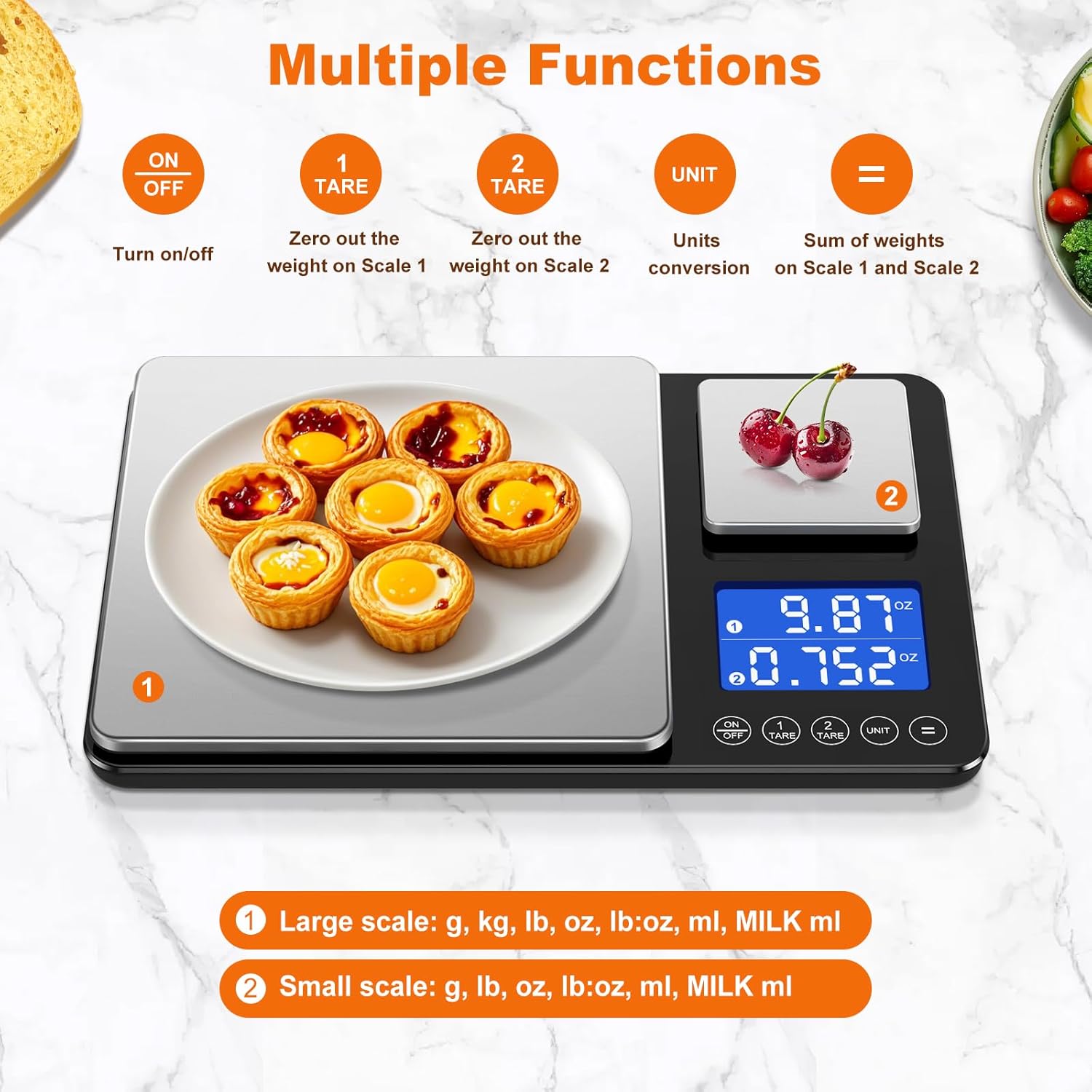
Image: Visual guide demonstrating the tare function, showing an empty bowl being tared to zero before adding ingredients.
Accumulation Function
This function allows you to sum the weights of items placed on both platforms.
- Place an item on Scale 1 (large platform) and another item on Scale 2 (small platform).
- Ensure both displays show stable weights.
- Press the = (equals) button. The display will show the combined total weight from both platforms.

Image: Illustration of the accumulation function, showing items on both scales and the resulting total weight.
Maintenance and Care
- Cleaning: The stainless steel surface is smooth and stain-resistant. Wipe the scale with a soft, damp cloth after each use. Do not immerse the scale in water or use abrasive cleaners.
- Storage: Store the scale in a cool, dry place. Avoid extreme temperatures and humidity.
- Battery Replacement: If the display shows a low battery indicator or becomes dim, replace both AAA batteries promptly.
- Handling: Handle the scale with care. Avoid dropping it or subjecting it to strong impacts, as this can damage the internal sensors.

Image: A hand wiping the stainless steel surface of the KUAIVO K600H scale, demonstrating its ease of cleaning.
Troubleshooting
| Problem | Possible Cause | Solution |
|---|---|---|
| Scale does not turn on | Dead or incorrectly installed batteries | Check battery polarity or replace batteries. |
| Inaccurate readings | Uneven surface, overloaded scale, or external interference | Place scale on a flat, stable surface. Do not exceed maximum capacity. Avoid strong electromagnetic fields. |
| Display shows 'Err' | Overload or internal error | Remove item from scale. If error persists, try removing and reinserting batteries. |
| Auto-off too quickly | Normal operation (210 seconds inactivity) | This is a power-saving feature. Turn the scale back on to continue use. |
Specifications
| Feature | Detail |
|---|---|
| Model | K600H |
| Brand | KUAIVO |
| Large Platform Capacity | 33 lbs (15 kg) |
| Large Platform Accuracy | 0.1 oz (1 g) |
| Small Platform Capacity | 1.1 lbs (500 g) |
| Small Platform Accuracy | 0.001 oz (0.01 g) |
| Units of Measurement | g, kg, lb, oz, lb:oz, ml, MILK ml |
| Display Type | LCD with Backlight |
| Auto-Off Time | 210 seconds |
| Material | Stainless Steel (platform), ABS Plastic (body) |
| Dimensions | 10.8 inches x 7 inches (27.5 cm x 18 cm) |
| Power Source | 2 x AAA Batteries |

Image: Diagram showing the dimensions of the KUAIVO K600H scale and a size comparison with a smartphone.
Warranty and Support
KUAIVO products are manufactured with quality and precision. For warranty information or technical support, please refer to the contact details provided with your purchase or visit the official KUAIVO website. Please retain your proof of purchase for warranty claims.